They will send you an offer and auftragsbestätigung.
I think its around 150 CHF / m2.
But you’ll have to pick it up by yourselfe, without delivery
 B
Offline
B
Offline
They will send you an offer and auftragsbestätigung.
I think its around 150 CHF / m2.
But you’ll have to pick it up by yourselfe, without delivery
I’ve made a privat order with the contact form on the right side: Here ->
@Jopyth I never did this before but I’ll try ;-)
Ok, that’s a nice modul :-)
I’ve insert an restart function for the MM app and the ability to turn you monitor on and off:
insert in node_helper.js at line 54:
				if (query.action === 'RESTART')
				{
					res.send({'status': 'success'});
					exec('pm2 restart mm', function(error, stdout, stderr){ callback(stdout); });
					return;
				}
				if (query.action === 'MONITORON')
				{
					res.send({'status': 'success'});
					exec('/opt/vc/bin/tvservice -p', function(error, stdout, stderr){ callback(stdout); });
					return;
				}
				if (query.action === 'MONITOROFF')
				{
					res.send({'status': 'success'});
					exec('/opt/vc/bin/tvservice -o', function(error, stdout, stderr){ callback(stdout); });
					return;
				}
in remote.js on line 131:
    'restart-mm-button': function () {
        Remote.getWithStatus("action=RESTART");
    },
    'monitor-on-button': function () {
        Remote.getWithStatus("action=MONITORON");
    },
    'monitor-off-button': function () {
        Remote.getWithStatus("action=MONITOROFF");
    }
in remote.html on line 40:
<!-- MagicMirror menu -->
		<div id="restart-mm-button" class="menu-button power-menu">
                    <span class="fa fa-recycle" aria-hidden="true"></span>
                    <span class="text">%%TRANSLATE:RESTARTMM%%</span>
                </div>
		<div id="monitor-on-button" class="menu-button power-menu">
                    <span class="fa fa-toggle-on" aria-hidden="true"></span>
                    <span class="text">%%TRANSLATE:MONITORON%%</span>
                </div>
                <div id="monitor-off-button" class="menu-button power-menu">
                    <span class="fa fa-toggle-off" aria-hidden="true"></span>
                    <span class="text">%%TRANSLATE:MONITOROFF%%</span>
                </div>
and the translations/en.json and de.json on line 8 ff:
    "RESTARTMM": "Restart MagicMirror2",
    "MONITORON": "Turn monitor ON",
    "MONITOROFF": "Turn monitor OFF",
    "RESTARTMM": "Starte MagicMirror2 neu",
    "MONITORON": "Bildschirm einschalten",
    "MONITOROFF": "Bildschirm ausschalten",
I think thats it.
The evil this is a must for my mirror… so thats next. I think we can do this like the IFTTT module does it.
Install modules remotly will be the next big thing… :-)
If you use pin 7 in your config its nr 4
You have to use the gpio nr.
ok so lets go step by step:
cd ~/MagicMirror/modules/
now we will remove the PIR folder:
rm -rf MMM-PIR-Sensor
and from here, we’re going to reinstall the MMM-PIR-Sensor modul:
git clone https://github.com/paviro/MMM-PIR-Sensor.git
cd MMM-PIR-Sensor
run the following cmd here:
npm install and wait, this can take a few minutes.
Now you’ll have to add pi to gpio
sudo useradd -g pi gpio
and reboot your Raspi:
sudo reboot
You’ll have to connect your PIR Sensor the right way with your Raspi.
I’ve connected my PIR Sensor on the following Pins:

I’ve got a Pi2 and use Pin 2 for power, Pin 6 for Ground and Pin 15 for Data.
– correctin grn pin

and dont forget to add the config :-)
@bibi I wish I could, I understand a still a lot, but I don’t use it anymore…
I’m from the german part of Switzerland, close to Zurich.
https://forum.magicmirror.builders/topic/117/bangee-s-mirror/16
This one is also built with a 24" Monitor and a 12 %, 4mm Mirror.
I would recommend this one.
I’ve ordered there different pices of mirrors. 12%, 4mm and 20%.
That looks fine.
Did you try to remove your folder MMM-PIR-Sensor an reinstall the modul?
Here is my MMM-DHT22 Module.
Temperature and Humidity monitoring Module for MagicMirror2 that works for DHT22 and AM2302 sensors.
https://github.com/Bangee44/MMM-DHT22/
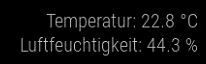
It’s analog to @psk’s Module: https://forum.magicmirror.builders/topic/726/mmm-temperature-humidity-module-dht11-dht22-and-am2302-sensors
But I don’t want to run MagicMirror as Root with sudo.
Bangee
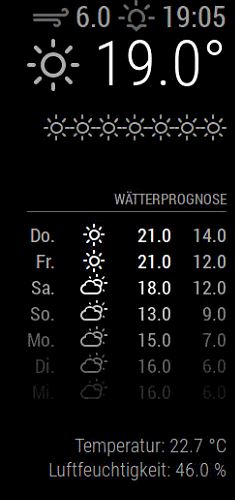
I’m using node-dht-sensor
As user pi I don’t have an error but after starting MagicMirror thers a crash.
@psk you should cool down your room :-)
@Jopyth yes, he has, but he’s going to start the MagicMirror with sudo npm start
for security reasons I try to run everything without sudo commands.
@psk Do you need to run magicmirror as root?
I try to find a solution to do the same as pi
Can you post a printscrenn from this folder?
you can also try to go use these commands:
cd ~/MagicMirror/modules/MMM-PIR-Sensor/
git pull
npm rebuild
@samydp did you maybe reneamed this folder:
modules/MMM-PIR-Sensor/node_m odules <- is there a space in this name??
you’ll have to remove this
hey there
@ostfilinchen that’s it. to start npm from my shell it need to use this command:
DISPLAY=:0 npm start dev
But with this I can not debug my script. Electron crashes alwasy on startup when I’ve activated my new module using const sensorLib = require('node-dht-sensor') in my node_helper.js
How can I debug this error?
Hi there
I try to start my mirror whit npm start dev to do some debugging but there are always a lot of errors. What’s wrong here?
pi@raspberrypi:~/MagicMirror $ npm start dev

> magicmirror@2.0.0 start /home/pi/MagicMirror
> electron js/electron.js "dev"


npm ERR! Linux 4.4.13-v7+
npm ERR! argv "/usr/local/bin/node" "/usr/local/bin/npm" "start" "dev"
npm ERR! node v6.4.0
npm ERR! npm  v3.10.3
npm ERR! code ELIFECYCLE
npm ERR! magicmirror@2.0.0 start: `electron js/electron.js "dev"`
npm ERR! Exit status 1
npm ERR!
npm ERR! Failed at the magicmirror@2.0.0 start script 'electron js/electron.js "dev"'.
npm ERR! Make sure you have the latest version of node.js and npm installed.
npm ERR! If you do, this is most likely a problem with the magicmirror package,
npm ERR! not with npm itself.
npm ERR! Tell the author that this fails on your system:
npm ERR!     electron js/electron.js "dev"
npm ERR! You can get information on how to open an issue for this project with:
npm ERR!     npm bugs magicmirror
npm ERR! Or if that isn't available, you can get their info via:
npm ERR!     npm owner ls magicmirror
npm ERR! There is likely additional logging output above.

npm ERR! Please include the following file with any support request:
npm ERR!     /home/pi/MagicMirror/npm-debug.log
I could fix this with the same workaround as the PIR Sensor.
now its runnig but electron start up everything and crashes after loading all data.
Any idea howto debug this? ther is nothing in my error logs…
/var/log/messages:
pi@raspberrypi:~/MagicMirror/modules/temperature $ tail -f /var/log/messages
Sep 14 13:16:05 raspberrypi kernel: [706942.834881] gpiomem-bcm2835 3f200000.gpiomem: gpiomem device opened.
Sep 14 13:16:32 raspberrypi kernel: [706969.575020] gpiomem-bcm2835 3f200000.gpiomem: gpiomem device opened.
Sep 14 13:17:00 raspberrypi kernel: [706997.192894] gpiomem-bcm2835 3f200000.gpiomem: gpiomem device opened.
thats all… :-(
node_helper.js:
'use strict';

/* Magic Mirror
 * Module: temperatur.js
 *
 * By Benjamin Angst
 * MIT Licensed.
 */

const NodeHelper = require('node_helper');
const sensorLib = require('node-dht-sensor');

module.exports = NodeHelper.create({
		 start: function () {
			 console.log('Temperatur helper started ...');
		 },

		 // Subclass socketNotificationReceived received.
		 socketNotificationReceived: function(notification, payload) {
		   const self = this;
		   if (notification === 'REQUEST') {
			 var sensor = {
			     initialize: function () {
			         return sensorLib.initialize(22, 27);
			     },
			     read: function () {
			         var readout = sensorLib.read();
			         console.log('Temperature: ' + readout.temperature.toFixed(2) + 'C, ' +
			             'humidity: ' + readout.humidity.toFixed(2) + '%');
			         setTimeout(function () {
			             sensor.read();
			         }, 2000);
			         // Send Temperatur
			         self.sendSocketNotification('DATA',{
							temp: readout.temperature.toFixed(2),
							humidity: readout.humidity.toFixed(2)
					 });
			     }
			 };

			 if (sensor.initialize()) {
			     sensor.read();
			 } else {
			     console.warn('Failed to initialize sensor');
			 }
		   }
		 }

});
temperature.js
/* Magic Mirror
 * Module: temperatur.js
 *
 * By Benjamin Angst
 * MIT Licensed.
 */

Module.register("temperature",{
    // Default module config.
    defaults: {
        gpioPIN: 27,
        sensorType: 22, // Can be 22 or 11
        prependString: "Temperatur ",
    },

    // Override dom generator.
    getDom: function() {
        var wrapper = document.createElement("div");
        wrapper.innerHTML = "T: " + this.temperature + " °C / H: " + this.humidity + " %";
        return wrapper;
    },

    start: function() {
        this.temperature = 'fetching...';
        this.sendSocketNotification('REQUEST');
    },


    socketNotificationReceived: function(notification, payload) {
    if (notification === 'DATA') {
        this.temperature = payload.temp;
        this.humidity = payload.humidity;
        this.updateDom();
    }
    },
});
this works for me too. without formatting and reinstallation.
I’ve remove the folder node_modules and startet from 4.
Thanks a lot.