@dæmoneyes - It’s probably another genius idea from the same guys who made “flammable” and “inflammable” mean the same thing.
Read the statement by Michael Teeuw here.
Posts
-
RE: Trividar's MagicMirror
-
RE: Halloween mirror ghouls anyone?
@frog You seem to be missing the
style='position...part.So:
config: { text: “<video src=‘vendor/skelloop.mp4’ autoplay loop style='position:absolute; top:100%;left:50%; height:200%’></video>” } -
RE: Two Instances in PM2
@shazglass All right, we’ll get you through it.
pm2 runs on Pi startup and will start your mirror process for you. There should be only one listing. If you ran the installation script and said “yes” to using pm2, there should be only one process called MagicMirror in pm2.
To remove the
mmprocess from pm2, enter the following:cd ~ pm2 stop all pm2 delete mm pm2 save rm mm.sh pm2 flush pm2 start MagicMirrorAt this point, your Magic Mirror interface should appear after a minute or so. You can press
ctrl-qto exit the Magic Mirror interface, but pm2 should bring it back up in short order. -
RE: A Question About Power Cables
I use a travel charger. It has an AC outlet for the monitor and a hefty USB socket for the Pi. Plus, you can plug other things into the USB sockets (such as LED lights).
-
RE: Prepping my first build. Care to check my work?
@3DPrintedWaffles It looks like you’re off to a good start. I do have a couple thoughts:
- If your monitor is going to be smaller than your glass, you’ll want black construction paper or felt to cover the area of the glass that are not covered by the monitor. This includes the edges of your internal framework.
- I would recommend wood screws for the internal framework. They don’t need to be large. 1.5" would probably do just fine.
- I don’t know about the Liquid Nails part. I’m not familiar with it enough to say whether or not it will keep your glass attached to monitor and/or framework. I would consult your local hardware store.
- Give a thought to power. Are you routing the power through the wall? Through a hole in your internal framework? Consider that at the moment, you have to power the Pi and the monitor, so that’s two cords.
IIRC, the people who apply window film a lot recommend using a spray bottle with water or windex on the glass and then applying the film over top. The liquid will let you slide the film a bit while you get it positioned properly. Once the liquid evaporates, the film should remain in position.
Bezel-free is certainly possible. It just requires slightly better construction skills and a bit more planning than your standard magic mirror. Normally, the bezel on the frame is what holds the glass up against the monitor face (and the monitor is usually the same size as the glass). Without that bezel, you’ll have to rely on the liquid adhesive. So long as you trust the Liquid Nails product, you should be good to go.
-
Magic Mirror Mark IV
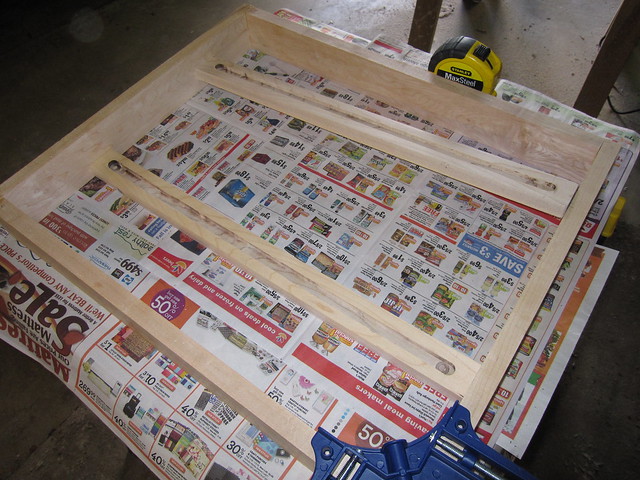
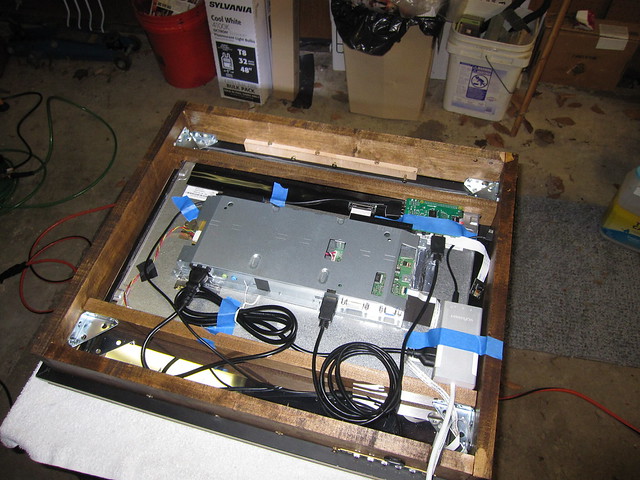
Yet another gift, this one for family. Lots of improvements in the basic wood craftsmanship, yet a few basic errors that I’m still kicking myself over. Most notably, the glass and the monitor aren’t the same size and it really affects how it turned out. The monitor isn’t the same quality as the previous ones and it shows if you’re looking for it. Ah, well.
The next one will be better.
That said, the miters on this one came out really well. A couple good passes with a router bit to get the multi-level effect:


The Pi camera is attached to the construction paper. I had a devil of a time getting it flush, so I mounted it to the plastic case of a microSD->SD card adapter.


-
RE: Smart Mirror: RSS Feeds Apps
@danielnewy - IMHO, these are good for creating an Android-based Magic Mirror project. There are a lot of development boards out there that run various flavors of Android and they likely can be used with these apps with little difficulty. If all you want out of your mirror is the basics (newsfeed, weather, stocks, exchange rates, date & time, calendar) then these apps will likely work and be very easy to install.
If you’re an existing Android developer, then these may be the way to go. If you’re just getting started, I would stick with the Raspberry Pi and configuration files that are the prevalent method around here (unsurprisingly, since the forum was started to provide a community for the Raspi Mirror builders).
Looking at the Mirror Feeds site, for example… there are already modules that perform all of those features, plus a lot more. That’s the beauty of the module framework: multiple developers are adding features all the time.
To be honest, I would recommend building a Raspberry Pi based mirror and proceeding that direction. Unless you can think of a reason why you need to go with Android.
-
RE: Weird graphical error
Problem resolved. I did two things:
- Moved to the real OpenGL driver, not the fake one.
- Changed the resolution of the Pi to “Monitor Default” instead of hard-coding to my monitor resolution.
I don’t know which of these two did it, but I haven’t experienced the graphical problem since.
-
RE: A Question About Power Cables
@Mykle1 No, it does not. You essentially pull the plug to turn it off. What I did at home was to plug it into a WeMo home automation outlet. I then used my phone to set up a schedule to turn the mirror off & on. And it ties into the Amazon Echo, so I can tell Alexa to turn the mirror off and on if I need it outside of the schedule.
The other downside is that the plug is only like 4 feet long. You may have to use an extension cord or (as I did) solder in an extension from a spare computer cord.
-
RE: [WANTED] new ownership of modules.
After all that you’ve given to the community (and the amount of code I’ve shamelessly stolen from your modules) the least I can do is help out. Please let me handle MMM-SelfieShot and MMM-WeatherBackground for you.