MagicMirror Forum
    • Recent
    • Tags
    • Unsolved
    • Solved
    • MagicMirror² Repository
    • Documentation
    • 3rd-Party-Modules
    • Donate
    • Discord
    • Register
    • Login
    1. Home
    2. Binog
    3. Posts
    A New Chapter for MagicMirror: The Community Takes the Lead
    Read the statement by Michael Teeuw here.
    B
    Offline
    • Profile
    • Following 0
    • Followers 0
    • Topics 4
    • Posts 67
    • Groups 0

    Posts

    Recent Best Controversial
    • RE: Deutsche Anleitung MagicMirror auf RaspberryPi 3

      Hey Yawns, hey, lavop3 Danke für Eure schnellen Antworten.

      Meine Json-Datei:

      {
      			"anytime": [
      				"Ha!"
      			],
      			"morning": [
      				"Gu",
      				"Ge !",
      				"Ha ?",
      				"Du!"
      			],
      			"afternoon": [
      				"Ha !",
      				"Na ?",
      				"Si!",
      				"Yo !"
      			],
      			"evening": [
      				"Wow !",
      				"Ha",
      				"He!",
      				"Ic !"
      			],
      
      			"day_sunny": [
      				"Today is a sunny day",
      				"It's a beautiful day"
      			],
      			"snow": [
      				"Snowball battle!"
      			],
      			"rain": [
      				"Don't forget your umbrella"
      			],
      }


      und meine config.js:

      		{
      			module: 'compliments',
      			position: 'top_center',
      			config: {
      				remoteFile: 'custom_compliments.json',
      				//remoteFile: 'http://i.p./default/compliments/custom_compliments.json',
      				},
      		},


      Dennoch bekomme ich die custom nicht angezeigt. Verstehe das nicht…

      posted in General Discussion
      B
      Binog
    • RE: Deutsche Anleitung MagicMirror auf RaspberryPi 3

      Hallo Leute!
      Habe ne Frage zur compliments-remote Datei.
      Wo muss die die remote-Datei liegen? habe sie dahingesagt: MagicMirror/modules/default/compliments/custom_compliments.json
      und den Link so eingetragen:
      remoteFile: ‘http://i.p.raspi/default/compliments/custom_compliments.json’,

      Das tut aber nichts… was muss ich wo hinlegen, und wie eintragen?
      Viele Dank
      Jimmy

      posted in General Discussion
      B
      Binog
    • RE: MMM-MotionEye - surveillance video stream on your mirror!

      Just have a look for the noir camera. Have a look for amazon.com. There is an official cam - I think - by the raspberry company. But any other that support the onboard psi cam plug is imho better than usb cam. But that is your decision.

      posted in Utilities
      B
      Binog
    • RE: Mirror turning black after a while

      But still, I am not using ResRobot,. and do have the same problem, from time to time,…

      posted in Troubleshooting
      B
      Binog
    • RE: Mirror turning black after a while

      me too,… still while after while,… guess have that problem since version 2.0.0 but not sure,. cause update everything regularly,…

      posted in Troubleshooting
      B
      Binog
    • RE: MMM-WunderGround

      Hey, even if this is more a year ago,. I recently have the Problem, that only the temperature shows one specific - incorrect - value. It is always 11.4 °C. Even tho at the moment its freezing,. the rest of the app is correct: forecast in written words,. in pictures, etc,…

      Any idea? No errors via pm2 log.

      posted in Troubleshooting
      B
      Binog
    • RE: Station monitor KVB Köln

      I am interested !

      posted in Requests
      B
      Binog
    • RE: MMM-MyCommute

      Hey j.e.f.f.

      Thanks for this amazing module !
      I do have the problem that I use two modules of your commute. once in a while it worked fine, but then it stopped working. Thought something withe the googleAPIkeys was wrong,. now trying, if I cutout one commute, the other shows itself.

      Do I have to name MMM-MyCommute to MMM-MyCommute2 for the second one? And then, do I have to rename the js-file as well?

      Thx for helping !

      posted in Transport
      B
      Binog
    • RE: ICS calendar not working (Synology NAS)

      I do have the same problem. Am Using DSM 6.1. with its “new” Calendar app. the problem is, the exporting link, links to the website, not to an ICS file.
      It is possible to export a ICS-file,…
      any one able to automate the process of exporting the ics.file on a regular basis?

      posted in Troubleshooting
      B
      Binog
    • RE: MMM-Profilepictures: problem with configuration

      as said above,. it does not differ. that example was just the last try, thats why I posted it,… Figured out, that a “0.9” does not crash the config, but does neither work…

      posted in Utilities
      B
      Binog
    • RE: MMM-Profilepictures: problem with configuration

      How to send it to the correct bug-report for this module?

      posted in Utilities
      B
      Binog
    • MMM-Profilepictures: problem with configuration

      Hey snille

      Having trouble to set it up.
      Here is my config, and it throws up my config-file

      {
      	module: "MMM-Profilepicture",
      	position: "fullscreen_below",
      	classes: "me",
      	config: {
      		opacity: "0.2",
      		maxWidth: 90%,
      		maxHeight: 90%,
      		url: "URL-to picture", 
      		},
      	},
      

      The problem exists with the maxWidth/Height . There is no difference between 90% and “90%” so how is the correct spelling? if I set a // in front of those two lines my config-files does not throw up, but I don’t see the pictures.
      Can You help me, please?

      posted in Utilities
      B
      Binog
    • RE: MMM-ProfileSwitcher, A Profile/User/Layout Switching Module

      @Blackmirror
      Where to You let Current_profile been read?

      posted in Utilities
      B
      Binog
    • RE: MMM-ProfileSwitcher, A Profile/User/Layout Switching Module

      so the Notification,.,. is a compiling-error of this board. as mentioned above or elsewhere it does look correct in the config file.
      Actually I am a bit further, and ruled out some errors,.none the less I am not able to switch profiles!
      If I press one of my - not working - bottoms, I get these errors:

      konsole:
      0_1495033667132_konsole.jpg

      source-code:
      1_1495033667133_source.jpg

      posted in Utilities
      B
      Binog
    • RE: MMM-ProfileSwitcher, A Profile/User/Layout Switching Module

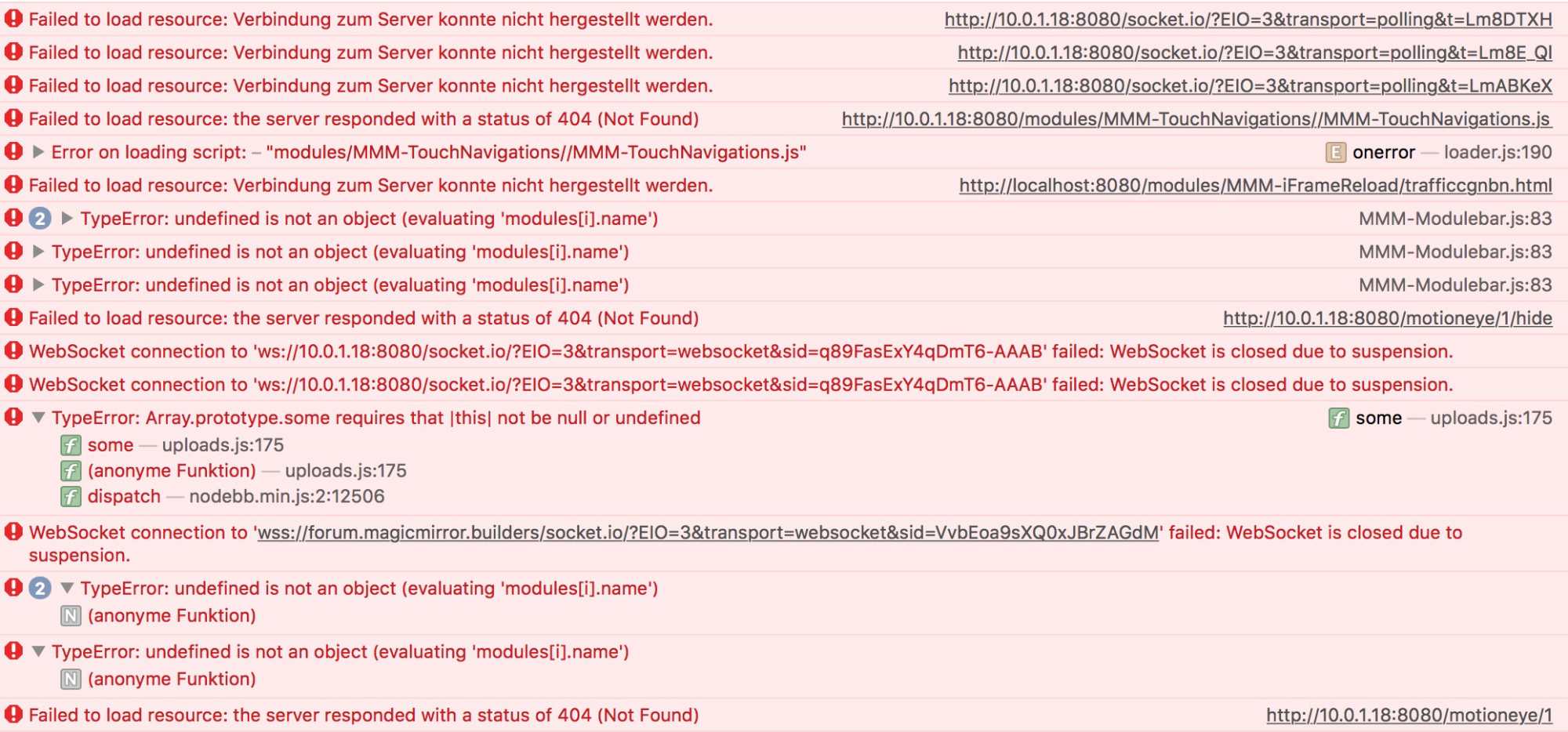
      OK, this should be relevant:
      If I press on one of my bottom “you” this is what comes up in the console:

      [Error] TypeError: undefined is not an object (evaluating 'modules[i].name')
      	(anonyme Funktion) (MMM-Modulebar.js:83)
      

      this is at this line:
      if (modules[i].name === data.module) {

      and this is what the bottoms look like:

      ```buttons: {
      		"1": {
      		     module: "MMM-MotionEye",
      		     text: "door",
      		     showUrl: "http://ip:8081/motioneye/1",
      		     hideUrl: "http://ip:8081/motioneye/1/hide",
      		    },
                      "2": {                            
      		    module: "MMM-Remote-Control",
                          symbol: "refresh",
                          showUrl: "http://ip:8080/remote?action=REFRESH",
                          },
                      "3": {
                          module: "MMM-Remote-Control",
                          symbol: "globe",
                          showUrl: "http://ip:8080/remote?action=UPDATE",
                          },
                      "4": {
                          module: "MMM-ProfileSwitcher",
                          //Ignium: 1,
                          //text: "me",
                          //showUrl: "this.sendNotification('CURRENT_PROFILE', 'me');",
                          img: "url.jpg",
                          showUrl: "http://localhost:8080/remote?action=NOTIFICATION¬ification=CURRENT_PROFILE&payload=%22me%22",
                           width: 30,
      		     height: 40,
      		     //profilename: "me",
                          },
                      "5": {
                          module: "MMM-ProfileSwitcher",
                          //text: "You",
                          img: "url.jpg", 
      		    showUrl: "http://ip:8080/remote?action=NOTIFICATION¬ification=CURRENT_PROFILE&payload=%22default%22",
                          width: 30,
      		    height: 40,
      		    //profilename: "You",
      		      },
      
      of course, ip has a relevant IP-adress. Interestingly button 1-3 work, except for 4 and 5. Any one could help?
      posted in Utilities
      B
      Binog
    • RE: MMM-ProfileSwitcher, A Profile/User/Layout Switching Module

      missed something:

      undefined is not an object (evaluating ‘modules[i].name’)

      I cannot really interpret the output of the console: here it is:
      0_1494823153170_Konsole.jpg

      posted in Utilities
      B
      Binog
    • RE: MMM-ProfileSwitcher, A Profile/User/Layout Switching Module

      @tosti007
      The only error is located with to TouchNacigations:

      The log says
      Cannot GET /modules/MMM-TouchNavigations//MMM-TouchNavigations.js

      Where does the double // comes from? (Between …Navigations and MMM-Touch…)
      I don’t find it in the config of TouchNavigations…
      Any ideas?

      posted in Utilities
      B
      Binog
    • RE: How to update.

      @Unbored
      Delete the " and add straight ones again " (If You edited this file via an alternate editor on win/Mac then it might be a cursive "… try it, worked for me!

      posted in Tutorials
      B
      Binog
    • RE: MMM-TouchNavigation, A Touch Activated Profile/Layout Changer

      Thanks for explaining,
      Is the Syntax, the same?
      I realized,. my module is TouchNavigation thow the installed module in modules ist TouchNavigations,… face-palm

      posted in Utilities
      B
      Binog
    • RE: MMM-TouchNavigation, A Touch Activated Profile/Layout Changer

      Hey, can someone please help, or just post their config file?

      1.: I have this, and it does not show anything:
      and
      2.: What does the payload has to look like? that seems incorrect,… !?

      {
                 module: "MMM-TouchNavigation",
                 position: "bottom_right",
                 classes: 'default you me',
         		config: {
         			picturePlacement: "right",
         			minWidth: "30px",
         			direction: "row",
         			//border-radius: "1px",
         			//border-radius: "50%",
         			buttons: {
         				"me": {
         					img: "http://file to jpg", 
         					width: 40,
         					height: 40,
         					profilename: "me",
         					text: "me",
         						},
         				"You": {
         					img: "https://file to .jpg", 
         					width: 40,
         					height: 40,
         					NOTIFICATION: {
         						payload: {
         							//this.sendNotification('CURRENT_PROFILE', 'You')
         								},
         						profilename: "You",
         									},
      
      posted in Utilities
      B
      Binog
    • 1
    • 2
    • 3
    • 4
    • 2 / 4