MagicMirror Forum
    • Recent
    • Tags
    • Unsolved
    • Solved
    • MagicMirror² Repository
    • Documentation
    • 3rd-Party-Modules
    • Donate
    • Discord
    • Register
    • Login
    A New Chapter for MagicMirror: The Community Takes the Lead
    Read the statement by Michael Teeuw here.

    Deutsche Anleitung MagicMirror auf RaspberryPi 3

    Scheduled Pinned Locked Moved General Discussion
    118 Posts 20 Posters 172.9k Views 25 Watching
    Loading More Posts
    • Oldest to Newest
    • Newest to Oldest
    • Most Votes
    Reply
    • Reply as topic
    Log in to reply
    This topic has been deleted. Only users with topic management privileges can see it.
    • 3 Offline
      35110
      last edited by

      Wenn ich bei “Deine IP” die IP des Pi (192.168.2.120) eingebe, startet der MagicMirror nicht bzw. der Bildschirm bleibt schwarz. Wenn ich dort 0.0.0.0 eingebe, wird MM zwar gestartet, aber im NetworkScanner wird weiterhin nichts angezeigt. Wenn ich die DHCP Adresse (192.168.2.1) meines Speedport eintrage, bleibt der Bildschirm auch schwarz.

      Auch die Erweiterung meiner Whitelist auf “::ffff:192.168.2.1/120” hat nichts verändert - wenn ich “deine IP” wieder auf “0.0.0.0” einstelle, wird zwar MM ausgeführt, aber NetworkScanner zeigt weiterhin “NO DEVICES ONLINE” an.

      CyruS1337C lavolp3L 3 Replies Last reply Reply Quote 0
      • CyruS1337C Offline
        CyruS1337 Project Sponsor @35110
        last edited by

        @35110

        Wie ich erfahren habe, ist es nicht sinnvoll wenn du dort die IP Adresse eingibst. Gibt dort einfach 0.0.0.0 ein.

        https://forum.magicmirror.builders/topic/8998/black-screen-after-starting/13

        1 Reply Last reply Reply Quote 0
        • lavolp3L Offline
          lavolp3 Module Developer @35110
          last edited by

          @35110 Hallo zusammen, sorry ich habe dieses Thema lange übersehen.
          Also, bei der “address” in der config sollte 0.0.0.0 angegeben werden. Diese Angabe ist vonnöten um dem MagicMirror zu sagen auf welchen Adressen er lauschen soll. 0.0.0.0 sagt “alle”. Aus einem Grund der mir noch nicht klar ist, funktioniert das System nicht wenn man die Standrrdeinstellung"localhost" beibelässt.

          Die Whitelist kann eigentlich auch keinen Einfluss haben, denn dort wird geregelt welche Geräte Zugriff auf Port 8080 bekommen. z.B. über den browser eines Computers.

          Hier mal meine config, die funktioniert

          var config = {
          port: 8080,
          address: "0.0.0.0",
          ipWhitelist: [],
          //ipWhitelist: ["80.157.5.50", "192.168.1.21", "::fff:0.0.0.0/1", "::fff:128.0.0.0/2", "::ffff:192.168.1.1/2$
          //ipWhitelist: ["80.157.5.50", "::fff:0.0.0.0/1", "::ffff:192.168.1.1/24", "::fff:128.0.0.0/2", "::fff:192.0$
                                                                         // or add a specific IPv4 of 192.168.1.5 :
                                                                         // ["127.0.0.1", "::ffff:127.0.0.1", "::1", "$
                                                                         // or IPv4 range of 192.168.3.0 --> 192.168.3$
                                                                         // ["127.0.0.1", "::ffff:127.0.0.1", "::1", "$
          
          
          language: 'de',
          timeFormat: 24,
          units: 'metric',
          zoom: 0.7,
          
              {
                  module: 'MMM-NetworkScanner',
                  classes: 'small',
                  position: 'top_left',
                  config: {
                      devices: [
                          { macAddress: "mac-address", name: "Dachboden", icon: "server"},
                          { macAddress: "mac-address", name: "Krachmacher", icon: "desktop"},
                          { macAddress: "mac-address", name: "Handy", icon: "mobile"},
                          { macAddress: "mac-address", name: "Handy", icon: "mobile"},
                          { macAddress: "mac-address", name: "Drucker", icon: "print"},
                      ],
                      //showUnknown: false,
                      showOffline: true,
                      //keepAlive: 300,
                      updateInterval: 5,
                      //residents: 'Mobile',
                  }
              },
          

          How to troubleshoot modules
          MMM-soccer v2, MMM-AVStock

          CyruS1337C S 2 Replies Last reply Reply Quote 0
          • lavolp3L Offline
            lavolp3 Module Developer @35110
            last edited by

            @35110 Bist du sicher dass alle Geräte im gleichen Netzwerk sind, oder hast du den Spiegel oder andere in einem Subnetz? Vielleicht kann es daran liegen!?

            How to troubleshoot modules
            MMM-soccer v2, MMM-AVStock

            1 Reply Last reply Reply Quote 0
            • CyruS1337C Offline
              CyruS1337 Project Sponsor @lavolp3
              last edited by

              @lavolp3 vielen Dank für dein Input und nochmals vielen Dank für deine Hilfe bei meinem vorherigen Problem.

              1 Reply Last reply Reply Quote 0
              • P Offline
                PaulB
                last edited by PaulB

                @Community Kann ich euch helfen?
                Fiel mir als Nicht-ITler am Anfang genauso schwer.
                Falls Ihr bei Englisch und Co. Hilfe braucht, gibt mir gerne Bescheid. Das Projekt macht einfach tierisch Spaß, da ist es doch klar, dass wir einander helfen.

                Viele Grüße aus Hamburg,
                Paul

                1 Reply Last reply Reply Quote 0
                • B Offline
                  Binog
                  last edited by

                  Hallo Leute!
                  Habe ne Frage zur compliments-remote Datei.
                  Wo muss die die remote-Datei liegen? habe sie dahingesagt: MagicMirror/modules/default/compliments/custom_compliments.json
                  und den Link so eingetragen:
                  remoteFile: ‘http://i.p.raspi/default/compliments/custom_compliments.json’,

                  Das tut aber nichts… was muss ich wo hinlegen, und wie eintragen?
                  Viele Dank
                  Jimmy

                  lavolp3L 1 Reply Last reply Reply Quote 0
                  • yawnsY Offline
                    yawns Moderator
                    last edited by

                    remoteFile: 'custom_compliments.json' sollte ausreichend sein, wenn der Inhalt deiner Datei in Ordnung ist.

                    Ich habe das damals mal getestet, weil einige User Probleme hatten, und das hier hat als Inhalt funktioniert:

                    {
                        "morning" : [
                            "heyho"
                        ],
                        "afternoon" : [
                            "home early?"
                        ],
                        "evening" : [
                            "finally home"
                        ],
                    	"fog" : [
                    		"fog, oh no :("             
                    	]
                    }
                    
                    1 Reply Last reply Reply Quote 0
                    • lavolp3L Offline
                      lavolp3 Module Developer @Binog
                      last edited by

                      @binog Meine liegt auch im gleichen Ordner und wird genutzt wie @yawns das beschrieben hat

                              {
                              //disabled: true,
                              module: "compliments",
                              position: "lower_third",
                              config: {
                                  classes: 'medium bright',
                                  remoteFile: 'stromberg.json',
                                  updateInterval: 12*60*60*1000,
                              }
                          },
                      

                      die json sieht so aus

                      {
                          "anytime" : [
                          "....",
                          "....",
                          ]
                      }
                      

                      (ja, es sind Stromberg-Zitate)

                      How to troubleshoot modules
                      MMM-soccer v2, MMM-AVStock

                      1 Reply Last reply Reply Quote 0
                      • B Offline
                        Binog
                        last edited by Binog

                        Hey Yawns, hey, lavop3 Danke für Eure schnellen Antworten.

                        Meine Json-Datei:

                        {
                        			"anytime": [
                        				"Ha!"
                        			],
                        			"morning": [
                        				"Gu",
                        				"Ge !",
                        				"Ha ?",
                        				"Du!"
                        			],
                        			"afternoon": [
                        				"Ha !",
                        				"Na ?",
                        				"Si!",
                        				"Yo !"
                        			],
                        			"evening": [
                        				"Wow !",
                        				"Ha",
                        				"He!",
                        				"Ic !"
                        			],
                        
                        			"day_sunny": [
                        				"Today is a sunny day",
                        				"It's a beautiful day"
                        			],
                        			"snow": [
                        				"Snowball battle!"
                        			],
                        			"rain": [
                        				"Don't forget your umbrella"
                        			],
                        }


                        und meine config.js:

                        		{
                        			module: 'compliments',
                        			position: 'top_center',
                        			config: {
                        				remoteFile: 'custom_compliments.json',
                        				//remoteFile: 'http://i.p./default/compliments/custom_compliments.json',
                        				},
                        		},


                        Dennoch bekomme ich die custom nicht angezeigt. Verstehe das nicht…

                        lavolp3L 1 Reply Last reply Reply Quote 0
                        • lavolp3L Offline
                          lavolp3 Module Developer @Binog
                          last edited by

                          @binog said in Deutsche Anleitung MagicMirror auf RaspberryPi 3:

                          und meine config.js:
                          {
                          module: ‘compliments’,
                          position: ‘top_center’,
                          config: {.
                          remoteFile: ‘custom_compliments.json’,
                          //remoteFile: ‘http://i.p./default/compliments/custom_compliments.json’,
                          },
                          },

                          Was macht der Punkt hinter config? Der muss weg.

                          How to troubleshoot modules
                          MMM-soccer v2, MMM-AVStock

                          1 Reply Last reply Reply Quote 0
                          • B Offline
                            Binog
                            last edited by

                            sorry, im Original nicht vorhanden. beim auslöschen einer Zeile drin geblieben.

                            1 Reply Last reply Reply Quote 0
                            • yawnsY Offline
                              yawns Moderator
                              last edited by

                              Hast Du den MagicMirror mal ein paar Minuten laufen lassen? Ich habe damals beobachten können, dass nach dem Start die Standard-Komplimente angezeigt wurden und einige Minuten später hat das System dann plötzlich meine eigenen Komplimente geladen.

                              So sah das damals in der Konsole aus:
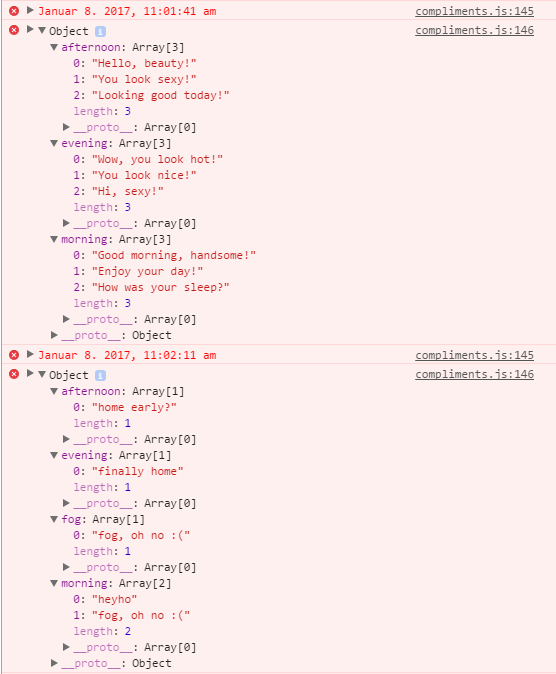
                              Bild Text

                              1 Reply Last reply Reply Quote 0
                              • lavolp3L Offline
                                lavolp3 Module Developer
                                last edited by

                                Der nächste Versuch wäre den MagicMirror im dev mode zu starten und zu schauen ob du eine Meldung zu dem Modul bekommst.

                                npm start dev
                                

                                Wenn du den Autostart via pm2 aktiviert hast musst du vorher den pm2 Prozess stoppen

                                pm2 stop all
                                npm start dev
                                

                                How to troubleshoot modules
                                MMM-soccer v2, MMM-AVStock

                                1 Reply Last reply Reply Quote 0
                                • D Offline
                                  dl3fre
                                  last edited by

                                  Hallo… hat eine Weile gedauert bis euch gefunden habe… mein Englisch ist praktisch nicht vorhanden ;-)

                                  Vielleicht kann jemand helfen oder hat einen Tipp wie es funktionieren könnte.
                                  Ich möchte im MM einige Statusmeldungen aus dem Smarthome Homematic angzeigt bekommen. Dazu suche ich nach einem Modul was man anpassen könnte. Die Homematiczentrale kann via html Zeile (z.B. http://192.168.178.xx/control?cmd=LCD…) Text senden. Das nutze ich bereits um auf einem Wemos D1 und einem 20x4 LCD kurze Infos anzuzeigen.
                                  Man bräuchte eigentlich “nur” was den Html code entgegen nimmt und zur Anzeige bringt. Was und wann welche Textzeilen gesendet werden bestimmt die Homematic Zentrale.
                                  Hat jemand einen Lösungsansatz? Meine Prog. Kenntnisse gehen leider nicht über die “Bedienung” der Raspi Konsole hinaus ;-)
                                  Gruß Fred

                                  lavolp3L 1 Reply Last reply Reply Quote 0
                                  • lavolp3L Offline
                                    lavolp3 Module Developer @dl3fre
                                    last edited by lavolp3

                                    @dl3fre said in Deutsche Anleitung MagicMirror auf RaspberryPi 3:

                                    Die Homematiczentrale kann via html Zeile (z.B. http://192.168.178.xx/control?cmd=LCD…) Text senden.

                                    Das habe ich nicht verstanden. Kannst du nochmal genauer beschreiben was in welche Richtung gesendet wird?
                                    Wird die Homematic zentrale per url mit optionen angefragt und gibt einen Text als response zurück?
                                    Wie sieht die response aus?

                                    How to troubleshoot modules
                                    MMM-soccer v2, MMM-AVStock

                                    1 Reply Last reply Reply Quote 0
                                    • 3 Offline
                                      35110
                                      last edited by

                                      Irgendwie habe ich kein Glück was die Updates von MM angeht. Hab gerade versuchtden Raspberry zu updaten und upgraden und das ging so schief, dass ich jetzt alles neu machen muß. Ich konnte nicht einmal über Putty meine config.js öffnen bzw. sichern. Ich beginne also nun mit einem neuen raspian buster und schaue was mich erwartet

                                      CyruS1337C 1 Reply Last reply Reply Quote 0
                                      • CyruS1337C Offline
                                        CyruS1337 Project Sponsor @35110
                                        last edited by

                                        @35110 Was machst du für Sachen ;)

                                        1 Reply Last reply Reply Quote 0
                                        • 3 Offline
                                          35110
                                          last edited by

                                          nur kurz gefragt, vielleicht bin ich ja der einzige dem das angezeigt wird. Ich habe Node 10.15.2 auf meinem PI bzw. für MM installiert. Das ist wohl die aktuellste Version derzeit. Komisch ist, das egal welche installation ich ausführe - automatische oder manuelle, mir angezeigt wird, dass es nicht sicher ist ob MM 7 oder auch bei Modulen, die mit dieser Version von Nodes arbeiten. Ich soll doch die aktuellste Version installieren :thinking_face:

                                          lavolp3L 1 Reply Last reply Reply Quote 0
                                          • lavolp3L Offline
                                            lavolp3 Module Developer @35110
                                            last edited by

                                            @35110 ich hatte eine ähnliche Meldung und der Grund ist miener Meinung nach dass deine Node-Version “zu” neu ist.
                                            Ich meine auch der Fehler wird von npm ausgegeben.
                                            Versuch mal npm upzudaten.

                                            sudo npm install -g npm@latest
                                            

                                            How to troubleshoot modules
                                            MMM-soccer v2, MMM-AVStock

                                            1 Reply Last reply Reply Quote 0

                                            Hello! It looks like you're interested in this conversation, but you don't have an account yet.

                                            Getting fed up of having to scroll through the same posts each visit? When you register for an account, you'll always come back to exactly where you were before, and choose to be notified of new replies (either via email, or push notification). You'll also be able to save bookmarks and upvote posts to show your appreciation to other community members.

                                            With your input, this post could be even better 💗

                                            Register Login

                                            • 1
                                            • 2
                                            • 3
                                            • 4
                                            • 5
                                            • 6
                                            • 3 / 6
                                            • First post
                                              Last post
                                            Enjoying MagicMirror? Please consider a donation!
                                            MagicMirror created by Michael Teeuw.
                                            Forum managed by Sam, technical setup by Karsten.
                                            This forum is using NodeBB as its core | Contributors
                                            Contact | Privacy Policy


