MagicMirror Forum
    • Recent
    • Tags
    • Unsolved
    • Solved
    • MagicMirror² Repository
    • Documentation
    • 3rd-Party-Modules
    • Donate
    • Discord
    • Register
    • Login
    A New Chapter for MagicMirror: The Community Takes the Lead
    Read the statement by Michael Teeuw here.

    MMM-ProfileSwitcher, A Profile/User/Layout Switching Module

    Scheduled Pinned Locked Moved Utilities
    userswitchprofilelayoutmodule
    91 Posts 21 Posters 146.5k Views 23 Watching
    Loading More Posts
    • Oldest to Newest
    • Newest to Oldest
    • Most Votes
    Reply
    • Reply as topic
    Log in to reply
    This topic has been deleted. Only users with topic management privileges can see it.
    • tosti007T Offline
      tosti007 Module Developer @Binog
      last edited by

      @Binog Sorry for the late reply, unfortunately I wasn’t able to find any problems with the code you submitted. Could you maybe launch your mm in servermode (node serveronly) and check the your browser’s console for any errors?

      If there is anything don't hesitate to contact me!
      ProfileSwitcher, TouchNotifications

      1 Reply Last reply Reply Quote 0
      • B Offline
        Blackmirror
        last edited by

        Hello,
        ‘default everyone’ has work
        But I can not start the MMM-Radio modul with profil-switch, but that was my idea.
        So, I switch to Profile Radio and the MMM-Radio module will work, all other module are default for everyone.

        Here the MMM-Button Module

         module: 'MMM-Buttons',
                            classes: 'default everyone',
         config: {
        minShortPressTime: 10,
                 buttons: [
                 {
                 pin: 10,
                 name: "Radio",
                 longPress: {
                          notification: "PROFILE_SWITCH",
                        payload: {action: "default"}},
                 shortPress: {
                        notification: "PROFILE_SWITCH",
                        payload: {action: "Radio"}}},
            {
                pin: 11,
                name: "Tagesschau",
                longPress: undefined,
               shortPress: {
                  notification: "BUTTON_PRESSED"
                 //   payload: {action: "SHUTDOWN"}
                }
            }
        ]
        

        }},

        tosti007T 1 Reply Last reply Reply Quote 0
        • tosti007T Offline
          tosti007 Module Developer @Blackmirror
          last edited by

          @Blackmirror try doing it like this:

              longPress: {
                notification: "CURRENT_PROFILE",
                payload: "default"
              },
              shortPress: {
                notification: "CURRENT_PROFILE",
                payload: "Radio"
              }
          

          If there is anything don't hesitate to contact me!
          ProfileSwitcher, TouchNotifications

          1 Reply Last reply Reply Quote 1
          • B Offline
            Blackmirror
            last edited by

            No, will not work. :-(

            1 Reply Last reply Reply Quote 0
            • B Offline
              Blackmirror
              last edited by

              Will work, I have the Current_profile not read. Thanks

              B 1 Reply Last reply Reply Quote 0
              • B Offline
                Binog
                last edited by

                @tosti007
                The only error is located with to TouchNacigations:

                The log says
                Cannot GET /modules/MMM-TouchNavigations//MMM-TouchNavigations.js

                Where does the double // comes from? (Between …Navigations and MMM-Touch…)
                I don’t find it in the config of TouchNavigations…
                Any ideas?

                1 Reply Last reply Reply Quote 0
                • B Offline
                  Binog
                  last edited by

                  missed something:

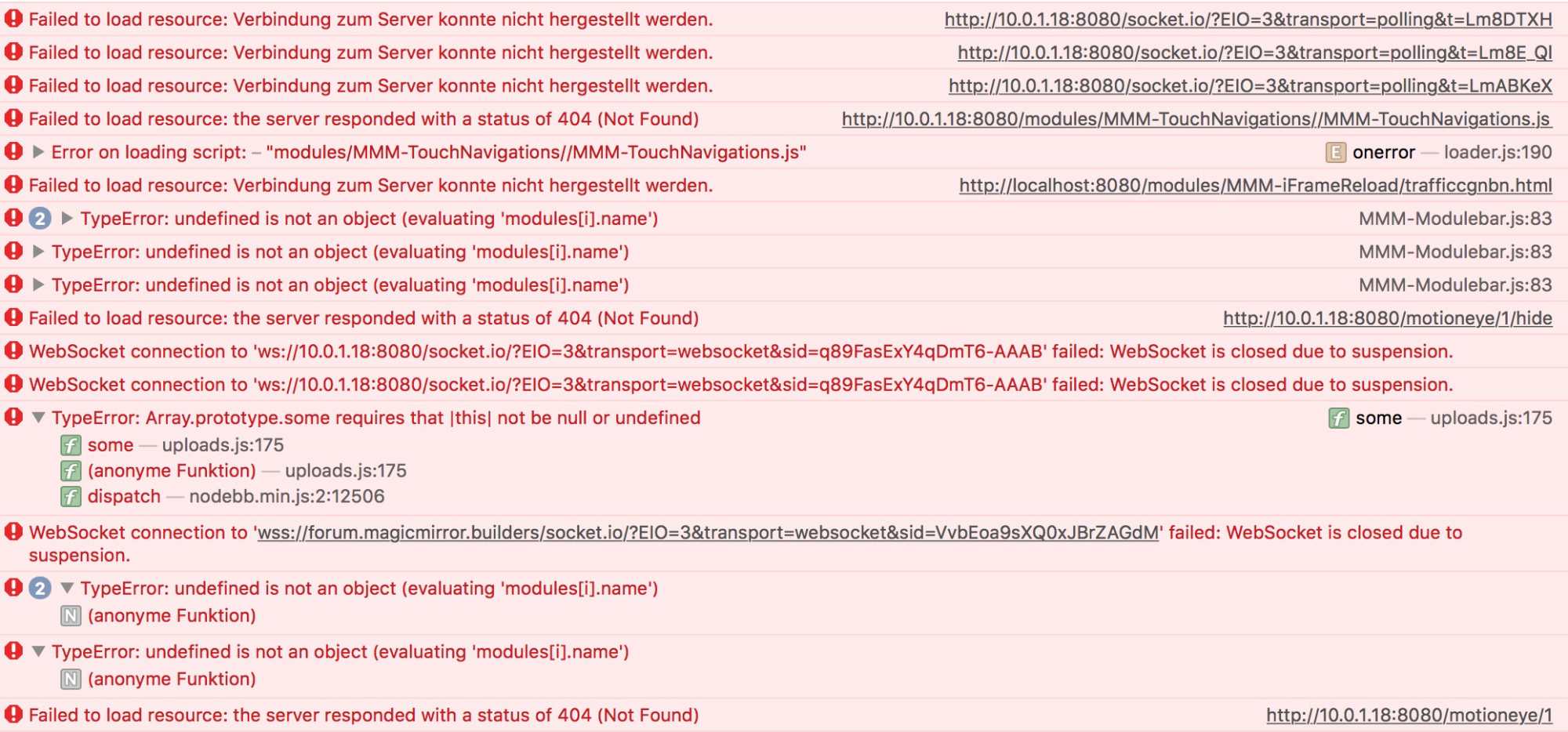
                  undefined is not an object (evaluating ‘modules[i].name’)

                  I cannot really interpret the output of the console: here it is:
                  0_1494823153170_Konsole.jpg

                  1 Reply Last reply Reply Quote 0
                  • B Offline
                    Binog
                    last edited by yawns

                    OK, this should be relevant:
                    If I press on one of my bottom “you” this is what comes up in the console:

                    [Error] TypeError: undefined is not an object (evaluating 'modules[i].name')
                    	(anonyme Funktion) (MMM-Modulebar.js:83)
                    

                    this is at this line:
                    if (modules[i].name === data.module) {

                    and this is what the bottoms look like:

                    ```buttons: {
                    		"1": {
                    		     module: "MMM-MotionEye",
                    		     text: "door",
                    		     showUrl: "http://ip:8081/motioneye/1",
                    		     hideUrl: "http://ip:8081/motioneye/1/hide",
                    		    },
                                    "2": {                            
                    		    module: "MMM-Remote-Control",
                                        symbol: "refresh",
                                        showUrl: "http://ip:8080/remote?action=REFRESH",
                                        },
                                    "3": {
                                        module: "MMM-Remote-Control",
                                        symbol: "globe",
                                        showUrl: "http://ip:8080/remote?action=UPDATE",
                                        },
                                    "4": {
                                        module: "MMM-ProfileSwitcher",
                                        //Ignium: 1,
                                        //text: "me",
                                        //showUrl: "this.sendNotification('CURRENT_PROFILE', 'me');",
                                        img: "url.jpg",
                                        showUrl: "http://localhost:8080/remote?action=NOTIFICATION¬ification=CURRENT_PROFILE&payload=%22me%22",
                                         width: 30,
                    		     height: 40,
                    		     //profilename: "me",
                                        },
                                    "5": {
                                        module: "MMM-ProfileSwitcher",
                                        //text: "You",
                                        img: "url.jpg", 
                    		    showUrl: "http://ip:8080/remote?action=NOTIFICATION¬ification=CURRENT_PROFILE&payload=%22default%22",
                                        width: 30,
                    		    height: 40,
                    		    //profilename: "You",
                    		      },
                    
                    of course, ip has a relevant IP-adress. Interestingly button 1-3 work, except for 4 and 5. Any one could help?
                    1 Reply Last reply Reply Quote 0
                    • tosti007T Offline
                      tosti007 Module Developer
                      last edited by

                      @Binog To be honest I have no clue why there would be an additional /, try pulling all the new updates from the magicmirror framework (perhaps it was a bug?). The config looks fine for me except the url looks a bit strange NOTIFICATION¬ification that part especially. Does it work when you go to the link manually?

                      If there is anything don't hesitate to contact me!
                      ProfileSwitcher, TouchNotifications

                      1 Reply Last reply Reply Quote 0
                      • B Offline
                        Binog
                        last edited by

                        so the Notification,.,. is a compiling-error of this board. as mentioned above or elsewhere it does look correct in the config file.
                        Actually I am a bit further, and ruled out some errors,.none the less I am not able to switch profiles!
                        If I press one of my - not working - bottoms, I get these errors:

                        konsole:
                        0_1495033667132_konsole.jpg

                        source-code:
                        1_1495033667133_source.jpg

                        1 Reply Last reply Reply Quote 0
                        • B Offline
                          Binog @Blackmirror
                          last edited by

                          @Blackmirror
                          Where to You let Current_profile been read?

                          B 1 Reply Last reply Reply Quote 0
                          • B Offline
                            Blackmirror @Binog
                            last edited by

                            @Binog
                            I understand your question not really.

                            I send the current_profile with MMM-Buttons and use it with MMM-RadioDE,
                            with
                            classes: ‘Radio’
                            under the module name

                            1 Reply Last reply Reply Quote 0
                            • P Offline
                              paul.calladine
                              last edited by

                              My mirror is just about finished, I have the MMM-PIRSensor working and MMM-Buttons working which both allow me to wake/sleep the monitor working fine.

                              However i’d like to use MMM-Buttons as a toggle switch to enable me to essentially enable or disable the PIR sensor module:

                              i.e.
                              Profile 1 - PIRSensor wakes and turns off the monitor as normal
                              Profile 2 - PIRSensor doesn’t do anything on motion being detected and the screen stays off

                              I was thinking of modifying the code to do this but does anyone know if this module will allow me to achieve the results? Essentially having two profiles the same but profile 1 includes the PIRSensor module?

                              1 Reply Last reply Reply Quote 0
                              • jdfraserJ Offline
                                jdfraser
                                last edited by

                                Hello and thanks for creating this module! I have experimenting with creating a photo frame and hope that your ProfileSwitcher will get me the rest of the way there.

                                I am having an issue with MMM-ProfileSwitcher and using it with MMM-RandomBackground or MMM-RandomPhoto. I have tried some simple troubleshooting steps, but am not sure how to proceed further and hope you could help.

                                I have simplified my config.js to try and eliminate other sources as being the issue. Currently I am experimenting using only the clock module, MMM-RandomBackground and MMM-ProfileSwitcher. I have 3 profiles ‘TestA’, ‘TestB’ and default. I ideally like to be able to show a random photo on my frame and alternate having overlays of weather / time / news / etc. based on the profile.

                                My idea is to have a class that shows the random photo at a reduced opacity that can have some overlay infomation (clock, weather, news, etc.). And another class that only shows the photo at full opacity.

                                The problem I have is that if my config.js has more than one entry for MMM-RandomBackground, it ignores more than the one entry. I am sure I have configured it correctly and have included my config.js below, but I only see a background photo for “TestA” Profile.

                                modules: [
                                	   {
                                			module: 'MMM-ProfileSwitcher',
                                			header: 'Profile',
                                			config: {
                                				defaultTime: 10000,
                                				defaultClass: 'default',
                                				everyoneClass: 'everyone',
                                				useLockStrings: true,
                                				leaveMessages: false,
                                				enterMessages: false,
                                				timers: {
                                					// when TestA is selected swap to the defaultClass after the defaultTime
                                					"TestA": {},
                                				    	//
                                				        // When TestB is selected swap to TestA after 20 seconds
                                				        "TestB": {
                                						profile: "TestA",
                                					    //	time: 20 * 1000
                                					},
                                					"default": {
                                						profile: "TestB"
                                					}
                                				}
                                
                                			}
                                		},
                                		{
                                			module: 'alert',
                                			displayTime: 10000
                                		},
                                		{
                                			module: "updatenotification",
                                			position: "top_bar"
                                		},
                                		{
                                			module: "clock",
                                			disabled: false,
                                			classes: "TestA",
                                			position: "bottom_left",
                                			config: {
                                				timeFormat: 12,
                                				displaySeconds: false,
                                				showPeriod: false,
                                				clockBold: false,
                                				dateFormat: "MMMM Do"
                                			}
                                		},
                                		{
                                			module: "clock",
                                			disabled: false,
                                			classes: "default",
                                			position: "top_right",
                                			config: {
                                				timeFormat: 12,
                                				displaySeconds: false,
                                				showPeriod: false,
                                				clockBold: false,
                                				dateFormat: "MMMM Do"
                                			}
                                		},
                                		{
                                			module: "clock",
                                			disabled: false,
                                			classes: "TestB",
                                			position: "top_left",
                                			config: {
                                				timeFormat: 12,
                                				displaySeconds: false,
                                				showPeriod: false,
                                				clockBold: false,
                                				dateFormat: "MMMM Do"
                                			}
                                		},
                                		{
                                			module : 'MMM-RandomBackground',
                                			disabled: false,
                                			classes: "TestA",
                                			position : 'fullscreen_below', // Any region but this one makes the most sense
                                			config : {
                                				animationSpeed : 2000,
                                				updateInterval : 50000,
                                				opacity : 1
                                			}
                                		},
                                			{
                                			module : 'MMM-RandomBackground',
                                			disabled: false,
                                			classes: "TestB",
                                			position : 'fullscreen_below', // Any region but this one makes the most sense
                                			config : {
                                				animationSpeed : 2000,
                                				updateInterval : 50000,
                                				opacity : 0.5
                                			}
                                		},
                                		]
                                
                                };
                                

                                If you are able to offer any insight as to why this might be happening or further troubleshooting I could do, I would greatly appreciate it.

                                *** Full disclosure ***
                                I originally posted this help request under another topic, but thought there would be a better chance that I might get more timely help with my issue in this topic. Sorry for the cross-post. :)

                                1 Reply Last reply Reply Quote 0
                                • C Offline
                                  Cyberdyne
                                  last edited by

                                  Is it possible to include a BT detection to switch profiles? RPi3 has a build BT which is not used (at least in my configuration) by the MagicMirror. It would be great if personal stuff like the calender could be switched depending on the BT device (Smartphone, Smartwatch, Fitnesstracker, …) which is near by.

                                  I was searching for identification via BT on the RPi and this is what I have found so far:

                                  “…present/absent can be done with very little power consumption on rPi and iPhone. Install bluetooth dongle on rPi as: (sudo aptitude install bluetooth bluez-utils bluez-compat). Figure out mac of your phone device by making it searchable and then do (hcitool scan) on rPi. Then connect to your device (make sure its searchable) as: sudo bluez-simple-agent hci0 mac_of_your_device and say yes on both sides. Then sudo bluez-test-device trusted mac_of_your_device. Now they both “know” each other. Then do sudo hcitool name mac_of_your_device in your favourite script to figure out if the iphone is nearby. This will not create a connection - but just say hi to it. If it returns a name, phone is nearby. If it returns nothing - phone is not nearby or bluetooth is switched off. Compared to creating connections or other distance computation methods out there - this method conserves battery on both sides and keeps airwave pollution to a minimum.” (found here)

                                  and this would be even better with distance sensing:
                                  https://www.raspberrypi.org/forums/viewtopic.php?f=37&t=47466

                                  F 1 Reply Last reply Reply Quote 1
                                  • F Offline
                                    fcornelius @Cyberdyne
                                    last edited by

                                    @cyberdyne I had the same idea two days ago and did some research on it. I also asked /r/smartmirrors for some advice on it and got pretty good tips. The bottom line is, if you want to have a solid, non hacky solution supporting both iOS/android go the other way round with the use of beacons.

                                    Thread is here

                                    1 Reply Last reply Reply Quote 0
                                    • 3 Offline
                                      3squaremirror
                                      last edited by

                                      having issue showing MMM-Profilepicture using MMM-ModuleScheduler and MMM-ProfileSwitcher.

                                      I’m trying to switch a day and night time image with profilepicture. Using modulescheduler to switch the image based on the time.

                                      As far as I can tell, each module is running correctly, as I’m not seeing any error in the console log.

                                      i think the issue has to do with LockStrings, and i don’t know how to fix it

                                      Will not show MMM-Profilepicture. LockStrings active: module_2_MMM-ProfileSwitcher
                                      

                                      my configs

                                      //////////////////// profile ///////////////////////////
                                      //////////////////// profile ///////////////////////////
                                              {
                                                  module: 'MMM-ProfileSwitcher',
                                                  disabled: false,
                                                  classes: 'default everyone',
                                                  config: {
                                                      // See 'Configuration options' for more information.
                                                          defaultClass: 'default',
                                                          everyoneClass: 'everyone',
                                                  }
                                              },
                                          
                                           {
                                              module: 'MMM-ModuleScheduler',
                                              disabled: false,
                                              classes: 'default everyone',
                                              config: {
                                                  notification_schedule: [
                                                      // SWITCH TO THE DAY PROFILE AT 07:30 EVERY DAY
                                                      {notification: 'CURRENT_PROFILE', schedule: '30 7 * * *', payload: 'day'},
                                                      // SWITCH TO THE NIGHT PROFILE AT 23:30 EVERY DAY
                                                      {notification: 'CURRENT_PROFILE', schedule: '30 18 * * *', payload: 'night'},
                                                  ]
                                              }
                                          },
                                          
                                              {
                                                  module: "MMM-Profilepicture",
                                                  position: "fullscreen_below",
                                                  classes: "day",
                                                  disabled: false,
                                                  config: {
                                                      url: "https://images.unsplash.com/photo-1623150502742-6a849aa94be4?ixlib=rb-4.0.3&ixid=MnwxMjA3fDB8MHxwaG90by1wYWdlfHx8fGVufDB8fHx8&auto=format&fit=crop&w=1980&q=80",
                                                      opacity: 1,
                                                      maxWidth: "120%",
                                                      maxHeight: "120%",
                                                  }
                                              },
                                          
                                              {
                                                  module: "MMM-Profilepicture",
                                                  position: "fullscreen_below",
                                                  classes: "night",
                                                  disabled: false,
                                                  config: {
                                                      url: "https://images.unsplash.com/photo-1620121692029-d088224ddc74?ixlib=rb-4.0.3&ixid=MnwxMjA3fDB8MHxwaG90by1wYWdlfHx8fGVufDB8fHx8&auto=format&fit=crop&w=1980&q=80",
                                                      opacity: 1,
                                                      maxWidth: "140%",
                                                      maxHeight: "140%",
                                                  }
                                              },
                                          ////////////////end profile //////////////////////////
                                      
                                      S 2 Replies Last reply Reply Quote 0
                                      • S Do not disturb
                                        sdetweil @3squaremirror
                                        last edited by

                                        @3squaremirror don’t know, but please don’t double post.

                                        members with reputation below 2 have every post reviewed.

                                        this stops the unrelated spam we get every day (6 this morning).

                                        Sam

                                        How to add modules

                                        learning how to use browser developers window for css changes

                                        1 Reply Last reply Reply Quote 0
                                        • S Do not disturb
                                          sdetweil @3squaremirror
                                          last edited by

                                          @3squaremirror yes. profileswitcher says it’s in charge of hiding and showing modules (via lockstring)

                                          so. can u force profile switcher to switch to that users profile?

                                          Sam

                                          How to add modules

                                          learning how to use browser developers window for css changes

                                          3 1 Reply Last reply Reply Quote 0
                                          • 3 Offline
                                            3squaremirror @sdetweil
                                            last edited by

                                            @sdetweil my apology about the double posting, it’s noted. i am not clear on how to force profile switcher to switch. can you elaborate that?
                                            S 1 Reply Last reply Reply Quote 0

                                            Hello! It looks like you're interested in this conversation, but you don't have an account yet.

                                            Getting fed up of having to scroll through the same posts each visit? When you register for an account, you'll always come back to exactly where you were before, and choose to be notified of new replies (either via email, or push notification). You'll also be able to save bookmarks and upvote posts to show your appreciation to other community members.

                                            With your input, this post could be even better 💗

                                            Register Login

                                            • 1
                                            • 2
                                            • 3
                                            • 4
                                            • 5
                                            • 4 / 5
                                            • First post
                                              Last post
                                            Enjoying MagicMirror? Please consider a donation!
                                            MagicMirror created by Michael Teeuw.
                                            Forum managed by Sam, technical setup by Karsten.
                                            This forum is using NodeBB as its core | Contributors
                                            Contact | Privacy Policy

