@waynerob11
Hi,
please send a screenshot to understand clearly what you like to do.
A New Chapter for MagicMirror: The Community Takes the Lead
Read the statement by Michael Teeuw here.
Read the statement by Michael Teeuw here.
C
Offline
Posts
-
RE: MMM-FroniusSolar family modules
-
RE: Send a notification to your MagicMirror
@sdetweil
Hi, yes but I used a different approach. I wanted to get a link from my module. Now the link is automatic saved an I can get it with an Apple shortcut. See MMM-Cookidoo. -
RE: SampleCode for Module to read a specific Information from a webpage
@newbi
If you want to display how crowded yor gym is, use HTML Snippet or SmartWebDisplay. Cheerio is more for static pages useful. If yor gym does not block iframes thi is the easiest way imho. -
RE: DIY Module Displays Nothing
Possible Issues:
In start(), you call this.scheduleUpdate(), which creates an interval. However, scheduleUpdate() sets a new interval each time it is called. If start() runs multiple times (e.g., on module reloads), multiple intervals will be created.
Fix: Store the interval in this.updateTimer and clear it before setting a new one:scheduleUpdate: function() { if (this.updateTimer) clearInterval(this.updateTimer); this.updateTimer = setInterval(() => { this.getLyrionNowPlaying(); }, this.config.updateInterval); },this.nowPlaying.duration and this.nowPlaying.position are used, but there’s no check if they are numbers. Ensure they are valid numbers before calculating.
if (typeof this.nowPlaying.duration === "number" && typeof this.nowPlaying.position === "number" &&
    this.nowPlaying.duration > 0 && this.nowPlaying.position >= 0) {
    this.nowPlaying.timeRemaining = this.formatTime(this.nowPlaying.duration - this.nowPlaying.position);
} else {
    this.nowPlaying.timeRemaining = "";
}
And in your css a closing } is missing But maybe copy+paste mistake.
-
Send a notification to your MagicMirror
Hi,
is there a chance to send a notification from outside to the Mirror? I‘d like to use an Apple shortcut to start some actions from outside. Another my could be Alexa but I think all Alexa-modules do not work anymore?!
I tried so far:
pm2 send mm emit "Cookidoo_view"and
node -e "require('electron').ipcRenderer.send('MY_CUSTOM_NOTIFICATION', { message: 'Hello from Node\!' })"And i tested a notification script but also without success:
var NodeHelper = require("node_helper");

var helper = NodeHelper.create({
    start: function () {
        this.sendSocketNotification("Cookidoo_view");
    }
});

module.exports = helper;
Any ideas?
-
RE: MMM-FroniusSolar family modules
@TomOMaley
All modules work without any problems on my mirror. No errors, nothing in the logs and it gets data every 2 seconds.To go to the chat and post a mimimi only is not that helpful to find the error. Use the log-version above then you‘ll find your error.
Read the doc, install the latest module, enter a correct ip and activate the api in your inverter. I cannot see any more I can do here. At least post an error log or somerhing helpful.
-
RE: MMM-Temp2IOT
@rkorell
Hi,my api has the correct time:
{
  "systemname": "Temp2IoT",
  "secure_counter": 469,
  "firmware": "2.3.06-b",
  "sensors": [
    {
      "name": "Draußen ",
      "value": -0.1875,
      "mean-1": {
        "value": "NaN",
        "count": 0,
        "period": 3600
      },
      "mean-24": {
        "value": "NaN",
        "count": 0,
        "period": 86400
      },
      "unit": "Celsius",
      "time": "Fri Feb 14 21:26:53 2025"
    },
    {
      "name": "Schuppen",
      "value": 2.0625,
      "unit": "Celsius",
      "time": "Fri Feb 14 21:26:53 2025"
    }
  ]
}
But if the temperature is okay it doesn‘t matter for the module.
The Temp2IOT project is not mine. But it is really great work.
-
RE: CalendarExt3 eventTransformer and refreshInterval
@fXtra
This is my code in ext3 config and it does its job:eventTransformer: (ev) => { if (ev.title.search('Altpapier') > -1) { ev.color = 'blue'; ev.symbol = ['noto:rolled-up-newspaper']; } if (ev.title.search('LVP') > -1) { ev.color = 'yellow'; ev.symbol = ['noto:recycling-symbol']; } if (ev.title.search('Biotonne') > -1) { ev.color = 'brown'; ev.symbol = ['noto:biohazard']; } if (ev.title.search('Restmüll') > -1) { ev.color = 'gray'; ev.symbol = ['noto:squinting-face-with-tongue']; } return ev; }, -
MMM-Cookidoo
Hello,
I have just released a new module: MMM-Cookidoo
For those who have a Thermomix it could be useful. :)
Until now only a German webpage is supported. If others exists in other countries, I don’t know. The endpoint can be adjusted easy in the config.js. Maybe they’re similar.
This is the very first release. I’m glad it is doing what I expected the most. I want to get the Cookidoo link running directly into the thermomix. If anyone has an idea how to do it, please let me know.

-
RE: I need Help. my shopping list is not clickable
@lucifer6669
Hi,
I’ve just fixed that issue in general. I’ve addedwrapper.style.pointerEvents = "none";andp.canvas.style.pointerEvents = "none";in the module file. This allows pointer events to pass to modules underneath! So also the CalExt3 can be used again with the pop-up windows. I’m also very happy now :-)Cheers Chris!
-
RE: I need Help. my shopping list is not clickable
@lucifer6669 Hi,
you’re running this:loader.js:178 Load script: modules/MMM-Fireworks/MMM-Fireworks.js module.js:489 Module registered: MMM-Fireworks loader.js:151 Bootstrapping module: MMM-FireworksIf is is configured in
fullscreen_aboveyou can’t see it but it is there.I think MMM-Fireworks it can be in
fullscreen_behind. But you may need to check if you have a background image that the z-index is correct. You can try to add in the background image css az-index: -2;and for Fireworks az-index: -1;. Then start a test for Fireworks. If you can see it, it should be okay and you can click in your list. I’m not sure if this works. This is on my to-check-list :) -
RE: triggering a module
@lucifer6669 Hi,
See my latest update:https://forum.magicmirror.builders/post/123879
You can use a notification now to start a fireworks. You can also send a specific text message to display. I think this solves your issue :)
-
RE: MMM-Fireworks
Hi,
I’ve just released an update to solve several requests and problems.https://github.com/ChrisF1976/MMM-Fireworks
- Multiple Scheduled Events:
- The module now accepts an array of scheduled events (each with its own start time and text message). At each event time, the fireworks start with the corresponding overlay text.
- Two separate notifications have been added:
- NotificationStart (e.g. “FireFireFire”) starts the fireworks immediately using either the notification’s payload text or a default (textNotification).
- NotificationStop (e.g. “StopFire”) stops the fireworks immediately if they are running.
- When a notification is received, it overrides the scheduled events temporarily without affecting future scheduled shows.
See also updated config!
You can test the notifications with this simple module. I used it during development. I created a small start and stop button you can use.
If you want to test the notification sender module you need to change the “fullscreen_above” to any other region of the mirror. Otherwise you cannot click on the buttons because they’re “behind” the MMM-Fireworks module…Config:
{
  module: "MMM-NotificationSender",
  position: "top_left",
  config: {
    startNotification: "FireFireFire",
    stopNotification: "StopFire",
    startText: "Test me!", //leave blank to use text from MMM-Fireworks
    stopText: "Stop Fire", //nothing happens currently - maybe not needed
  }
},
Module:
Module.register("MMM-NotificationSender", { // Default configuration options. These can be overwritten in config.js. defaults: { // Notification names to send. Other modules can listen to these names. startNotification: "START_NOTIFICATION", stopNotification: "STOP_NOTIFICATION", // Text payloads for the notifications. startText: "This is a start notification.", stopText: "This is a stop notification." }, // Called when the module is started start: function() { Log.info("Starting module: " + this.name); }, // Override the getDom method to create your custom UI. getDom: function() { // Create a wrapper element to contain the buttons. var wrapper = document.createElement("div"); wrapper.style.textAlign = "center"; // Create the Start button var startBtn = document.createElement("button"); startBtn.innerHTML = "Start"; startBtn.style.marginRight = "10px"; startBtn.addEventListener("click", this.sendStartNotification.bind(this)); wrapper.appendChild(startBtn); // Create the Stop button var stopBtn = document.createElement("button"); stopBtn.innerHTML = "Stop"; stopBtn.addEventListener("click", this.sendStopNotification.bind(this)); wrapper.appendChild(stopBtn); return wrapper; }, // Function to send the start notification sendStartNotification: function() { // Log to console and MagicMirror logs to check the button click event. console.log("Start button pressed. Sending start notification..."); Log.info( "Sending start notification: " + this.config.startNotification + " with payload: " + JSON.stringify({ text: this.config.startText }) ); // Send the notification with the configured name and payload. this.sendNotification(this.config.startNotification, { text: this.config.startText }); }, // Function to send the stop notification sendStopNotification: function() { // Log to console and MagicMirror logs to check the button click event. console.log("Stop button pressed. Sending stop notification..."); Log.info( "Sending stop notification: " + this.config.stopNotification + " with payload: " + JSON.stringify({ text: this.config.stopText }) ); // Send the notification with the configured name and payload. this.sendNotification(this.config.stopNotification, { text: this.config.stopText }); } }); - Multiple Scheduled Events:
-
RE: MMM-Fireworks
@chrisfr1976 Hi,
maybe interesting also for others: There is a canvas opacity parameter set now. So you can can keep all your stuff visible in the background while the fireworks is dancing on your mirror. I didn’t had this feature in mind, but I got this request on GitHub. I like that, too ;-)A picture from my playground to explain what I mean:
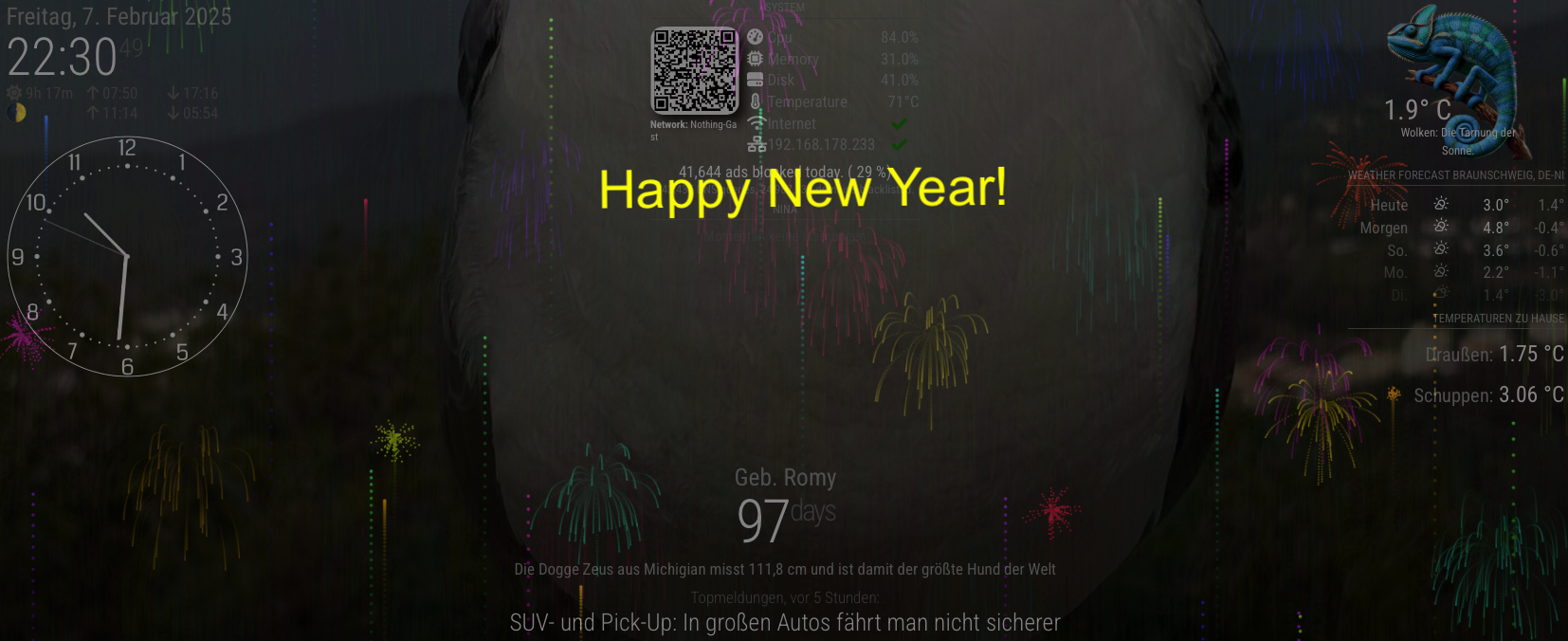
-
RE: MMM-Fireworks
I have completely reworked the MMM-Fireworks module!
New:
- It is now using the p5.js library. So it is now faster and I’ve added more config options.
- Also the timing problem ist solved. You can define a start date and time. If you need to restart your mm inbetween it continues.
- you can install it today and enjoy on next new years eve. (The JavaScript’s setTimeout is solved here (has a maximum delay roughly 2³¹–1 milliseconds - only 24.8 days)
- Added a text overlay
- runs as before in fullscreen but also “in a box” as every other module
- And the best: the explosion effect is now really nice!

-
RE: MMM-FroniusSolar family modules
@waynerob11 Hello,
I’ve created a version with console.logs inside. Go to the MMM-FroniusSolar2 module folder and replace the files with this content:MMM-FroniusSolar2.js:
Module.register("MMM-FroniusSolar2", { defaults: { InverterIP: "192.168.178.134", updateInterval: 60000, // Update every 60 seconds icons: { P_Akku: "mdi:car-battery", P_Grid: "mdi:transmission-tower", P_Load: "mdi:home-lightbulb", P_PV: "mdi:solar-panel-large", }, Radius: 80, // Radius for the SVG gauges MaxPower: 1000, // Maximum power for grid, house, and battery MaxPowerPV: 10400, // Maximum power for solar PV ShowText: true, TextMessge: [ { about: "600", Text: "Leicht erhöhter Netzbezug.", color: "#999" }, { about: "1000", Text: "Über 1 KW Netzbezug!", color: "#ffffff" }, { about: "1500", Text: "Über 1,5KW Netzbezug.", color: "#eea205" }, { about: "2500", Text: "Über 2,5KW aus dem Netz!", color: "#ec7c25" }, { about: "5000", Text: "Auto lädt, richtig? Nächstes Mal auf Sonne warten.", color: "#cc0605" }, { less: "-500", Text: "Sonne scheint! Mehr als 500W frei.", color: "#f8f32b" }, { less: "-2000", Text: "Wäsche waschen! Über 2KW freie Energie!", color: "#00bb2d" }, { less: "-4000", Text: "Auto laden! Über 4KW freie Energie!", color: "#f80000" }, ], debug: true, // Set to true to enable debug logging }, start: function () { if (this.config.debug) { console.log("[MMM-FroniusSolar2] Starting module with config:", this.config); } this.solarData = null; this.solarSOC = null; // Added for SOC console.log("[MMM-FroniusSolar2] Sending configuration to node_helper..."); this.sendSocketNotification("SET_CONFIG", this.config); // Send configuration to node_helper this.scheduleUpdate(); // Schedule periodic updates }, getStyles: function () { return ["MMM-FroniusSolar2.css", "https://code.iconify.design/2/2.2.1/iconify.min.js"]; }, scheduleUpdate: function () { if (this.config.debug) { console.log("[MMM-FroniusSolar2] Scheduling updates every", this.config.updateInterval, "ms"); } const self = this; setInterval(function () { if (self.config.debug) { console.log("[MMM-FroniusSolar2] Requesting data update from node_helper..."); } self.sendSocketNotification("GET_FRONIUS_DATA"); }, this.config.updateInterval); }, socketNotificationReceived: function (notification, payload) { if (notification === "FRONIUS_DATA") { if (this.config.debug) { console.log("[MMM-FroniusSolar2] Received FRONIUS_DATA:", payload); } this.solarData = { P_Akku: Math.round(payload.P_Akku || 0), P_Grid: Math.round(payload.P_Grid || 0), P_Load: Math.round(payload.P_Load || 0), P_PV: Math.round(payload.P_PV || 0), }; this.solarSOC = payload.Inverters && payload.Inverters["1"] && payload.Inverters["1"].SOC ? Math.round(payload.Inverters["1"].SOC) : 0; // Fallback to 0 if SOC is undefined if (this.config.debug) { console.log("[MMM-FroniusSolar2] Processed solarData:", this.solarData, "SOC:", this.solarSOC); } this.updateDom(); } }, getDom: function () { if (this.config.debug) { console.log("[MMM-FroniusSolar2] Rendering DOM"); } const wrapper = document.createElement("div"); wrapper.className = "solar2-wrapper"; if (!this.solarData) { wrapper.innerHTML = "Loading..."; return wrapper; } const radius = this.config.Radius || 80; const strokeWidth = 12; const svgSize = 350; // Adjusted SVG height for labels and padding // Recalculate house consumption const outerPower = this.solarData.P_Grid + this.solarData.P_Akku + this.solarData.P_PV; // Fixed positions for the gauges in dice layout const positions = { PV: { x: 75, y: 75 }, Grid: { x: 225, y: 75 }, Akku: { x: 75, y: 225 }, House: { x: 225, y: 225 } }; // Define colors for gauges const gridColor = this.solarData.P_Grid >= 0 ? "#808080" : "#add8e6"; // Gray for positive, light blue for negative const akkuColor = "#00ff00"; // Always green const pvColor = "#ffff00"; // Always yellow // House Gauge: Logic for color determination let houseColor; if (this.solarData.P_Akku - 100 > Math.abs(this.solarData.P_Grid)) { houseColor = "#a3c49f"; // Light green for high battery activity } else if (this.solarData.P_Grid > 150) { houseColor = "#808080"; // Gray for high grid consumption } else if (outerPower > 0) { houseColor = "#00ff00"; // Green for positive power flow } else { houseColor = "#1f84ff"; // Light blue } if (this.config.debug) { console.log("[MMM-FroniusSolar2] Gauge colors determined:", { pvColor, gridColor, akkuColor, houseColor }); } // Create unified SVG const svg = document.createElementNS("http://www.w3.org/2000/svg", "svg"); svg.setAttribute("width", svgSize); svg.setAttribute("height", svgSize); svg.setAttribute("viewBox", "0 -20 300 350"); // Adjusted viewBox to fix label cutoff svg.style.margin = "auto"; // Center the SVG // Define glow effect const defs = document.createElementNS("http://www.w3.org/2000/svg", "defs"); defs.innerHTML = ` <filter id="glow"> <feGaussianBlur in="SourceGraphic" stdDeviation="4" result="blurred" /> <feMerge> <feMergeNode in="blurred" /> <feMergeNode in="SourceGraphic" /> </feMerge> </filter> `; svg.appendChild(defs); // Function to create a line const createLine = (x1, y1, x2, y2, color) => { if (this.config.debug) { console.log("[MMM-FroniusSolar2] Creating line:", { x1, y1, x2, y2, color }); } const line = document.createElementNS("http://www.w3.org/2000/svg", "line"); line.setAttribute("x1", x1); line.setAttribute("y1", y1); line.setAttribute("x2", x2); line.setAttribute("y2", y2); line.setAttribute("stroke", color); line.setAttribute("stroke-width", "4"); line.setAttribute("class", "flow-lines"); return line; }; // Add flow lines based on power conditions if (this.solarData.P_Akku < -10 && this.solarData.P_PV > 0 ) { svg.appendChild(createLine(positions.PV.x, positions.PV.y + radius, positions.Akku.x, positions.Akku.y - radius, "#ffff00")); } if (this.solarData.P_PV > 10) { svg.appendChild(createLine(positions.PV.x + (radius * 0.7071), positions.PV.y + (radius * 0.7071), positions.House.x - (radius * 0.7071), positions.House.y - (radius * 0.7071), "#ffff00")); } if (this.solarData.P_Grid > 10) { svg.appendChild(createLine(positions.Grid.x, positions.Grid.y + radius, positions.House.x, positions.House.y - radius, "#808080")); } if (this.solarData.P_Akku > 10) { svg.appendChild(createLine(positions.Akku.x + radius, positions.Akku.y, positions.House.x - radius, positions.House.y, "#00ff00")); } if (this.solarData.P_Grid < -10 && this.solarData.P_PV > Math.abs(this.solarData.P_Grid)) { svg.appendChild(createLine(positions.PV.x + radius, positions.PV.y, positions.Grid.x - radius, positions.Grid.y, "#add8e6")); } if (this.solarData.P_Grid < -10 && this.solarData.P_PV <= 0) { svg.appendChild(createLine(positions.Akku.x + (radius * 0.7071), positions.Akku.y - (radius * 0.7071), positions.Grid.x - (radius * 0.7071), positions.Grid.y + (radius * 0.7071), "#00ff00")); } if (this.solarData.P_PV <= 0 && this.solarData.P_Akku < -10) { svg.appendChild(createLine(positions.Grid.x - (radius * 0.7071), positions.Grid.y + (radius * 0.7071), positions.Akku.x + (radius * 0.7071), positions.Akku.y - (radius * 0.7071), "#808080")); } // Function to create a gauge const createGauge = (x, y, mainValue, subValue, percentage, color, label, icon, labelPosition) => { if (this.config.debug) { console.log("[MMM-FroniusSolar2] Creating gauge:", { label, mainValue, subValue, percentage, color }); } const group = document.createElementNS("http://www.w3.org/2000/svg", "g"); group.setAttribute("transform", `translate(${x},${y})`); // Circle Background const bgCircle = document.createElementNS("http://www.w3.org/2000/svg", "circle"); bgCircle.setAttribute("cx", 0); bgCircle.setAttribute("cy", 0); bgCircle.setAttribute("r", radius); bgCircle.setAttribute("stroke", "#e0e0e0"); bgCircle.setAttribute("opacity", "1"); bgCircle.setAttribute("stroke-width", strokeWidth); bgCircle.setAttribute("fill", "none"); group.appendChild(bgCircle); // Circle Progress with glow const progressCircle = document.createElementNS("http://www.w3.org/2000/svg", "circle"); progressCircle.setAttribute("cx", 0); progressCircle.setAttribute("cy", 0); progressCircle.setAttribute("r", radius); progressCircle.setAttribute("stroke", color); progressCircle.setAttribute("stroke-width", strokeWidth); progressCircle.setAttribute("fill", "none"); progressCircle.setAttribute("stroke-dasharray", `${percentage * 2 * Math.PI * radius} ${2 * Math.PI * radius}`); progressCircle.setAttribute("transform", "rotate(-90 0 0)"); progressCircle.setAttribute("filter", "url(#glow)"); // Apply glow filter group.appendChild(progressCircle); // Main Text const mainText = document.createElementNS("http://www.w3.org/2000/svg", "text"); mainText.setAttribute("x", 0); mainText.setAttribute("y", 6); // Adjusted y position for main text mainText.setAttribute("text-anchor", "middle"); mainText.setAttribute("font-size", "22px"); mainText.setAttribute("fill", "#ffffff"); mainText.textContent = mainValue; group.appendChild(mainText); // Sub Text if (subValue) { const subText = document.createElementNS("http://www.w3.org/2000/svg", "text"); subText.setAttribute("x", 0); subText.setAttribute("y", 25); // Adjusted y position for sub text subText.setAttribute("text-anchor", "middle"); subText.setAttribute("font-size", "16px"); subText.setAttribute("fill", "#ffffff"); subText.textContent = subValue; group.appendChild(subText); } // Label with foreignObject for icon const labelY = labelPosition === "top" ? -(radius + 45) : radius + 15; // Increased offset for top labels const labelContainer = document.createElementNS("http://www.w3.org/2000/svg", "foreignObject"); labelContainer.setAttribute("x", -radius - 20); labelContainer.setAttribute("y", labelY); labelContainer.setAttribute("text-anchor", "middle"); labelContainer.setAttribute("width", radius * 2); labelContainer.setAttribute("height", labelPosition === "top" ? 60 : 40); // Adjusted label height labelContainer.innerHTML = ` <div xmlns="http://www.w3.org/1999/xhtml" style="display: flex; align-items: center; justify-content: center; text-align: center; font-size: 20px; color: white;"> <span class="iconify" data-icon="${icon}" style="margin-right: 5px;"></span> ${label} </div> `; group.appendChild(labelContainer); return group; }; // Add gauges to SVG svg.appendChild(createGauge( positions.PV.x, positions.PV.y, `${this.solarData.P_PV || 0} W`, null, Math.min((this.solarData.P_PV || 0) / this.config.MaxPowerPV, 1), pvColor, "PV", this.config.icons.P_PV, "top" )); svg.appendChild(createGauge( positions.Grid.x, positions.Grid.y, `${this.solarData.P_Grid || 0} W`, null, Math.min(Math.abs(this.solarData.P_Grid || 0) / this.config.MaxPower, 1), gridColor, "Grid", this.config.icons.P_Grid, "top" )); svg.appendChild(createGauge( positions.Akku.x, positions.Akku.y, `${this.solarSOC || 0}%`, `${this.solarData.P_Akku || 0} W`, Math.min(this.solarSOC / 100, 1), akkuColor, "Akku", this.config.icons.P_Akku, "bottom" )); svg.appendChild(createGauge( positions.House.x, positions.House.y, `${outerPower || 0} W`, null, Math.min(Math.abs(outerPower || 0) / this.config.MaxPower, 1), houseColor, "House", this.config.icons.P_Load, "bottom" )); wrapper.appendChild(svg); // Add dynamic text message below the gauge if (this.config.ShowText) { const textMessageDiv = document.createElement("div"); textMessageDiv.className = "text-message2"; const messageConfig = this.config.TextMessge || []; let selectedMessage = null; for (const message of messageConfig) { if ( (message.about && this.solarData.P_Grid > parseInt(message.about)) || (message.less && this.solarData.P_Grid < parseInt(message.less)) ) { // If no message is selected yet, or the new match is more specific if ( !selectedMessage || (message.about && parseInt(message.about) > parseInt(selectedMessage.about || -Infinity)) || (message.less && parseInt(message.less) < parseInt(selectedMessage.less || Infinity)) ) { selectedMessage = message; } } } if (selectedMessage) { if (this.config.debug) { console.log("[MMM-FroniusSolar2] Selected text message:", selectedMessage); } textMessageDiv.innerHTML = ` <span style="color: ${selectedMessage.color}; font-size: 18px;"> ${selectedMessage.Text} </span> `; } else { textMessageDiv.innerHTML = ` <span style="color: #999; font-size: 16px;"> PV Anlage läuft... </span> `; } wrapper.appendChild(textMessageDiv); } return wrapper; } });node_helper.js::
const NodeHelper = require("node_helper");

module.exports = NodeHelper.create({
    config: null, // Initially, no config is set

    start: function () {
        console.log("[MMM-FroniusSolar2] Node helper started");
    },

    socketNotificationReceived: function (notification, payload) {
        console.log("[MMM-FroniusSolar2] Received socket notification:", notification, payload);
        if (notification === "SET_CONFIG") {
            this.config = payload;
            if (this.config.debug) {
                console.log("[MMM-FroniusSolar2] Configuration received:", this.config);
            }
            this.startFetchingData();
        } else if (notification === "GET_FRONIUS_DATA") {
            if (!this.config) return;
            if (this.config.debug) {
                console.log("[MMM-FroniusSolar2] GET_FRONIUS_DATA triggered");
            }
            this.getFroniusData();
        }
    },

    startFetchingData: function () {
        if (this.config && this.config.InverterIP) {
            if (this.config.debug) {
                console.log("[MMM-FroniusSolar2] Starting data fetch interval for IP", this.config.InverterIP);
            }
            this.fetchInterval = setInterval(() => {
                this.getFroniusData();
            }, 60000); // Fetch data every 60 seconds
        }
    },

    getFroniusData: function () {
        if (!this.config || !this.config.InverterIP) return;

        const url = `http://${this.config.InverterIP}/solar_api/v1/GetPowerFlowRealtimeData.fcgi`;
        if (this.config.debug) {
            console.log("[MMM-FroniusSolar2] Fetching data from URL:", url);
        }

        fetch(url)
            .then(response => {
                if (this.config.debug) {
                    console.log("[MMM-FroniusSolar2] Response received:", response);
                }
                if (!response.ok) {
                    throw new Error(`HTTP error!`);
                }
                return response.json();
            })
            .then(data => {
                if (this.config.debug) {
                    console.log("[MMM-FroniusSolar2] JSON data received:", data);
                }
                const siteData = data.Body.Data.Site;
                const inverterData = data.Body.Data.Inverters ? data.Body.Data.Inverters["1"] : {};

                const result = {
                    P_Akku: siteData.P_Akku || 0,
                    P_Grid: siteData.P_Grid || 0,
                    P_Load: siteData.P_Load || 0,
                    P_PV: siteData.P_PV || 0,
                    Inverters: { "1": { SOC: inverterData.SOC || 0 } },
                };

                if (this.config.debug) {
                    console.log("[MMM-FroniusSolar2] Parsed result:", result);
                }

                this.sendSocketNotification("FRONIUS_DATA", result);
            })
            .catch(error => {
                console.error("[MMM-FroniusSolar2] Error fetching data:", error);
            });
    },
});
This will create a lot of log entry. So only use this temporary. If you see any errors you can’t solve, please send me the logs.
Later use
pm2 flushto clear the logs. The log-file size will increase with this version quite fast. -
RE: MMM-CalendarExt3 possible to round the corners?
@bobbylx
Have you tried to add a border-radius to .CX3 .weekGrid? I don‘t know if that works, but maybe… :) -
RE: pm2 doesnt work with crontab
@plainbroke
Then use this:
/usr/local/bin/pm2