I have re-published it already: https://github.com/Coernel82/MMM-Pir
C
Offline
A New Chapter for MagicMirror: The Community Takes the Lead
Read the statement by Michael Teeuw here.
Read the statement by Michael Teeuw here.
Posts
-
RE: Bugsounet and MMM-Pir
-
RE: Bugsounet and MMM-Pir
I also just looked for the module as I wanted to contribute some troubleshooting guide and didn’t find it.
As I have installed the module, what do you think about re-publishing it so that it doesn’t get lost?
It is MIT-license so no problem about that! -
RE: MM und nextcloud auf ein RPI möglich?
@stoffel said in MM und nextcloud auf ein RPI möglich?:
Statt GMAIL habe ich DeltaChat, statt GoogleMaps Magic Earth, statt PlayStrore AuroraStore und FDroid, statt G…Chrome DuckDuck Browser.
Danke für die Infos! Davon kenne ich tatsächlich einige noch nicht. Werde mir auch mal DeltaChat und AuroraStore anschauen.
Melde dich auf jeden Fall und erzähle, wie das Projekt NextcloudPi + MagicMirror läuft, insbesondere in Hinblick auf die Performance!
-
RE: Problems with MMM-DWD-Pollen regions
Yes, I had the problem too.
Two mistakes I made:- the default value for the pollen might not be a default - so better include the line in your config
- Did it for you already: I went to https://opendata.dwd.de/climate_environment/health/alerts/s31fg.json and checked if your part region exists. It does, so this is fine.
Also one mistake many people make is not to fully install:
cd ~/MagicMirror/modules # adapt directory if you are using a different one
git clone https://github.com/carstendirks/MMM-DWD-Pollen.git
cd MMM-DWD-Pollen
npm install # this can take a while
The important part is the npm install which installs dependencies!
For support always post your config. Here is mine - you can try my config to see if the problem is caused by a wrong config:
			module: "MMM-DWD-Pollen",
			position: "top_right",
			header: "Pollenwarnung",
			classes: 'scheduler',
			config: {
				// I use a schedule to only display it from spring to autumn!
                                // module_schedule: {from: '00 8 1 3 *', to: '00 8 15 10 *' },
				updateInterval: 5 * 60 * 60 * 1000, // every 5 hours
				DWD_region: 41, // Rhein-Westfälisches Tiefland
				icon: true, // Show icons or not
				pollenList: "Hasel,Erle,Esche,Birke,Graeser,Roggen,Beifuss,Ambrosia", // Which Pollen to display?
				showNullValue: false, //Show value or symbol if value is 0
			}
		},
You might want to set
showNullValuetotrueand also check in the json-Link if there are readings available (which currently there are) -
RE: MM und nextcloud auf ein RPI möglich?
Von meinem technischen Verständnis aus sollte das gehen. Ich würde so vorgehen:
- Image der SD-Karte mit Win32 Disk Imager erstellen, falls was schief geht. Wenn was schief geht mit Win32Disk Imager oder Balena Etcher Image wiederherstellen. Zum Wiederherstellen nehme ich immer Etcher, ich finde den für den Zweck besser.
- Nextcloud installieren
- Ausführlich testen
Grundsätzlich frage ich mich hierbei aber, ob die Performance ausreicht. Aber wie gesagt, das frage ich mich nur und weiß es nicht.
Ich handhabe die Sache aber anders: Ich habe die Nextcloud auf einem Raspberry Pi 4 und den MagicMirror ebenfalls auf einem anderen Raspberry Pi 4. Als Bildschirm für den Mirror nehme ich jedoch ein Waveshare E-Ink Display um Strom zu sparen.
Das Kalendermodul vom Mirror holt sich den Kalender von der Nextcloud.Die Nextcloud habe ich mit einem Image installiert: www.nextcloudpi.com. Vorteil ist, dass es ein Admin-Interface mit sehr vielen Sicherheits-, DynDNS-, Bruteforce und Backupfunktionen und mehr gibt. Auf scan.nextcloud.com habe ich ein Sicherheitsrating von A+, was du auf deine Art vermutlich nur mit Mühe hinbekommen kannst.
Weiterhin kann mit wenigen Klicks der Speicher und die Datenbank auf den USB-Stick verschoben werden.
Per Cronjob und Skript sichere ich nächtlich die Datenbank als sql-Dump, der von der Nextcloudpi automatisch erstellt wird, und Kalender und Kontakte per Nextcloud-Export Skript als vcf bzw. cal Datei auf dem Synology Backupserver. Wöchentlich drucke ich eine Testseite auf meinem Drucker (mit CUPS), damit die Tinte nicht eintrocknet.Handy ohne Google hatte ich auch, hatte da aber zu viele Einschränkungen leider. Mein Kompromiss ist jetzt ein Fairphone 4, welches zumindest keine China-Bloatware hat.
Was die Nextcloud angeht so betreibe ich diese problemlos seit 13 Jahren (damals noch OwnCloud). In der aktuellen Version von Nextcloudpi (Nextcloud 25), ohne Nextcloudpi könntest du dir sogar 26 installieren läuft auch Collabora / Nextcloud Office ohne Probleme und lies sich per OCC-Command unproblematisch installieren.
Hoffe, ich konnte dir weiterhelfen und dir ein paar Inspriationen geben!
-
RE: MMM-Fritz-Box-Callmonitor: Notification formatting
@Jan-0
This is so cool! It does work now. Has it been published to the list of modules?
If you or @wishmaster270 are somewhere near Cologne you or are invited for a free professional solo session of Feldenkrais Functional Integration or a free professional singing lesson! -
RE: MMM-Fritz-Box-Callmonitor: Notification formatting
@wishmaster270 said in MMM-Fritz-Box-Callmonitor: Notification formatting:
@coernel
Hi,
as i can see this fork https://github.com/drtorchwood/MMM-FRITZ-Box-Callmonitor-py3/tree/code_update_2023 contains all changes needed.
But you will need to either use the current development version of MagicMirror or wait for the next release which i think is planned for 2022-04-01 to get the alerts formatted correctly.This is great however I just get this:

Is this the formatting error we are talking about without the Core update? If yes I am willing to wait. But this for me looks like more than a formatting setting!Callmonitor definately is enabled via Fritz!Phone. And username and password are correct - I can access the Fritz!Box and the user has the view and edit settings:
Benutzer mit dieser Berechtigung können alle Einstellungen der FRITZ!Box sehen und bearbeiten.Any help would be appreciated!
-
RE: MMM-Fritz-Box-Callmonitor: Notification formatting
@wishmaster270 and @Jan-0 Is there now a current repository with the issues fixed? I would love to use the module as well.
Also it should be added here : https://github.com/MichMich/MagicMirror/wiki/3rd-party-modules -
RE: MMM-Fritz-Box-Callmonitor: Notification formatting
@wishmaster270 This is great.
I can confirm that executingfritz_acces.pywith username and password now works! It results in some structured data:<Call><Id>4373</Id><Type>3</Type><Called>0123456789</Called><Caller>SIP: 9328727</Caller><CallerNumber>54321</CallerNumber><Name>Some fancy Name</Name><Numbertype>sip</Numbertype><Device>Tardis</Device><Port>13</Port><Date>03.09.22 12:55</Date><Duration>0:02</Duration><Count></Count><Path /></Call>I also get the module to show however it does not show active nor missed calls. It just shows “no call”, the spinner and the phonebook.
I used this config:
			module: 'MMM-FRITZ-Box-Callmonitor-py3',
			position: 'bottom_left',
			header: "Verpasste Anrufe",
			config: {
				username: "foo",
				password: "bar",
				reloadContactsInterval: 24*60,
				minimumCallLength: 0,
				showContactsStatus: true,
				maximumCallDistance: 60*6,
				maximumCalls: 4,
				fade: false,
				debug: true,
			}
		},
So I guess the communication between the js and the py is faulty.
I would like to help you with your formatting though in the end…
-
RE: MMM-Fritz-Box-Callmonitor: Notification formatting
After changing some lines as suggested by sdetweil the MagicMirror loads again.
@Jan-0 said in MMM-Fritz-Box-Callmonitor: Notification formatting:
python3 fritz-access.py -u ‘’ -p ‘’
The filename is fritz_access.py. So after executing it I got
 print json.dumps({"filename": file, "content": content})
          ^
SyntaxError: invalid syntax
This was easily solded by changing it to
print (json.dumps({"filename": file, "content": content}))(Just adding round brackets) - that was a change from Python2 to Python3.However it was followed by the next error
urllib2does not work in Python 3. According to stackoverflow urllib.error and urllib.request must be used for Python3.Are you sure you uploaded the right code to github? It seems you accidentally uploaded th old python2 code!
-
RE: MMM-Fritz-Box-Callmonitor: Notification formatting
I tried to install it but the MagicMirror stays blank after that. I noticed that you don’t use a pyhton-3 shebang in your Python file. Could this be the cause? I will try later to add that!
This is my config:
{ module: 'MMM-FRITZ-Box-Callmonitor-py3', position: 'bottom_left', // This can be any of the regions. Best results in left or right regions. header: "Verpasste Anrufe", // This is optional config: { username: "foo", password: "bar", reloadContactsInterval: 24*60, } }, -
RE: MMM-Fritz-Box-Callmonitor: Notification formatting
@Jan-0 I will have a look tomorrow!
-
RE: MMM-Fritz-Box-Callmonitor: Notification formatting
@Jan-0 Please publish your fork and I will have a look at the formatting!
-
RE: MMM-Fritz-Box-Callmonitor: Notification formatting
@Jan-0 Can you please fork the updated module? I also tried to make it run under Python3 but failed.
I will then install and have a look at the formatting - though I am no expert either I will give my best.
-
RE: Default weather module: "hourly" with increments
@karsten13 said in Default weather module: "hourly" with increments:
can you open an issue on github for this? Thanks.
-
Default weather module: "hourly" with increments
It would be very great if the default weather module would be able to show the
hourlyweather with for instanceincrements = 2resulting in:- 12:00
- 14:00
- 16:00
increments = 3resulting in:- 12:00
- 15:00
- 18:00
and so on…
as on smaller screens hourly clutters the screen very much.I’d be very happy about this option!
-
RE: MMM-Gas-storage-EU
@sdetweil as I am really still a noob would you be so friendly to give me the exact line of code? If I do it it will take either a minute if my first guess is right or even half an hour.
The main problem is that I do not know, when Gas Infrastructure Europe updates the values. Are they live? Set at midnight or maybe at six in the morning? I will try to find that out. So for now a 2 hour update interval will be a good compromise.
So defining
reloadIntervalis enough to trigger a reload? -
RE: MMM-FRITZ-Box-Callmonitor
@sdetweil Hey thanks, that is exactly what I understood. And that arises the question: With an older version of python isn’t there the danger of other modules being broken? So would there be the possibility to force an older python version for the specific module only?
-
MMM-Gas-storage-EU
I just programmed my first JavaScript program ever. It is no big thing but it works (thanks to ChatGPT)…
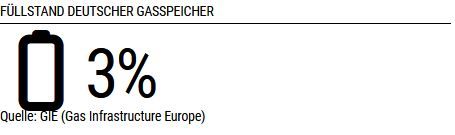
So the module shows a battery icon and the amount of stored gas for a specified EU country (according to country codes such as
DE,IT,FRetc.
The size of the font and battery change according to the amount. The lesser gas, the bigger the icon (as it is more important now).
For now I am still testing if the module updates as wished. Is it enough to adddefaults: { reloadInterval: 1000 * 60 * 60 * 2, // all 2 hours - really should be enough once a day but who knows when this time will be? },??? or is there more to do?
I will think about my module a bit longer if there are other things to consider.Do you have any specific wished I could implement?
I will publish a beta soon.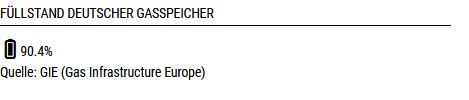
-
RE: MMM-FRITZ-Box-Callmonitor
I have the same problem. What do you mean by “I uninstalled Python?” So if I uninstall Python many other things won’t work.