@Mykle1 Awesome, I’m glad it worked out in the end.
A New Chapter for MagicMirror: The Community Takes the Lead
Read the statement by Michael Teeuw here.
Read the statement by Michael Teeuw here.
D
Offline
Posts
-
RE: No Country (Bluetooth) For Old Men
-
RE: No Country (Bluetooth) For Old Men
@Mykle1 Getting close.
Run pulseaudio --start then try the speaker thing again. -
RE: No Country (Bluetooth) For Old Men
@Mykle1 Can you try the right click on the speaker icon now to see if it works?
-
RE: No Country (Bluetooth) For Old Men
@Mykle1 try the command line instead of the gui to pair your speaker.
Run bluetoothctl in terminal.
Then type:
power on
Default-agent
Agent on
Scan on
then see if bluetoothct sees the speaker. -
RE: No Country (Bluetooth) For Old Men
@Mykle1 Sorry to hear it’s not working.
When you reboot try it without running the start-pulseaudio-x11 command. If that doesn’t work, I’m lost.
Iirc, when I set mine up, I paired the speaker, then did the right click on the speaker icon to change it to the bluetooth speaker. -
RE: No Country (Bluetooth) For Old Men
@Mykle1 you might have to be remove (forget) the speaker on your pi bluetooth and restart the pi again once you remove blueman.
-
RE: No Country (Bluetooth) For Old Men
@Mykle1 If you’re on jessie (with pixel), keep reading this post. I think you mentioned you have blueman installed. You don’t need blueman anymore. I would recommend getting rid of it. Pixel comes with pi-bluetooth which is supposed to make things easier for audio. Notice how you have 2 bluetooth icons in your taskbar? They could be conflicting.
Please also see this link https://www.raspberrypi.org/blog/another-update-raspbian/ for how to connect the speaker. It should work.
Of course do back up your card in case something goes wrong.Raspbian Stretch also changed some stuff about bluetooth, maybe take a look at that if you have a spare sd card lying around. I personally haven’t tried it yet.
https://www.raspberrypi.org/blog/raspbian-stretch/This is how mine looks
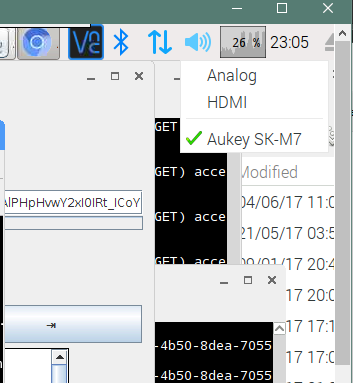
-
RE: No Country (Bluetooth) For Old Men
@Mykle1
What’s your exact issue? Does it work then gets disconnected?
I struggled a lot with bluetooth audio on the pi3. In the end I had to disable the onboard chip and use a usb dongle.
Edit:
From your screenshots it looks like it’s connected. Apprently the correct way to connect the speaker once you device is paired is to right click on the speaker icon on the right then select your bluetooth speaker(It should be listed there). -
RE: Garmin Connect Integration
I think there might be an issue with the module. Mine doesn’t load anymore.
Maybe Garmin changed something on their side. -
RE: Error Running DISPLAY=:0
I have the same issue. So does this guy.
https://github.com/MichMich/MagicMirror/issues/1007 -
RE: Alot of SPAM lately on this forum!
Or make new posters go through a 5 post vetting process where their posts would need to be reviewed before being made public.
Not sure how the logistics would work since the mods would still need to review a lot of posts. -
RE: Alot of SPAM lately on this forum!
It’s seems to be getting worse. I just signed in and I see about 20 of them in recent posts. Can something be done?
Maybe prevent posts with Chinese characters from being instantly posted since most of the spam are not in English. -
RE: AlexaPI and MagigMirror at same raspberry
Do you really need alexapi? I use the code which was made available by amazon. [https://github.com/alexa/alexa-avs-sample-app](link url)
Unless you need a specific alexapi module on MM2 you could try this one. -
RE: TESTERS WANTED - Multi-sport Scoreboard module
Just installed the module. Looking good so far. Monitoring it while the Jays game is on. Looking forward to the updates. Specially the MLS one.
-
RE: monthly calendar - not update
@zdenek Mine didn’t update too. Not sure why.
-
RE: Change heading color
Thank you for both your help.
@Anhalter42 said in Change heading color:header {
color: green;
}That’s exactly what I was looking for.
-
Change heading color
Hello,
I have changed the color of all the regular text on my mirror by using the color argument. What would I need to add to my custom.css to assign a color to all the headers? I’m looking for a simple solution if possible.body { margin:0px; height:100%; width: 100%; zoom: 110%; **color : white ;** position : absolute; }Thanks
-
RE: MMM-Globe
Well, this sucks. I tried to enable the GL drivers on my Raspberry Pi 3 and it crashed the Pi. It installed the drivers, asked me to reboot and then the Pi won’t come back up. I’m going to have to reflash the card and start over.
It’s going to be a long night. If you’re going to try the GL drivers, back up your
config.jsat the very least. Better yet, image your SD card just in case.I had the same black screen issue on my pi3. I reflashed my card twice before realizing I could have disabled opengl by editing the boot config.txt file. This might save someone else some time. So if you enable opengl and get the black screen issue remember to edit you config file to fix the issue.
dtoverlay=vc4-kms-v3ddtoverlay=vc4-fkms-v3d
gpu_mem=256
#dtoverlay=vc4-fkms-v3d

#Adding these two lines stopped the black screen issue.
hdmi_force_edid_3d=1
avoid_warnings=2
https://www.raspberrypi.org/forums/viewtopic.php?p=999920#p999920