@j-e-f-f said in Using MM as a SmartDisplay for my Living room:
@sgopala Heh! I just did the same thing for my Kitchen:
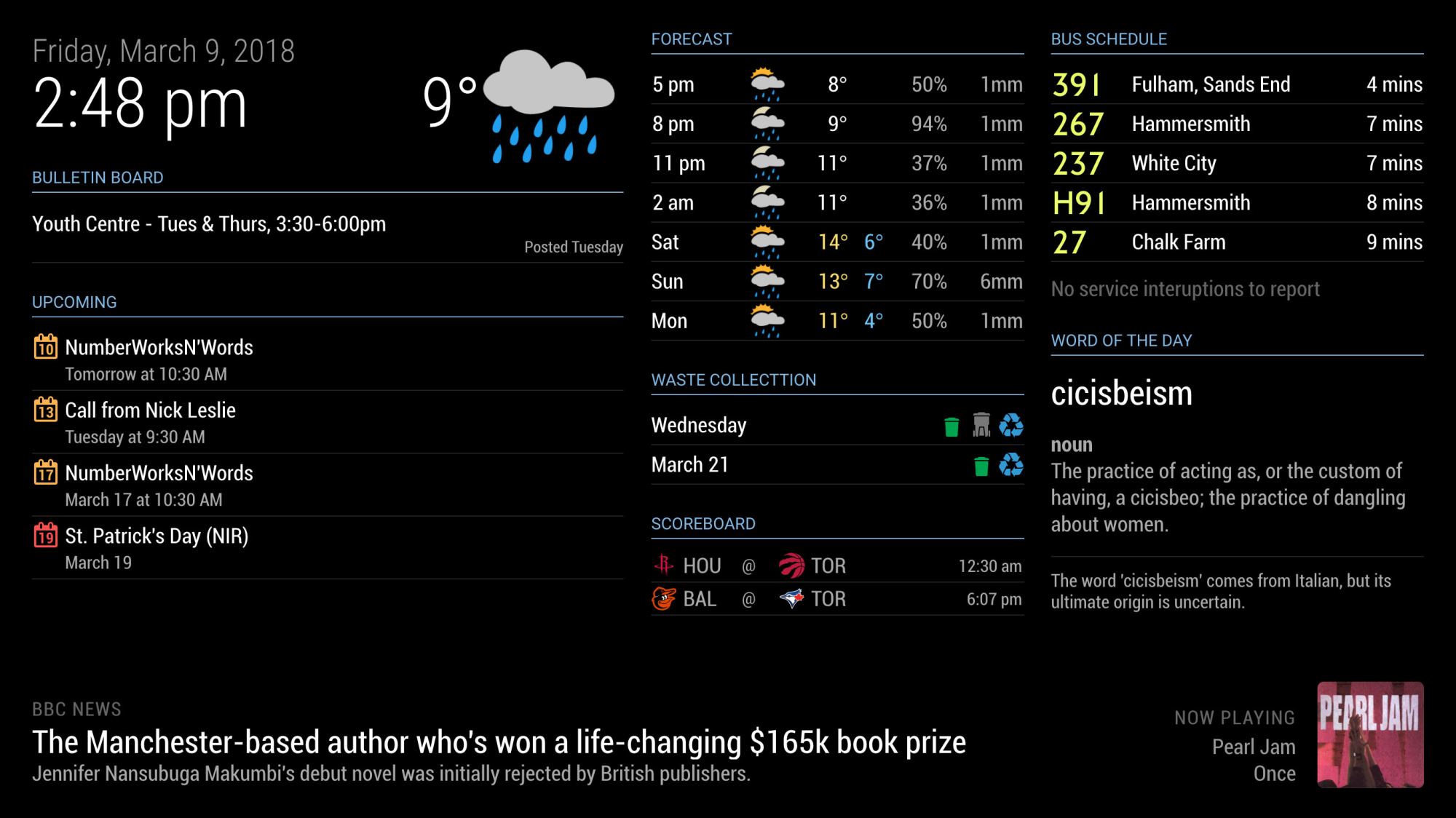
Hi, which module did you use for the player at the bottom right?

@j-e-f-f said in Using MM as a SmartDisplay for my Living room:
@sgopala Heh! I just did the same thing for my Kitchen:
Hi, which module did you use for the player at the bottom right?
Hi guys!
I have this project in mind that I hope you can help me to realize!
I am a beginner and I am slowly trying to understand how the MM works.
I would like to command with the voice (Google Assistant) a light (or door closure, temperature, thermostat temperature, etc …).
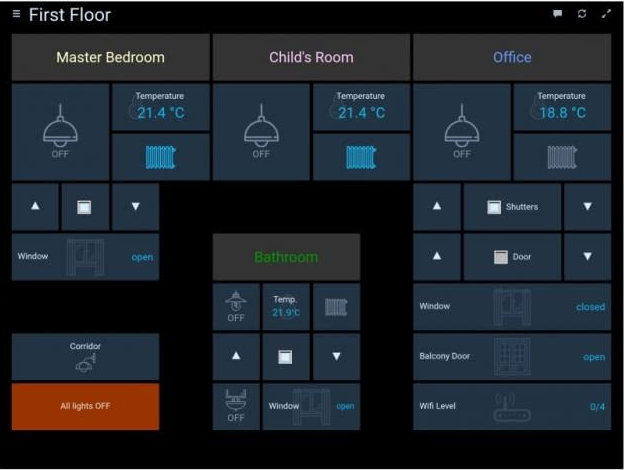
I would also like to display the status in the OpenHAB dashboard always on a page of the Magic Mirror, as in the following picture:
Below a small drawing of the project:
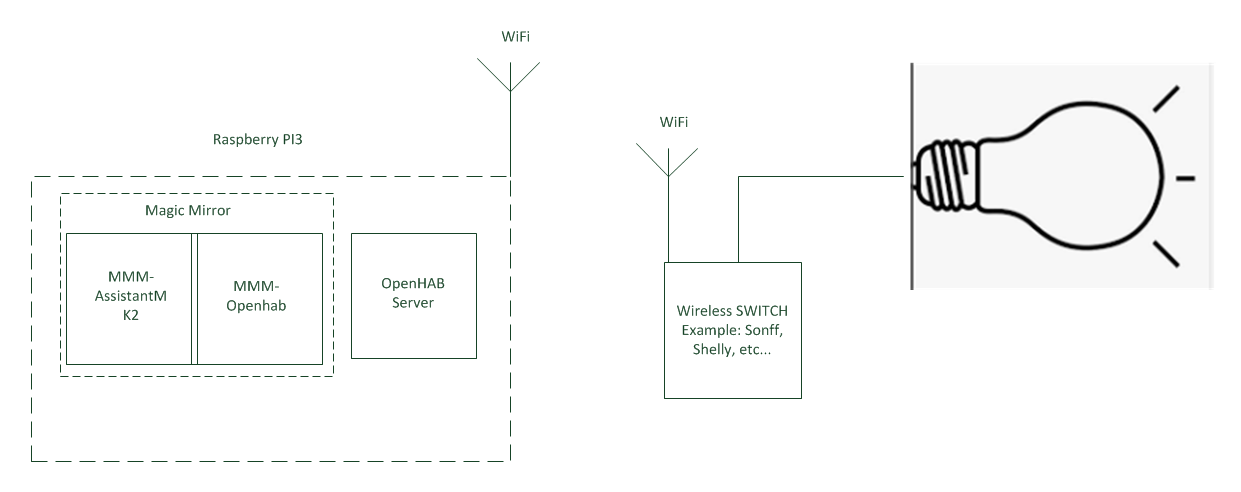
I believe this project can be implemented this way:
Questions:
Is it possible to do this?
Am I leaving out some aspect?
The modules I would like to use are correct?
Has anyone already tried to create something like this?
Thank you all.
@sean said in MMM-AssistantMk2:
Adjust sensitivity.
The sensitivity of the microphone?
If yes, how do you do it?
@sean said in MMM-AssistantMk2:
Redefine CSS selector
#ASSISTANT_YOUTUBEincss/custom.css.
Where should I make this modify?
Thanks a lot!
Hi @Sean.
I have some questions to ask you:
I installed AssistantMK2 and Hotword successfully but the only way to wake up the assistant is to say “snowboy”. The hot word “smartmirror” and “jarvis” do not work. Can you help me? (my config.js below…)
When I ask for a song on youtube I can not stop the song anymore. The assistant does not listen to me. To talk to the assistant I have to wait for the end of the song. How do I solve?
When the assistant begins to speak, he cuts the first words, is it possible to solve?
The videos on youtube are reproduced in full screen. Is it possible to reproduce them in a small box (example: bottom right …)?
Thanks you for your great work and patience! :winking_face:
/* Magic Mirror Config Sample
 *
 * By Michael Teeuw http://michaelteeuw.nl
 * MIT Licensed.
 *
 * For more information how you can configurate this file
 * See https://github.com/MichMich/MagicMirror#configuration
 *
 */

var config = {
	address: "localhost", // Address to listen on, can be:
	                      // - "localhost", "127.0.0.1", "::1" to listen on loopback interface
	                      // - another specific IPv4/6 to listen on a specific interface
	                      // - "", "0.0.0.0", "::" to listen on any interface
	                      // Default, when address config is left out, is "localhost"
	port: 8080,
	ipWhitelist: ["127.0.0.1", "::ffff:127.0.0.1", "::1"], // Set [] to allow all IP addresses
	                                                       // or add a specific IPv4 of 192.168.1.5 :
	                                                       // ["127.0.0.1", "::ffff:127.0.0.1", "::1", "::ffff:192.168.1.5"],
	                                                       // or IPv4 range of 192.168.3.0 --> 192.168.3.15 use CIDR format :
	                                                       // ["127.0.0.1", "::ffff:127.0.0.1", "::1", "::ffff:192.168.3.0/28"],

	language: "en",
	timeFormat: 24,
	units: "metric",

	modules: [
		{
		  module: "MMM-AssistantMk2",
		  position: "top_right",
		  config: {
		    /*useWelcomeMessage: "brief today",*/
		    deviceLocation: {
					coordinates: { // set the latitude and longitude of the device to get localized information like weather or time. (ref. mygeoposition.com)
					latitude: 45.200049, // -90.0 - +90.0
					longitude: 7.568917, // -180.0 - +180.0
          }
        },
			profiles: {
				"default" : { // profile name.
				profileFile: "default.json", // profile file name.
				lang: "it-IT",
				//currently available (estimation, not all tested):
				//  de-DE, en-AU, en-CA, en-GB, en-US, en-IN
				// fr-CA, fr-FR, it-IT, ja-JP, es-ES, es-MX, ko-KR, pt-BR
				// https://developers.google.com/assistant/sdk/reference/rpc/languages
				}
        },
			record: { // Full values are in `FOR EXPERTS` section.
				recordProgram: "arecord",  // Defaults to "arecord" - also supports "rec" and "sox"
				device: "plughw:1"        // recording device (e.g.: "plughw:1")
      },
			play: { // Full values are in `FOR EXPERTS` section.
				playProgram: "mpg321", // recommended.
			},
			notifications: {
        ASSISTANT_ACTIVATED: "HOTWORD_PAUSE",
        ASSISTANT_DEACTIVATED: "HOTWORD_RESUME",
      },

				}
    },
		{
    module: "MMM-Hotword",
    config: {
      record: {
        recordProgram : "arecord",
        device        : "plughw:1",
      },
      autostart:true,
      onDetected: {
        notification: function (payload) {
          return "ASSISTANT_ACTIVATE"
        },
        payload: function (payload){
          return {
            profile: payload.hotword
          }
        }
      },
    },
  },

{
  module: 'MMM-Hotword',
  config: {
    snowboy: [
  {
    hotwords: "smartmirror", //this will be sent to other module for distinguishing which hotword is detected.
    file: "resources/models/smart_mirror.umdl",
    sensitivity: '0.5',
  },
  {
    hotwords: "snowboy",
    file: "resources/models/snowboy.umdl",
    sensitivity: '0.5',
  },
  {
    file: 'resources/models/jarvis.umdl',
    sensitivity: '0.8,0.80',
    hotwords: ['jarvis','jarvis'] //Kitt.ai changed their Jarvis UMDL, it has 2 models in one file. So weird.
    //anyway, you can give different name for each. ['jarvis_1', 'jarvis_2']. Even though I think this is useless.
  }
    ],
    record: {
      sampleRate    : 16000,      // audio sample rate
      threshold     : 0.5,        // silence threshold (rec only)
      thresholdStart: null,       // silence threshold to start recording, overrides threshold (rec only)
      thresholdEnd  : null,       // silence threshold to end recording, overrides threshold (rec only)
      silence       : 1.0,        // seconds of silence before ending
      verbose       : true,      // log info to the console. Use this when you want to check mic working or not.
      recordProgram : 'arecord',  // Defaults to 'arecord' - also supports 'rec' and 'sox'
      device        : 'plughw:1'        // recording device (e.g.: 'plughw:1')
    },
    autostart: true,              // if 'false', this module will wait for 'HOTWORD_RESUME' notification to start hotwords detection at the beginning.
    autorestart: false,          // You can set this 'true' when you want this module to go back to listening mode automatically again after hotword is detected. But use this carefully when your other modules are using microphone or speaker.

    // customizable notification trigger
    notifications: {
      PAUSE: "HOTWORD_PAUSE",
      RESUME: "HOTWORD_RESUME",
      LISTENING : "HOTWORD_LISTENING",
      SLEEPING : "HOTWORD_SLEEPING",
      ERROR : "HOTWORD_ERROR",
    },
    onDetected: {
      notification: (payload) => {
        return "HOTWORD_DETECTED"
      },
      payload: (payload) => {
        return payload
      }
    },
  }
},

/*		{
        module: 'MMM-pages',
        config: {
                modules:
                    [[ "weatherforecast", "newsfeed"],
                     [ "calendar", "compliments" ]],
                excludes: ["clock", "currentweather", "MMM-page-indicator", "MMM-AssistantMk2"],
				}
		},
		{
        module: 'MMM-page-indicator',
        position: 'bottom_bar',
        config: {
            pages: 3,
			}
		},
*/		{
			module: "alert",
		},
		{
			module: "updatenotification",
			position: "top_bar"
		},
		{
			module: "clock",
			position: "top_left"
		},
		{
			module: "calendar",
			header: "US Holidays",
			position: "top_left",
			config: {
				calendars: [
					{
						symbol: "calendar-check-o ",
						url: "webcal://www.calendarlabs.com/templates/ical/US-Holidays.ics"
					}
				]
			}
		},
		{
			module: "compliments",
			position: "lower_third"
		},
		{
			module: "currentweather",
			position: "top_right",
			config: {
				location: "New York",
				locationID: "",  //ID from http://bulk.openweathermap.org/sample/; unzip the gz file and find your city
				appid: "YOUR_OPENWEATHER_API_KEY"
			}
		},
		{
			module: "weatherforecast",
			position: "top_right",
			header: "Weather Forecast",
			config: {
				location: "New York",
				locationID: "5128581",  //ID from http://www.openweathermap.org/help/city_list.txt
				appid: "YOUR_OPENWEATHER_API_KEY"
			}
		},
		{
			module: "newsfeed",
			position: "bottom_bar",
			config: {
				feeds: [
					{
						title: "La Stampa",
						url: "https://www.lastampa.it/rss.xml"
					}
				],
				showSourceTitle: true,
				showPublishDate: true
			}
		},
	]

};

/*************** DO NOT EDIT THE LINE BELOW ***************/
if (typeof module !== "undefined") {module.exports = config;}
@sean Let’s take the example of the “AssistantMk2” module.
To copy the module I should follow these steps:
Install the pre-dependencies: sudo apt-get install libasound2-dev sox libsox-fmt-all
I copy the “MMM-AssistantMk2” folder to the new “modules” folder.
In theory I should not follow the fourth chapter of the installation guide IV. Google Assistant Setup, because the configuration has already been implemented.
All right?
Thanks.
Sorry guys i need your help again!
I had to reinstall raspbian due to a module that did not work.
Before formatting the SD, I backed up the MagicMirror folder.
Question: can I copy the folders with the old modules (Mmm-assistantmk2, MMM-Pages, etc…) in the new MagicMirror installation?
Thanks.
@sean said in Start or not...?:
MMM-Hotword(snowboy) can’t understand the language itself. It just will match the pattern of your voice with defined models. So, that is not configurable. However you can create your custom private hotword model(.pmdl) and use it. See the Snowboy website. (http://kitt.ai)
Ok, so I can substitute the words in English with those in Italian, changing in this way:
customizable notification trigger
    notifications: {
      PAUSE: "HOTWORD_PAUSA",
      RESUME: "HOTWORD_RIPRENDI",
      LISTENING : "HOTWORD_ASCOLTA",
      SLEEPING : "HOTWORD_DORMI",
      ERROR : "HOTWORD_ERRORE",
@sean said in Start or not...?:
First; You have to make gAction or transcriptionHook . Here is a sample for transcriptionHook
What is the difference between gAction and transcriptionHook?
The code you wrote should be put under the module MMM-assistantmk2, MMM-Hotword or MMM-pages?
Is the MMM-pages module suitable for my needs or another module is better?
Thanks and sorry for the 1000 questions!!!
@sean I have some question on MMM-assistantmk2, MMM-Hotword and MMM-pages (or another module that creates multiple pages recommended by you…).
MMM-assistantmk2: this module also speak Italian?
MMM-Hotword: can I also use hot words in Italian?
Or can I use only the English hot words shown in the configuration file?
customizable notification trigger
    notifications: {
      PAUSE: "HOTWORD_PAUSE",
      RESUME: "HOTWORD_RESUME",
      LISTENING : "HOTWORD_LISTENING",
      SLEEPING : "HOTWORD_SLEEPING",
      ERROR : "HOTWORD_ERROR",
Thanks.
@sdetweil said in syntax errors:
from the MM folder run
node tests/configs/check_config.js
find and fix all errors, starting from the top of the list
Thanks, as soon possible I will try this command.
Ok thanks @ganget, but I do not understand why if I remove the comma of the “}” referring to “play” the configuration does not give problems but if I remove the comma from the “}” referring to “record” it goes into error…
	record: { // Full values are in `FOR EXPERTS` section.
			recordProgram: "arecord",  // Defaults to "arecord" - also supports "rec" and "sox"
			device: null        // recording device (e.g.: "plughw:1")
  },
		play: { // Full values are in `FOR EXPERTS` section.
			playProgram: "mpg321", // recommended.
		}
Sorry for the banalities … but I’m a beginner.:smiling_face_with_open_mouth_cold_sweat:
@sean said in Start or not...?:
@egnos function itself is included. But activating that function with hotword needs MMM-Hotword.
Ok, so I have to install MMM-Hotword.
Thanks
How can I activate it with the H / W keys?
Only for test…
@sean said in Start or not...?:
You can activate with other module which can emit notification. (Yes, Even default calendar module can activate this)
This function be done directly with “MMM-assistantmk2” or should I always install “MMM-Hotword”?
Sorry @ganget, but I’m not sure that the configuration you propose can work, because after opening a “{” is closed with a “},” and the “},” is used only for the closure of the entire module and not the single configurations. Correct?
Is it possible that the problem is on the comma after “mpg321”?
play: { // Full values are in `FOR EXPERTS` section.
      playProgram: "mpg321", // recommended.
Thank you all!
@sean said in Start or not...?:
@egnos
MMM-Hotwordis needed if you want to activate it with voice hotword.
Thanks Sean!
So if I only install the module “MMM-assistantmk2” how can I use it?
So if I only install the module “MMM-assistantmk2” I can not do anything … correct?
Hello everyone and happy new year!
I returned the “Sonoff 4ch pro r2” because it was not for me!
During the Christmas holidays I started the installation of the Magic Mirror with all its modules.
These days I’m trying to install the module MMM-Assistantmk2 but I did not understand how to activate the assistant with my voice.
In the configuration of MMM-Assistantmk2 module I did not find a way to insert a watchword to wake up the Assistant.
Can you help me?
Do you need to install modules like “MMM-Hotword” and “MMM-NotificationTrigger”?
Thanks guys.
Sorry, the config.js below:
/* Magic Mirror Config Sample
 *
 * By Michael Teeuw http://michaelteeuw.nl
 * MIT Licensed.
 *
 * For more information how you can configurate this file
 * See https://github.com/MichMich/MagicMirror#configuration
 *
 */

var config = {
	address: "localhost", // Address to listen on, can be:
	                      // - "localhost", "127.0.0.1", "::1" to listen on loopback interface
	                      // - another specific IPv4/6 to listen on a specific interface
	                      // - "", "0.0.0.0", "::" to listen on any interface
	                      // Default, when address config is left out, is "localhost"
	port: 8080,
	ipWhitelist: ["127.0.0.1", "::ffff:127.0.0.1", "::1"], // Set [] to allow all IP addresses
	                                                       // or add a specific IPv4 of 192.168.1.5 :
	                                                       // ["127.0.0.1", "::ffff:127.0.0.1", "::1", "::ffff:192.168.1.5"],
	                                                       // or IPv4 range of 192.168.3.0 --> 192.168.3.15 use CIDR format :
	                                                       // ["127.0.0.1", "::ffff:127.0.0.1", "::1", "::ffff:192.168.3.0/28"],

	language: "en",
	timeFormat: 24,
	units: "metric",

	modules: [
		{
		  module: "MMM-AssistantMk2",
		  position: "top_right",
		  config: {
		    deviceLocation: {
					coordinates: { // set the latitude and longitude of the device to get localized information like weather or time. (ref. mygeoposition.com)
					latitude: 45.200049, // -90.0 - +90.0
					longitude: 7.568917, // -180.0 - +180.0

			profiles: {
				"default" : { // profile name.
				profileFile: "default.json", // profile file name.
				lang: "it-IT"
				//currently available (estimation, not all tested):
				//  de-DE, en-AU, en-CA, en-GB, en-US, en-IN
				// fr-CA, fr-FR, it-IT, ja-JP, es-ES, es-MX, ko-KR, pt-BR
				// https://developers.google.com/assistant/sdk/reference/rpc/languages

			record: { // Full values are in `FOR EXPERTS` section.
				recordProgram: "arecord",  // Defaults to "arecord" - also supports "rec" and "sox"
				device: null        // recording device (e.g.: "plughw:1")

			play: { // Full values are in `FOR EXPERTS` section.
				playProgram: "mpg321", // recommended.
											}
										}
								 	}
								 }
							}
					  }
				}
        },
		{
			module: "alert",
		},
		{
			module: "updatenotification",
			position: "top_bar"
		},
		{
			module: "clock",
			position: "top_left"
		},
		{
			module: "calendar",
			header: "US Holidays",
			position: "top_left",
			config: {
				calendars: [
					{
						symbol: "calendar-check-o ",
						url: "webcal://www.calendarlabs.com/templates/ical/US-Holidays.ics"
					}
				]
			}
		},
		{
			module: "compliments",
			position: "lower_third"
		},
		{
			module: "currentweather",
			position: "top_right",
			config: {
				location: "New York",
				locationID: "",  //ID from http://bulk.openweathermap.org/sample/; unzip the gz file and find your city
				appid: "YOUR_OPENWEATHER_API_KEY"
			}
		},
		{
			module: "weatherforecast",
			position: "top_right",
			header: "Weather Forecast",
			config: {
				location: "New York",
				locationID: "5128581",  //ID from http://www.openweathermap.org/help/city_list.txt
				appid: "YOUR_OPENWEATHER_API_KEY"
			}
		},
		{
			module: "newsfeed",
			position: "bottom_bar",
			config: {
				feeds: [
					{
						title: "New York Times",
						url: "http://www.nytimes.com/services/xml/rss/nyt/HomePage.xml"
					}
				],
				showSourceTitle: true,
				showPublishDate: true
			}
		},
	]

};

/*************** DO NOT EDIT THE LINE BELOW ***************/
if (typeof module !== "undefined") {module.exports = config;}
Thanks.
Hi guys,
I’m a beginner and I’m setting up the module MMM-AssistantMk2 but I don’t know why if I add this two configuration:
record: { // Full values are in FOR EXPERTS section.
recordProgram: “arecord”, // Defaults to “arecord” - also supports “rec” and “sox”
device: null // recording device (e.g.: “plughw:1”)
play: { // Full values are in FOR EXPERTS section.
playProgram: “mpg321”, // recommended.
the MM show me: WARNING! Could not validate config file. Please correct syntax errors. Starting with default configuration.
Where am I wrong?
I attach my config.js
Thanks everyone.
[0_1546719570197_config.js](Caricamento 100%)
Ciao a tutti, puro italiano…nella forma e nell’animo! :winking_face:
Io sto iniziando a districarmi fra i vari moduli SW e HW.
Se riuscissimo a formare una specie di gruppo non sarebbe male!
A disposizione…
@j-e-f-f said in Start or not...?:
Pi 3B has WiFi and bluetooth built-in. Pi 2B needs a USB dongle, but they’re not expensive.
Yes, I have Raspberry PI3.
@j-e-f-f said in Start or not...?:
If you want to display your house temperature, you need a smart thermostat like a Nest or an Ecobee. There exists a module for Nest, but I don’t know about Ecobee. Maybe you would relay that through Home Assistant?
If you want to display the weather outside, there are a bunch of weather modules available. I’m sure will suit your needs well.
I would like to display the “real” outdoor temperature, if possible using a temperature sensor.
I would like the real external and internal temperature (the internal one I will take from a smart thermostat) always be visible on my MM.
The temperatures acquired by the various modules are estimates…correct?
@peter said in Start or not...?:
I use cheap Xiaomi sensors in all rooms in my house, displayed on MM.
Peter
Which module for MM do you use?
Which xiaomi sensor do you use?
I have another questions:
I bought the “Sonoff 4ch pro r2” but I do not understand how to make the Sonoff work together with the physical switch.
Example:
STEP 1: I turn on the light 1 with Sonoff
STEP 2: I turn off the light 1 from the physical switch
STEP 3: I turn on the light 1 with Sonoff
It’s possible?
Is it possible to receive feedback from the “Sonoff”?
Example: I would like to know if the house gate is open or closed or if the garden light is on, etc …
the “Sonoff 4ch pro r2” has a 433Mhz receiver (I think it is used to open the automatic gates …) and I would like to use it using a 433Mhz transmitter.
Are there transmitters with 433Mhz for Raspberry?
Have you tested someone?
Could I use GA to open the gate at home?
Thank you for your precious help!!
Sorry guys,
exist a wireless sensor (WiFi, bluetooth,etc…) that transmits the temperature to the Raspberry?
Maybe there is some MM module that manages the communication …
Thanks
Good night! :sleeping_face:
@peter thanks for your precious advice!
I would like to start but for work I am often around Europe and time is always a little … !!
I’ll start soon … promised!:smiling_face_with_halo:
@peter said in Start or not...?:
But I find it more fun to say: “Hey Google, turn on the fountain …”
Ok, but how do you connect a sentence to GA with a command to Sonoff?
Thanks for your patience!