MagicMirror Forum
    • Recent
    • Tags
    • Unsolved
    • Solved
    • MagicMirror² Repository
    • Documentation
    • 3rd-Party-Modules
    • Donate
    • Discord
    • Register
    • Login
    1. Home
    2. Hawking
    3. Posts
    A New Chapter for MagicMirror: The Community Takes the Lead
    Read the statement by Michael Teeuw here.
    H
    Offline
    • Profile
    • Following 0
    • Followers 1
    • Topics 3
    • Posts 51
    • Groups 0

    Posts

    Recent Best Controversial
    • Sleep for updatenotification loop -- Help with JS needed

      Hi,
      I’m running MM on a PiZero, which has a comparable small amount of memory and to have a long lasting SD card, I put some tmp directories in memory and disabled swap. It works fine, however, once the update process of the default updatenotification module starts, I quickly run out of memory and the browser crashes. By changing the updateinterval, I verified that it is indeed due to the updatenotification module. I think this is because all modules are checked at the same time. I’ve 10 installed modules plus the default ones. All these parallel update processes consume quite some memory.

      I think I found the responsible loop “for (moduleName in modules)” in MagicMirror/modules/default/updatenotification/node_helper.js

      However I didn’t manage to put in some sleep command between each execution of the items in the loop. My knowledge of JS is very limited and I was not able to adapt the code examples found here https://stackoverflow.com/questions/3583724 to the MM code. I hope that somebody of you can help me with this issue.

      For me a hard coded sleep time would be totally fine, but of course an official change with a parameter that can be changed in the config file (or an option, that would make the different simpleGits run one after each other) would be even better.

      Already many thanks for your help!
      posted in Troubleshooting
      H
      Hawking
    • RE: (2.1.0) New default module: update notification.

      If I’m not totally mistaken, this module does not only check for updates of MagicMirror itself but also all other used modules. Maybe one should make this clearer in the description/Readme. I was a bit surprised to suddenly see several git-remote-http-processes (for all my modules) in top.

      posted in Upcoming Features
      H
      Hawking
    • RE: How I got my Magic Mirror working on a Raspberry Pi 0 (zero)

      @bmarofsky said in How I got my Magic Mirror working on a Raspberry Pi 0 (zero):

      so i have all my modules in place and the system crashes: unable to handle kernel null pointer dereference at virtual address
      I’ll roll back to your setup and see if it is stable. i am using calendar, weather, clock and newsfeed- very similar to yours.

      Please report if you could stabilize your system. I also had crashes (approx twice a day) when using Chromium. I didn’t had time to investigate the exact cause (to heavy load?).

      posted in Tutorials
      H
      Hawking
    • RE: How I got my Magic Mirror working on a Raspberry Pi 0 (zero)

      @noorm91
      I simply did

      sudo apt-get install chromium-browser
      

      and the start is by

      chromium-browser --incognito --kiosk http://localhost:8080
      

      I don’t know if this is a new possibility in Stretch light or is also possible in Jessie Lite (I know that there were some issues in the past). However, as I said, the performance is slow and not stable (I see that the free amount of memory gets low and the system freezes every few hours). Therefore I would prefer to use still Midori, whoch worked fine for me in Jessie. However, using Midori with Stretch I simply get a black screen. I don’t know if this is due to an error in my installation, due to changes from Jessie to Stretch, due to changes in the Midori browser, due to changes in MM (I tried to install an older version, which didn’t help) or yet another reason.

      posted in Tutorials
      H
      Hawking
    • RE: How I got my Magic Mirror working on a Raspberry Pi 0 (zero)

      @MarWind
      I still didn’t get it to work using Midori in combination with Raspian Stretch Lite.
      On this distribution, I could only get it to work using Epiphany or Chromium. However, their performance is much slower than Midori (which worked fine in Jessie Lite). I can’t tell if this is due to some general changes in Stretch or in the newer versions of Midori.

      posted in Tutorials
      H
      Hawking
    • RE: Calendar Symbols Question

      And does it work?
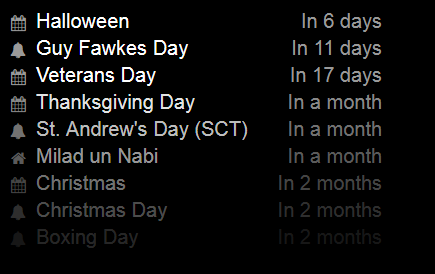
      I made a test using

      {
                      module: "calendar",
                      position: "top_left",
                      maximumEntries: 8,
                      config: {
                         calendars: [
                                     {
                                       symbol: "calendar",
                                       url: "webcal://www.calendarlabs.com/templates/ical/US-Holidays.ics"
                                     },
                                     {
                                       symbol: "bell",
                                       url: "https://www.calendarlabs.com/ical-calendar/ics/75/UK_Holidays.ics",
                                       maximumEntries: 4
                                     },
                                     {
                                       symbol: "home",
                                       url: "https://www.calendarlabs.com/ical-calendar/ics/52/Islam_Holidays.ics"
                                     }
                                  ],
                             }
             },
      

      and the symbols look OK:
      0_1508900216758_MM.png

      posted in Troubleshooting
      H
      Hawking
    • RE: Calendar Symbols Question

      I don’t have access to my MM at the moment, therefore I couldn’t test your configuration.
      However two comments

      1. There should be a comma after
      url: "https://calendar.google.com/calendar/ical/blahbkah"
      

      (like it was in your old code sample).

      1. The quotation marks at the end of the url look different in calender 2 and 3 compared to 1. I don’t know if this is a problem in your sample code or if you should adjutst the actual configuration file.
      posted in Troubleshooting
      H
      Hawking
    • RE: Calendar Symbols Question

      Regarding the limit to 4 entries, I think you shouldn’t use “” around the number, so try just

      maximumEntries: 4,
      

      (and also adjust the global setting from “10” to 10. As 10 is the default, it does not have an effect anyway)

      Maybe this also fixes the wrong symbol? If not, what happens if you e.g. switch the order of calender 1 and 2 (just as a test).

      posted in Troubleshooting
      H
      Hawking
    • RE: How I got my Magic Mirror working on a Raspberry Pi 0 (zero)

      @Doubleve
      Can you tell me which Linux distribution (lsb_release -a), node version ( node -v ) and version of MM you are using?

      posted in Tutorials
      H
      Hawking
    • RE: How I got my Magic Mirror working on a Raspberry Pi 0 (zero)

      @noorm91 said in How I got my Magic Mirror working on a Raspberry Pi 0 (zero):

      @bhepler
      I can’t seem to start MM with npm start

      Thats what I expected for the Pi Zero. Did you try the method described in the first post of this thread in the section “Setting up boot scripts”?

      posted in Tutorials
      H
      Hawking
    • RE: How I got my Magic Mirror working on a Raspberry Pi 0 (zero)

      @Doubleve
      In which directory did you execute npm start
      ? I would assume you would first go to your MagicMirror directory (cd /home/pi/MagicMirror ). This would also explain the problem with the missing package.json file.

      However, I’m not sure if npm start works at all in combination with the serveronly mode (needed for the Pi Zero). For starting, I use the method described in the first post of this thread in the section “Setting up boot scripts”.

      I can acccess my MM from remote, however still didn’t get it to show in the Midori browser :-/

      posted in Tutorials
      H
      Hawking
    • RE: How I got my Magic Mirror working on a Raspberry Pi 0 (zero)

      After some weeks with the MagicMirror running, my SD card got corrupted and I decided to reinstall the system from scratch. I switched from “Jessie Light” to “Stretch light”, used node 6.11.4 and of course the latest MagicMirror 2.1.3.

      I can access the MM from the browser of my laptop, but Midori only shows a white page. Even for a very simple config file:

      var config = {
              address: "",
              port: 8080,
              ipWhitelist: ["192.168.2.185", "127.0.0.1", "::ffff:127.0.0.1", "::1"],
              language: "en",
              units: "metric",
              modules: [
              {
                      module: "helloworld",
                      position: "bottom_bar",
                      config: {
                              text: "Hello world!"
                      }
              }
              ]
      
      };
      
      /*************** DO NOT EDIT THE LINE BELOW ***************/
      if (typeof module !== "undefined") {module.exports = config;}
      

      The start of MM gives no error

      Starting MagicMirror: v2.1.3
      Loading config ...
      Loading module helpers ...
      No helper found for module: helloworld.
      All module helpers loaded.
      Starting server on port 8080 ...
      Server started ...
      Sockets connected & modules started ...
      
      Ready to go! Please point your browser to: http://localhost:8080
      

      and if I change from

      midori -e Fullscreen -a http://localhost:8080
      

      to

      midori -e Fullscreen -a http://www.google.de
      

      I see the google page. So Midori itself and the output on screen seems working as well.

      Is anybody having an idea where to search for the error?
      Is anybody using MagicMirror 2.1.3 on its Pi Zero?

      posted in Tutorials
      H
      Hawking
    • RE: Motion Detector

      @Natacha3
      I also tested the motiondetector of alexyak, without success and therefore installed Motion, which works without problems. However, I understand, that the process to compile it for your self is not easy for a beginner.
      Are you aware of https://forum.magicmirror.builders/topic/988/motion-detection-with-raspicam-non-module-version
      The linked thread provides a precompiled version of Motion and some recommended settings.

      posted in Utilities
      H
      Hawking
    • RE: How I got my Magic Mirror working on a Raspberry Pi 0 (zero)

      @SebTota
      Just to make sure that I understand the problem correctly:
      You see the MagicMirror on the screen (Clock running etc). but you can no longer connect to the Pi Zero (using eg. ssh)?

      Just as a test:
      What happens if you disable the MagicMirror from autostart (for example by moving the MagicMirror start script from /etc/init.d/ to your home directory) and start it manually while you are already logged in? I don’t know your exact setup or your Linux knowledge, if you need further help how to do this, just let me know.

      posted in Tutorials
      H
      Hawking
    • RE: How I got my Magic Mirror working on a Raspberry Pi 0 (zero)

      @SebTota said in How I got my Magic Mirror working on a Raspberry Pi 0 (zero):

      git pull && npm install

      Have there been errors when you did so?

      I got

      npm WARN lifecycle magicmirror@2.1.1~install: cannot run in wd %s %s (wd=%s) magicmirror@2.1.1 cd vendor && npm install /home/me/MagicMirror
      

      Thats why I then did

      cd ~/MagicMirror/vendor && npm install
      

      in addition (see my post above). Maybe this also solves your problem.

      posted in Tutorials
      H
      Hawking
    • RE: How I got my Magic Mirror working on a Raspberry Pi 0 (zero)

      @SebTota
      I still don’t understand what update you are referring to.
      Both error messages sound like there are modules missing (either “express” or “colors”).

      What happens if you do

      cd ~/MagicMirror && sudo npm install
      cd ~/MagicMirror/vendor && npm install
      
      posted in Tutorials
      H
      Hawking
    • RE: How I got my Magic Mirror working on a Raspberry Pi 0 (zero)

      @SebTota

      • Do you also get this error if you use a very minimal config file like
      var config = {
              port: 8080,
              ipWhitelist: ["127.0.0.1", "::ffff:127.0.0.1", "::1"],
              language: "en",
              timeFormat: 24,
              units: "metric",
              modules: [
                      {
                              module: "clock",
                              position: "top_left"
                      },
              ]
      };
      
      /*************** DO NOT EDIT THE LINE BELOW ***************/
      if (typeof module !== "undefined") {module.exports = config;}
      

      If this works, you can step by step add the modules you want and see which one causes the problem.

      • The exact error message would be helpful for an analysis.
      posted in Tutorials
      H
      Hawking
    • RE: How I got my Magic Mirror working on a Raspberry Pi 0 (zero)

      @SebTota
      Which updates are you referring to? I’m still using Raspbian Jessie Light (I didn’t use the image provided in this thread but my own installation and didn’t update so Stretch yet), which is up to date (according to sudo apt-get update && sudo apt-get upgrade) and the latest version of MagicMirror (according to cd ~/MagicMirror && sudo git pull) and don’t see any (new) issues on my Pi Zero W.

      What are your problems?
      `

      posted in Tutorials
      H
      Hawking
    • RE: How I got my Magic Mirror working on a Raspberry Pi 0 (zero)

      @delusional112
      I didn’t use the image but used my own installation. Therefore In can’t tell for sure. However,where ist the wpa_supplicant.conf you are referring to located? Did you use/create one directly on /boot? This should automatically be copied to the “normal” location and then automatically get deleted.

      My wpa_suplicant.conf file looked like

      ctrl_interface=DIR=/var/run/wpa_supplicant GROUP=netdev
      update_config=1
      network={
      ssid="NAMEOFNETWORK"
      psk="WPA2KEY"
      }
      

      (of course you have put your network name and key in, but keep the quotation marks).
      Which editor did you use (not that there is a problem with the line end or something similar)?

      Once it worked, I replaced the clear text psk by a passphrase by using wpa_passphrase.

      `

      posted in Tutorials
      H
      Hawking
    • RE: Motion Detector

      @jdahli1
      Can you just execute /opt/vc/bin/tvservice --preferred to see if it is tvservice or chvt that does not respond?

      Here https://news.screenly.io/how-to-automatically-turn-off-and-on-your-monitor-from-your-raspberry-pi-5f259f40cae5 also problems with turning the screen back on using tvservice are mentioned. Maybe the other methods mentioned in the article are worth a try. If they work you can simply change the commands used in ~/MagicMirror/modules/motiondetector/node_helper.js

      posted in Utilities
      H
      Hawking
    • 1
    • 2
    • 3
    • 1 / 3