J
Offline
J
Offline
A New Chapter for MagicMirror: The Community Takes the Lead
Read the statement by Michael Teeuw here.
Read the statement by Michael Teeuw here.
Posts
-
RE: [MMM-RTSPStream] - Video Streaming from Live Feeds & Security Cameras
@Egnos said in [MMM-RTSPStream] - Video Streaming from Live Feeds & Security Cameras:
Hi everyone,
I believe that the MMM - RTSPStream module is incompatible with the MMM-Pages multi page module!
By removing MMM-Pages, the RTSPStream module works again.
The link for the video stream works correctly both with VLC and with the “omxplayer” command.The version of MM I am using is the latest available 2.14.0.
The error I find in the console is the following:
MMM-RTSPStream.js:164 MMM-RTSPStream has resumed... rotateStreams: true, autoStart: true
MMM-RTSPStream.js:368 Uncaught TypeError: Cannot read property 'getBoundingClientRect' of null
    at Class.playStream (MMM-RTSPStream.js:368)
    at Class.rotateStream (MMM-RTSPStream.js:123)
    at Class.setupStreamRotation (MMM-RTSPStream.js:94)
    at Class.resumed (MMM-RTSPStream.js:168)
    at newCallback (MMM-RTSPStream.js:186)
    at main.js:324
Here is my configuration:
{
		   module: "MMM-RTSPStream",
		   position: "bottom_right",
		   header: "Test",
		   config: {
			    //initialSetup: true,
				autoStart: true,
				rotateStreams: true,
				rotateStreamTimeout: 10,
				moduleWidth: 354,
				moduleHeight: 240,
				localPlayer: 'omxplayer',
				remotePlayer: 'none',
				showSnapWhenPaused: false,
				remoteSnaps: false,

				stream1: {
					name: 'Ingresso',
					url: 'rtsp://xxxxxxxxxxx:xxxxxxxxx@xxx.xxx.x.xxx:554/stream1',
					frameRate: 'undefined',
					//width: undefined,
					//height: undefined,
						},
				}
		},
In the “bottom_right” region what I see:

Have any of you noticed this incompatibility?
Any advice / help is welcome.
Thanks.Goodmorning, I belive.
rtsp://gebruikersnaam:wachtwoord@IPCAM:554/cam/realmonitor?channel=1&subtype=2
Pleas run this line in a VLC player. if you can see the camera screen than you know that the connection is oke.
After that we kan see what’s wrong whit the config.js
bur first check if you see the camera feet…
pleasWhits type camera you use???
Jerry frome Holland
-
RE: Covid-19 sparkline
[21.01.2021 19:10.37.452] [WARN]  (electron) The default value of app.allowRendererProcessReuse is deprecated, it is currently "false".  It will change to be "true" in Electron 9.  For more information please check https://github.com/electron/electron/issues/18397
[21.01.2021 19:10.39.835] [ERROR] (node:3443) [DEP0066] DeprecationWarning: OutgoingMessage.prototype._headers is deprecated
Is this the same what I can ignore???
-
RE: Covid-19 sparkline
@ashishtank I have nou manecht to get the failed going away by updating the Higharts.js.
But now I got a nieuw think whit the police. The Electric police.
security-warnings.ts:182 Electron Security Warning (Insecure Content-Security-Policy) This renderer process has either no Content Security Policy set or a policy with "unsafe-eval" enabled. This exposes users of this app to unnecessary security risks. For more information and help, consult https://electronjs.org/docs/tutorial/security. This warning will not show up once the app is packaged. -
RE: MMM-COVID19-SPARKLINE
@ashishtank @skelliam found another failure in the log.
[LOG]   [COVID:CORE] Resolving: csse_covid_19_data/csse_covid_19_time_series/time_series_covid19_deaths_global.csv
[LOG]   [COVID:CORE] Resolving: csse_covid_19_data/csse_covid_19_time_series/time_series_covid19_recovered_global.csv
[LOG]   [COVID:CORE] Resolving: csse_covid_19_data/csse_covid_19_time_series/time_series_covid19_confirmed_global.csv
[LOG]   can't find property recovered Canada:
Every time i’t te recover data from Canada. But I never searched for Canada.
I’m only have in the config.js
	sortby: "confirmed",
	columns: ["confirmed", "deaths", "recovered"],
	countries: ["Netherlands", "Germany", "Belgium"],
Please help.
-
RE: Covid-19 sparkline
@ashishtank
Yes the module Is look to seem working oke.
I only saw the yellow exclamation mark. and I like to have a smoothie log. -
Covid-19 sparkline
Hello everyone.
I’m a user of theI have one issue.
MMM-covid19-sparkline app from @skelliam
Now I see in de dev-tool the next issue.DevTools failed to parse SourceMap: http://localhost:8080/modules/MMM-COVID19-SPARKLINE/lib/highcharts.js.map Is showing up on the DevTools. logSo ken someone tell mee what its meen and how to remove the failer.
Thanks for the help.
{ module: 'MMM-COVID19-SPARKLINE', position: "bottom_left", config : { worldStats: false, sparklines: true, sparklineWidth: 100, sparklineHeight: 55, sparklineDays: 50, sparklineDeltavsDaily: true, sortby: "confirmed", columns: ["confirmed", "deaths", "recovered"], countries: ["Netherlands", "Germany", "Belgium"], updateInterval: 1000 * 60 * 60 * 8, //8 hours infoRowClass: "medium", headerRowClass: "small", fadeSpeed: 1000, showDelta: true, showDeltaPlotNDays: 7, sparklineDeathScale: -4, showDelimiter: true }}, -
RE: I can't get mmm-screencast to work
@sdetweil i removed the ip adres of the laptop an tv.
But for the mmm-screencast module is That no problem -
RE: I can't get mmm-screencast to work
var config = {
	address: "0.0.0.0"
	port: 8080,
	ipWhitelist: ["127.0.0.1", "::ffff:127.0.0.1", "::1"],
	useHttps: false,
	httpsPrivateKey: "",
	httpsCertificate: "",

	language: "nl",
	timeFormat: 24,
	units: "metric",
modules:
This is my part of de var (ip handeling)
-
RE: I can't get mmm-screencast to work
@jste84 so tried unplugging the shield when I hit the cast button it says no devices found.
I’m thinking that you want something that’s not possible. Or I’m confused.
The Shield is a different device. so unplug the power of it.
Than take a phone whits is on the seem wifi network as the mirror
Then use your phone en pick a movie on YouTube.com
and hit the cast button.Your config looks oke.
The pull is als don
so I don’t know why it’s not working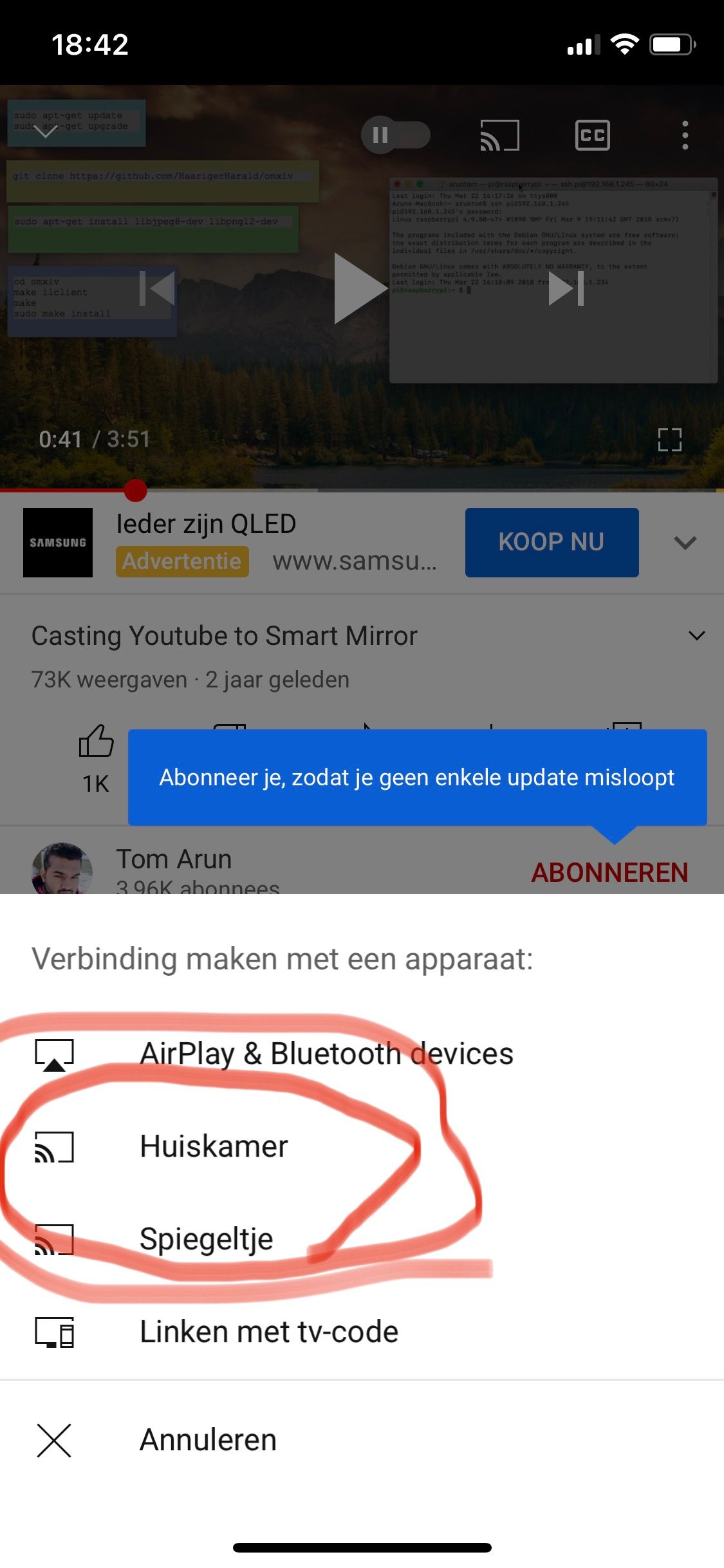
In the picture you can see my 2 mirrors.
“Huiskamer”
“Spiegeltje” -
RE: I can't get mmm-screencast to work
@jste84
Can you try to put de Nvidia shield down. (unplug the power) and is I’t than possible tot see the screencast on the mirror (maybe reboot the mirror after you hef unplug the Nvidia shield)
and kan you post one more time te config. -
RE: MMM-COVID19-SPARKLINE
I have one issue.
DevTools failed to parse SourceMap: http://localhost:8080/modules/MMM-COVID19-SPARKLINE/lib/highcharts.js.mapIs showing up on the DevTools. log
-
RE: I can't get mmm-screencast to work
@jste84 OK.
And now when you reboot the mirror.
Are u using the same wifi network for our phone and mirror. to broadcast YouTube?? Frome your laptop it’s not working. “At my place only the phone and iPad can connect the module” -
RE: I can't get mmm-screencast to work
lets try to pull the module!!
Navigate to the modules directory via the follow command:
cd MagicMirror/modules/MMM-Screencast
git pull
npm install -
RE: I can't get mmm-screencast to work
@fribse So now whit the new line of code i’t a live.
Lets stream YouTube.
I use the module for the kids to see school movies. Home school. hahaha -
RE: I can't get mmm-screencast to work
See her is my config
{ module: 'MMM-Screencast', position: 'bottom_right', config: { position: 'center', castName: 'Spiegeltje', height: 300, width: 500, }}, -
RE: I can't get mmm-screencast to work
@jste84 Please use the code input</> button
and copy past your code
what I now see is u missing de cast name -
RE: I can't get mmm-screencast to work
@jste84
Can you post our config file.