@kristjanesperanto
Since the update last week the module is running fine. No more duplicate lines. I think this is the right way.
Run now with stationID: “975242” and and comment //ignoreRelatedStations: true again.
Btw.
I have no space to display the module twice on the display.
J
Offline
A New Chapter for MagicMirror: The Community Takes the Lead
Read the statement by Michael Teeuw here.
Read the statement by Michael Teeuw here.
Posts
-
RE: display issue MMM-PublicTransportHafas
-
RE: display issue MMM-PublicTransportHafas
@jo-0 short feedback:
sorry for typo.
with “ID: 975247” only STR1, STR2 and STR4 are displayed.
“ID: 975242” only the others, but the above are missing.
A double display no longer occurred. -
RE: display issue MMM-PublicTransportHafas
@jo-0
short feedback:
with “ID: 975247” only , and are displayed.
“ID: 975242” only the others, but the above are missing.
A double display no longer occurred. -
RE: display issue MMM-PublicTransportHafas
@kristjanesperanto said in display issue MMM-PublicTransportHafas:
ignoreRelatedStations: true,
Thanks.
I added it to the config and will monitor the behavior. First with stationID: “975242”, -
RE: display issue MMM-PublicTransportHafas
@kristjanesperanto
Pity, the double output at has disappeared, but the same problem now occurs at in the direction of ‘Kleinzschachwitz’.
region Dresden Postplatz
stationID: “975242” -
RE: display issue MMM-PublicTransportHafas
@jo-0
Hello, I’ve been watching it for 24 hours now and it seems to be working. No more wrong output. Thank you again for the useful tip. -
RE: display issue MMM-PublicTransportHafas
Okay, thanks for the hint. I changed it and will keep an eye on it.
-
display issue MMM-PublicTransportHafas
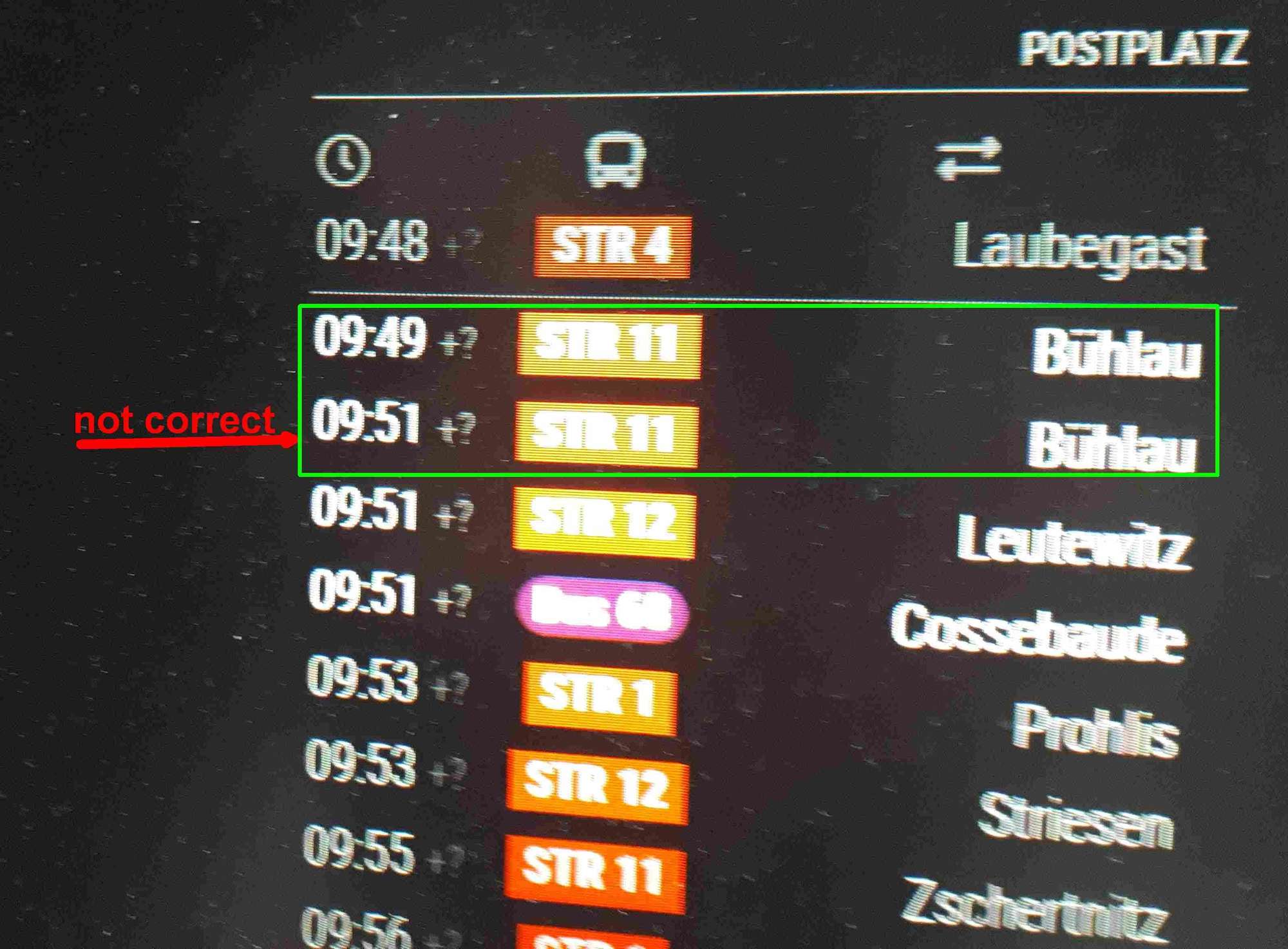
I think I have a problem with the module.
The display often (10 times a day) appears twice, especially with the <STR 11> towards Bühlau.
region of Dresden Postplatz
stationID: “975247”
-
RE: [MMM-JaST] Just another Stock Ticker (new: version 2.x)
@jalibu
thank you very much, that was the solution -
RE: [MMM-JaST] Just another Stock Ticker (new: version 2.x)
@jalibu Hi,
workes fine now! Exactly how i wanted it.
thank you.But next:
how can I update the modul?
‘git pull’
decline with the notice ‘please committen or stashen …’
cancellation.
Not sure what to do. -
RE: [MMM-JaST] Just another Stock Ticker (new: version 2.x)
@sdetweil I know, but where can I find the email address?
-
RE: [MMM-JaST] Just another Stock Ticker (new: version 2.x)
@jalibu don’t know how to PN
therefore here:
{
module: “MMM-Jast”,
position: “bottom_right”, //“bottom_center”,
config: {
locale: “de-DE”,
useGrouping: true,
stocks: [
{ name: “DOW 30”, symbol: “^DJI”, quantity: 10 },
//{ name: “S&P 500”, symbol: “^GSPC”, quantity: 15 },
{ name: “Nasdaq 100”, symbol: “^NDX” },
//{ name: “DAX 30”, symbol: “^GDAXI” },
{ name: “EUR/USD”, symbol: “EURUSD=X”}
],
maxWidth: “100%”,
updateIntervalInSeconds: 300,
fadeSpeedInSeconds: 15, //3.5,
scroll: “none”, // One of [“none”, “vertical”, “horizontal”]
useGrouping: false,
currencyStyle: “symbol”, // One of [“code”, “symbol”, “name”]
lastUpdateFormat: “HH:mm”,
showColors: true,
showCurrency: true,
showChangePercent: true,
showChangeValue: false,
showChangeValueCurrency: false,
showLastUpdate: false,
showPortfolioValue: false,
showPortfolioGrowthPercent: false,
showPortfolioGrowth: false,
numberDecimalsValues: 2,
numberDecimalsPercentages: 1,
virtualHorizontalMultiplier: 2
}
}, -
RE: [MMM-JaST] Just another Stock Ticker (new: version 2.x)
@jo-0
Btw. I’m new in MMM.
I got the message that there is an update for JaST.
How can I get this
git pull
npm install --only=production
does not help -
RE: [MMM-JaST] Just another Stock Ticker (new: version 2.x)
@jalibu said in [MMM-JaST] Just another Stock Ticker (new: version 2.x):
useGrouping: true,
it does not work.
I run scroll: “none” -
RE: [MMM-JaST] Just another Stock Ticker (new: version 2.x)
@jalibu thanks for fast answering,
Doesn’t work the way I want it to.
I just want the separator for the thousands.
modules locale: “de-DE”,
Jast lokale:
de-DE gives 14170,85$
en-GB gives US$14170.85
What I want is 14.170,85$ -
RE: [MMM-JaST] Just another Stock Ticker (new: version 2.x)
Hi,
how can I format the Output Numbers?
like 34,265.37$ or
34.265,37$ according the settings.