@karsten13 said in MMM-Remote-Control Not working well after upgrade to 2.29:
I submitted a PR
Thank you very much
@karsten13 said in MMM-Remote-Control Not working well after upgrade to 2.29:
I submitted a PR
Thank you very much
@kent79 said in MMM-Remote-Control Not working well after upgrade to 2.29:
is it a bug of 2.29 or remote module? how do fix it ? Thanks
I am still using default config
		{
    			module: "MMM-Remote-Control",
    			// uncomment the following line to show the URL of the remote control on the mirror
    			// position: 'bottom_left',
    			// you can hide this module afterwards from the remote control itself
    			config: {
       				customCommand: {},  // Optional, See "Using Custom Commands" below
        			showModuleApiMenu: true, // Optional, Enable the Module Controls menu
        			secureEndpoints: true, // Optional, See API/README.md
       			 	// uncomment any of the lines below if you're gonna use it
        			// customMenu: "custom_menu.json", // Optional, See "Custom Menu Items" below
        			// apiKey: "", // Optional, See API/README.md for details
        			// classes: {} // Optional, See "Custom Classes" below
    			}
		},
Many thanks for your quick reply always. It is not a urgent matter. You may investigate later. Thanks.
is it a bug of 2.29 or remote module? how do fix it ? Thanks
I got the error message when running on pm2
0|mm | [2024-10-02 08:59:41.255] [ERROR] Whoops! There was an uncaught exception…
0|mm | [2024-10-02 08:59:41.262] [ERROR] TypeError: Cannot read properties of undefined (reading ‘modules’)
0|mm | at /home/user/MagicMirror/modules/MMM-Remote-Control/node_helper.js:224:60
0|mm | at FSReqCallback.readFileAfterClose [as oncomplete] (node:internal/fs/read/context:68:3)
There is no any error log on startup. I have clean install MM, but still no luck. It seems MMM-Remote-Control can’t recognize modules after upgrade
The “updates” & “Modules Controls” is missing after upgrated to 2.29. It seems the modules can’t not load
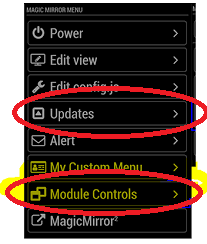
Everything is work. Only MMM-Remote-Control doesn’t. When I access MM-Remote-Control through by web, in “updates”. It shows “not loaded module” And no any module control shown up
After upgrade to 2.29, MMM-Remote-Control running not properly. No any module loaded in “Update” & “Remote control”
I see. Thank you for your quick reply. Any free API is available now? I will move
V3 submittion need to provide a credit information. It is bad idea. Well, I will keep using 2.5 api key and 2.28 old weather module in this moment.
I wish MM can revert it later since version 2.5 is totally free. Thanks.
I just update to v2.29.0, but find out the weather module doesn’t work (MagicMirror\modules\default\weather). It can’t show the information.
I used the old module to replace. It works again. So it must be weather module issue. Please fix it. Thanks.
Below is my config
                {

                			module: "weather",

                			position: "top_right",

                			config: {

                				weatherProvider: "openweathermap",

                				type: "current",

                				location: "s",

                				locationID: "1",

                				apiKey: "1",

                				showSun: false,

                				showHumidity: "wind",

                			}

                		},

                		{

                			module: "weather",

                			position: "top_right",

                			header: "weather",

                			config: {

                				weatherProvider: "openweathermap",

                				type: "forecast",

                				location: "s",

                				locationID: "1",

                				apiKey: "1",

                				colored: true,

                			}

                		},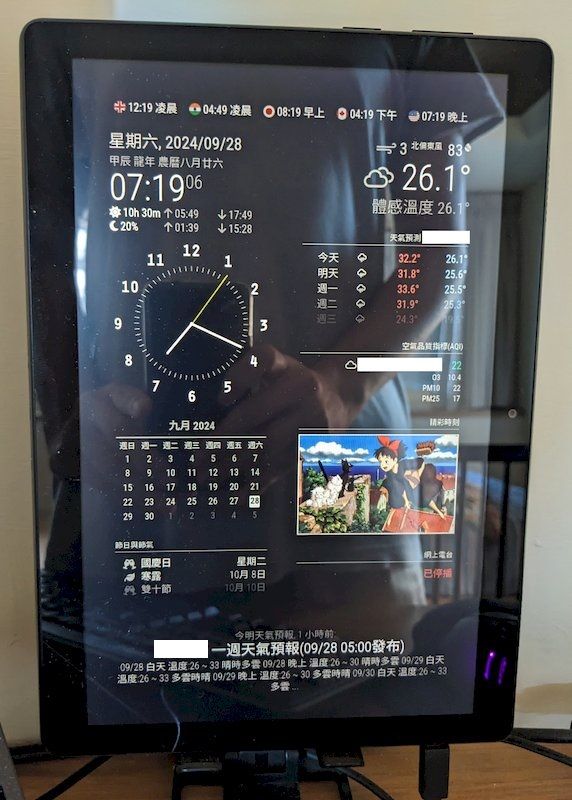
I just add world clock (MMM-Worldclock) on the top of the screen
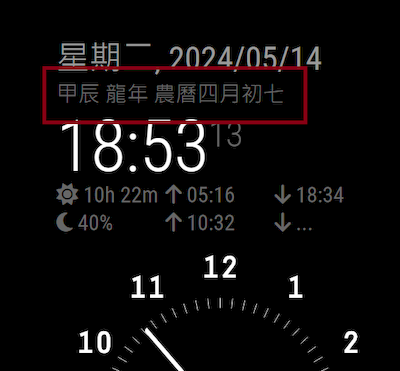
Combined the lunar script to default clock module. It looks great. Thank you again for your great help. :)
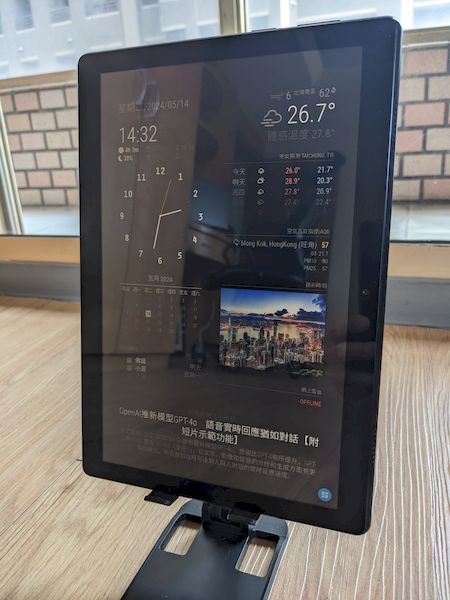
WallPanel is a magicial App. It lets your old tablet to be MagicMirror.
On Magic Dashboard, You may using most of function including touch screen function, but some modules may not be workable such as playing video (black screen) or webview (not working). So I need to install remote control module for access. It is amazing time for someone who want to try MagicMirror as a Dashboard.
Server: Raspberry Pi Zero 2 W
Client: Android Tablet 10 inch (1280 x 800)
MagicMirror
Public2.27.0
WallPanel App:
https://play.google.com/store/apps/details?id=xyz.wallpanel.app&hl=en_US
Module List:
deafult-alert
deafult-calendar
deafult-clock (show Lunar date - revised version)
deafult-newsfeed
deafult-updatenotification
deafult-weather
MMM-AQI
CalendarMonthly
MMM-ImagesPhotos
MMM-Remote-Control
MMM-SmartWebDisplay (hidden on Screen - revised version)
MMM-Webradio (edit Text format - revised version)
I find out line 41 coding is wrong, the correct value is “MS_in_day = 10006060*24”. I have tested and work fine now. Thanks.
Orginal:
let MS_in_day =
20*60*60*1000+8*60*1000 //24*60*60*1000;
New:
let MS_in_day = 1000*60*60*24;
of course. I have still no idea