Once I figure out why git(hub) is pulling in all of the erroneous stuff and fix that, I’ll create a pull request so it gets merged.
A New Chapter for MagicMirror: The Community Takes the Lead
Read the statement by Michael Teeuw here.
Read the statement by Michael Teeuw here.
K
Offline
Posts
-
RE: Change default interface colors
-
RE: Change default interface colors
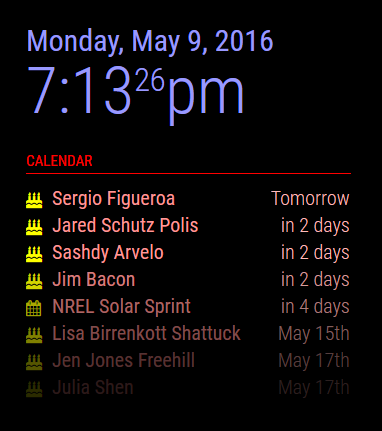
A modified one that I haven’t checked into the base code yet. :)
-
RE: Change default interface colors
For custom modules that you create, you can use the getStyles method to assign a custom CSS file so you can override the colors to whatever you want. For the current, default modules, I think those are hard coded styles. I suppose you can always edit those files should you really want to.
-
RE: Face Recognition - File can't be opened for writing
Looks like it doesn’t have permission to open your trainingFile:
model.load(json.loads(sys.argv[1])[“trainingFile”])
cv2.error: /build/opencv-ISmtkH/opencv-2.4.9.1+dfsg/modules/contrib/src/facerec.cpp:325: error: (-2) File can’t be opened for writing! in function load
Notice the
File can't be opened for writingmessage.Wherever it’s trying to create that file, the main process running MM can’t write to that location.
-
RE: Missing CSS icons?
Myah, you have slow connections somewhere. From the log you sent me, I want to say the socket isn’t responding fast enough … why, who knows. Still need investigating …
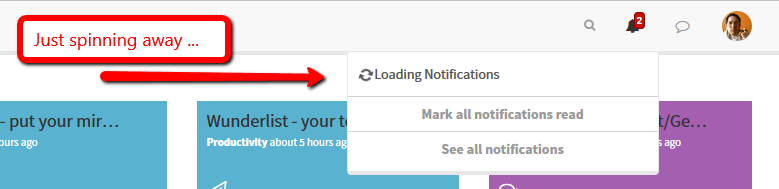
I had to force refresh the page, then let it sit there for a bit before the notification icon popped up again, as well as the ‘Unread’ notification. Definitely some delay/timeout somewhere.
-
RE: MagicMirror Stuck/Freeze
Couple of things:
- Are you using a proper power supply for the pi? You want something that can provide at least 2Amps.
- Is the rPi very hot? Do you have it in a sealed box with little air flow?
- Have you checked the file system itself on the card? One method is to issue a forced check upon a reboot with
'sudo shutdown -F -r now'- After the reboot, look the results in'/var/log/fsck/'. If for some reason that fails when you type it in, you can try adding'fsck.mode=force fsck.repair=yes'to/boot/cmdline.txtand reboot the pi. That will force a file system check upon start up and you can watch to see if there are errors. - Failing that, you can always move all of your modules onto a different computer (or in the cloud somewhere), rebuild the pi from a fresh image, and try it again, see what happens.
-
RE: Starting MagicMirror v2 beta
I can also verify this as I just setup a brand new rPi yesterday. Downloaded a fresh copy of jessie, booted up the rPi, did the setup for it, made sure all apps were up to date (with
'sudo apt-get update ; sudo apt-get upgrade'then installed MM as per the wiki’s instructions. Done. -
RE: Change default interface colors
Assuming you’re simply talking about the elements on the display, one possible way is to use a custom CSS file, where you over ride the colors of the various elements.
-
RE: Getting started tutorial
I have a default Raspbian installation on an 8Gb card, with some of the bloat removed (such as LibreOffice, wolfram-engine, and others). With MM installed, plus some other stuff that I put on, this is the current storage:
pi@magicmirror:~ $ df -h Filesystem Size Used Avail Use% Mounted on /dev/root 7.2G 3.4G 3.5G 50% / devtmpfs 459M 0 459M 0% /dev tmpfs 463M 5.6M 458M 2% /dev/shm tmpfs 463M 6.8M 457M 2% /run tmpfs 5.0M 4.0K 5.0M 1% /run/lock tmpfs 463M 0 463M 0% /sys/fs/cgroup /dev/mmcblk0p1 60M 20M 41M 34% /boot tmpfs 93M 0 93M 0% /run/user/1000 -
RE: 720p TV - Re-adjust Region Sections?
By the way, while inconvenient every time, you can issue a
'pm2 restart <MM>'(where<MM>is whatever you called your process) to refresh the display and those times would display properly again. -
RE: 720p TV - Re-adjust Region Sections?
I know someone said to switch to 24 hours, but I am not certain that actually affects the calendar itself, or the overall display of time (and therefore time calculations) in general. That’s something I need to go check on in the code. And right now I’m in the middle of another project that’s preventing me from diving into the module code.
-
RE: 720p TV - Re-adjust Region Sections?
So the
Tomorrow at 9:30AMis how moment.js displays it. We’re not doing the formatting, moment.js is. However, what you CAN control is the amount of characters the event itself displays. So for example, if you happen to have an event with a rather long title, you can tell the Calendar module to limit that (by truncating the text). Look for themaxTitleLengthconfig option to do that. The default is 25 characters.As for whether to display
TomorroworTomorrow at 9:30AM, that’s a difference in events. All day events are displayed simply asTomorrow. However an event at a specific time, will be displayed with the time it will happen.And the calendar module itself does not change between 12 or 24 hour display. At least, as far as memory serves me. I’ll have to go back and look in the code.
-
RE: MagicMirror Stuck/Freeze
Can you try running MM with the default sample config that it comes with? Let it sit for a while, see if it freezes then too?
-
RE: MagicMirror Stuck/Freeze
Let’s isolate things … can you run the rPi without MM running, just let it sit on the desktop and let it sit for a few hours, see what happens.
-
RE: GitHub/Fork/Local Git/Getting Giddified ...
Bwahahaha. Yeah, I think I’m going to have to ask the git community or on stackoverflow.
-
RE: Configuring autostart with pm2
Regarding the ‘keyboard and mouse’ part in your post … I use a wireless set. So the rPi is mounted behind the monitor and only has 2 wires on it: power and HDMI. There’s a USB dongle plugged in that’s for the keyboard and mouse which I rarely use. Specially since I log in remotely. The only time I need the mouse or keyboard is if something bad happened and the rPi won’t boot up normally. But other than that, not needed.
-
GitHub/Fork/Local Git/Getting Giddified ...
Ok, someone with a way better understanding of GitHub/Git, please chime in here. Be warned, this is convoluted:
- I have a fork of the main project (/MichMich/MagicMirror) on GitHub
- From my PC, I pulled it down with GitHub and saved it onto a folder that’s shared FROM the rPi’s
piuser account (where MM lives and runs from) - I edit on my PC, refresh MM from the rPi and when satisfied, push changes back into my fork of the project (see below why)
- Every so often I will pull the upstream branch down and merge it with my own so I keep synced with the main project
I also pull the same fork down at work, same setup, from a PC running GitHub, onto a shared folder running on a unix machine. I run MM from that unix machine, make edits on my PC, and when satisfied, push them back up to my fork. This also means that every day I resync my systems from my fork. If I make changes while at the office, I resync when I get home so my computer at home has those changes. When I get to the office in the morning, I resync so I get all the changes I made at home. I told you it’s convoluted, didn’t I?
This works … except, when I create a pull-request, it pulls in every-little-detail. Like, each time I (re)synced with the main branch. Local .gitattributes file that I created and synced back up to my own fork. Here’s is an example of what it’s doing:
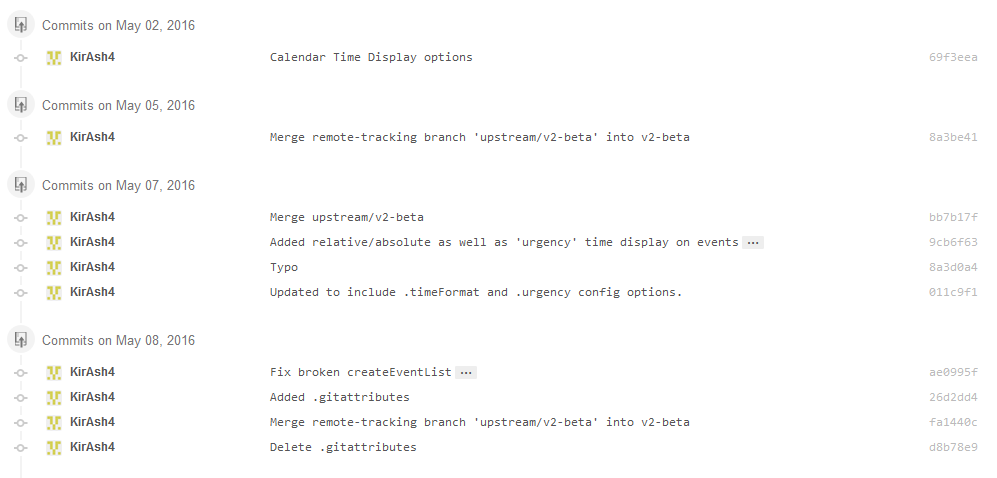
Note the upstream merge commits, and the .gitattributes file create and delete … those are all being reported in the pull request. As well as some random filemode changes.
So, without me losing my head completely, is there a better way to do a pull request where all of that extraneous crap isn’t there?
-
RE: Configuring autostart with pm2
- the rPi should not reboot when you first start the process - are you sure it’s actually rebooting, as opposed to you just seeing a gray screen flash, then black, before MM starts displaying the elements on screen? If the rPi reboots, you should see the full log of it starting up, with 4 raspberry icons at the top.
- Issuing the
pm2 savecommand is best done through a remote connection. One way is to setup VNC on the rPi, and use something such as RealVNC (http://www.realvnc.com/) on Windows to remotely access the rPi. Another method is to use an SSH client like PuTTY (http://www.putty.org/) to log into the rPi. Once logged in, you can issuepm2commands such as:
pm2 save- save the current process list so they automatically relaunch
pm2 stop mm- stop the Magic Mirror process and exit back to desktop
pm2 show mm- show the current status of the Magic Mirror processPS: the default login on an rPi is:
username:pi
password:raspberryI strongly recommend you change the password once you’re logged in by issuing the
passwdcommand. Remember the new password you set. -
RE: PSA: Mirror Film Will Not Work on Capacitive Touchscreens
I have not, but I do order a lot of small electronics, custom made PCBs, and stuff like that. Unless I pay the additional $35 DHL service fee, my orders take roughly 3 weeks to arrive. Some of them don’t offer a DHL service, in which case you’re stuck waiting for regular China Post to get to you through the several layers of customs …
-
RE: Missing CSS icons?
Looking at stylesheet.css, there’s a big portion of it that’s mangled. The content: “” line is simply a square box. That tells me something didn’t translate right, either when you originally installed it, or when files were copied over, possibly from a different OS that mangled the file types …