MagicMirror Forum
    • Recent
    • Tags
    • Unsolved
    • Solved
    • MagicMirror² Repository
    • Documentation
    • 3rd-Party-Modules
    • Donate
    • Discord
    • Register
    • Login
    1. Home
    2. Medo
    3. Posts
    A New Chapter for MagicMirror: The Community Takes the Lead
    Read the statement by Michael Teeuw here.
    Offline
    • Profile
    • Following 0
    • Followers 0
    • Topics 7
    • Posts 44
    • Groups 0

    Posts

    Recent Best Controversial
    • RE: MMM-FRITZ-Box-Callmonitor: Show callers of two phones? (one DECT and one FON)

      Alright, found the solution by myself: The “deviceFilter” option is ment to be an “exclude” function. So, if you have two phones like me, just put in the name (which is stored in your router) of the phone you DONT want to display in the module.

      No clue what the problem was - but it works now… :-)

      posted in Troubleshooting
      MedoM
      Medo
    • MMM-PIR-Sensor: Everything works fine, just one thing not...

      My sensor is working fine for months now. It works as designed (shuts my mirror down after 5 minutes and is reactivated if someone enters the room or goes by).

      But i noticed this:
      After a reboot of the whole PI mirror system, the screen isn’ t turned off by the MMM-PIR-Sensor-module (even after waiting for more than an hour or more - i think it would be on forever). Only if someone goes by, the sensor shuts down the screen (monitor) for a millisecond and immediately after that, turns the screen on again. After that, the PIR sensor works fine like every day before…

      Does any one of you ever had a similar behavior of a PIR sensor configuration?

      Thanks!

      Medo

      posted in Troubleshooting
      MedoM
      Medo
    • MMM-FRITZ-Box-Callmonitor: Show callers of two phones? (one DECT and one FON)

      Great piece of software! I implemented it some time ago and im pretty satisfied! Works like a charm! Thanks PAVIRO/JOPYTH!

      But i have one question:

      What can i do with the “deviceFilter”? Its described by the documentation like that:

      *"You can enter the names of your real phone devices here (optional).
      …
      Example: deviceFilter: [“firstphone”, “secondphone”].

      Possible values: array of strings
      Default value: [ ]"*

      Lets say, i run two telephones at my FritzBox (one DECT phone and one “normal” FON phone - connected via a telephone-cable):

      All i can manage, is that both telephones are shown (if i leave the array brackets of deviceFilter[] empty).
      When i enter the name (like “telefon_one”) of my DECT single phone, nothing happens.

      How can i configure the module that only my DECT phone is shown?

      Thanks for your information about that…

      Medo

      posted in Troubleshooting
      MedoM
      Medo
    • RE: MMM-MyWastePickup (Toronto waste collection schedule)

      @J.e.f.f: Can you explain, how to add more than one day the calender is then displaying? If i understand your module correctly, when adding a collectionCalender (lets say “Tuesday2”) - only the dates from Tuesday2 (from the CSV file) are displayed. Right?
      My waste is collected on three different days a week. Is this possible to configure with your addon?

      posted in Productivity
      MedoM
      Medo
    • RE: FRITZ!Box Callmonitor - always know who is calling!

      Great piece of software! I implemented it some hours ago and im pretty satisfied! Works like a charm! Thanks PAVIRO/JOPYTH!

      But i have one question because the documentation (readme) is not stating this clear:

      What can i do with the “deviceFilter”? You described it like that:

      *"You can enter the names of your real phone devices here (optional). You should be redirected to the list after you login here.
      Example: deviceFilter: [“firstphone”, “secondphone”].

      Possible values: array of strings
      Default value: [ ]"*

      Lets say, i run two telephones at my FritzBox:
      Is this option meant like, that i can exclude a device by inserting "deviceFilter: “name_of_telephone_one_or_two” into the config.js - and this so excluded device, is then not shown in the caller list?

      Thanks for your information about that…

      Medo

      posted in Utilities
      MedoM
      Medo
    • MMM-WunderGround: Add a second weatherstation (pws id)?

      Hey guys!

      I would like to add a second weatherstation (pws id) in case that the one i declared over at config.js stops working (for reasons like not available any more or something). Where (if) can i store a second pws-id? Is this possible?

      Thanks in advance

      Medo

      posted in Troubleshooting
      MedoM
      Medo
    • RE: Newsfeed only loads once, then stops udating...

      @poutr
      Guess what: You were right!

      I changed from two rss-feed to only one and also took a site, which provides an URL which ends with .xml
      And see: No error since 7 days… The newsfeed is updating frequently and no errors ocurring…
      It seems, like there are sites which are not that available as i thought and they drop calls from time to time. But the mirror does not like those…

      Perfect! You gave me the right hint! Thanks a lot @poutr!

      posted in Troubleshooting
      MedoM
      Medo
    • RE: Newsfeed only loads once, then stops udating...

      Sad to say, but my problem keeps coming back.
      I installed a fresh version of the MagicMirror software - but still the newsfeed stops updating some times later (hours, days)

      Dont know, how to interprete this error log (even dont know, if its the source of my problem) - but i think i got some sort of a connection timeout. But where and why?

      See:

      pi@raspberrypi:~ $ pm2 logs mm --lines 100
      [TAILING] Tailing last 100 lines for [mm] process (change the value with --lines option)
      /home/pi/.pm2/logs/mm-error-0.log last 100 lines:
      0|mm       | npm ERR! There is likely additional logging output above.
      0|mm       | 
      0|mm       | npm ERR! Please include the following file with any support request:
      0|mm       | npm ERR!     /home/pi/MagicMirror/npm-debug.log
      0|mm       | { Error: connect ETIMEDOUT 95.100.183.154:443
      0|mm       |     at Object.exports._errnoException (util.js:1026:11)
      0|mm       |     at exports._exceptionWithHostPort (util.js:1049:20)
      0|mm       |     at TCPConnectWrap.afterConnect [as oncomplete] (net.js:1081:14)
      0|mm       |   code: 'ETIMEDOUT',
      0|mm       |   errno: 'ETIMEDOUT',
      0|mm       |   syscall: 'connect',
      0|mm       |   address: '95.100.183.154',
      0|mm       |   port: 443 }
      0|mm       | { Error: socket hang up
      0|mm       |     at createHangUpError (_http_client.js:252:15)
      0|mm       |     at TLSSocket.socketCloseListener (_http_client.js:284:23)
      0|mm       |     at emitOne (events.js:101:20)
      0|mm       |     at TLSSocket.emit (events.js:188:7)
      0|mm       |     at TCP._handle.close [as _onclose] (net.js:493:12) code: 'ECONNRESET' }
      0|mm       | { Error: getaddrinfo ENOTFOUND www.gala.de www.gala.de:80
      0|mm       |     at errnoException (dns.js:28:10)
      0|mm       |     at GetAddrInfoReqWrap.onlookup [as oncomplete] (dns.js:76:26)
      0|mm       |   code: 'ENOTFOUND',
      0|mm       |   errno: 'ENOTFOUND',
      0|mm       |   syscall: 'getaddrinfo',
      0|mm       |   hostname: 'www.gala.de',
      0|mm       |   host: 'www.gala.de',
      0|mm       |   port: 80 }
      0|mm       | TypeError: Cannot read property 'statusCode' of undefined
      0|mm       |     at Request.request [as _callback] (/home/pi/MagicMirror/modules/MMM-Fuel/node_helper.js:40:25)
      0|mm       |     at self.callback (/home/pi/MagicMirror/modules/MMM-Fuel/node_modules/request/request.js:186:22)
      0|mm       |     at emitOne (events.js:96:13)
      0|mm       |     at Request.emit (events.js:188:7)
      0|mm       |     at Request.onRequestError (/home/pi/MagicMirror/modules/MMM-Fuel/node_modules/request/request.js:845:8)
      0|mm       |     at emitOne (events.js:96:13)
      0|mm       |     at ClientRequest.emit (events.js:188:7)
      0|mm       |     at TLSSocket.socketErrorListener (_http_client.js:308:9)
      0|mm       |     at emitOne (events.js:96:13)
      0|mm       |     at TLSSocket.emit (events.js:188:7)
      0|mm       | TypeError: Cannot read property 'statusCode' of undefined
      0|mm       |     at Request.request [as _callback] (/home/pi/MagicMirror/modules/MMM-Fuel/node_helper.js:40:25)
      0|mm       |     at self.callback (/home/pi/MagicMirror/modules/MMM-Fuel/node_modules/request/request.js:186:22)
      0|mm       |     at emitOne (events.js:96:13)
      0|mm       |     at Request.emit (events.js:188:7)
      0|mm       |     at Request.onRequestError (/home/pi/MagicMirror/modules/MMM-Fuel/node_modules/request/request.js:845:8)
      0|mm       |     at emitOne (events.js:96:13)
      0|mm       |     at ClientRequest.emit (events.js:188:7)
      0|mm       |     at TLSSocket.socketErrorListener (_http_client.js:308:9)
      0|mm       |     at emitOne (events.js:96:13)
      0|mm       |     at TLSSocket.emit (events.js:188:7)
      0|mm       | { Error: connect ETIMEDOUT 95.100.183.154:443
      0|mm       |     at Object.exports._errnoException (util.js:1026:11)
      0|mm       |     at exports._exceptionWithHostPort (util.js:1049:20)
      0|mm       |     at TCPConnectWrap.afterConnect [as oncomplete] (net.js:1081:14)
      0|mm       |   code: 'ETIMEDOUT',
      0|mm       |   errno: 'ETIMEDOUT',
      0|mm       |   syscall: 'connect',
      0|mm       |   address: '95.100.183.154',
      0|mm       |   port: 443 }
      0|mm       | { Error: socket hang up
      0|mm       |     at createHangUpError (_http_client.js:252:15)
      0|mm       |     at TLSSocket.socketCloseListener (_http_client.js:284:23)
      0|mm       |     at emitOne (events.js:101:20)
      0|mm       |     at TLSSocket.emit (events.js:188:7)
      0|mm       |     at TCP._handle.close [as _onclose] (net.js:493:12) code: 'ECONNRESET' }
      0|mm       | { Error: connect ETIMEDOUT 95.101.30.23:80
      0|mm       |     at Object.exports._errnoException (util.js:1026:11)
      0|mm       |     at exports._exceptionWithHostPort (util.js:1049:20)
      0|mm       |     at TCPConnectWrap.afterConnect [as oncomplete] (net.js:1081:14)
      0|mm       |   code: 'ETIMEDOUT',
      0|mm       |   errno: 'ETIMEDOUT',
      0|mm       |   syscall: 'connect',
      0|mm       |   address: '95.101.30.23',
      0|mm       |   port: 80 }
      0|mm       | { Error: socket hang up
      0|mm       |     at createHangUpError (_http_client.js:252:15)
      0|mm       |     at Socket.socketCloseListener (_http_client.js:284:23)
      0|mm       |     at emitOne (events.js:101:20)
      0|mm       |     at Socket.emit (events.js:188:7)
      0|mm       |     at TCP._handle.close [as _onclose] (net.js:493:12) code: 'ECONNRESET' }
      0|mm       | { Error: getaddrinfo EAI_AGAIN www.welt.de:443
      0|mm       |     at Object.exports._errnoException (util.js:1026:11)
      0|mm       |     at errnoException (dns.js:33:15)
      0|mm       |     at GetAddrInfoReqWrap.onlookup [as oncomplete] (dns.js:76:26)
      0|mm       |   code: 'EAI_AGAIN',
      0|mm       |   errno: 'EAI_AGAIN',
      0|mm       |   syscall: 'getaddrinfo',
      0|mm       |   hostname: 'www.welt.de',
      0|mm       |   host: 'www.welt.de',
      0|mm       |   port: 443 }
      0|mm       | { Error: getaddrinfo EAI_AGAIN www.gala.de:80
      0|mm       |     at Object.exports._errnoException (util.js:1026:11)
      0|mm       |     at errnoException (dns.js:33:15)
      0|mm       |     at GetAddrInfoReqWrap.onlookup [as oncomplete] (dns.js:76:26)
      0|mm       |   code: 'EAI_AGAIN',
      0|mm       |   errno: 'EAI_AGAIN',
      0|mm       |   syscall: 'getaddrinfo',
      0|mm       |   hostname: 'www.gala.de',
      0|mm       |   host: 'www.gala.de',
      0|mm       |   port: 80 }
      

      Any ideas on this?

      Thanks in advance…

      posted in Troubleshooting
      MedoM
      Medo
    • RE: MMM-Wunderground: Weather alert not disappearing...

      @yawns Of course, you`re right :-)

      posted in Troubleshooting
      MedoM
      Medo
    • RE: MMM-Wunderground: Weather alert not disappearing...

      Found it - late - but i found it.
      RedNax67 made an update…
      If you got an similar error, you need to change or replace the “MMM-WunderGround.js” file

      See here: https://github.com/RedNax67/MMM-WunderGround
      I downloaded the complete new js-file and replaced the one on my pi (Mirror)
      Now it seems that the message is gone (up to date to the current weather)

      Here the changes that were made (just if you`re interested):
      https://github.com/RedNax67/MMM-WunderGround/commit/9bc9c9f165876b6d4e10e2b57fb7751e1d227040

      Thanks to RedNax67!

      posted in Troubleshooting
      MedoM
      Medo
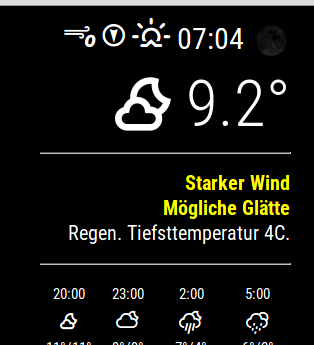
    • MMM-Wunderground: Weather alert not disappearing...

      Hi!
      I wonder, why this message (yellow text) is not cleared.

      0_1488222077128_Bildschirmfoto vom 2017-02-27 19:51:24.png

      I do have this for about 5 days now. Reboot will not help.

      Can someone give me a hint, how to clear this?

      Besides: Its pretty warm right now and no “Glätte” (ice) nor “Wind” (wind) can be expected. Its clearly an old message ;-)

      Thanx!

      posted in Troubleshooting
      MedoM
      Medo
    • RE: VoiceControl module

      Searching for endless hours now, but no solution in sight…

      Im trying to trigger the mm-music-player module with this voicecontrol module (i say “MUSIK ON” and the mm-music-player starts a certain mp3 file). But no luck…

      My microfone can record audio (tested with arecord …) …

      (note: i had to change my “sudo nano /usr/share/alsa/alsa.conf” and the entries “defaults.ctl.card 1” and “defaults.pcm.card 1” from “0” to “1” to get my USB microphone working/recording)

      …and my mp3 soundfile can be played (tested with “omxplayer -o hdmi …”) - and also if i click on the mm-music-player-module…

      pm2 logs mm (after a reboot) shows this:

      [STREAMING] Now streaming realtime logs for [mm] process
      0|mm | ALSA lib pcm_dmix.c:1022:(snd_pcm_dmix_open) unable to open slave
      0|mm | ALSA lib pcm.c:2239:(snd_pcm_open_noupdate) Unknown PCM cards.pcm.rear
      0|mm | ALSA lib pcm.c:2239:(snd_pcm_open_noupdate) Unknown PCM cards.pcm.center_lfe
      0|mm | ALSA lib pcm.c:2239:(snd_pcm_open_noupdate) Unknown PCM cards.pcm.side
      0|mm | ALSA lib pcm.c:2239:(snd_pcm_open_noupdate) Unknown PCM cards.pcm.hdmi
      0|mm | ALSA lib pcm.c:2239:(snd_pcm_open_noupdate) Unknown PCM cards.pcm.hdmi
      0|mm | ALSA lib pcm.c:2239:(snd_pcm_open_noupdate) Unknown PCM cards.pcm.modem
      0|mm | ALSA lib pcm.c:2239:(snd_pcm_open_noupdate) Unknown PCM cards.pcm.modem
      0|mm | ALSA lib pcm.c:2239:(snd_pcm_open_noupdate) Unknown PCM cards.pcm.phoneline
      0|mm | ALSA lib pcm.c:2239:(snd_pcm_open_noupdate) Unknown PCM cards.pcm.phoneline
      0|mm | ALSA lib pulse.c:243:(pulse_connect) PulseAudio: Unable to connect: Connection refused
      0|mm | ALSA lib pulse.c:243:(pulse_connect) PulseAudio: Unable to connect: Connection refused
      0|mm | ALSA lib pcm_dmix.c:1022:(snd_pcm_dmix_open) unable to open slave
      0|mm | Cannot connect to server socket err = No such file or directory
      0|mm | Cannot connect to server request channel
      0|mm | jack server is not running or cannot be started
      0|mm | Expression ‘paInvalidSampleRate’ failed in ‘src/hostapi/alsa/pa_linux_alsa.c’, line: 2048
      0|mm | Expression ‘PaAlsaStreamComponent_InitialConfigure( &self->capture, inParams, self->primeBuffers, hwParamsCapture, &realSr )’ failed in ‘src/hostapi/alsa/pa_linux_alsa.c’, line: 2719
      0|mm | Expression ‘PaAlsaStream_Configure( stream, inputParameters, outputParameters, sampleRate, framesPerBuffer, &inputLatency, &outputLatency, &hostBufferSizeMode )’ failed in ‘src/hostapi/alsa/pa_linux_alsa.c’, line: 2843
      0|mm | Traceback (most recent call last):
      0|mm | File “./modules/voicecontrol/snowboy/kws-multiple.py”, line 34, in
      0|mm | detector = snowboydecoder.HotwordDetector(models, sensitivity=sensitivity)
      0|mm | File “/home/pi/MagicMirror/modules/voicecontrol/snowboy/snowboydecoder.py”, line 115, in init
      0|mm | stream_callback=audio_callback)
      0|mm | File “/usr/lib/python2.7/dist-packages/pyaudio.py”, line 747, in open
      0|mm | stream = Stream(self, *args, **kwargs)
      0|mm | File “/usr/lib/python2.7/dist-packages/pyaudio.py”, line 442, in init
      0|mm | self._stream = pa.open(**arguments)
      0|mm | IOError: [Errno Invalid sample rate] -9997

      I…

      • installed the voicecontrol and mm-music-player
      • double checked the code
      • changed the mp3 file with another
      • implemented the code like “GinSeng” stated some lines above.
      • created the hotwords over at snowboy and copied them to “/MagicMirror”, “voicecontrol” and “mm-music-player” directories
      • …
        But im not able to find the problem…

      Any suggestions?

      Thanks a lot for your help…
      posted in Utilities
      MedoM
      Medo
    • RE: MMM-PIR-Sensor - White Screen

      @zichao92
      What i also did, was a complete reinstall of the PIR-Sensor

      I followed the steps, “Banglee” described some lines above:

      ok so lets go step by step:
      cd ~/MagicMirror/modules/

      now we will remove the PIR folder:
      rm -rf MMM-PIR-Sensor

      and from here, we’re going to reinstall the MMM-PIR-Sensor modul:

      git clone https://github.com/paviro/MMM-PIR-Sensor.git
      cd MMM-PIR-Sensor
      

      run the following cmd here:
      npm install and wait, this can take a few minutes.

      Now you’ll have to add pi to gpio
      sudo useradd -g pi gpio

      and reboot your Raspi:
      sudo reboot

      Sorry, no further ideas so far (maybe you can open a PIR-Sensor troubleshooting thread)?


      Note from admin: Please use Markdown on code snippets for easier reading!

      posted in Troubleshooting
      MedoM
      Medo
    • RE: MMM-PIR-Sensor - White Screen

      @zichao92

      First things that come to my mind:

      • maybe a “sudo” is missing? Like sudo npm install --unsafe-perm?
      • are you executing this from the MMM-PIR-Sensor directory ?
      posted in Troubleshooting
      MedoM
      Medo
    • RE: MMM-PIR-Sensor - White Screen

      Also had the “white screen” problem. I installed a complete new Raspian (with PIXEL), a new MagicMirror - including node.js in version 7.3.0
      As soon as i tried to get the MMM-Pir-Sensor working, it failed (with an white screen). Heres, how i solved my problem.

      At first: Theres no need to downgrade the node (i tried this too, and had no luck)

      I figured out, that my problem was an MMM-PIR-Sensor installation error i did not recognized at the beginning. When i tried “npm install” i got something like this (an error):

      "gyp WARN EACCES user “root” does not have permission to access the dev dir “/root/.node-gyp/5.12.0”

      I figured out, that there are two ways of solving this:

      1. CHOWN the directory the install procedure tries to install
      2. use “npm install --unsafe-perm”

      Im aware that option two is not the “elegant” way, but it solved my problem (and i did not have to change directory permissions).

      I removed all files and git the files again (like described some lines above from banglee) and then just use “npm install --unsafe-perm”

      The “–unsafe-perm” option was the key to my problem…

      posted in Troubleshooting
      MedoM
      Medo
    • RE: News feed refresh?

      Same problem here. My newsfeed works for some time (can not say how long) and then stops receiving new news…

      posted in Troubleshooting
      MedoM
      Medo
    • RE: Newsfeed only loads once, then stops udating...

      @lolobyte

      Try to look at the original files which came in the downloaded package. I also had problems and realized later, that i had forgotten some characters…

      In your case, i think you have to put each title and url in parentheses. Look at my example from above and also dont miss commas…

      Something like this:

                                     {
                                      title: "Süddeutsche Zeitung",
                                      url: "http://rss.sueddeutsche.de/rss/Topthemen",
                                      },
                                      title: "Tagesschau",
                                      url: "http://www.tagesschau.de/xml/rss2",
                                      "http://www.stimme.de/storage/rss/rss/regioticker/regioticker.xml",
                                       }
      

      As i mentioned above - take the original files as reference, go throug it character by character and you will get it some trys later…

      posted in Troubleshooting
      MedoM
      Medo
    • RE: Bathroom mirror and humidity

      @Stellanova
      I build a bathroom mirror and its doing well (but installed it just a few days before). See my thread: link
      I read a lot about humidity and elektronics, but could not get a valid result if a monitor would get damaged or not.

      I think it also depends a bit in how your bathroom is constructed and how humidity is handled. My bathroom is based on chalk walls which absorb nearly 85% of the fog i produce when i shower.

      The monitor i used for my mirror, has also no air holes at the back. I think this will also prevent some damage…

      posted in Hardware
      MedoM
      Medo
    • RE: Newsfeed only loads once, then stops udating...

      Managed to get it working again. Cant say, what went wrong before. Thread can be closed…

      posted in Troubleshooting
      MedoM
      Medo
    • RE: Medos Bathroom Mirror

      @Knox

      Yes, my wife admitted the mirror with "if you like to play with your new toy…and i can still use it as an mirror - its okay for me " rolleyes

      :-D

      posted in Show your Mirror
      MedoM
      Medo
    • 1 / 1