Thanks for doing this - much appreciated!
 M
Offline
M
Offline
A New Chapter for MagicMirror: The Community Takes the Lead
Read the statement by Michael Teeuw here.
Read the statement by Michael Teeuw here.
Posts
-
RE: electron-rebuild and MagicMirror v2.18 (and more)
-
RE: MMM-dropbox - new module to show Dropbox photos on your mirror!
Hi guys - there’s a new version of the module out that should fix the Dropbox API issue. Please try it out and see if it works for you.
-
RE: MMM-Nest-Status - New module for your Nest thermostats and protect smoke detectors!
@JohnBachini said in MMM-Nest-Status - New module for your Nest thermostats and protect smoke detectors!:
@michael5r
Is this the same token obtained doing this .??No - the token my module needs is the old “Works with Nest API”-token.
-
RE: MMM-Hue-Lights - new module for your Philips Hue lights!
@jasim Sorry, I don’t speak German - can you please post in english?
-
RE: MMM-Hue-Lights - new module for your Philips Hue lights!
@jasim Yeah, but you must have set it up at some time - for instance, I use
pm2on my mirrors, so I can dopm2 stop mmto stop my magic mirror instance. -
RE: MMM-Hue-Lights - new module for your Philips Hue lights!
@jasim You already have another instance of Magic Mirror running (that’s the
EADDRINUSEerror) - you’ll need to stop that before runningnpm start dev. How do you normally start/stop your mirror? -
RE: MMM-Hue-Lights - new module for your Philips Hue lights!
@jasim You need to be in the folder of your Magic Mirror installation when you run these commands.
-
RE: MMM-Hue-Lights - new module for your Philips Hue lights!
@jasim said in MMM-Hue-Lights - new module for your Philips Hue lights!:
@michael5r said in MMM-Hue-Lights - new module for your Philips Hue lights!:
@jasim said in MMM-Hue-Lights - new module for your Philips Hue lights!:
I updated the module and tested it for several hours. The module fails after 45 - 60 minutes (API ERROR) and no longer works.
And not only that, the entire mirror no longer works.
After removing the module from the mirror, the mirror works again.Can you try running your mirror in dev mode and post some logs?
Would you tell me what to do, I am a layperson and not a professional.
Instead of running
npm run startin your Magic Mirror folder to start the mirror, try runningnpm start devwhich will open a browser console next to your mirror instance. Then look for any errors (marked in red) in there. -
RE: MMM-Hue-Lights - new module for your Philips Hue lights!
@jasim said in MMM-Hue-Lights - new module for your Philips Hue lights!:
I updated the module and tested it for several hours. The module fails after 45 - 60 minutes (API ERROR) and no longer works.
And not only that, the entire mirror no longer works.
After removing the module from the mirror, the mirror works again.Can you try running your mirror in dev mode and post some logs?
-
RE: MMM-Hue-Lights - new module for your Philips Hue lights!
I’ve released a new
1.4.0version of this module that will hopefully help with the refresh issue - it now automatically reschedules an update, no matter whether there’s an error or not. Thanks to @ulrichwisser for pushing this fix.Please download the version and see if that solves your issues.
-
RE: MMM-Energy-Saver - an easy way to suspend/resume modules based on a PIR sensor.
@jordes said in MMM-Energy-Saver - an easy way to suspend/resume modules based on a PIR sensor.:
how should the MMM-Pir-Sensor be set up for this module to work?
This is my code:{ module: 'MMM-PIR-Sensor', config: { sensorPin: "23", // See 'Configuration options' for more information. } }, { module: "mmm-energy-saver", config: { triggerMonitor: "true", timeoutInSeconds: "3", // ... whatever configuration options you want to use } },This is how I have mine set up:
{ module: 'MMM-PIR-Sensor', config: { sensorPin: 17, powerSavingDelay: 0, powerSavingNotification: false, powerSaving: false // Should the monitor be turned off if no user is present? (via HDMI or relay) } }, -
RE: MMM-Nest-Status - New module for your Nest thermostats and protect smoke detectors!
@kash said in MMM-Nest-Status - New module for your Nest thermostats and protect smoke detectors!:
@michael5r
i have not migrated to a google account yet and still have a existing developers account. how do i get the token?Download the previous version of the module:
https://github.com/michael5r/mmm-nest-status/tree/fcbf291a26374e32901e993f9e109465819f59bfIt has the shell script that allows you to get a token.
-
RE: MMM-Hue-Lights - new module for your Philips Hue lights!
@jasim said in MMM-Hue-Lights - new module for your Philips Hue lights!:
I installed mmm-hue-lights by default and get the following error message after 5 minutes. Hue API ERROR: Error: Read ECONNRESET. I ask for help with this problem. I’ve already reinstalled everything and it doesn’t help.
Have you tried changing the
updateIntervalsetting to be a higher number than the default? I would suggest trying 10 mins - eg. setting it to600000 -
RE: MMM-Hue-Lights - new module for your Philips Hue lights!
@Cain said in MMM-Hue-Lights - new module for your Philips Hue lights!:
i also found that i had to change folder name from
MMM-Hue-Lights to mmm-hue-lights - not sure why but i did.
After the 10mintues when it stops workings. can you then access the debug using the website? Only when the error occurs.
also have you done the sudo apt-get update && sudo apt-get full-upgrade ?
The folder should be
mmm-hue-lights- it’s case-sensitive, soMMM-Hue-Lightswouldn’t work. -
RE: MMM-Hue-Lights - new module for your Philips Hue lights!
@craig859 said in MMM-Hue-Lights - new module for your Philips Hue lights!:
Even after using Hue Developer to access the API debug/clip.html and generate a user string the Magic Mirror displays “please add your hue bridge IP and user to MagicMirror config.js file.”
Has anyone seen anything new on this? Is there a change in the authentication for Hue, maybe something that broke this module?There shouldn’t be - the Hue API hasn’t been updated in a long time, and both my mirrors are running just fine with this module.
-
RE: MMM-Nest-Status - New module for your Nest thermostats and protect smoke detectors!
@numb3rs It works just fine if you have an existing Nest developer account, but as I also posted in the repo for the module, there’s currently no way for new users to use the module.
Still waiting on Google to open their Individual Device Access program:
https://developers.google.com/nest/device-access -
RE: MMM-Hue-Lights - new module for your Philips Hue lights!
@Smotx said in MMM-Hue-Lights - new module for your Philips Hue lights!:
If i set
displayMode: ‘groups’,
in config file, MM show ‘lights’,
to view Groups, I have to parameter on mmm-hue-lights.js.
I don’t know why.
Please paste in your entire config for this module - you can XXX out the sensitive info. Thanks!
-
RE: MMM-Hue-Lights - new module for your Philips Hue lights!
@Smotx said in MMM-Hue-Lights - new module for your Philips Hue lights!:
I don’t understand why settings 'displaymode: “groups” does not work :(Setting ‘groups’ work only in mmm-hue-lights?js file, on config file does not work.
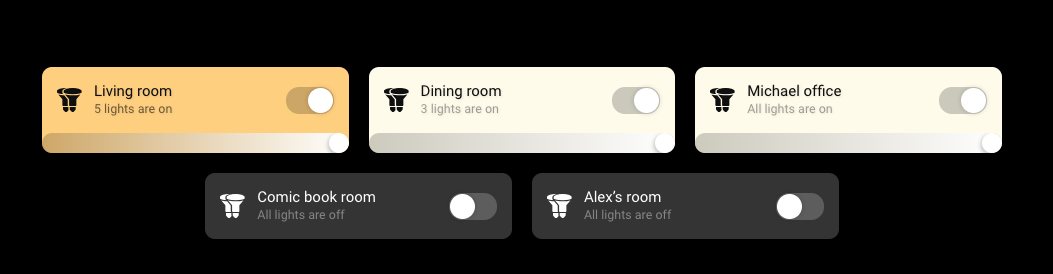
What do you mean it doesn’t work? That’s what I do on my mirror:
-
RE: MMM-Hue-Lights - new module for your Philips Hue lights!
@Smotx said in MMM-Hue-Lights - new module for your Philips Hue lights!:
Hi,
very great module. Thanks for job.
It’s not possible to just see ‘your Rooms’, same as android Hue official app ?
Sure - in the config, set this:
displayMode: 'groups',and then it will only show your Rooms.
-
RE: MMM-Hue-Lights - new module for your Philips Hue lights!
@dhoggan said in MMM-Hue-Lights - new module for your Philips Hue lights!:
The first issue is that, despite setting the position to be middle_center it adamantly displays justified to the left. If I set it as bottom_center, bottom_right or a variety of other positions it displays as expected; but always to the left if middle_center selected.
The position has nothing to do with the internal alignment of the module - you need to add:
alignment: 'center',to your config for the content to be centered.
The third is more of a question as I can’t find out how to do this. One of the display examples has the left column with room groups and the right with individual lights. Can anyone point in the direction as to how to do this?
Ahh … I guess I should have been more specific in the description of the examples. There’s no way to do what you describe above - in the screenshots I just wanted to show what both the lights and groups settings looked like, so I took 2 screenshots and placed them next to each other.