@pflnpi0305 I believe that @cowboysdude is correct about that line spilling over. It needs to be on one line. When in doubt you can always paste your config.js at http://jshint.com/ and see if there are any errors (one warning about undefined variable module is ok)
A New Chapter for MagicMirror: The Community Takes the Lead
Read the statement by Michael Teeuw here.
Read the statement by Michael Teeuw here.
 M
Offline
M
Offline
Posts
-
RE: Creating a module to display daily horoscopes
-
RE: MMM-horoscope - daily horoscope
@pflnpi0305 are you getting any errors? Looks like you’ve posted your config in another thread, will help you there.
-
RE: starter problem # 2
@kurt Cool. Sometimes off brand SD cards is the culprit of data loss. Memory is so inexpensive these days it is worth getting a good brand name card. Hopefully your trouble will now end with a new memory card. Also after so many installs you are a PRO now.
-
RE: $9 C.H.I.P.
I dug up the CHIP that was sitting and collecting dust to see if I can run MM on it. It was almost successful. I documented my installation and setup path here https://gist.github.com/morozgrafix/db069203ac4d8635a0f27e3dfa52f532
-
RE: sendSocketNotification from node_helper to Module
@Leobaillard I think I got it.
Lines 76-81 of
MMM-JCD-Bikes.jsis the culprit. I believe that once you were going intoObject.keysit was losing the scope. Try changing those lines to this:// List available bikes via a stations array var self = this; Object.keys(self.stationsData).forEach(function (key) { table.appendChild(self.createStationNameRow(self.stationsData[key].name)); table.appendChild(self.createAmountRow(self.stationsData[key])); });note that I’ve added
var self = this;and now calling these when appending children elements to the table:self.createStationNameRow,self.stationsData[key].name,self.createAmountRowandself.stationsData[key]Another spot that I’ve noticed is that
createStationNameRowfunction didn’t appendHTML name of the station to the cell. I didn’t dig too much into it, but I think thiscell.innerHTML = name;was missing from it:createStationNameRow: function(name) { var nameRow = document.createElement("tr"); var cell = document.createElement("td"); cell.className = "stationName"; cell.setAttribute("colSpan", 2); cell.innerHTML = name; nameRow.appendChild(cell); return nameRow; },Hopefully it will get you going in the right direction.
-
RE: Test suite for MagicMirror²
@roramirez I haven’t played with Docker in a while and never tried raspbian on a docker container. Quickly glanced at DockerHub and it seems that people are able to do that. https://hub.docker.com/search/?isAutomated=1&isOfficial=0&page=1&pullCount=0&q=raspbian&starCount=0
I may take a look into it, but it all depends on my availability. -
RE: starter problem # 2
@kurt I’m not in front of my RasPi at the moment and can’t give you exact instructions, doing it from memory. Hitting
Ctrl Alt F1will drop you into terminal session, hittingCtrl Alt F7(if I’m not mistaken) will take you back to X window session. You can try switching to different sessions by hittingCtrl Alt F1,Ctrl Alt F2etc. until you get to the right place.If you are running full Jessie with PIXEL there is also a terminal app in GUI that you can use. Some more info on PIXEL is here
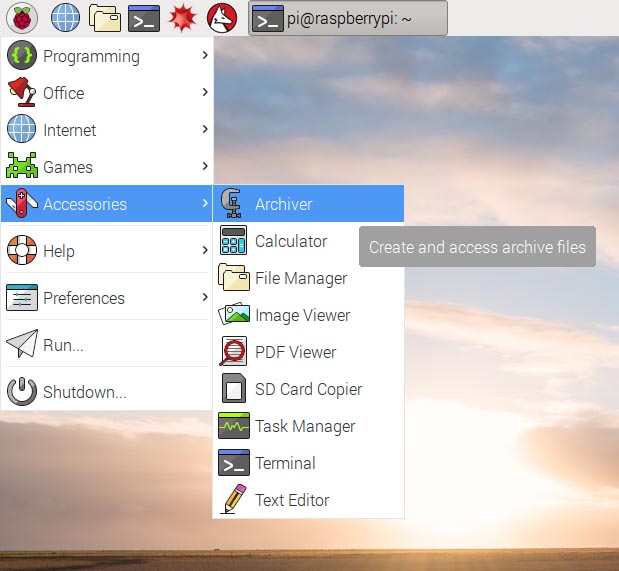
:point_up: see that
TerminalIcon? That way you don’t have to switch back and forth.If you are running Jessie Lite you can hit
Windows Key + R(sorry I’m not really sure what the correct terminology for Windows Key on your keyboard) and typelxterminal
and you will have a terminal session in your GUI! It will look something like this (sorry that’s a huge image):
On US English keyboard layout
~is located to the left of the1key and you have to useShift, but good news is that you can change default RasPi keyboard layout to match your locale by runningsudo raspi-configin terminal. Some more information on how to get it done is here: https://www.raspberrypi.org/documentation/configuration/raspi-config.md#change-localeGood luck and I’m glad you are making progress.
P.S. Thanks about compliments on the profile background. It’s a macro photo of a DVD-R disc that was cooked in the microwave. I have a few more from that series here https://www.flickr.com/photos/morozgrafix/albums/72157626165398064
-
RE: Creating a module to display daily horoscopes
@djbosman Hi Danie,
In the code snippet that you’ve posted (it’s a good idea to use markdown for code snippets) it looks like you are possibly using “fancy quotes”. Make sure that your
config.jsfile has these'or"and not these‘or“(it’s possible that they were only converted in your post on the forum and your config is ok). Additionally make sure you have a comma after last}bracket as shown below:{ module: 'MMM-horoscope', position: 'top_right', // This can be any of the regions. config: { // See ‘Configuration options’ for additional options and more information. sign: 'aries', // Zodiac sign } },Also since this module is using
node helperyou may need to restart electron app for MM to pickup module helper for horoscopes.
You should see these lines in the console log when you donpm start:Connecting socket for: MMM-horoscope Starting NodeHelper for MMM-horoscopemodule.Hope this helps and thanks for trying out my module.
P.S. I just added instructions about restarting MM in the README
-
RE: sendSocketNotification from node_helper to Module
@Leobaillard sent you a DM for API key. Will try to troubleshoot it
-
RE: starter problem # 2
@kurt I totally understand your point and reasons for you to use GUI tools for file transfers, editing etc. My personal choice is mostly working in the terminal, but it takes some getting used to. The reason why I mentioned SSH and scp, as alternative to using GUI transfer tools, is because they are very reliable and proven to work well. I just wanted to check your comfort level using them, in case that you are suspecting FileZilla, Cyber Duck or some other GUI tool is messing up your MM installation.
To answer your question about text editors that work in terminal. There are plenty of them and they have existed for a very long time in unix/linux world. Most of the time they are available with any *nix flavor. To name a few: nano (probably easiest to learn), vim and emacs
Hope you get everything sorted with your install and if you need assistance we are here to help.
-
RE: How to Remove old Module
@nobita not the entire directory, but rather directory that contains your module inside of
MagicMirror/modulesFor example if you have
MagicMirror/modules/module_to_deleteYou would do:
cd ~/MagicMirror rm -rf modules/module_to_delete -
RE: How to Remove old Module
General suggestion on that would be:
- backup your config.js file
- Remove that module entry from config.js
- Remove directory for that module under
MagicMirror/modules
-
RE: IE11 / Edge browser black screen
I don’t have a windows tablet or running MM on windows. I was able to load MM running on my RasPi from Windows 10 IE edge (whatever the latest version) without any problems and need to go into developer mode. Sorry can’t really reproduce the issue that you are experiencing.
-
RE: starter problem # 2
if you are comfortable with using
sshandscpyou may not even need any GUI tools to transfer files. -
RE: Settings in config.js aren't loaded after reboot of RasPi
cool, glad you managed to get it resolved and up and running.
-
RE: starter problem # 2
@kurt said in starter problem # 2:
from the Raspberry with the npm start I get some error messages.
What error messages are you getting when you running
npm startfrom the RasPi terminal? (I’m assuming that you still have PIXEL loaded at that time)I would hold off on auto starting for now, until you can start it cleanly from the shell.
-
RE: starter problem # 2
@kurt are you running raspbian jessie or Jessie lite?
If you are running regular jessie with graphical interface then I believe you need to run
npm startin the terminal.DISPLAY=:0 npm startis used when you are connected over SSH from remote system, if I’m not mistaken.If you are running jessie lite then make sure you have minimal X window GUI installed. Full guide is here https://github.com/MichMich/MagicMirror/wiki/Jessie-Lite-Installation-Guide
-
RE: How to load a <script> src = " " </script> into my mirror?
@nbrenn sounds good. Good luck!
-
RE: How to load a <script> src = " " </script> into my mirror?
@nbrenn I’ve reworked the code to follow that logic outline to get
Your sum is 37to show up in the middle of the MM. You can find a PR on GitHub or just look at my fork of your repo. Most of the code is commented and hopefully easy to follow. I also added some configuration options for better flexibility.
Since you didn’t need a table any longer, I took some shortcuts with processing the data and just calculating the sum of all numeric values from the file. You can add the module to the MM and then as it runs update the datafile with new values, MM should update in about a minute or whatever your
updateIntervalis set to.Let me know if you have any questions.
P.S. I didn’t run it on RasPi, but it should work without a problem. :fingers_crossed: Also if you are planning to make this module available for others it may be worth renaming it to
MMM-datafeedto follow the standard naming conventions. -
RE: How to load a <script> src = " " </script> into my mirror?
@nbrenn perfect!!! i can now see your full code and have better idea what you are trying to achieve.
Your data file is not really a CSV (Comma Separated Values) file, just a text file with values on each line, so you were correct to remove that
line.split(",")part. I already spotted a few things where your code will not work correctly. I will take a closer look at it later tonight and hopefully together we can get this resolved.