@tomXGames IF not mistaken, the “,” after the last module should not be there either.
A New Chapter for MagicMirror: The Community Takes the Lead
Read the statement by Michael Teeuw here.
Read the statement by Michael Teeuw here.
 M
Offline
M
Offline
Posts
-
RE: After adding MMM-GPIO-Notifications, config.js doesn't work...
-
RE: After adding MMM-GPIO-Notifications, config.js doesn't work...
@tomXGames THis certainly doesn’t look right:
notification: "'CURRENT_PROFILE', 'Tom'", -
RE: Problem with the Module "email"
@CyruS1337 Please remember, for the emails to display you need to set
fade: false. -
RE: Error with launching the magic mirror Applicants. it said i need to create a config file.
@dearco said in Error with launching the magic mirror Applicants. it said i need to create a config file.:
EADDRINUSE
That usually means that something else is running on port 8080. Maybe you have two instances of MM running?
-
RE: MMM-YouTube
@sdetweil I thought it was the other way around? Tilda (~) was shifted and back tick (`) non shifted? :smiling_face_with_open_mouth_smiling_eyes:
-
RE: Problem with the Module "email"
@CyruS1337 I assume that you meant that you replace your password with the generated key? When you run
pm2 logswhat do you get? Does it show anything for email? Have you in the /modules/email folder run npm install? -
RE: Problem with the Module "email"
@CyruS1337 I just setup the module and created my app key and email is working for me.
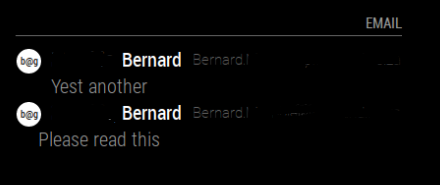
And my config: I also had to change fade to false in order for email to display properly
module: 'email', position: 'top_right', header: 'Email', config: { accounts: [ { user: 'xxxxxxxxxxxxx@gmail.com', password: 'xxxxxxxxxxxxxxxx', host:'imap.gmail.com', port: 993, tls: true, authTimeout: 10000, numberOfEmails: 5, } ], fade: false, maxCharacters: 30 } }, -
RE: Problem with the Module "email"
@sdetweil Strange. I had to generate a key to get email to work. Not sure why you guys don’t see the option.
Edit:
Maybe because your 2FA is turned off. -
RE: Update Magic Mirror error
@MisterT Great it worked for you. Please mark the post as Resolved if you are happy that it worked.
-
RE: Problem with the Module "email"
@CyruS1337 No problem:
When loggin into gmail, on the right hand side there is the “hamburger menu”:

When you click that you get a list of apps, select Account from there. On the left click security:
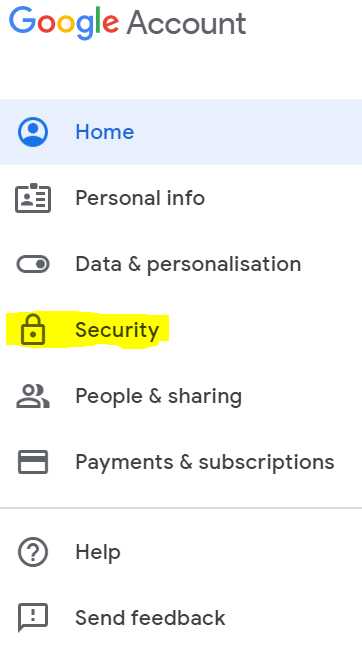
On the right you will see Signing into Google. Click on the “>” on the line “App Passwords”
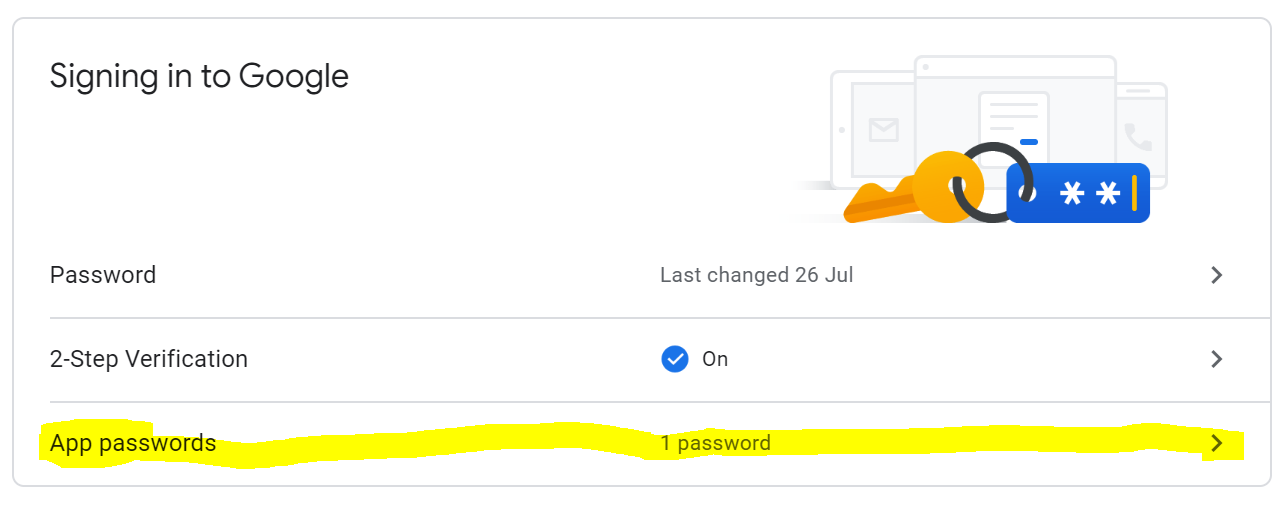
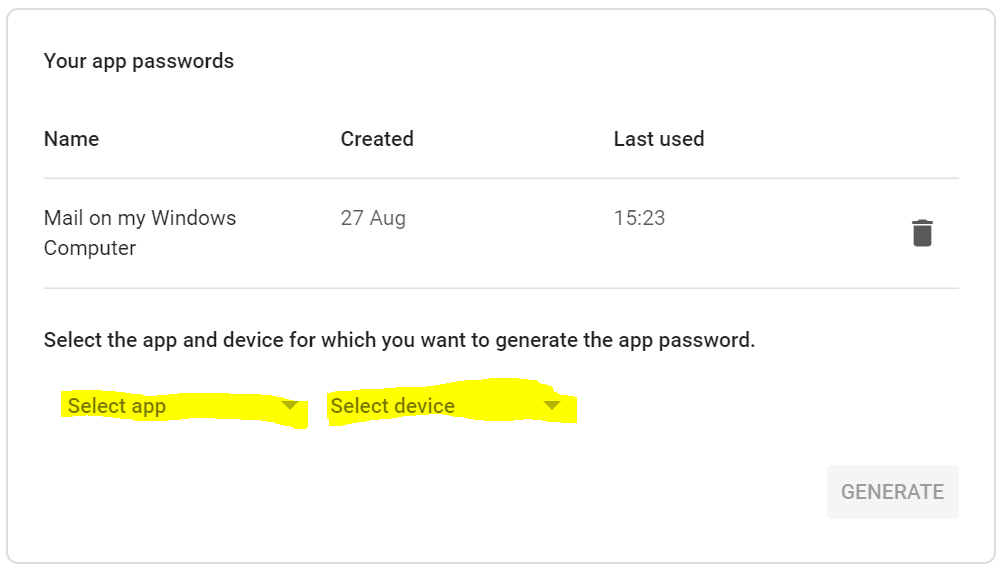
On the next screen enter your password and then on the next screen you will be able to create the key.
-
RE: Update Magic Mirror error
@MisterT You will not lose your modules and configs.
-
RE: Update Magic Mirror error
@MisterT You could also just do a
git reset --hardand thengit pull $$ npm install. I have had this issue every time I had to update my mirror. -
RE: Problem with the Module "email"
@CyruS1337 In gmail, you need to select the Google Apps menu:

Next click on Account. On the left hand side click on Security.
On the right Select App Passwords and create a password for your app. Copy that key into your mirror where you need to enter the password and that should work. -
RE: Problem with the Module "email"
@CyruS1337 With gmail you have to create an application key on gmail itself. Your email account password would not work.
-
RE: Need help please MMM-dropbox error
@sdetweil I love this. Gone from MMM-dropbox to weather module…:grinning_face: :smiling_face_with_open_mouth: :smiling_face_with_open_mouth_smiling_eyes:
-
RE: Magic Mirror only shows black screen
@maddinmirror Glad you managed to get it working again. Can you mark the post as Solved if you are happy with the solution?
-
RE: "Error: Cannot find module 'ping' " and black screen on startup (Beginner)
@keyk123 Can you cd into the MMM-network-signal module folder,
cd ~/MagicMirror/modules/MMM-network-signaland runnpm install? It requires you to run the command so that it can install all the dependencies. Try that and let us know if it solved your problem. -
RE: "Error: Cannot find module 'ping' " and black screen on startup (Beginner)
@keyk123 Can you edit your post and remove your keys etc?
-
RE: MMM-Hue
@Mitchfarino What a pity though. The module works perfectly for me though. There are some instructions missing though but I managed to get it up and running when I first implemented it a few months ago. Great module.