@sdetweil Ah, got you.
 M
Offline
M
Offline
A New Chapter for MagicMirror: The Community Takes the Lead
Read the statement by Michael Teeuw here.
Read the statement by Michael Teeuw here.
Posts
-
RE: MMM-NewsAPI
Hi. What is the below config for?
@ufransa said in MMM-NewsAPI:pages: { “sport”: “bottom_bar” },
-
RE: Having trouble with screen on and off? Here are some tips that could help
@reviewsfornerds Hi. Apologies for the late reply. Was away for the weekend.
Can you share your script that you are calling? Also the output of
wlr-randr. -
Having trouble with screen on and off? Here are some tips that could help
Hey guys,
I have updated the scripts below to reflect what works now for wayland. Have also added a crontab ready script to start MM.
Just a little note for for those who are struggling.
I have recently upgraded from my RPi 3B+ to RPi 5 4GB. MM has been running fine for a while now and all my modules are running sweet.
One thing I have been struggling with was getting the Pi to shut off the output at night and then on again in the morning. The old way,
vcgencmd display_power 0andvcgencmd display_power 1does not work on the RPi5.In order to get things working again, and after a lot of research I have managed to get this working now. Below are 2 scripts that I have which are called from crontab at specified times.
You have to ensure that both of the below scripts are executeable. To do this you need to run the following command.
chmod +x mon.sh mof.shfrom the command prompt.mof.sh - Monitor Off. Works for X11 Compositor.
Create a file:nano mof.shand add the below.#!/bin/bash export WAYLAND_DISPLAY=wayland-1 export XDG_RUNTIME_DIR=/run/user/1000 /usr/bin/wlr-randr --output HDMI-A-1 --offSince update to 2.35.0 Wayland: The below is now valid for Wayland. Biggest change is that it is now wayland-
0.#!/bin/bash export WAYLAND_DISPLAY=wayland-0 export XDG_RUNTIME_DIR=/run/user/1000 /usr/bin/wlr-randr --output HDMI-A-1 --offExplanation
- Declare a variable for WAYLAND_DISPLAY
- Declare a variable for XDG_RUNTIME_DISPLAY (I had an issue with this and only found recently that I needed to declare this as well in the script)
- Execute the wlr-randr command to turn off the display
mon.sh - Monitor On. Works for X11 Compositor
Create a file:nano mon.shand add the below to it.#!/bin/bash export WAYLAND_DISPLAY=wayland-1 export XDG_RUNTIME_DIR=/run/user/1000 /usr/bin/wlr-randr --output HDMI-A-1 --on --mode 1920x1080@60Hz --transform 270And for 2.35.0 update:
#!/bin/bash
export WAYLAND_DISPLAY=wayland-0
export XDG_RUNTIME_DIR=/run/user/1000
/usr/bin/wlr-randr --output HDMI-A-1 --on --mode 1920x1080@60Hz --transform 270
Explanation
- Declare a variable for WAYLAND_DISPLAY
- Declare a variable for XDG_RUNTIME_DISPLAY (I had an issue with this and only found that I needed to declare this as well in the script)
- Execute the wlr-randr command to turn on the display
- lI have to supply options to this command as I needed to ensure that when the monitor is turned on, it has the same pixilation and rotation etc. This is achieved by passing
--mode 1929x1080@60Hzand to ensure it is flipped 90 degrees I pass the option--transform 270.
To obtain your current screen settings you run
wlr-randrfrom the command prompt and you will be shown the current settings for your mirror. You can then use those values and substitute them for the values above if yours is different. This will also confirm if your monitor isHDMI-A-1or if it is called something else.Crontab
To instantiate a crontab you docrontab -efrom the command line.
Add the following entries at the bottom of the file.00 06 * * * /home/pi/mon.sh >> /home/pi/mon.log 2>&1 00 21 * * * /home/pi/mof.sh >> /home/pi/mof.log 2>&1From the above, it will turn the output on at 6am and turn it off at 9pm.
One added bonus script that could save others. I use this to start MM from the cron. This works for wayland compositor.
#!/bin/bash
set -e

sleep 5

export PATH=/usr/local/bin:/usr/bin:/bin
export WAYLAND_DISPLAY=wayland-0
export XDG_RUNTIME_DIR=/run/user/1000

cd /home/pi/MagicMirror
exec /usr/bin/npm run start:wayland
Hope this helps somebody.
-
RE: MMM-MealViewer
@dadAndEl Check that it is not set to private as I could not see it as well now.
-
RE: MMM-Rugby
@manu85340 Hi. I have updated the module. You can now do a gitpull and test if all is working ok. There seem to have been an issue with the call that refreshes the league data. Should be working fine now.
-
RE: MMM-Rugby
@manu85340 I have now looked at the API and it looks like the data has changed. I need to have a look at it a little more. Will advise when I have an update available.
-
RE: MMM-Rugby
@manu85340 You can have the rankings but not the scores. As they are out of date, they will not be displayed unless you set the
apiSportDaysPastvalue to say 365 then they will display again. -
RE: MMM-Rugby
@manu85340 No. That is not how it works. The module looks at the date of each game and does calculations based on your
apiSportDaysPastandapiSportsDaysFutureconfigs to work out if there is games data to display.If I change the
apiSportDaysPastconfig to 124 days then I get data displayed. But after a few days that will disappear again.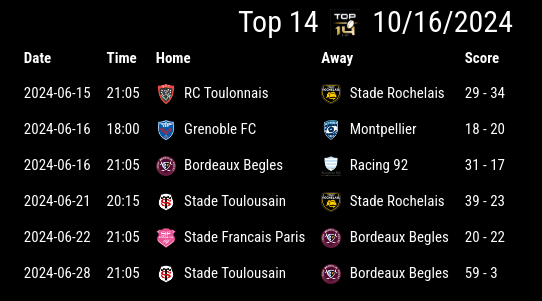
Until a new league season starts you will not have data again. Unless you follow an active league.
-
RE: MMM-Rugby
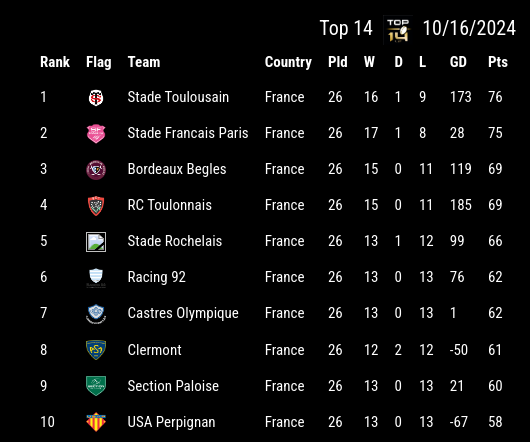
@manu85340 Just checking api-sport Tope 14 ended in June 2024. The module is setup to only show data from x amount of days previous,
apiSportDaysPast:. Could be that because the league is finished that there is no data coming through.{ "leagueId": 16, "leagueName": "Top 14", "leagueType": "League", "leagueFlag": "https://media.api-sports.io/rugby/leagues/16.png", "leagueCountryId": 7, "leagueCountryName": "France", "leagueCountryCode": "FR", "leagueCountryFlag": "https://media.api-sports.io/flags/fr.svg", "currentSeasons": [ { "season": 2023, "current": true, "start": "2023-08-18", "end": "2024-06-08" } ] },The League standings will continue to show data as this is built differently but match results will no longer show because of the dayspast config.
-
RE: MMM-MovieListings
UPDATES
V1.1.0
- Fixed issue with cast list appending cast members from different movies to the same list. Now only cast members of the displayed movie is displayed.
- Update and simplify the API calls to reduce the number of calls.
-
RE: MMM-MovieListings
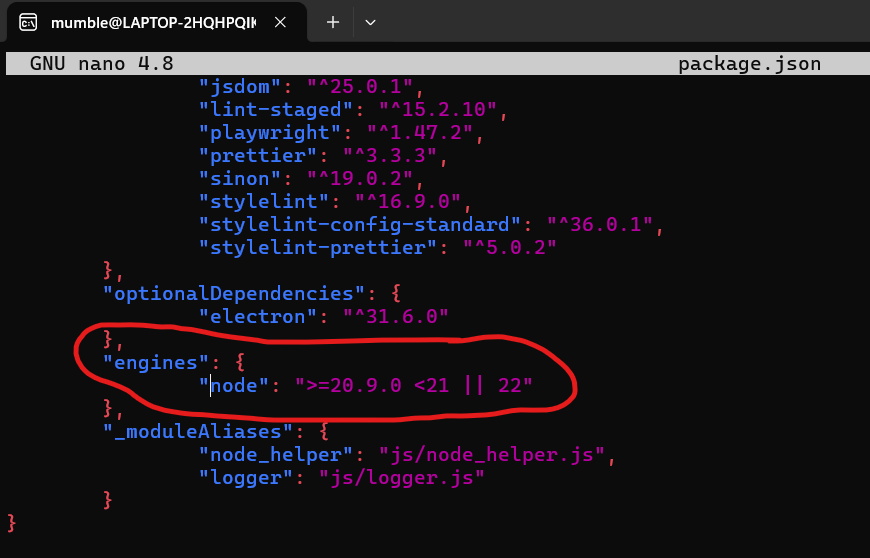
@sdetweil From the above it does seem like he used your script but it failed to update node to the required version which should be one of the following, right?
>=20.9.0 <21 || 22 -
RE: MMM-MovieListings
@BerkSmash1984 I am not sure what updating node would do to your 2.25.0 version of MM. I assume it should be fine. I updated the module using node 20.9.0. I unfortunately do not have an older version of MM running. My dev machine runs the latest version.
@sdetweil Would MM v2.25.0 run fine with node 20.9.0? I am hoping you may have the answer at hand.