@AliAS said in MagicMirror: Changing font colors:
I made a syntax error.
Yeah, I hate when that happens. :-)
 M
Offline
M
Offline
@AliAS said in MagicMirror: Changing font colors:
I made a syntax error.
Yeah, I hate when that happens. :-)
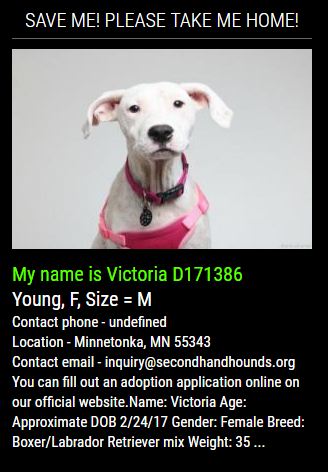
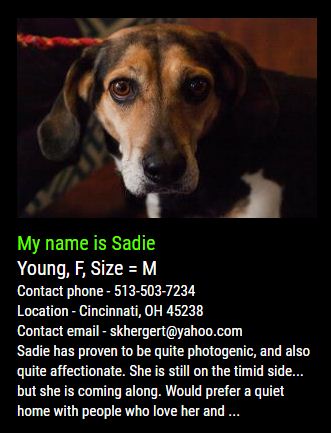
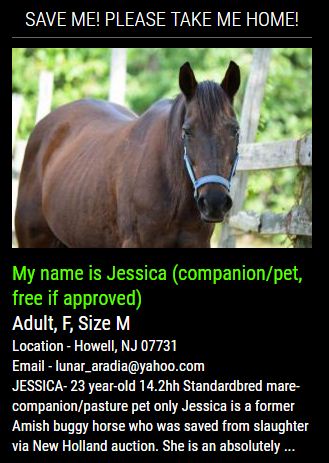
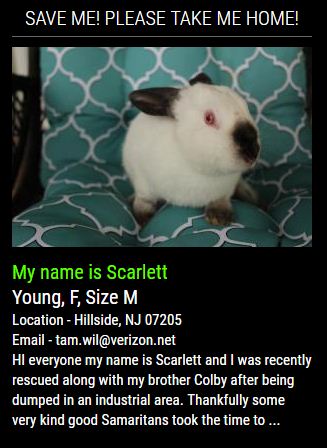
All types of pets for adoption.
Cat, dog, bird, horse, rabbit, reptile, smallfurry, barnyard.
293,097 adoptable pets that need a good home.
11,460 shelters and rescue members across NORTH AMERICA.
A rotation of adoptable pets, based on the criteria you enter into the config.
One without a header.
[card:mykle1/MMM-PetFinder]
@strawberry-3.141 said in Multiple Modules on one set-up?:
I’m curious about the modifications you did to mmm-voice
That is a mistake on my part. The modifications I made were to the AlarmClock module because mmm-voice seems to be disabled while the AlarmClock is ringing.
As you know, AlarmClock uses the alert module. The alert module comes to the forefront when the AlarmClock rings and all other modules are inaccessible until the alarm is reset. I don’t have a touch screen so I needed a way to reset the AlarmClock module manually. First, I disabled the alert module. That solved the problem of accessing the AlarmClock but still left me with resetting the alarm manually.
Also. I wanted all modules hidden (by mmm-voice) until the alarm rings. This created another problem for me. The alarm would ring but all modules would remain hidden and mmm-voice will not accept the “SHOW MODULES” command while the alarm is ringing.
So, my answer to this was to disable the alert module, add a “SHOW MODULES” command the the AlarmClock module when the alarm fires to show all modules, and add a clickable button to the AlarmClock module that resets the alarm manually.
I am working on modifying mmm-voice, too, but that is slow going because I am learning this stuff as I go along. My old brain keeps asking me, “Why the hell are you doing this, Mykle?”
Adding some things that seem relevant. I made a quick background module that will work by default with Hello-Lucy. It works as a stand alone module, as well. Anyway . . . .
@pjkoeleman said in Vanity Mirror, thy name is woman.:
There is no excuse in being late !
Oh really? My wife has a million of them.
Some of the custom responses/compliments I’ve created for my own Hello-Lucy. There are some that are inappropriate for public consumption so I left those out. :-)
Updated Hello Lucy enhancement for MM
https://www.youtube.com/watch?v=ZXWf7s3K3as&lc=
I guess if anyone wants to use this you can go here:
Ich habe mich in meinem ganzen Leben noch nie so ausgeschlossen gefühlt. ;-)
Im Ernst, was dieses Forum so cool macht, ist, dass Menschen aus der ganzen Welt hier zusammenkommen. Es ist mir eine Ehre und ein Privileg, Teil dieser Gemeinschaft zu sein.
Frieden!
Danke Gott für den Google Übersetzer
Well, why don’t you try the mic that you have? You may be satisfied with the result. If not, you can always pick up the other. I didn’t do any shopping. I simply chose an inexpensive mic that employs a 3.5mm jack instead of USB. In any case, let me know your results
MM community: “Oh no, not another video!”
Oh, shut up! Indulge an old man, will ya? :-)
This was one of my original goals. I wanted to have some modules occupy the same position on the mirror but only be shown when I wanted to see them. Sort of like RemoteControl or Carousel using voice commands. You will see here how MMM-NOAA and MMM-PilotWX share the top left region, just not at the same time. The same is true for MMM-EARTH and MMM-Lunartic (bottom center) and for MMM-EasyPix (Lucy) and MMM-NASA (top center). I like this idea. You can have as many modules as you want loaded but only those showing that you choose. Who wants to shut down their mirror to enable a module that they only want to see once in a while? Not me. This solves that problem, for me anyway.
And lastly, I still can’t believe the response of this old laptop with handling the voice commands. I purposely issued the commands quickly, one after the other, to demonstrate how nicely it responds. I have a few more ideas for Lucy, but I have to think about how to proceed with them. For now, it’s very useful just as it is.
The config entry itself tells you:
timezone: false, // please refer to http://php.net/manual/en/timezones.php
So, go to that site and find your location, and how it is written. In my case it would be America/New_York. I’m assuming the entry should now be:
timezone: "America/New_York",
@NathanWilcox said in Hello-Lucy:
Is there a way to automatically show modules on MagicMirror start as appose to them being hidden and only shown when prompted.
If you’re not gun shy about modifying the files yourself, you can find this in the MMM-voice.js file and comment it out. You’ll find it at about line 277. I assume you know that every module you have loading will be displayed. :-)
     if (notification === 'DOM_OBJECTS_CREATED') {
         MM.getModules().enumerate((module) => {
                module.hide(1000);
            });
     }
@cowboysdude said in The 32" Inch Mirror:
Works with either mouse or touch, yes.
Now you’re just showing off! :-)
Good stuff, bro.
@m1cr0ch1p said in Getting Started:
the software setup?
https://forum.magicmirror.builders/topic/236/complete-setup-tutorial
There is no tutorial for hardware/build as everyone’s hardware and build techniques are different. However, if you read through the forum topics, or search the forum topics (which I recommend) you will find plenty of ideas.
Take a look at some of the builds that others have made:
https://forum.magicmirror.builders/category/12/show-your-mirror
No, thank you my friend. I am honored that you use something of mine when you are capable of such greatness.
Thank you, mate. I’m glad that was helpful. Enjoy the process and the learning. It really is a lot of fun. If you encounter any problems or have other questions, feel free to post. Don’t forget the forum search feature. You can often find what you’re looking for there.
Added 4 new modules to the Hello-Lucy defaults.