@Mykle1
I’am not that fast in typing and testing it …
P
Offline
A New Chapter for MagicMirror: The Community Takes the Lead
Read the statement by Michael Teeuw here.
Read the statement by Michael Teeuw here.
Posts
-
RE: MMM-Traffic - make text lighter ?
-
RE: MMM-Traffic - make text lighter ?
@ironman_DK Thats not the way to do this.
Do it this way:
- When you don’t have a custom.css create one in /MagicMirror/css
- Add the following code to custom.css
.MMM-Traffic div.small.dimmed {
color: #00FF00;
}
Now you have the text in green but you can change that as you like.
-
RE: [MMM-PIR-Sensor] Install failing
@STEFF92
What is not working;- Do you still have the problem with the config.sys, when post your config.sys here.
- Is the PIR not switching off you screen?
-
RE: [MMM-PIR-Sensor] Install failing
Delete the ‘,’ in te last line (relayOnState: 1)
-
RE: Where are you from?
I’am from Rijnsburg, a small place between Amsterdam and the Hague, Near the North Sea in the Netherlands
-
RE: Internet Monitor
@ronny3050 said in Internet Monitor:
remove all margins from the custom.css
I have been testing for some time and found a solution !
My custom.css looks like this now.wifi-symbol-1 [foo], .wifi-symbol-1, .wifi-symbol-2 [foo], .wifi-symbol-2, .wifi-symbol-3 [foo], .wifi-symbol-3, .wifi-symbol-4 [foo], .wifi-symbol-4 { position: relative; float: right; margin-top: -30px; margin-right: -20px; }The result on the screen looks like this
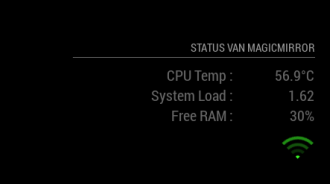
Now it looks like this I took out the header of Internet-monitor, now it belongs to the header with my status. Didn’t now negative numbers in margins were also possible till I tested it.
-
RE: Internet Monitor
@ronny3050 said in Internet Monitor:
In the code for your custom.css, try to change position from absolute to relative.
When I do that, that gives not the result I’am looking for. With the following code in the custom.css
position: relative;
float: right;
margin-top: 5px;
margin-right: 5px;
It gives me the following on my screen
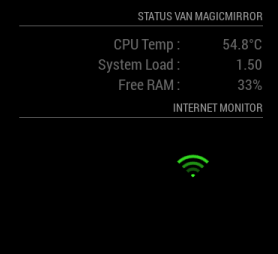
Much lower and to the left. Now your guess is as good as mine !
-
RE: Internet Monitor
@ronny3050 said in Internet Monitor:
Oops, forgot to remove convert.js from the script. Should work now.
Just installed the latest update and it’s running like an well-oiled machine.
One question I still have and can’t find an solution for. I have the internet-monitor in te ‘bottom_right’ location and added the following to my custom.css
.wifi-symbol-1 [foo], .wifi-symbol-1, .wifi-symbol-2 [foo], .wifi-symbol-2, .wifi-symbol-3 [foo], .wifi-symbol-3, .wifi-symbol-4 [foo], .wifi-symbol-4 {
position: absolute;
float: right;
margin-top: 35px;
}
Now it looks like this;
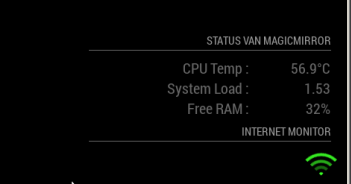
How can I give it a little right-margin so it lines out to the right side of my screen, now its a little to much to the right.
Already tried margin-left an padding but no one is giving me the result I want.
-
RE: Internet Monitor
@strawberry-3.141 Thanks, waiting for @ronny3050 reaction.
-
RE: Internet Monitor
@ronny3050 said in Internet Monitor:
@pjkoeleman @Advokaten customizable WiFi symbol is updated on github. Unfortunately, I could not test on my Mirror yet (especially the animations). I would greatly appreciate any feedback
I hope this is what you were looking for.Thanks for your work in updating the module, but I now have a black screen with nothing on it.
Here is my part of config.js what I’am using.{ module: 'internet-monitor', position: 'bottom_right', config: { type: 'minimal', maxTime: 7000, updateInterval: 120000, verbose: false, displayStrength: true, displaySpeed: false, strengthIconSize: 40, maxGaugeScale: 25, wifiSymbol:{ size: 50, fullColor: '#3afc25', almostColor: '#ffff0c', halfColor: '#ff8c00', noneColor: '#ff1111' } } },I have nothing in custom.css regarding internet-monitor.
When I start with npm start dev, I see one error in the panel, this is the following;loader.js:189 GET http://localhost:8080/modules/internet-monitor//convert.js loadFile @ loader.js:189 loadFile @ loader.js:236 loadNextScript @ module.js:236 (anonymous function) @ module.js:238 script.onload @ loader.js:187Personaly I think animated gif’s are a bit to much, change them back to PNG-files with the option to color them.
One other thing; is color options not something for the custom.css? -
RE: Current Weather
@roramirez said in Current Weather:
I can tell you the feature is already done and waiting to merge, this is a @MichMich’s decision.
Thanks a lot.
-
RE: Internet Monitor
@Advokaten said in Internet Monitor:
Don’t know what is turning the strength bars into a white color
There are four images (white) used for the strength. You can find them in the sub-folder ‘images’.
-
Current Weather
@roramirez I’m having a question about your module Current weather.
In the Netherlands it is common to write the temperature including the “C” for Celcius, directly behind the degree-sign. See also Taaladvies, in dutch.
The module calculates the temperature in Celsius or Fahrenheit so it should not be a problen to add the ‘C’ or ‘F’ behind the degree sign.
I did that hard codeded now at line 187 of currentweather.js (I now that that will be overwritten with an update).My question can you add this in the next update or do this via the config off the module. Thanks in advance.
-
RE: Internet Monitor
@ronny3050 Thanks for taking up the challenge.
I would prefer option #1 as well. So the user can choose its own colors. -
RE: Internet Monitor
@Advokaten Yes it’s just working as discribed. Here is my part off config.js for the Internet Monitor.
{
  Module: 'internet-monitor',
  position: 'bottom_right',
  config: {
    type: 'minimal',
    maxTime: 10000,
    updateInterval: 120000,
    verbose: false,
    displayStrength: true,
    displaySpeed: false,
    strengthIconSize: 40,
    maxGaugeScale: 25
  }
},
Now I want to bring a little color to the wifi indicator.
-
RE: Internet Monitor
@Mykle1 said in Internet Monitor:
@ronny3050 thanks for a nice Monitor, i love the wifi indicator.You asked for wishes for the Internet Monitor.
I have been looking in the code if it is possible to give te wifi indicators some color.
Making strength_full.png green, strength_almost yellow, strength_half orange and strength_non.png red. Would love to see this as an config option of in the my custom.css.Is there a way to do this?
-
RE: Monthly Calendar View
@KirAsh4
What I’am missing in the calendar is a colum with the weeknumbers, left of the dates.
The weeknumbers could or should be an option ‘showWeekNr’ is true of false.
This should not be too difficult to build into the calendar.just my thoughts
-
RE: MMM-Traffic, Resize icon
@broberg Thanks for the tip, that was it!
An icon represented by fa, I had not found it yet!