bumping for visibility.
P
Offline
A New Chapter for MagicMirror: The Community Takes the Lead
Read the statement by Michael Teeuw here.
Read the statement by Michael Teeuw here.
Posts
-
MMM-Google-Route and API Quotas
I have setup MMM-Google-Routes and learned the painful experience of not setting a quota with Google. I have since setup a quota of 160 queries/day and a cron job with MMM-Scheduler in an attempt to limit queries. Unfortunately, I have hit my quota everyday before I wake up. Here is my scheduler configuration, could it be the issue? my intent is to run the query every 5 min between 6:00 AM and 9:00 AM.
module: 'MMM-ModuleScheduler', config: { notification_schedule: [ // Refresh the route every 5 minutes from 6:00 AM to 9:00 AM { notification: 'MMM-google-route/refresh', schedule: '*/5 6-8 * * *' }, -
Commodity Prices?
I’m looking for a module that will display commodity prices. Particularly WTI. Is there anything that exists or maybe one of the stock modules does this?
-
RE: Bright UI
Awesome, thanks.
This would be for the custom.css for the module?
-
RE: Bright UI
Any one using this with MMM-calendarext2? Would love to get everything styled together.
-
RE: MMPM and Docker
That helps, I should be able to map the two dockers together.
-
RE: Bright UI
I’ve been poking around and figured out how to make the Image art larger in the sonos module but could still use some help with the paprika font color.
-
RE: Bright UI
and the default sonos.css that I just reloaded from github.
.sonos ul { list-style-type: none; padding: 0; margin: 0; } .sonos ul .name, .sonos ul .art { display: inline-block; vertical-align: middle; } .sonos ul .name { padding: 0 .25em; } .sonos ul .art img { height: 100px; } .sonos ul .room { font-size: 50%; padding: .25em .5em; } .sonos ul.flip { direction: rtl; } /* This beautiful CSS-File has been crafted with LESS (lesscss.org) and compiled by simpLESS (wearekiss.com/simpless) */ -
RE: Bright UI
Thanks for the help
Custom.css
@import url("https://fonts.googleapis.com/css?family=Lato:300,400,700");

html {
  cursor: hidden;
  overflow: hidden;
  background: #e7e7e7;;
}


body {
  margin: 10px;
  position: absolute;
  width: calc(100% - 20px);
  height: calc(100% - 20px);
  background: #e7e7e7;
  color: #8a8a8a;
  font-weight: 400;
  font-size: 2em;
  font-family: "Lato", sans-serif;
  line-height: 1.5em;
  margin-bottom: -10px;
  -webkit-font-smoothing: antialiased;
}

header {
  text-transform: uppercase;
  font-family: "Lato", sans-serif;
  text-align: center;
  font-weight: bold;
  background: #F7F7F7;
  border-bottom: none;
  color:#8a8a8a;
}

 .module.compliments,
 .module.newsfeed,
 .module.clock,
 .module.weatherforecast,
 .module.calendar,
 .module.MMM-Todoist,
 .module.MMM-Sonos,
 .module.MMM-PaprikaMenu,
 .module.currentweather {
  font-family: "Lato", sans-serif;
  background-color: #f7f7f7;
  color: #8a8a8a;
  border: 1px solid #c1c1c1;
  box-shadow: 0px 10px 25px -5px rgba(50, 88, 130, 0.32);
  border-radius: 15px;
  padding: 30px;
}

.dimmed {
  color: #8a8a8a;
}

.normal {
  color: #8a8a8a;
}

.bright {
  color: #8a8a8a;
}


/**
 * module.width_height
 */

 .module.compliments {
  width:800px;
}

/**
 * clock.
 */

.clock .time {
 text-align: center;
 font-family: "Lato", sans-serif;

}
.clock .date {
  text-transform: uppercase;
  text-align: center;
  font-weight: bold;
  color: #8a8a8a;
  font-family: "Lato", sans-serif;
}


/**
 * weather.
 */

.currentweather .bright {
  font-family: "Lato", sans-serif;
}

.weathericon {
  color: #8a8a8a;
}
PaprikaMenu.css
.MMM-PaprikaMenu * {
  box-sizing: border-box;
}

.MMM-PaprikaMenu .module-content {
  width: 500px;
}

.MMM-PaprikaMenu table.menu {
  font-size: 17px;
  line-height: 1;
  border-collapse: collapse;
  table-layout: fixed;
  width: 100%;
}

.MMM-PaprikaMenu table.menu tr {
  border-bottom: solid 1px #222;
}

.MMM-PaprikaMenu table.menu tr.fade {
  opacity: 0.33;
}

.MMM-PaprikaMenu table.menu > tbody > tr > td:first-child {
  width: 55px;
  height: 55px;
}

.MMM-PaprikaMenu .menu .img-cell > img {
  float: left;
  width: 45px;
  height: 45px;
  margin: 5px;
}

.MMM-PaprikaMenu .menu .img-cell > img.rounded {
  border-radius: 10%;
}

.MMM-PaprikaMenu table.inner td {
  line-height: 24px;
  height: 28px;
}

.MMM-PaprikaMenu .menu > span {
  text-align: left;
  white-space: nowrap;
}

.MMM-PaprikaMenu .menu .date {
  font-size: 14px;
}

.MMM-PaprikaMenu .menu .meal {
  font-size: 17px;
  text-overflow: ellipsis;
  overflow: hidden;
}

.MMM-PaprikaMenu .menu .today .date {
  font-size: 17px;
}

.MMM-PaprikaMenu .menu .today .meal {
  color: #FFF;
  font-size: 24px;
}
Sonos.css is empty, might have mucked it up when logged on with my phone. I’ll need to check the github page for that one.
-
MMPM and Docker
I am running magicmirror in a Docker by ICH777 on github. I want to play around with MMPM but am a little confused. Can I run it as a standalone docker? Should I add it to my existing docker? Or setup a new docker with an image that includes both magicmirror and MMPM?
-
RE: Bright UI
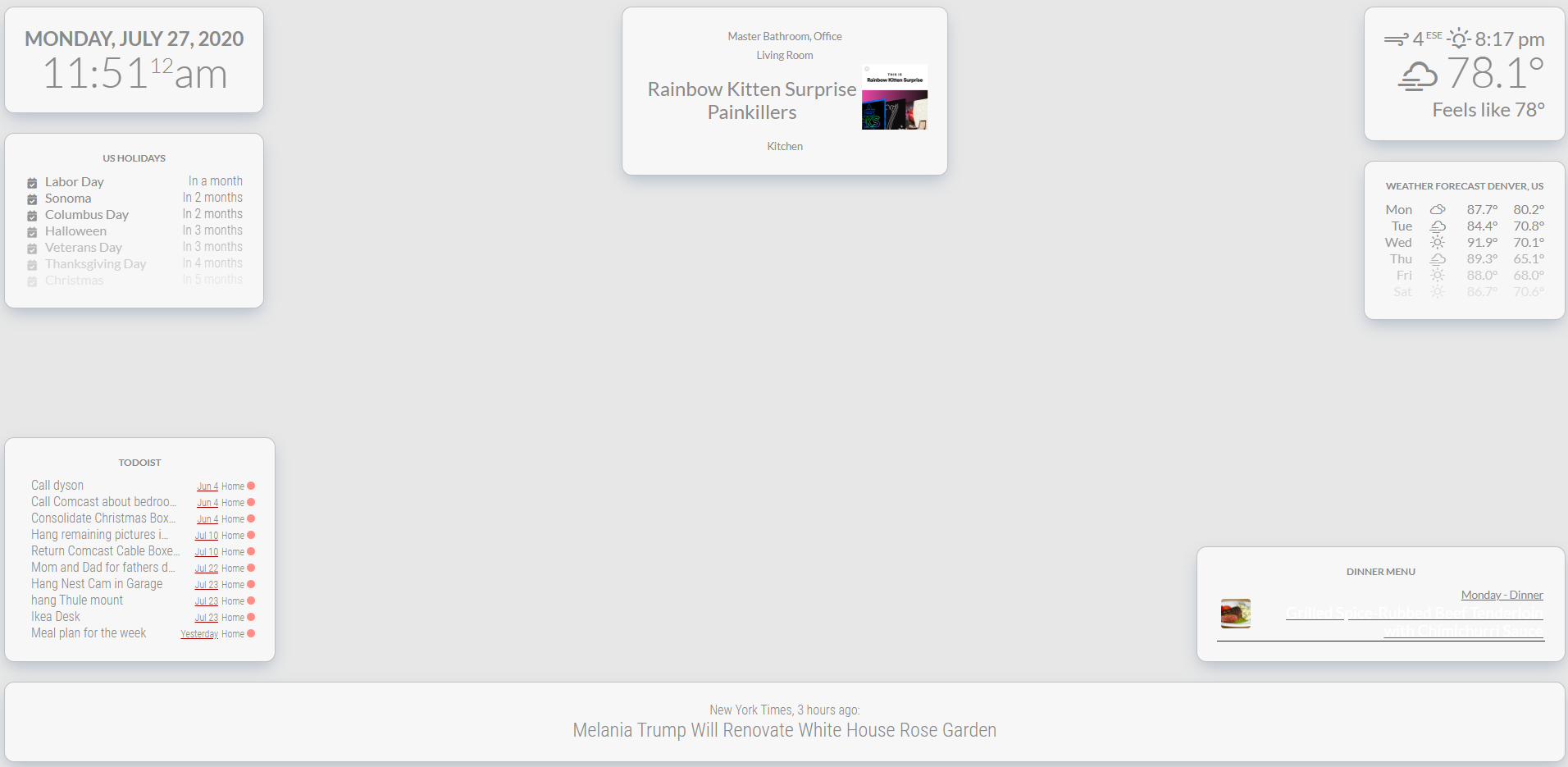
I have this mostly working and absolutely love it on our TV. 2 questions though.
- I am using MMM-PaprikaMenu to show our meal plan for the week and the font is the same color as the background. How can I fix that so it looks like the other?
- Is there a way with CSS to make the album art from MMM-sonos larger?
-
RE: Clientonly mode vs just a browser
I’m thinking about running client only configs on a couple pi zeros.
If I were to go with a browser only how would I configure it to launch and load full screen on start up?
-
RE: Raspberry Pi Client Only Build
Can anyone confirm that these instructions a valid? Also, could client only be run on a pi zero?
-
RE: new update/upgrade script, ready for testing
it ran with the following errors and magic mirror did not start.
install log being saved to /home/pi/MagicMirror/installers/install.log Hit:1 http://raspbian.raspberrypi.org/raspbian stretch InRelease Get:2 http://archive.raspberrypi.org/debian stretch InRelease [25.4 kB] Fetched 25.4 kB in 1s (22.4 kB/s) Reading package lists... Done Reading package lists... Done Building dependency tree Reading state information... Done build-essential is already the newest version (12.3). curl is already the newest version (7.52.1-5+deb9u9). git is already the newest version (1:2.11.0-3+deb9u4). unzip is already the newest version (6.0-21+deb9u2). wget is already the newest version (1.18-5+deb9u3). The following packages were automatically installed and are no longer required: coinor-libipopt1v5 libmumps-seq-4.10.0 libraw15 Use 'sudo apt autoremove' to remove them. 0 upgraded, 0 newly installed, 0 to remove and 0 not upgraded. (node:4945) [DEP0022] DeprecationWarning: os.tmpDir() is deprecated. Use os.tmpdir() instead. Reading package lists... Done Building dependency tree Reading state information... Done npm is already the newest version (1.4.21+ds-2). The following packages were automatically installed and are no longer required: coinor-libipopt1v5 libmumps-seq-4.10.0 libraw15 Use 'sudo apt autoremove' to remove them. 0 upgraded, 0 newly installed, 0 to remove and 0 not upgraded. (node:4979) [DEP0022] DeprecationWarning: os.tmpDir() is deprecated. Use os.tmpdir() instead. npm WARN package.json path-is-inside@1.0.2 No README data npm WARN package.json sorted-object@2.0.1 No README data /usr/local/bin/npm -> /usr/local/lib/node_modules/npm/bin/npm-cli.js /usr/local/bin/npx -> /usr/local/lib/node_modules/npm/bin/npx-cli.js npm WARN package.json config-chain@1.1.12 No license field. npm WARN package.json cyclist@0.2.2 No license field. npm WARN package.json json-schema@0.2.3 No license field. npm WARN package.json punycode@1.4.1 punycode is also the name of a node core module. npm WARN package.json qrcode-terminal@0.12.0 No license field. npm WARN package.json string_decoder@1.2.0 string_decoder is also the name of a node core module. npm@6.11.3 /usr/local/lib/node_modules/npm -
RE: new update/upgrade script, ready for testing
I am getting the below errors when trying to run your installer script, thoughts?
bash: line 18: $‘\r’: command not found
bash: line 20: $‘\r’: command not found
bash: line 27: $‘\r’: command not found
bash: -c: line 28: syntax error near unexpected token$'{\r'' 'ash: -c: line 28:trim() { -
RE: Help With 2.8 Install?
@sdetweil said in Help With 2.8 Install?:
bash -c “$(curl -sL https://www.dropbox.com/s/rlh710ng0zwv3vp/raspberry.sh?dl=0)”
I saw your other post. What is different between yours and the official one?
-
Help With 2.8 Install?
I had MagicMirror 2.7 installed and it was working fine. I hadn’t gotten very far along with it when I upgraded to 2.8 and it black screened on me. I know that there are some threads discussing this but I decided to wipe everything and start over.
I have a completely fresh and updated Raspbian install and when I run the installer script I get the following errors.
Installing dependencies ...
(node:4177) [DEP0022] DeprecationWarning: os.tmpDir() is deprecated. Use os.tmpdir() instead.
npm WARN deprecated time-grunt@2.0.0: Deprecated because Grunt is practically unmaintained. Move on to something better. This package will continue to work with Grunt v1, but it will not receive any updates.
npm WARN engine grunt-markdownlint@2.5.0: wanted: {"node":">=6","npm":">=3"} (current: {"node":"8.11.1","npm":"1.4.21"})
npm ERR! Error: Method Not Allowed
npm ERR!     at errorResponse (/usr/share/npm/lib/cache/add-named.js:260:10)
npm ERR!     at /usr/share/npm/lib/cache/add-named.js:120:12
npm ERR!     at saved (/usr/share/npm/node_modules/npm-registry-client/lib/get.js:167:7)
npm ERR!     at FSReqWrap.oncomplete (fs.js:135:15)
npm ERR! If you need help, you may report this *entire* log,
npm ERR! including the npm and node versions, at:
npm ERR!     <http://github.com/npm/npm/issues>

npm ERR! System Linux 4.19.57-v7+
npm ERR! command "/usr/bin/node" "/usr/bin/npm" "install"
npm ERR! cwd /root/MagicMirror
npm ERR! node -v v8.11.1
npm ERR! npm -v 1.4.21
npm ERR! code E405
|
> electron-chromedriver@1.8.0 install /root/MagicMirror/node_modules/spectron/node_modules/electron-chromedriver
> node ./download-chromedriver.js

module.js:549
    throw err;
    ^

Error: Cannot find module '/root/MagicMirror/node_modules/spectron/node_modules/electron-chromedriver/download-chromedriver.js'
    at Function.Module._resolveFilename (module.js:547:15)
    at Function.Module._load (module.js:474:25)
    at Function.Module.runMain (module.js:693:10)
    at startup (bootstrap_node.js:188:16)
    at bootstrap_node.js:609:3
npm WARN deprecated left-pad@1.3.0: use String.prototype.padStart()
npm WARN This failure might be due to the use of legacy binary "node"
npm WARN For further explanations, please read
/usr/share/doc/nodejs/README.Debian

npm ERR! error rolling back Error: ENOTEMPTY: directory not empty, rmdir '/root/MagicMirror/node_modules/spectron/node_modules/webdriverio/lib/commands'
npm ERR! error rolling back  spectron@3.8.0 { Error: ENOTEMPTY: directory not empty, rmdir '/root/MagicMirror/node_modules/spectron/node_modules/webdriverio/lib/commands'
npm ERR! error rolling back   errno: -39,
npm ERR! error rolling back   code: 'ENOTEMPTY',
npm ERR! error rolling back   syscall: 'rmdir',
npm ERR! error rolling back   path: '/root/MagicMirror/node_modules/spectron/node_modules/webdriverio/lib/commands' }
npm ERR! tar.unpack untar error /root/.npm/postcss-jsx/0.36.2/package.tgz
npm ERR! tar.unpack untar error /root/.npm/table/5.4.4/package.tgz
npm ERR! error rolling back Error: ENOTEMPTY: directory not empty, rmdir '/root/MagicMirror/node_modules/stylelint/node_modules/postcss/lib'
npm ERR! error rolling back  stylelint@10.1.0 { Error: ENOTEMPTY: directory not empty, rmdir '/root/MagicMirror/node_modules/stylelint/node_modules/postcss/lib'
npm ERR! error rolling back   errno: -39,
npm ERR! error rolling back   code: 'ENOTEMPTY',
npm ERR! error rolling back   syscall: 'rmdir',
npm ERR! error rolling back   path: '/root/MagicMirror/node_modules/stylelint/node_modules/postcss/lib' }
npm ERR! tar.unpack untar error /root/.npm/escape-string-regexp/1.0.5/package.tgz
npm ERR! tar.unpack untar error /root/.npm/supports-color/5.5.0/package.tgz
npm ERR! tar.unpack untar error /root/.npm/postcss-selector-parser/3.1.1/package.tgz
npm ERR! tar.unpack untar error /root/.npm/autoprefixer/9.6.1/package.tgz
npm ERR! error rolling back Error: ENOTEMPTY: directory not empty, rmdir '/root/MagicMirror/node_modules/stylelint/node_modules/chalk/node_modules/ansi-styles'
npm ERR! error rolling back  chalk@2.4.2 { Error: ENOTEMPTY: directory not empty, rmdir '/root/MagicMirror/node_modules/stylelint/node_modules/chalk/node_modules/ansi-styles'
npm ERR! error rolling back   errno: -39,
npm ERR! error rolling back   code: 'ENOTEMPTY',
npm ERR! error rolling back   syscall: 'rmdir',
npm ERR! error rolling back   path: '/root/MagicMirror/node_modules/stylelint/node_modules/chalk/node_modules/ansi-styles' }
npm ERR! tar.unpack untar error /root/.npm/remark-parse/6.0.3/package.tgz
npm ERR! error rolling back Error: ENOTEMPTY: directory not empty, rmdir '/root/MagicMirror/node_modules/stylelint/node_modules/postcss-markdown/node_modules/remark/node_modules/remark-stringify/lib/util'
npm ERR! error rolling back  remark@10.0.1 { Error: ENOTEMPTY: directory not empty, rmdir '/root/MagicMirror/node_modules/stylelint/node_modules/postcss-markdown/node_modules/remark/node_modules/remark-stringify/lib/util'
npm ERR! error rolling back   errno: -39,
npm ERR! error rolling back   code: 'ENOTEMPTY',
npm ERR! error rolling back   syscall: 'rmdir',
npm ERR! error rolling back   path: '/root/MagicMirror/node_modules/stylelint/node_modules/postcss-markdown/node_modules/remark/node_modules/remark-stringify/lib/util' }
npm ERR! tar.unpack untar error /root/.npm/remark-stringify/6.0.4/package.tgz
npm ERR!
npm ERR! Additional logging details can be found in:
npm ERR!     /root/MagicMirror/npm-debug.log
npm ERR! not ok code 0
Unable to install dependencies!
Any help with these errors or help installing 2.7 appreciated, Thanks.
-
RE: Blackscreen after update to v.2.8.0
I know that the last thing it says it is launching the app but a white screen with the developer console opens with the error “Dev tools was disconnected from the page…”
pi@raspberrypi:~/MagicMirror $ npm start dev > magicmirror@2.8.0 start /home/pi/MagicMirror > sh run-start.sh "dev" Starting MagicMirror: v2.8.0 Loading config ... Loading module helpers ... WARNING! Could not load config file. Starting with default configuration. Error found: Error: Cannot find module 'node_helper' Loading module helpers ... App threw an error during load Error: Cannot find module 'node_helper' at Module._resolveFilename (internal/modules/cjs/loader.js:602:15) at Function.Module._resolveFilename (/home/pi/MagicMirror/node_modules/electron/dist/resources/electron.asar/common/reset-search-paths.js:35:12) at Function.Module._load (internal/modules/cjs/loader.js:528:25) at Module.require (internal/modules/cjs/loader.js:658:17) at require (internal/modules/cjs/helpers.js:20:18) at Object.<anonymous> (/home/pi/MagicMirror/modules/MMM-Sonos/node_helper.js:7:18) at Object.<anonymous> (/home/pi/MagicMirror/modules/MMM-Sonos/node_helper.js:30:3) at Module._compile (internal/modules/cjs/loader.js:711:30) at Object.Module._extensions..js (internal/modules/cjs/loader.js:722:10) at Module.load (internal/modules/cjs/loader.js:620:32) Whoops! There was an uncaught exception... { Error: Cannot find module 'node_helper' at Module._resolveFilename (internal/modules/cjs/loader.js:602:15) at Function.Module._resolveFilename (/home/pi/MagicMirror/node_modules/electron/dist/resources/electron.asar/common/reset-search-paths.js:35:12) at Function.Module._load (internal/modules/cjs/loader.js:528:25) at Module.require (internal/modules/cjs/loader.js:658:17) at require (internal/modules/cjs/helpers.js:20:18) at Object.<anonymous> (/home/pi/MagicMirror/modules/MMM-Sonos/node_helper.js:7:18) at Object.<anonymous> (/home/pi/MagicMirror/modules/MMM-Sonos/node_helper.js:30:3) at Module._compile (internal/modules/cjs/loader.js:711:30) at Object.Module._extensions..js (internal/modules/cjs/loader.js:722:10) at Module.load (internal/modules/cjs/loader.js:620:32) code: 'MODULE_NOT_FOUND' } MagicMirror will not quit, but it might be a good idea to check why this happened. Maybe no internet connection? If you think this really is an issue, please open an issue on GitHub: https://github.com/MichMich/MagicMirror/issues Launching application. -
RE: Blackscreen after update to v.2.8.0
THe config file does not contain syntax errors.
pi@raspberrypi:~/MagicMirror $ npm run config:check

> magicmirror@2.8.0 config:check /home/pi/MagicMirror
> node tests/configs/check_config.js

Checking file...  /home/pi/MagicMirror/config/config.js
Your configuration file doesn't contain syntax errors :)
pi@raspberrypi:~/MagicMirror $