MagicMirror Forum
    • Recent
    • Tags
    • Unsolved
    • Solved
    • MagicMirror² Repository
    • Documentation
    • 3rd-Party-Modules
    • Donate
    • Discord
    • Register
    • Login
    1. Home
    2. qqqqqqqq
    3. Posts
    A New Chapter for MagicMirror: The Community Takes the Lead
    Read the statement by Michael Teeuw here.
    Q
    Offline
    • Profile
    • Following 0
    • Followers 0
    • Topics 8
    • Posts 41
    • Groups 0

    Posts

    Recent Best Controversial
    • RE: Has anyone got MMM-Remote-Control working on MM 2.11 ?

      I did the fix in the socketclient.js file. but here are two issues that i am still facing. Anyone knows, how to fix them?

      1. The icons aren’t still visible, like it was in earlier versions.
      2. The top buttons just showing “All” and not “Show all” or “Hide All”.
      posted in Troubleshooting
      Q
      qqqqqqqq
    • RE: MMM-Remote-Control (undefined error)

      Okay, thanks for your help. It is working now.
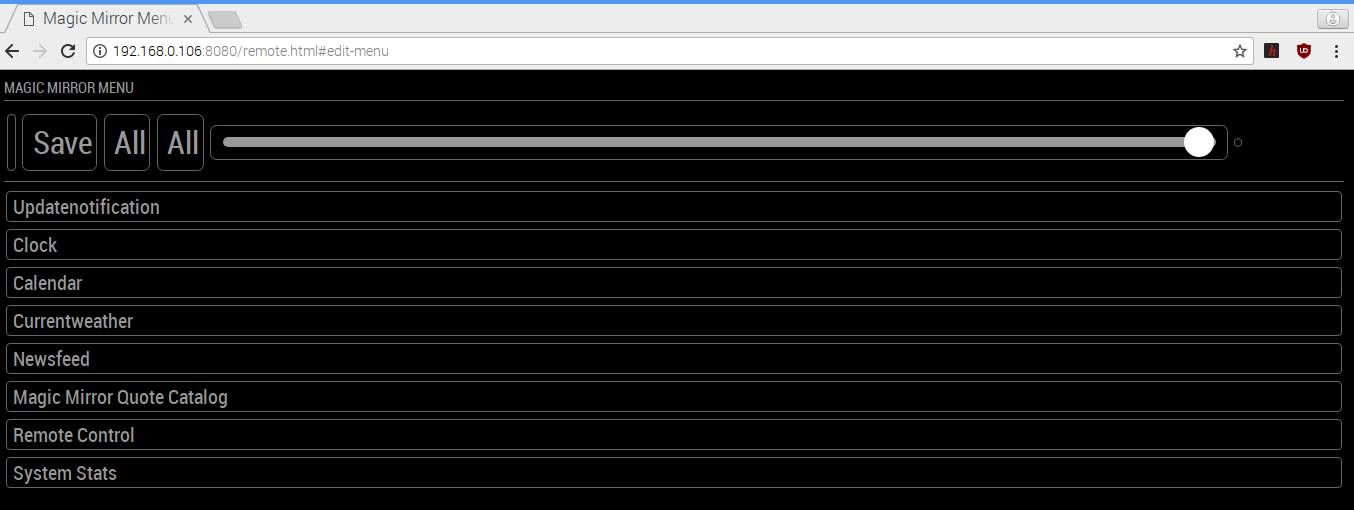
      There are still few issues, if you can help.

      1. The exact ip still isn’t shown on the magic mirror.
      2. The icons aren’t still visible, like it was in earlier versions.
      3. The top buttons just showing “All” and not “Show all” or “Hide All”.

      2020-06-17-110526_1360x768_scrot.jpg

      posted in Troubleshooting
      Q
      qqqqqqqq
    • MMM-Remote-Control (undefined error)

      I installed the MMM-Remote-Control module for the 3rd time. It gets installed successfully. But here are few problems that I face when MagicMirror Starts.

      1. Instead of showing me the pi’s local ip address, it is showing me the default “http://ip-of-your-mirror:8080/remote.html”. I am able to access it with another device in the same network, but why won’t it show me y ip?

      2. I am unable to see any icons on the magicmirror remote website and I see this error (file attached) 2020-06-16-182258_1360x768_scrot.jpg
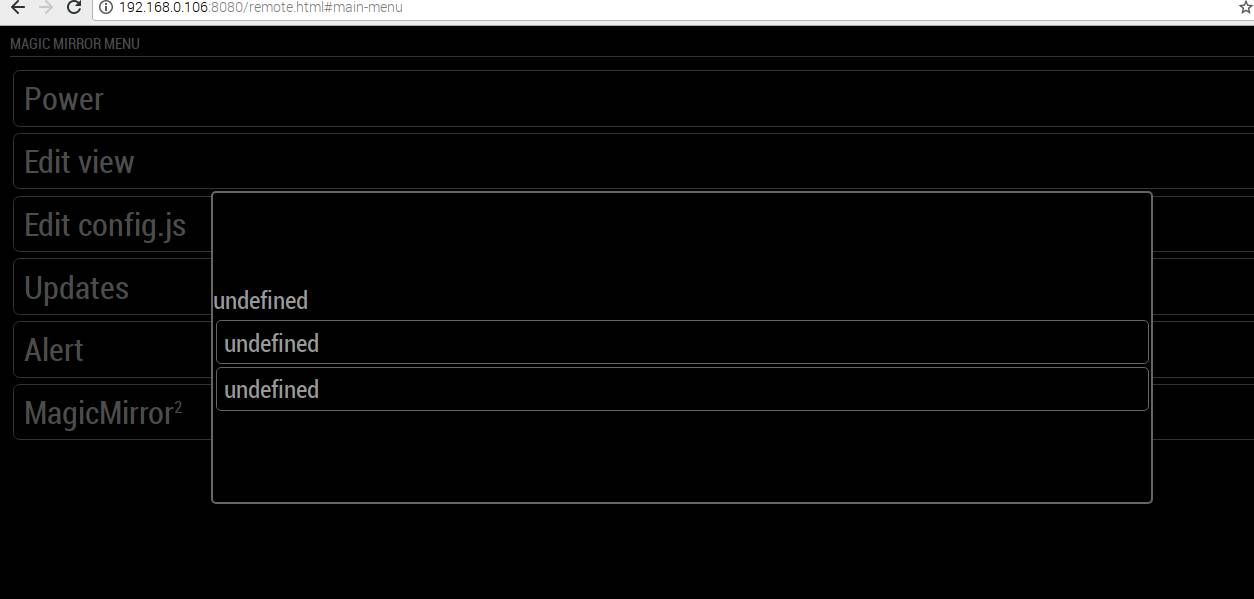
      Here is my congif file

      ar config = {
      	address: '0.0.0.0', // Address to listen on, can be:
      	                      // - "localhost", "127.0.0.1", "::1" to listen on loopback interface
      	                      // - another specific IPv4/6 to listen on a specific interface
      	                      // - "0.0.0.0", "::" to listen on any interface
      	                      // Default, when address config is left out or empty, is "localhost"
      	port: 8080,
      	ipWhitelist: ["127.0.0.1", "::ffff:127.0.0.1", "::1", "::ffff:192.168.0.1/120", "192.168.0.1/24"], // Set [] to allow all IP addresses
      	                                                       // or add a specific IPv4 of 192.168.1.5 :
      	                                                       // ["127.0.0.1", "::ffff:127.0.0.1", "::1", "::ffff:192.168.1.5"],
      	                                                       // or IPv4 range of 192.168.3.0 --> 192.168.3.15 use CIDR format :
      	                                                       // ["127.0.0.1", "::ffff:127.0.0.1", "::1", "::ffff:192.168.3.0/28"],
      
      {
      			module: "MMM-Remote-Control",
      			position: "top_right",
      			// you can hide this module afterwards from the remote control itself
      			config: {
      				customCommand: {},  // Optional, See "Using Custom Commands" below
      				customMenu: "custom_menu.json", // Optional, See "Custom Menu Items" below
      				showModuleApiMenu: true, // Optional, Enable the Module Controls menu
      				apiKey: "",         // Optional, See API/README.md for details
      		    }
      		},
      
      posted in Troubleshooting
      Q
      qqqqqqqq
    • RE: pm2 Error auto starting

      @sdetweil said in pm2 Error auto starting:

      @qqqqqqqq
      mm.sh is not marked executable at all or for the user trying to execute it…

      to make it executable for the user… but not any other user
      use the command

      chmod 766  /home/pi/mm.sh 
      

      to make it executable by ANY user (root/pi/…)
      do

      chmod +x /home/pi/mm.sh
      

      Thanks! Worked perfectly.
      But I wonder why it didn’t give mm.sh the permission when i used the command.

      chmod +x mm.sh
      
      posted in Troubleshooting
      Q
      qqqqqqqq
    • pm2 Error auto starting

      I’ve followed all the instructions mentioned here

      This is the error that I’m facing

      pi@raspberrypi:~ $ pm2 start mm.sh
      [PM2] Applying action restartProcessId on app [mm](ids: 0)
      [PM2] [mm](0) ✓
      [PM2] Process successfully started
      ┌──────┬────┬──────┬─────────┬─────┬─────┬────────┐
      │ Name │ id │ mode │ status  │ ↺   │ cpu │ memory │
      ├──────┼────┼──────┼─────────┼─────┼─────┼────────┤
      │ mm   │ 0  │ fork │ stopped │ 136 │ 0%  │ 0 B    │
      └──────┴────┴──────┴─────────┴─────┴─────┴────────┘
       Use `pm2 show <id|name>` to get more details about an app
      pi@raspberrypi:~ $ pm2 logs mm
      [TAILING] Tailing last 15 lines for [mm] process (change the value with --lines option)
      /home/pi/.pm2/logs/mm-out.log last 15 lines:
      /home/pi/.pm2/logs/mm-error.log last 15 lines:
      0|mm       | bash: /home/pi/mm.sh: Permission denied
      0|mm       | bash: /home/pi/mm.sh: Permission denied
      0|mm       | bash: /home/pi/mm.sh: Permission denied
      0|mm       | bash: /home/pi/mm.sh: Permission denied
      0|mm       | bash: /home/pi/mm.sh: Permission denied
      0|mm       | bash: /home/pi/mm.sh: Permission denied
      0|mm       | bash: /home/pi/mm.sh: Permission denied
      0|mm       | bash: /home/pi/mm.sh: Permission denied
      0|mm       | bash: /home/pi/mm.sh: Permission denied
      0|mm       | bash: /home/pi/mm.sh: Permission denied
      0|mm       | bash: /home/pi/mm.sh: Permission denied
      0|mm       | bash: /home/pi/mm.sh: Permission denied
      0|mm       | bash: /home/pi/mm.sh: Permission denied
      0|mm       | bash: /home/pi/mm.sh: Permission denied
      0|mm       | bash: /home/pi/mm.sh: Permission denied
      
      ^C
      pi@raspberrypi:~ $
      
      posted in Troubleshooting
      Q
      qqqqqqqq
    • RE: Error after updating MM

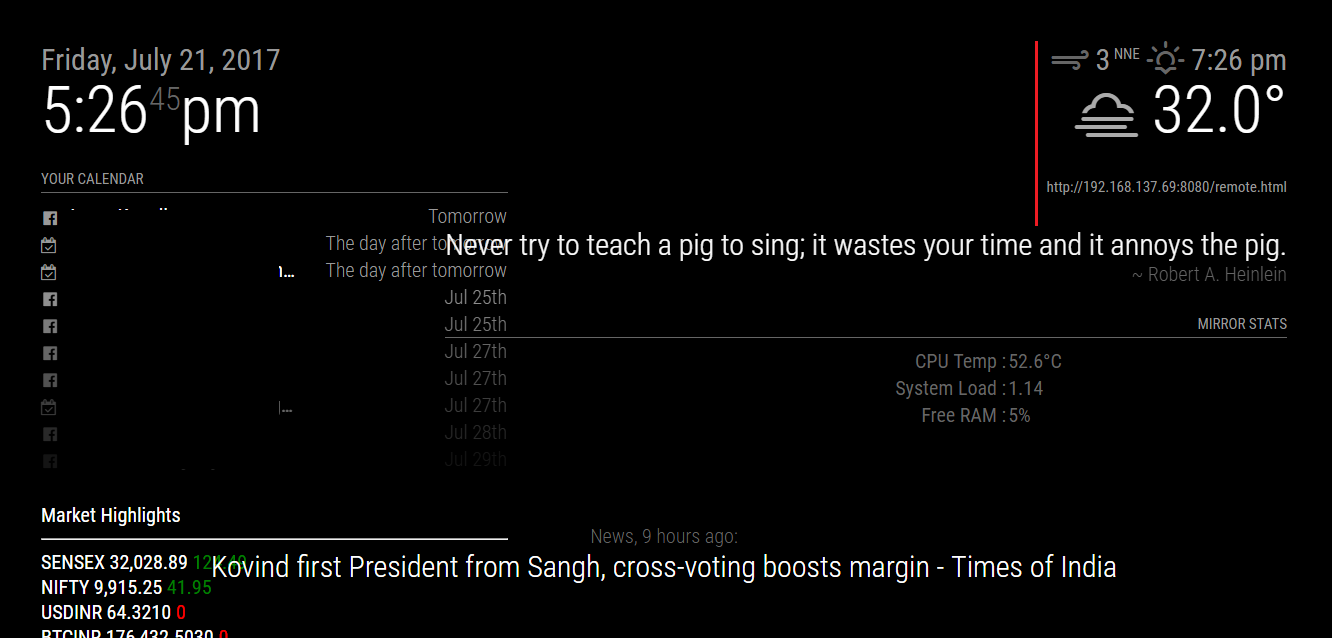
      0_1500638366059_Capture.PNG

      As you can see in the image,

      The quote module “never try to teach the pig…” should stay behind the red line, since it’s width was fixed, and was aligned to right.
      That, along with the Mirror stats has crossed the line (no pun intended).
      I want it to word wrap, but it is taking the width of the whole sentence. :(

      And, the Market highlights is taking up the width of the calendar module above it (which should not happen).

      posted in Troubleshooting
      Q
      qqqqqqqq
    • RE: Error after updating MM

      @Mykle1 said in Error after updating MM:

      @qqqqqqqq

      As far as your ipWhitelist is concerned, this seems to be working for others after the update (for all IP’s)

      var config = {
         ipWhitelist:  [],
         address: "0.0.0.0",
      }
      

      Thanks! This worked great (using ethernet cable, i’ll try using wifi and report back if i face any issues.)

      posted in Troubleshooting
      Q
      qqqqqqqq
    • Error after updating MM

      I recently updated my MagicMirror (after leaving the project unfinished 4-5 months ago), and the layout has changed a bit.
      Also, one of the module (MMM-remote-control) has stopped working.

      I’m unable to access the mirror using the remote module. The error I’m getting is “This device is not allowed to access your mirror”

      I tried this, but still the same error.

      @xer0design said in ipWhitelist HowTo:

      Not a fan of this addition; would have rathered it was something you enable rather than disable.

      For anyone wondering how to allow all ips, use:

      ipWhitelist: ["::fff:0.0.0.0/1", "::fff:128.0.0.0/2", "::fff:192.0.0.0/3", "::fff:224.0.0.0/4", "127.0.0.1", "::ffff:127.0.0.1", "::1"],
      
      1. My modules were aligned to right of the screen taking width of approx 250px, now they are covering 3/4 of the whole screen. :/
        all my css were untouched, am I supposed to change anything?

      Screenshots & more explanation in the post below.

      Also, can anyone help me reset the whole mirror/raspbian in case I want to start again? (without formatting the SD card)

      posted in Troubleshooting
      Q
      qqqqqqqq
    • RE: MagicMirror Autostart Error

      @yawns said in MagicMirror Autostart Error:

      EADDRINUSE means there is another process running on port 8080

      Please run netstat -lntu on your raspberry in terminal and check what processes are running on port 8080

      maybe the MMM-Remote Control ?
      I’ll try the command when I get home.

      Btw, what does this mean? Is there something wrong?

      ERROR! Could not find main module js file.
      
      posted in Troubleshooting
      Q
      qqqqqqqq
    • RE: MagicMirror Autostart Error

      Any help on this?

      posted in Troubleshooting
      Q
      qqqqqqqq
    • RE: MagicMirror Autostart Error

      Also, I tried starting it using npm start; the mirror worked fine, but this is the error.

      pi@raspberrypi:~/MagicMirror $ npm start
      
      > magicmirror@2.1.0 start /home/pi/MagicMirror
      > electron js/electron.js
      
      Xlib:  extension "RANDR" missing on display ":1.0".
      Starting MagicMirror: v2.1.0
      Loading config ...
      Loading module helpers ...
      No helper found for module: alert.
      Initializing new module helper ...
      No helper found for module: clock.
      Initializing new module helper ...
      No helper found for module: compliments.
      No helper found for module: currentweather.
      Initializing new module helper ...
      Initializing new module helper ...
      No helper found for module: random_quotes.
      Initializing new module helper ...
      Initializing new module helper ...
      All module helpers loaded.
      Starting server op port 8080 ... 
      Server started ...
      Connecting socket for: updatenotification
      Connecting socket for: calendar
      Starting node helper for: calendar
      Connecting socket for: newsfeed
      Starting module: newsfeed
      Connecting socket for: MMM-Remote-Control
      Starting node helper for: MMM-Remote-Control
      Connecting socket for: MMM-SystemStats
      Connecting socket for: stocks
      stocks helper started ...
      Sockets connected & modules started ...
      Whoops! There was an uncaught exception...
      { Error: listen EADDRINUSE :::8080
          at Object.exports._errnoException (util.js:1026:11)
          at exports._exceptionWithHostPort (util.js:1049:20)
          at Server._listen2 (net.js:1253:14)
          at listen (net.js:1289:10)
          at net.js:1399:9
          at _combinedTickCallback (internal/process/next_tick.js:77:11)
          at process._tickCallback (internal/process/next_tick.js:98:9)
          at Module.runMain (module.js:592:11)
          at run (bootstrap_node.js:402:7)
          at startup (bootstrap_node.js:157:9)
        code: 'EADDRINUSE',
        errno: 'EADDRINUSE',
        syscall: 'listen',
        address: '::',
        port: 8080 }
      MagicMirror will not quit, but it might be a good idea to check why this happened. Maybe no internet connection?
      If you think this really is an issue, please open an issue on GitHub: https://github.com/MichMich/MagicMirror/issues
      Xlib:  extension "XInputExtension" missing on display ":1.0".
      Xlib:  extension "RANDR" missing on display ":1.0".
      Launching application.
      Xlib:  extension "XInputExtension" missing on display ":1.0".
      Xlib:  extension "XInputExtension" missing on display ":1.0".
      ERROR! Could not find main module js file.
      ERROR! Could not find main module js file.


      Inspite of this, the mirror showed me the latest news, but not the calendar. :/

      posted in Troubleshooting
      Q
      qqqqqqqq
    • MagicMirror Autostart Error

      I’m trying to make MagicMirror Autostart at boot, by following the guide on github using pm2.
      I worked once, but now I get this error.

      pi@raspberrypi:~ $ pm2 start mm
      [PM2] Applying action restartProcessId on app [mm](ids: 0)
      [PM2] [mm](0) ✓
      [PM2] Process successfully started
      ┌──────┬──────┬────────┬───┬─────┬──────────┐
      │ Name │ mode │ status │ ↺ │ cpu │ memory   │
      ├──────┼──────┼────────┼───┼─────┼──────────┤
      │ mm   │ fork │ online │ 1 │ 11% │ 2.3 MB   │
      └──────┴──────┴────────┴───┴─────┴──────────┘
       Use `pm2 show ` to get more details about an app
      pi@raspberrypi:~ $ pm2 logs mm
      [TAILING] Tailing last 10 lines for [mm] process (change the value with --lines option)
      /home/pi/.pm2/logs/mm-error-0.log last 10 lines:
      0|mm       | ERROR! Could not find main module js file.
      0|mm       | [1713:0223/004533:FATAL:bus.cc(1204)] D-Bus connection was disconnected. Aborting.
      0|mm       | #0 0x0000012a3bb0 
      0|mm       | #1 0x0000012b4406 
      0|mm       | #2 0x00000120fd0a 
      0|mm       | 
      0|mm       | ERROR! Could not find main module js file.
      0|mm       | ERROR! Could not find main module js file.
      0|mm       | ERROR! Could not find main module js file.
      0|mm       | ERROR! Could not find main module js file.
      
      /home/pi/.pm2/logs/mm-out-0.log last 10 lines:
      0|mm       | Connecting socket for: MMM-SystemStats
      0|mm       | Connecting socket for: stocks
      0|mm       | stocks helper started ...
      0|mm       | Sockets connected & modules started ...
      0|mm       | Launching application.
      0|mm       | Create new calendar fetcher for url: http://calendar.google.com/calendar/ical/xxxxxxxxxxxxxxxxxxx/basic.ics - Interval: 300000
      0|mm       | Create new calendar fetcher for url: http://calendar.google.com/calendar/ical/xxxxxxxxxxxxxxx/basic.ics - Interval: 300000
      0|mm       | Create new calendar fetcher for url: http://localhost:8080/modules/Cals/x.ics - Interval: 300000
      0|mm       | Create new calendar fetcher for url: http://calendar.google.com/calendar/ical/xxxxxxxxxxxxxxxxxxxxxx/public/basic.ics - Interval: 300000
      0|mm       | Create new news fetcher for url: https://news.google.com/news?cf=all&hl=en&pz=1&ned=in&output=rss - Interval: 300000
      
      [STREAMING] Now streaming realtime logs for [mm] process
      
      
      posted in Troubleshooting
      Q
      qqqqqqqq
    • RE: Change Relative to Absolute in Holidays

      @johnnyboy

      I don’t know if there is a difference but try both.
      But like you must have read in the other thread, it doesn’t get absolutely absolute.
      It will still display an event 2 days from now as “The day after tomorrow” & next day’s event as “tomorrow”.

      fadepoint is to define, from where the events list will start to face out.
      “//” is used to mark start of a comment made by the programmer .

      posted in Troubleshooting
      Q
      qqqqqqqq
    • RE: Change Relative to Absolute in Holidays

      @johnnyboy, check this thread.

      And, this comment in specific, since I had the same problem.

      posted in Troubleshooting
      Q
      qqqqqqqq
    • RE: Moving a fixed module

      @johnnyboy said in Moving a fixed module:

      … move the Weather Module down a touch?

      Sorry, I don’t understand. Can you upload a screenshot, that would be helpful?

      posted in Troubleshooting
      Q
      qqqqqqqq
    • RE: Moving a fixed module

      @johnnyboy

      Yes. If two or modules have the same position ( Eg. ‘top_left’), they will be displayed in the order of their entry in the config file.

      posted in Troubleshooting
      Q
      qqqqqqqq
    • pm2 error

      I tried to autostart MM2 using pm2 & it actually even worked once (from here ).

      But Now it doesn’t even start.

      here is the data from the log file.

      [STREAMING] Now streaming realtime logs for [mm] process
      0|mm       | Initializing new module helper ...
      0|mm       | No helper found for module: compliments.
      0|mm       | No helper found for module: currentweather.
      0|mm       | Initializing new module helper ...
      0|mm       | Initializing new module helper ...
      0|mm       | No helper found for module: random_quotes.
      0|mm       | Initializing new module helper ...
      0|mm       | Initializing new module helper ...
      0|mm       | All module helpers loaded.
      0|mm       | Starting server op port 8080 ... 
      0|mm       | Server started ...
      0|mm       | Connecting socket for: updatenotification
      0|mm       | Connecting socket for: calendar
      0|mm       | Starting node helper for: calendar
      0|mm       | Connecting socket for: newsfeed
      0|mm       | Starting module: newsfeed
      0|mm       | Connecting socket for: MMM-Remote-Control
      0|mm       | Starting node helper for: MMM-Remote-Control
      0|mm       | Connecting socket for: MMM-SystemStats
      0|mm       | Connecting socket for: stocks
      0|mm       | stocks helper started ...
      0|mm       | Sockets connected & modules started ...
      0|mm       | Xlib:  extension "XInputExtension" missing on display ":1.0".
      0|mm       | Xlib:  extension "RANDR" missing on display ":1.0".
      0|mm       | Launching application.
      0|mm       | Xlib:  extension "XInputExtension" missing on display ":1.0".
      0|mm       | Xlib:  extension "XInputExtension" missing on display ":1.0".
      0|mm       | Xlib:  extension "XInputExtension" missing on display ":1.0".
      0|mm       | ERROR! Could not find main module js file.
      0|mm       | ERROR! Could not find main module js file.
      0|mm       | Create new calendar fetcher for url: http://calendar.google.com/calendar/ical/....ics - Interval: 300000
      0|mm       | Create new calendar fetcher for url: http://calendar.google.com/calendar/ical/....ics - Interval: 300000
      0|mm       | Create new calendar fetcher for url: http://localhost:8080/modules/Cals/FbBirthday.ics - Interval: 300000
      0|mm       | Create new calendar fetcher for url: http://calendar.google.com/calendar/ical/e....ics - Interval: 300000
      0|mm       | Create new news fetcher for url: https://news.google.com/news?cf=all&hl=en&pz=1&ned=in&output=rss - Interval: 300000


      Something to do with this perhaps?
      0|mm | ERROR! Could not find main module js file.

      posted in Troubleshooting
      Q
      qqqqqqqq
    • RE: Modules to display Stock (Capital Stock)

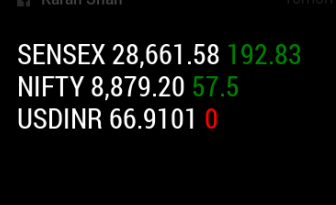
      This is how they look right now.

      0_1487601867939_stock.png

      Can someone please help me change the font style/size, since they look a little big compared to the others.

      how do I change the brightness of a specific module?

      I know, both has to be done using the custom.css but how?

      posted in Troubleshooting
      Q
      qqqqqqqq
    • RE: Random Quotes

      @geeflaxx said in Random Quotes:

      how i can config the data so, that the autor is always the same ?

      or
      do i need after a quote add the autor with “~” ?

      Too late, but here it goes.

      You can add all the quotes from the same author in a category (like motivational or life) and change the config file to show quotes from that category only.

      It’s upto you to add “~”, but if you do, they will follow different styles as set by the developer.

      @KirAsh4 , I’ve noticed that the selection of quotes isn’t true random. Every time I start MM, I get the same quotes.

      posted in Utilities
      Q
      qqqqqqqq
    • RE: Modules to display Stock (Capital Stock)

      @Yurick

      3rd works for me too. And, thanks for your help, I’ve added currency in in too.

      I got it to display it as static list by modifying the .js file as below. I’ve modified the line 26 from this

              var wrapper = document.createElement("marquee");
      

      to this

              var wrapper = document.createElement("div");
      

      And line 62

      from

                          divider.innerHTML = '  •  ';
      

      to

                          divider.innerHTML = '<br>';
      
      posted in Troubleshooting
      Q
      qqqqqqqq
    • 1 / 1