@Mitchfarino I love that it’s so small and doesn’t bulk up the mirror. It picks my voice throughout the room and it works very well (at least with the module I am working with). I am very happy with it and I don’t remember any false positives in regards to voice recognition till now. Also note that it is buried very deep inside the frame.
R
Offline
A New Chapter for MagicMirror: The Community Takes the Lead
Read the statement by Michael Teeuw here.
Read the statement by Michael Teeuw here.
Posts
-
RE: USB Microphone
-
RE: USB Microphone
@Mitchfarino
This is what I use: https://www.amazon.com/gp/product/B00IR8R7WQ/ref=oh_aui_detailpage_o00_s00?ie=UTF8&psc=1It works absolutely fantastic.
-
RE: Preference Page
@Mitchfarino I thought that as well, hence I posted because I wanted to let OP know that I could incorporate this into the voice module and hear his thoughts on whether that will help.
Thank you @darkeagl105! As far as the page goes, from my side, I can show a settings page when activated using voice commands that will display the settings and can be changed. -
RE: Voice/motion control
Thank you @plumcraft and @tyho!
It is a bit of both. The module developer incorporating voice commands for his module will add a list of commands that he needs. For instance, ‘COUNT UNREAD; HOW MANY EMAILS?’. A dictionary is then generated automatically by the voice command module. The mirror will only understand count, unread, count unread, how many emails, emails (un-important words are ignored).
@strawberry-3-141 and I have both been working on the module, and I would like to take his suggestion of adding regex matching as well. -
RE: Preference Page
@KirAsh4 said in Preference Page:
@ronny3050, please don’t cross-post your messages. Each category will reset and display at the top of the Recent page. Having the same thing posted multiple times will just become noise across all the categories.
I apologize for that. Sorry for any inconvenience!
-
RE: Preference Page
@strawberry-3-141 and I are working on a voice command module that includes default voice commands. Among the default ones, I plan to add changing mirror settings option that can be controlled through voice. It can include most of what you requested. Here’s a video showing the current progress.
-
RE: Voice/motion control
Here’s a video showing the current status of the voice command module. I am eager to hear your thoughts on it.
Current Features:
- Extremely simple for mirror module developers to add their own voice commands for their modules.
- Default voice commands: hide or show any module
- Multiple commands mapped to one voice command. (for eg. “How old are you?”, “What’s your age?” corresponds to “Age”)
Upcoming Features:
- More default voice commands: change mirror settings; current time, date and weather; jokes; list all widgets; help;
Thank you!
-
RE: config not working.
For future reference, paste your code first on JSHint. It will tell you if you have any errors.
-
RE: Auto-disable module
@KirAsh4’s solution is much neater and elegant. He never ceases to amaze me! :D
-
RE: Auto-disable module
@yo-less No problem! If you have any issues, I’ll be glad to answer them on chat :)
-
RE: Auto-disable module
First send a notification from your main module.js to node_helper.js to ask it to look for the time of day.
Something like in your main module.js:start: function(){ this.sendSocketNotification('LookForTime'); }In your node_helper.js, you could check for the time. Once you see that it is night, you can send a socket notification to your main module.js file like:
socketNotificationReceived: function(notification, payload){
         if(notification === 'LookForTime'){
                  // Keep checking for time. Once night,
                 if(night){
                            this.sendSocketNotification('NIGHT');
                 }
       }
}
In your main module.js:
socketNotificationReceived: function(notification, payload){ if(notification === 'NIGHT'){ this.hide(); } } -
RE: Pushbullet
Finished with the module. https://forum.magicmirror.builders/topic/477/phone-notifications
Please let me know if this solves your request!
-
Phone Notifications
Module that displays and alerts mirror users on new phone notifications.
Please let me know if there are any additional features or improvements that are required.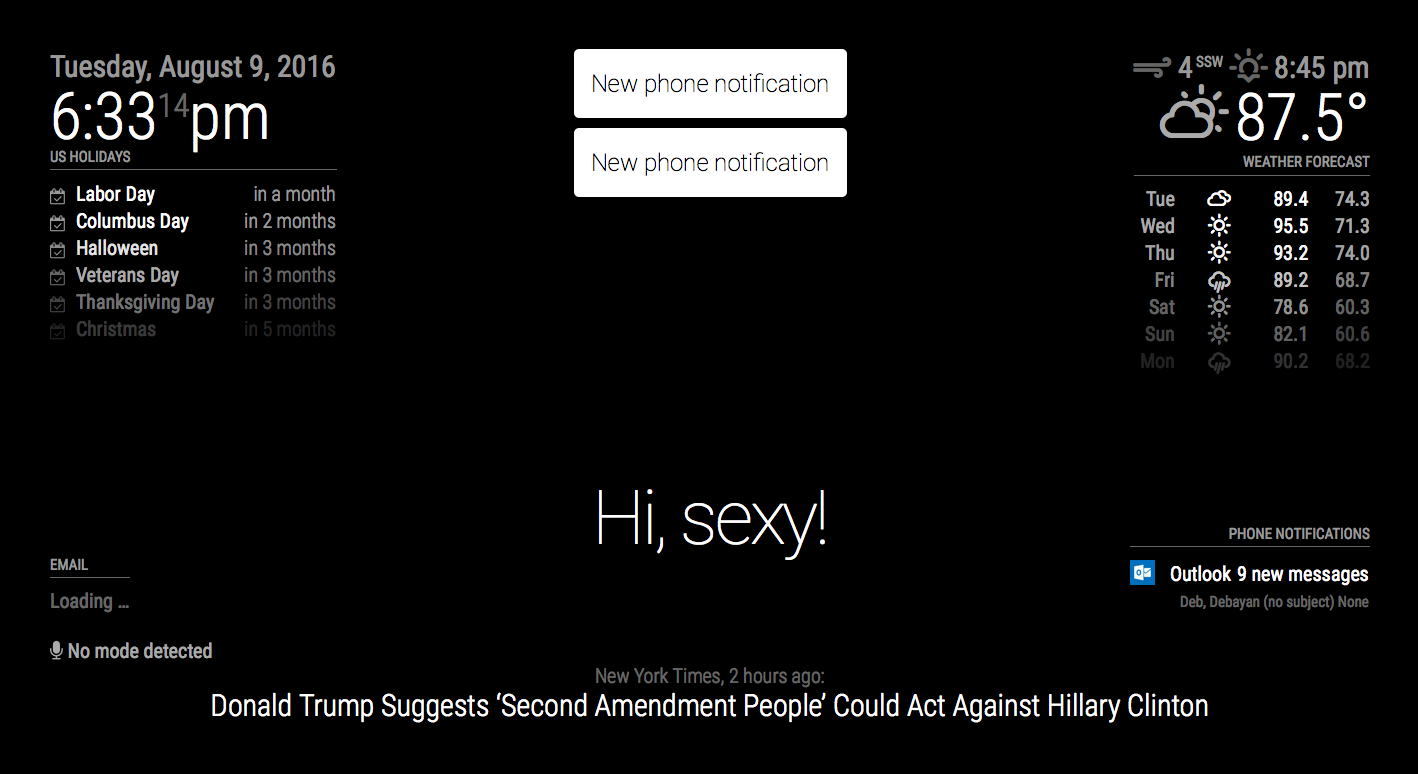
Features:
- Displays current and incoming notification using Pushbullet
- Alerts using alert module

- Notification count

- Full notification display capabilities

- Fully customizable
-
RE: Email
@pietrodona rebooting helps. The issue could’ve been some IMAP error. This happens because IMAP is super sensitive and errors without reason.
Hopefully, all is well now.
-
RE: Asterisk - Call log and active Call
@luvien I have a pushbullet module coming up in a week (due to traveling). This gives you live phone updates for any notification and includes active incoming call notification. Hoping that would help.
-
RE: Email
@Neokamikaze Thanks for your kind words!
It is definitely possible. Unfortunately, I am traveling and don’t have my mirror with me. I will add it in a week and update you.Thanks once more :D
-
RE: Blank black screen | Noob
@MichMich I think this has something to do with electron? Because everything runs fine on server only.
-
RE: Blank black screen | Noob
@Arod192 I can confirm this is a bug. Hardcoding ‘en’ in config.js causes black-screen, however, leaving it as ’ ’ or node serveronly runs fine.
-
RE: This might be a daft question, but...
@Mitchfarino yes you do get intellisense, which helps when you are requiring core node modules to easily find out the function you’re looking for.
You should always develop on your local machine before deploying it to the pi. This way your code is generic and you won’t have memory issues. Not to mention, there’s no lag if you’re sshing into pi and can see results straightaway without having to restart mm all the time.