@rkorell the header: property goes outside the modules config section, as it is a MagicMirror owned property
The module does not provide a direct config property for that
@rkorell the header: property goes outside the modules config section, as it is a MagicMirror owned property
The module does not provide a direct config property for that
@wildbi111 they always go in the modules folder
You need to get inside the docker container
docker exec …..
@British_Kiwi I do not know how without sending a notification
@British_Kiwi thanks for the config.
I see you have MMM-Keyboard in fullscreen-above
That means it should get all the user interactions keystroke and button clicks.
Can you try disabling that module , add disabled:true
Just a test
There are parameter changes from my older fork and the current version on MMM-pages
@British_Kiwi can you show us the config, xxx out and private details
(?i)Spotify\s*$
this didn’t work for my tests, find any title with the word Spotify in it, and change it to only Music
this works (I use https://regex101.com/ to test my regex’s)
search: '^.*\b(Spotify)\b.*$', replace:'Music'
on the other… do you know that the space looking thing between is actually presented as a space?
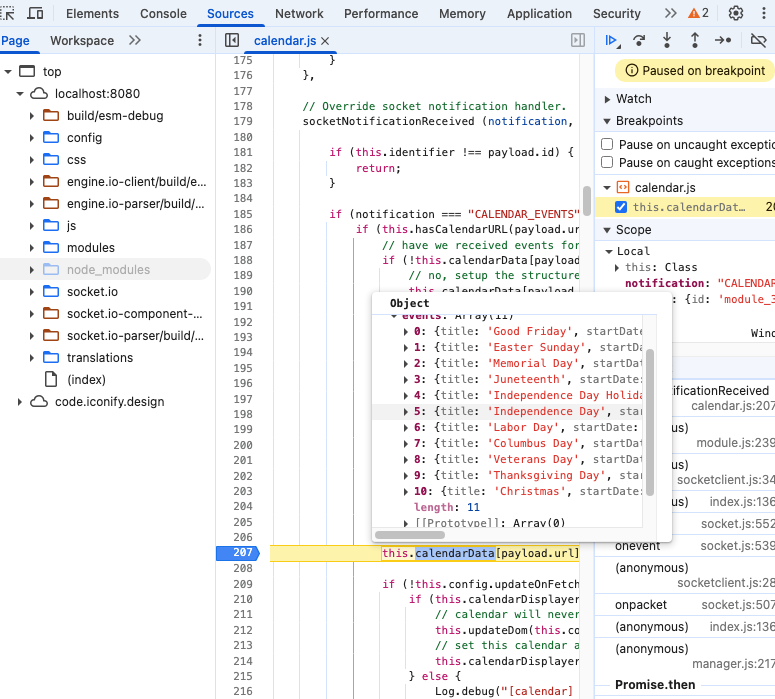
open the developers window, ctrl-shift-i, go to the sources tab, navigate the left pane
to the modules/default/calendar, select calendar.js
put a stop on the line in the listed in this image (click the line number),
press ctrl-r to refresh the page,
code will stop there, move the mouse over the word calendarData
it will popup the box, mouse up to click the list,
and it will expand, scroll to find the event, and click to expand it to look at the text…
@daportelli I won’t be able to get to looking at this til late today
Can you use an online regex tester on you regex and data
@atwist do this
pm2 status
pm2 info xxxx
where xxxx is the name/number on the row that contains the MagicMirror app
see the line in the output (example from my Mac, )
script path │ /Users/sam/MagicMirror/installers/mm.sh
is it pointing to the correct sh file??
@daportelli can you show me the calendar module config, xxx out any cal urls
pm2 status
Then
pm2 start xxx
Where xxx is the name or number of the row in the status output
Then pm2 save
And the sudo reboot
@atwist try adding these two lines in front of the
export DISPLAY=:0
export ELECTRON_OZONE_PLATFORM_HINT=x11
npm start line
And try the
./MagicMirror.sh again.
May need to reboot before retry
@atwist you are on the pi directly, right? Not via ssh or vnc
@com1cedric I think this is relative/setrelative. See the doc on this settings
@videogame95 said in pages:
i add pages but my calendar stopped loading and so did my weather module ? I’ve add my config to a post troubleshoot .
when using pages, ALL modules you want displayed MUST be added to the pages config thru its module name, OR the classes: property added,
else the module will NOT be displayed…
@videogame95 I don’t understand
at the top of MMM-pages config there is the modules list
its an array [] (list of logical pages) of arrays [] (list of modules names on page)
or alternately using the class approach
its an array [] (list of logical pages) of arrays (with single entry of page name)
    {
        module: "MMM-pages",
        config: {
            timings: {
                default: 20000,      // rotate every 20 seconds
                2: 30000,            // page 2 rotates every 30 seconds
                "admin": 30000       // admin hidden page auto-returns after 30 seconds
            },
            modules: [
                ["page0"],           // class name for page 0
                ["page1"],           // class name for page 1
                ["page2"],           // class name for page 2
            ],
            fixed: ["on_all_pages"],
            hiddenPages: {
                "screenSaver": ["screensaver_page"],
                "admin": ["admin_page"],
            }
        }
    },
then in the class approach, you add
classes:"page0 page1", // space separated list of page names
after the module:“weather”, // for example
(on every module you want displayed)
the module provides page rotation, using the
timings: {
                default: 5000,               // rotate every 5 seconds  // all pages rotate every 5 seconds
                0: 20000,                    // page 0 rotates every 20 seconds // except page 0 hold for 20
                "admin": 30000               // admin hidden page auto-returns after 30 seconds
            },
every module provides a README.md file, (what is shown on github landing page for module), that is the module DOCUMENTATION
@magicmirror6043 because it’s past the time for those stops?
What time was the MagicMirror screenshot?
@Rags there is a lot of content…
my MMM-Config tries to remove the config.js editing , and put all the config in one place.
and lately adding modules from the 3rd party list in one place.
I’m not UI guy, so its not fancy/modern UI. (but customizable some via css)
as I’m sure you found, the consistency of the MM UI depends on the combined UI experience of all the module developers. quite a challenge. and the see thruness to allow for separate background content poses some unique challenges…
but still, its amazing how fast one can get content up on display, with very little traditional developer skill.