@zzaidi148 said in MMM-RandomQuranAyah:
@slametps it just said to recheck your config
Can you post your whole config? It seems your config is the problem.
 S
Offline
S
Offline
@zzaidi148 said in MMM-RandomQuranAyah:
@slametps it just said to recheck your config
Can you post your whole config? It seems your config is the problem.
@zzaidi148 said in MMM-RandomQuranAyah:
@slametps I’m a noob at this but this is the log on my terminal:
> magicmirror@2.1.3 start /home/pi/MagicMirror
> sh run-start.sh

Starting MagicMirror: v2.1.3
Loading config ...
WARNING! Could not validate config file. Please correct syntax errors. Starting with default configuration.
Loading module helpers ...
Initializing new module helper ...
Module helper loaded: updatenotification
No helper found for module: helloworld.
All module helpers loaded.
Starting server on port 8080 ...
Server started ...
Connecting socket for: updatenotification
Sockets connected & modules started ...
Launching application.
What you got on the screen? Pls post the screen capture here.
@zzaidi148 said in MMM-RandomQuranAyah:
@slametps Tried that but still didn’t load up magic mirror
Can you post the pm2 or MM log?
@zzaidi148 said in MMM-RandomQuranAyah:
@slametps I tried setting up this module put it doesnt allow my magic mirror to work. I downloaded the module, put the config in my config.js and got a failed config. I put it in jshint and found nothing. Below is my config. Please help. Thank You.
modules: [
		{
		module: 'MMM-RandomQuranAyah',
		position: 'top_bar',
		config: {
			apiVersion: '1.0' /
			showArabic: true,
			showTranslation: true,
			surahArabicName:false,
			translationLang:'id.indonesian',
			updateInterval: 3600 * 1000,
		}
		},
		{
			module: "alert",
		},

		{
			module: "updatenotification",
			position: "top_bar",
		},

		{
			module: "clock",
			position: "top_left",
		},
You should remove update_notification module (or change the location) because it override the same location.
@kvicksson said in After update, Calendar shows infinite number of events.:
Everything works after setting maximumEntries after each URL. I don’t like it though because it doesn’t show the 10 upcoming items due to where the items are in time. But guess I have to live with it :)
IMHO, It will be better if there is still a global config limiting total closest event will be displayed.
@axellejamous said in How to MANUALLY install MM on your Pi. For absolute beginners.:
@slametps Yeah had to do the same! But I downgraded to 1.7.9, so I’ll change it to 1.6.10 now thank you! :)
Glad to hear that. I just realize an issue with language translations is not working in default modules such as current-weather. Is anyone here experience same issue?
@axellejamous said in How to MANUALLY install MM on your Pi. For absolute beginners.:
@slametps If you run it with
npm start, does it work for you?
For me that only solved my issue if I run it withnode serveronly.
Now there’s 0 errors so I have no clue why my screen still shows up black with npm start.
Yap, it works like a charm now (also after I downgraded electron to 1.6.10 (1.7.9 consumes excessive CPU).
Firstly, I got the same issue. After I did what I mentioned earlier, it is OK now.
@orayoflighto said in After update, Calendar shows infinite number of events.:
You didn’t miss it. It is a change with the most recent update.
Default value for maximumEntries is 10. How can the calendar module display infinite number of events because not setting maximumEntries option?
@axellejamous said in How to MANUALLY install MM on your Pi. For absolute beginners.:
@slametps glad you found it! you basically had the same issue as me except I didn’t have the fonts one. It’s really odd.
@axellejamous You should try:
$ cd {your_magicmirror_folder}/fonts
$ npm install
it will install required fonts.
@slametps said in How to MANUALLY install MM on your Pi. For absolute beginners.:
@Mykle1 said in How to MANUALLY install MM on your Pi. For absolute beginners.:
You didn’t answer my question.
You didn’t try my suggestion.
You did the one thing that I said I didn’t know was your issue.Shrug
Yap, I install MM manually refers to documentation you wrote (and backed up current running MM 2.1.0).
config. js I mentioned earlier, is a fresh copy from config.js.sample in config folder.
I didnpm-installin MM folder, but not in vendor yet. I’ll try later when I have access to my MM.
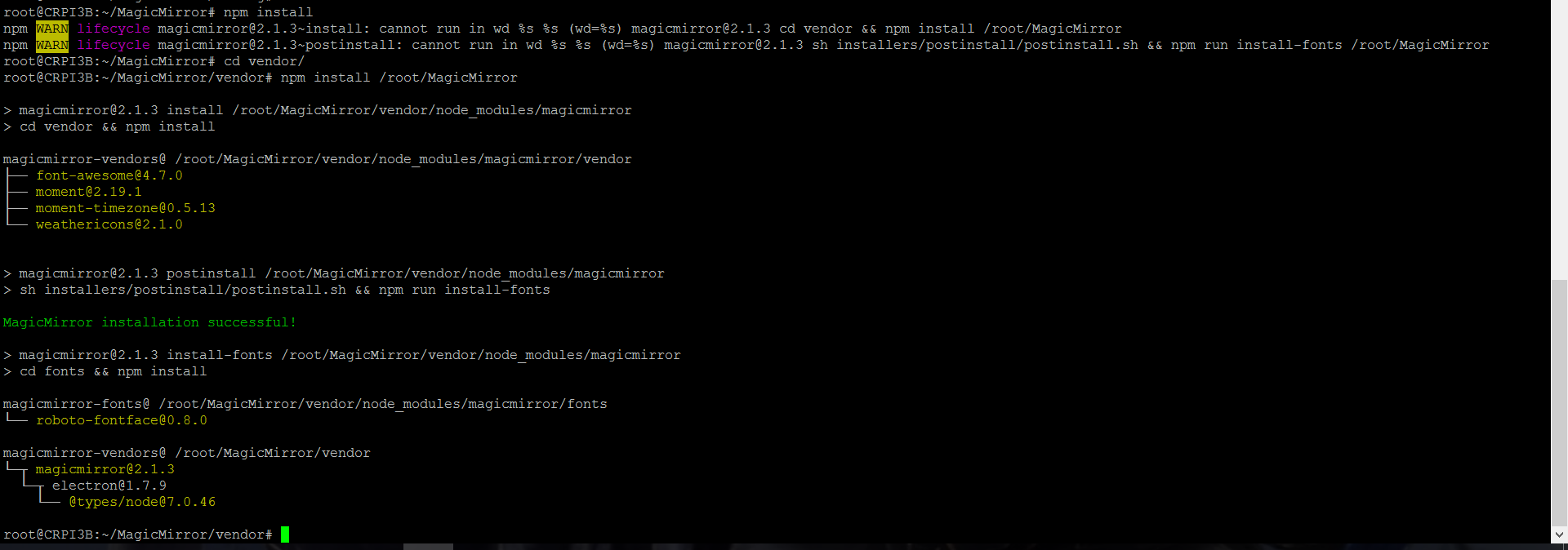
Finally, MM 2.1.3 was installed successfully by executing:
cd /root/MagicMirror/vendor
npm install /root/MagicMirror
cd /root/MagicMirror/fonts
npm install
@Mykle1 said in How to MANUALLY install MM on your Pi. For absolute beginners.:
You didn’t answer my question.
You didn’t try my suggestion.
You did the one thing that I said I didn’t know was your issue.Shrug
Yap, I install MM manually refers to documentation you wrote (and backed up current running MM 2.1.0).
config. js I mentioned earlier, is a fresh copy from config.js.sample in config folder.
I did npm-install in MM folder, but not in vendor yet. I’ll try later when I have access to my MM.
@Mykle1 said in How to MANUALLY install MM on your Pi. For absolute beginners.:
@slametps said in How to MANUALLY install MM on your Pi. For absolute beginners.:
If I remove config.js, the MM display to create a config. Still no clue how to solve this.
You did a manual install and ran
npm installin the MagicMirror directory? He solved his problem by runningnpm installin the vendor directory. I don’t know if you have the same issue.But it seems to me if MM is reporting “Create a config” that MM is launching correctly. You could try getting a fresh copy of the config.js.sample (in case something is wrong with the one you have) and trying again.
Good luck
Yap, I just copy config.js from config.js.sample, and got a black screen.
I will give a try, running npm install in vendor folder.
@axellejamous I still got no luck making 2.1.3 works. the log said MM run without error. Unfortunately, got a black screen using default config.js (copy from config.js.sample). If I remove config.js, the MM display to create a config. Still no clue how to solve this.
@dvbit : in the frame since raspi cam is small.
@Mitchfarino : I did a pull-request for Indonesian translation and showLabel option to your MMM-Hue module.
@Eunanibus : your module name has conflicted with this one MMM-Globe. I suggest you change your Globe module name.
@broberg : the requirement is not like that. The original idea is module internal timer with 1 second interval for example, can be replaced with event from the clock. The module no longer required to implement the timer itself.
@strawberry-3.141 : so, implement broadcast event in Clock is not efficient rather than module internal timer? I mean, it is an on/off option. User can activate clock broadcast event if required.