MagicMirror Forum
    • Recent
    • Tags
    • Unsolved
    • Solved
    • MagicMirror² Repository
    • Documentation
    • 3rd-Party-Modules
    • Donate
    • Discord
    • Register
    • Login
    1. Home
    2. STEFF92
    3. Posts
    A New Chapter for MagicMirror: The Community Takes the Lead
    Read the statement by Michael Teeuw here.
    S
    Offline
    • Profile
    • Following 0
    • Followers 0
    • Topics 2
    • Posts 19
    • Groups 0

    Posts

    Recent Best Controversial
    • RE: MMM-DHT-Sensor

      @sdetweil i tried that code, but it doesnt work. Still the same problem.
      I always start the MM in the command line with:

      cd MagicMirror/
      npm start
      

      Then the black screen opens and i can’t see whats in the command line because if i want to stop MM i have to reboot the pi (I’m a total beginner, sorry, maybe there is an other possibility to stop without reboot).

      I despair :loudly_crying_face:

      posted in Troubleshooting
      S
      STEFF92
    • RE: MMM-DHT-Sensor

      @yawns yes i did

      posted in Troubleshooting
      S
      STEFF92
    • RE: MMM-DHT-Sensor

      @binia doesn’t work

      posted in Troubleshooting
      S
      STEFF92
    • RE: MMM-DHT-Sensor

      @yawns same problem, nothing else than a black screen

      posted in Troubleshooting
      S
      STEFF92
    • RE: MMM-DHT-Sensor

      @sdetweil i tried it but then there was a black screen with the massage i should create a correct config.js file.

      Befor i added the DHT-module, my MagicMirror was running. Here is my complete config.js file:

      /* Magic Mirror Config Sample
       *
       * By Michael Teeuw http://michaelteeuw.nl
       * MIT Licensed.
       *
       * For more information how you can configurate this file
       * See https://github.com/MichMich/MagicMirror#configuration
       *
       */
      
      var config = {
      	address: "localhost", // Address to listen on, can be:
      	                      // - "localhost", "127.0.0.1", "::1" to listen on loopback interface
      	                      // - another specific IPv4/6 to listen on a specific interface
      	                      // - "", "0.0.0.0", "::" to listen on any interface
      	                      // Default, when address config is left out, is "localhost"
      	port: 8080,
      	ipWhitelist: ["127.0.0.1", "::ffff:127.0.0.1", "::1"], // Set [] to allow all IP addresses
      	                                                       // or add a specific IPv4 of 192.168.1.5 :
      	                                                       // ["127.0.0.1", "::ffff:127.0.0.1", "::1", "::ffff:192.168.1.5"],
      	                                                       // or IPv4 range of 192.168.3.0 --> 192.168.3.15 use CIDR format :
      	                                                       // ["127.0.0.1", "::ffff:127.0.0.1", "::1", "::ffff:192.168.3.0/28"],
      
      	language: "en",
      	timeFormat: 24,
      	units: "metric",
      
      	modules: [
      		{
      			module: "alert",
      		},
      		{
      			module: "updatenotification",
      			position: "top_bar"
      		},
      		{
      			module: "clock",
      			position: "top_left"
      		},
      		{
      			module: "currentweather",
      			position: "top_right",
      			config: {
      				location: "Castrop-Rauxel",
      				locationID: "",  //ID from http://www.openweathermap.org/help/city_list.txt
      				appid: "447e7403ed196c5dcfc895a3b85dd6b4"
      			}
      		},
      		{
      			module: "weatherforecast",
      			position: "top_right",
      			header: "Wettervorhersage",
      			config: {
      				location: "Castrop-Rauxel",
      				locationID: "",  //ID from http://www.openweathermap.org/help/city_list.txt
      				appid: "447e7403ed196c5dcfc895a3b85dd6b4"
      			}
      		},
      		{
      			module: "newsfeed",
      			position: "bottom_bar",
      			config: {
      				feeds: [
      					{
      						title: "Tagesschau",
      						url: "http://www.tagesschau.de/xml/rss2"
      					},
      					{
      						title: "BILD News",
      						url: "https://www.bild.de/rss-feeds/rss-16725492,feed=news.bild.html"
      					},
      					{
      						title: "Kicker News",
      						url: "http://rss.kicker.de/news/aktuell"
      					},
      					{
      						title: "Kicker BVB",
      						url: "http://rss.kicker.de/team/borussiadortmund"
      					}
      				],
      				showSourceTitle: true,
      				showPublishDate: true
      			}
      		},
      		{
                            module: 'MMM-soccer',
                            position: 'bottom_left',
                            config: {
                                    api_key: 'c7c930952f7a4d73951b33b2386d30c1',
                                    colored: false,
                                    show: 'GERMANY',
                                    leagues: {"GERMANY":430},
                                    }
                      },
      		{
      			module: "MMM-DHT-Sensor",
      			position: "bottom_right",
      			config: {
      				sensorTyp: "11",
      				sensorPIN: "7",
      				updateInterval: "2000 ms",
      				animationSpeed: "0",
      				titleText: "Raumtemperatur",
      				units: "metric",
      			}
      		},
      	]
      
      };
      
      /*************** DO NOT EDIT THE LINE BELOW ***************/
      if (typeof module !== "undefined") {module.exports = config;}
      
      posted in Troubleshooting
      S
      STEFF92
    • MMM-DHT-Sensor

      Hi,
      I need some help. I tried to install the DHT module from bernardpletikosa (https://github.com/bernardpletikosa/MMM-DHT-Sensor). But when i start my MagicMirror i onley get a black screen.
      Did i anything wrog in my config.js file? This is what i added:

      {
      			module: "MMM-DHT-Sensor",
      			position: "bottom_right",
      			config: {
      				sensorTyp: "11",
      				sensorPIN: "7",
      				updateInterval: "2000 ms",
      				animationSpeed: "0",
      				titleText: "Raumtemperatur",
      				units: "metric",
      			}
      		},
      

      Thanks

      posted in Troubleshooting dht dht11
      S
      STEFF92
    • RE: [MMM-PIR-Sensor] Install failing

      @strawberry-3.141 Thanks, now the config file and the magic mirror surface are running but there is no response from the sensor. i have moved the potentiometer but the screen doesnt turn off. Do you know any possible mistake i could have made?

      posted in Troubleshooting
      S
      STEFF92
    • RE: [MMM-PIR-Sensor] Install failing

      @johnnyboy yes i tried it like this :

                     {
      			module: 'MMM-PIR-Sensor',
      			config: {
      				sensorPIN: 23,
                                      powerSaving: true,
                                      relayPIN: none,
                                      relayOnState: 1
      			}
      		},
      

      But it dosent work. Same problem as before.

      posted in Troubleshooting
      S
      STEFF92
    • RE: [MMM-PIR-Sensor] Install failing

      @pjkoeleman when i want to start the magic mirror it says that i should create a correct config.js file. But the only thing i added in my config.js file (which runs without the following lines) is:

                     {
      			module: 'MMM-PIR-Sensor',
      			config: {
      				sensorPIN: 23,
                                      powerSaving: true,
                                      relayPIN: none,
                                      relayOnState: 1,
      			}
      		},
      
      posted in Troubleshooting
      S
      STEFF92
    • RE: [MMM-PIR-Sensor] Install failing

      @johnnyboy But it doesnt matter as long as i use the gpio that belongs to this pin or am i wrong?

      posted in Troubleshooting
      S
      STEFF92
    • RE: DHT22 Sensor

      Hi, i’m a totally beginner and the temperature/ humidity sensor is one of my first modules i want to install by myself. Here is the github link:

      https://github.com/bernardpletikosa/MMM-DHT-Sensor

      This were the first things i did:

      pi@raspberrypi:~ $ cd ~/MagicMirror/modules
      pi@raspberrypi:~/MagicMirror/modules $ git clone https://github.com/bernardpletikosa/MMM-DHT-Sensor.git
      Klone nach 'MMM-DHT-Sensor'...
      remote: Counting objects: 18, done.
      remote: Total 18 (delta 0), reused 0 (delta 0), pack-reused 18
      Entpacke Objekte: 100% (18/18), Fertig.
      Prüfe Konnektivität... Fertig.
      pi@raspberrypi:~/MagicMirror/modules $ cd MMM-DHT-Sensor
      pi@raspberrypi:~/MagicMirror/modules/MMM-DHT-Sensor $ npm install
      

      But then there came these lines:

      npm WARN prefer global node-gyp@3.6.0 should be installed with -g
      
      > rpi-dht-sensor@0.1.1 install /home/pi/MagicMirror/modules/MMM-DHT-Sensor/node_modules/rpi-dht-sensor
      > node-gyp rebuild
      
      make: Entering directory '/home/pi/MagicMirror/modules/MMM-DHT-Sensor/node_modules/rpi-dht-sensor/build'
        CC(target) Release/obj.target/node_dht_sensor/src/bcm2835.o
        CXX(target) Release/obj.target/node_dht_sensor/src/node-dht-sensor.o
        SOLINK_MODULE(target) Release/obj.target/node_dht_sensor.node
        COPY Release/node_dht_sensor.node
      make: Leaving directory '/home/pi/MagicMirror/modules/MMM-DHT-Sensor/node_modules/rpi-dht-sensor/build'
      
      > Magic-Mirror-Module-DHT-Sensor@1.0.0 postinstall /home/pi/MagicMirror/modules/MMM-DHT-Sensor
      > electron-rebuild -e ../../node_modules/electron-prebuilt
      
      An unhandled error occurred inside electron-rebuild
      Unable to find electron-prebuilt's version number, either install it or specify an explicit version
      
      Error: Unable to find electron-prebuilt's version number, either install it or specify an explicit version
          at _callee$ (/home/pi/MagicMirror/modules/MMM-DHT-Sensor/node_modules/electron-rebuild/lib/cli.js:74:17)
          at tryCatch (/home/pi/MagicMirror/modules/MMM-DHT-Sensor/node_modules/babel-runtime/node_modules/regenerator-runtime/runtime.js:63:40)
          at GeneratorFunctionPrototype.invoke [as _invoke] (/home/pi/MagicMirror/modules/MMM-DHT-Sensor/node_modules/babel-runtime/node_modules/regenerator-runtime/runtime.js:337:22)
          at GeneratorFunctionPrototype.prototype.(anonymous function) [as next] (/home/pi/MagicMirror/modules/MMM-DHT-Sensor/node_modules/babel-runtime/node_modules/regenerator-runtime/runtime.js:96:21)
          at GeneratorFunctionPrototype.tryCatcher (/home/pi/MagicMirror/modules/MMM-DHT-Sensor/node_modules/bluebird/js/release/util.js:16:23)
          at PromiseSpawn._promiseFulfilled (/home/pi/MagicMirror/modules/MMM-DHT-Sensor/node_modules/bluebird/js/release/generators.js:97:49)
          at /home/pi/MagicMirror/modules/MMM-DHT-Sensor/node_modules/bluebird/js/release/generators.js:201:15
          at Object. (/home/pi/MagicMirror/modules/MMM-DHT-Sensor/node_modules/electron-rebuild/lib/cli.js:197:4)
          at Module._compile (module.js:570:32)
          at Object.Module._extensions..js (module.js:579:10)
          at Module.load (module.js:487:32)
          at tryModuleLoad (module.js:446:12)
          at Function.Module._load (module.js:438:3)
          at Module.runMain (module.js:604:10)
          at run (bootstrap_node.js:394:7)
          at startup (bootstrap_node.js:149:9)
      
      npm WARN Magic-Mirror-Module-DHT-Sensor@1.0.0 No repository field.
      npm WARN Magic-Mirror-Module-DHT-Sensor@1.0.0 No license field.
      npm ERR! Linux 4.4.34-v7+
      npm ERR! argv "/usr/bin/nodejs" "/usr/bin/npm" "install"
      npm ERR! node v6.10.0
      npm ERR! npm  v3.10.10
      npm ERR! code ELIFECYCLE
      npm ERR! Magic-Mirror-Module-DHT-Sensor@1.0.0 postinstall: `electron-rebuild -e ../../node_modules/electron-prebuilt`
      npm ERR! Exit status 255
      npm ERR! 
      npm ERR! Failed at the Magic-Mirror-Module-DHT-Sensor@1.0.0 postinstall script 'electron-rebuild -e ../../node_modules/electron-prebuilt'.
      npm ERR! Make sure you have the latest version of node.js and npm installed.
      npm ERR! If you do, this is most likely a problem with the Magic-Mirror-Module-DHT-Sensor package,
      npm ERR! not with npm itself.
      npm ERR! Tell the author that this fails on your system:
      npm ERR!     electron-rebuild -e ../../node_modules/electron-prebuilt
      npm ERR! You can get information on how to open an issue for this project with:
      npm ERR!     npm bugs Magic-Mirror-Module-DHT-Sensor
      npm ERR! Or if that isn't available, you can get their info via:
      npm ERR!     npm owner ls Magic-Mirror-Module-DHT-Sensor
      npm ERR! There is likely additional logging output above.
      
      npm ERR! Please include the following file with any support request:
      npm ERR!     /home/pi/MagicMirror/modules/MMM-DHT-Sensor/npm-debug.log
      

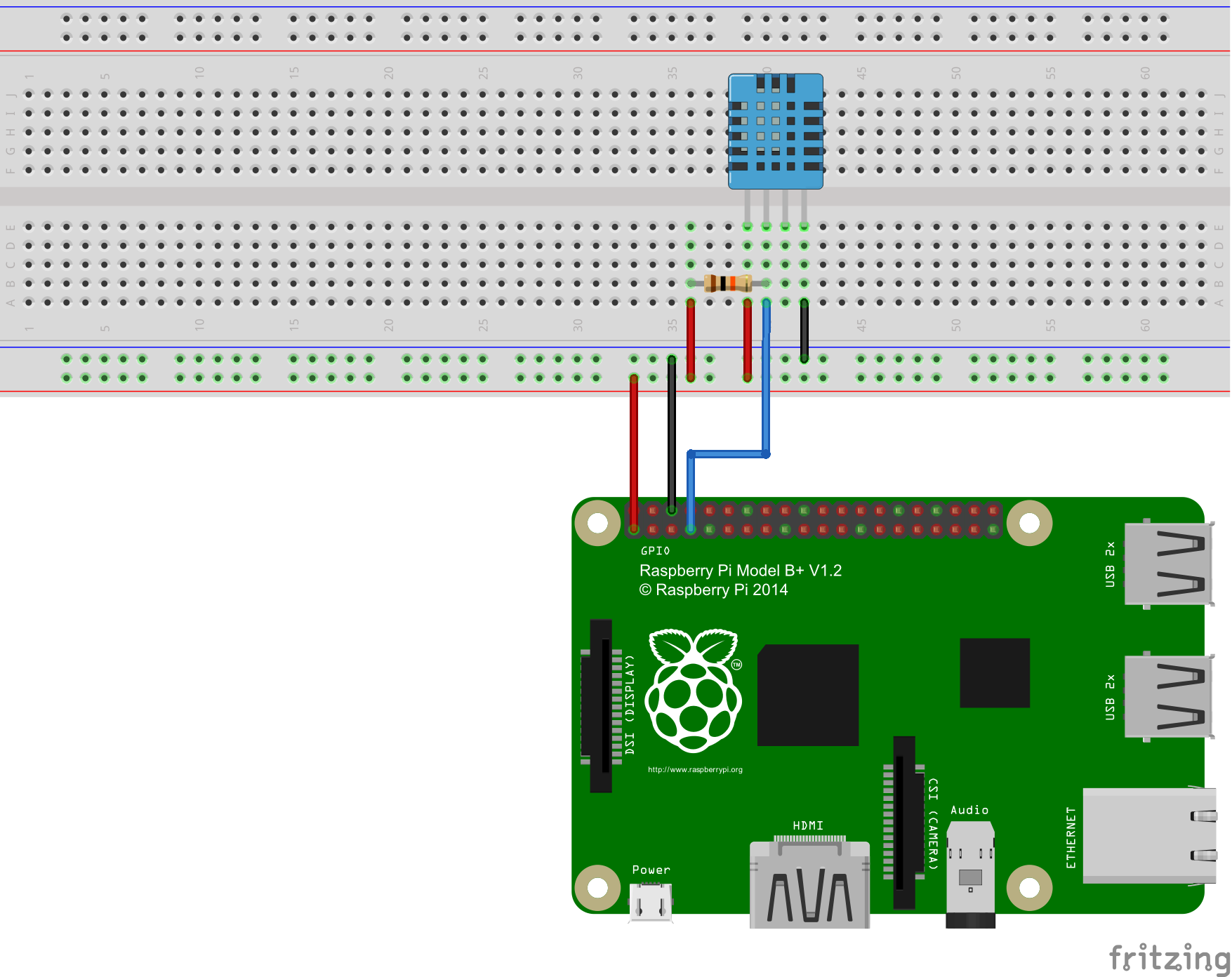
      The way i connected the dht11 sensor is shown in the following picture:
      alt text

      I dont know what i did wrong, can anyone help me please?

      posted in Requests
      S
      STEFF92
    • RE: [MMM-PIR-Sensor] Install failing

      @pjkoeleman Doesnt work :(

      posted in Troubleshooting
      S
      STEFF92
    • RE: [MMM-PIR-Sensor] Install failing

      @Jay yes i did. The basic modules like clock or weather are running but when i add the module for the PIR sensor in the config.js file i cant start the magic mirror

      posted in Troubleshooting
      S
      STEFF92
    • RE: [MMM-PIR-Sensor] Install failing

      Hi, i tried to install the module MMM-PIR-Sensor. I did it like its explained here:

      https://github.com/paviro/MMM-PIR-Sensor

      After installing the module i opened the config.js file an added:

      {
      			module: 'MMM-PIR-Sensor',
      			config: {
      				sensorPIN: 23,
                                      powerSaving: true,
                                      relayPIN: none,
                                      relayOnState: 1,
      			}
      		},
      

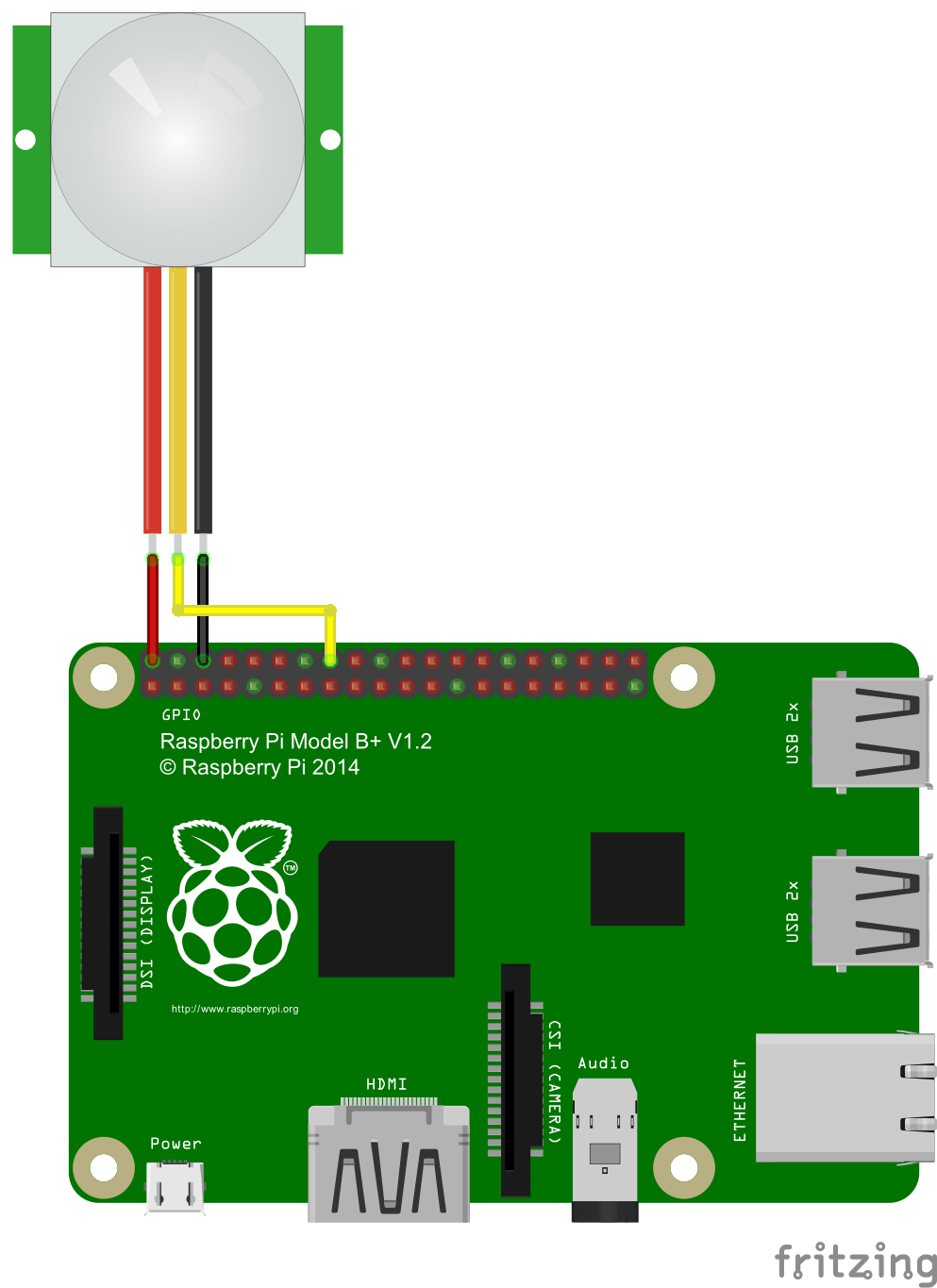
      The way i connected the sensor is shown in the following picture:

      alt text

      But when i want to start the magic mirror it says that i have to add a correct config.js file.
      What did i wrong? Please help me guys ;)

      posted in Troubleshooting
      S
      STEFF92
    • MMM DHT-Sensor Help

      Hi, i’m a totally beginner and the temperature/ humidity sensor is one of my first modules i want to install by myself. Here is the github link:

      https://github.com/bernardpletikosa/MMM-DHT-Sensor

      This were the first things i did:

      pi@raspberrypi:~ $ cd ~/MagicMirror/modules
      pi@raspberrypi:~/MagicMirror/modules $ git clone https://github.com/bernardpletikosa/MMM-DHT-Sensor.git
      Klone nach 'MMM-DHT-Sensor'...
      remote: Counting objects: 18, done.
      remote: Total 18 (delta 0), reused 0 (delta 0), pack-reused 18
      Entpacke Objekte: 100% (18/18), Fertig.
      Prüfe Konnektivität... Fertig.
      pi@raspberrypi:~/MagicMirror/modules $ cd MMM-DHT-Sensor
      pi@raspberrypi:~/MagicMirror/modules/MMM-DHT-Sensor $ npm install


      But then there came these lines:

      npm WARN prefer global node-gyp@3.6.0 should be installed with -g
      
      > rpi-dht-sensor@0.1.1 install /home/pi/MagicMirror/modules/MMM-DHT-Sensor/node_modules/rpi-dht-sensor
      > node-gyp rebuild
      
      make: Entering directory '/home/pi/MagicMirror/modules/MMM-DHT-Sensor/node_modules/rpi-dht-sensor/build'
        CC(target) Release/obj.target/node_dht_sensor/src/bcm2835.o
        CXX(target) Release/obj.target/node_dht_sensor/src/node-dht-sensor.o
        SOLINK_MODULE(target) Release/obj.target/node_dht_sensor.node
        COPY Release/node_dht_sensor.node
      make: Leaving directory '/home/pi/MagicMirror/modules/MMM-DHT-Sensor/node_modules/rpi-dht-sensor/build'
      
      > Magic-Mirror-Module-DHT-Sensor@1.0.0 postinstall /home/pi/MagicMirror/modules/MMM-DHT-Sensor
      > electron-rebuild -e ../../node_modules/electron-prebuilt
      
      An unhandled error occurred inside electron-rebuild
      Unable to find electron-prebuilt's version number, either install it or specify an explicit version
      
      Error: Unable to find electron-prebuilt's version number, either install it or specify an explicit version
          at _callee$ (/home/pi/MagicMirror/modules/MMM-DHT-Sensor/node_modules/electron-rebuild/lib/cli.js:74:17)
          at tryCatch (/home/pi/MagicMirror/modules/MMM-DHT-Sensor/node_modules/babel-runtime/node_modules/regenerator-runtime/runtime.js:63:40)
          at GeneratorFunctionPrototype.invoke [as _invoke] (/home/pi/MagicMirror/modules/MMM-DHT-Sensor/node_modules/babel-runtime/node_modules/regenerator-runtime/runtime.js:337:22)
          at GeneratorFunctionPrototype.prototype.(anonymous function) [as next] (/home/pi/MagicMirror/modules/MMM-DHT-Sensor/node_modules/babel-runtime/node_modules/regenerator-runtime/runtime.js:96:21)
          at GeneratorFunctionPrototype.tryCatcher (/home/pi/MagicMirror/modules/MMM-DHT-Sensor/node_modules/bluebird/js/release/util.js:16:23)
          at PromiseSpawn._promiseFulfilled (/home/pi/MagicMirror/modules/MMM-DHT-Sensor/node_modules/bluebird/js/release/generators.js:97:49)
          at /home/pi/MagicMirror/modules/MMM-DHT-Sensor/node_modules/bluebird/js/release/generators.js:201:15
          at Object. (/home/pi/MagicMirror/modules/MMM-DHT-Sensor/node_modules/electron-rebuild/lib/cli.js:197:4)
          at Module._compile (module.js:570:32)
          at Object.Module._extensions..js (module.js:579:10)
          at Module.load (module.js:487:32)
          at tryModuleLoad (module.js:446:12)
          at Function.Module._load (module.js:438:3)
          at Module.runMain (module.js:604:10)
          at run (bootstrap_node.js:394:7)
          at startup (bootstrap_node.js:149:9)
      
      npm WARN Magic-Mirror-Module-DHT-Sensor@1.0.0 No repository field.
      npm WARN Magic-Mirror-Module-DHT-Sensor@1.0.0 No license field.
      npm ERR! Linux 4.4.34-v7+
      npm ERR! argv "/usr/bin/nodejs" "/usr/bin/npm" "install"
      npm ERR! node v6.10.0
      npm ERR! npm  v3.10.10
      npm ERR! code ELIFECYCLE
      npm ERR! Magic-Mirror-Module-DHT-Sensor@1.0.0 postinstall: `electron-rebuild -e ../../node_modules/electron-prebuilt`
      npm ERR! Exit status 255
      npm ERR! 
      npm ERR! Failed at the Magic-Mirror-Module-DHT-Sensor@1.0.0 postinstall script 'electron-rebuild -e ../../node_modules/electron-prebuilt'.
      npm ERR! Make sure you have the latest version of node.js and npm installed.
      npm ERR! If you do, this is most likely a problem with the Magic-Mirror-Module-DHT-Sensor package,
      npm ERR! not with npm itself.
      npm ERR! Tell the author that this fails on your system:
      npm ERR!     electron-rebuild -e ../../node_modules/electron-prebuilt
      npm ERR! You can get information on how to open an issue for this project with:
      npm ERR!     npm bugs Magic-Mirror-Module-DHT-Sensor
      npm ERR! Or if that isn't available, you can get their info via:
      npm ERR!     npm owner ls Magic-Mirror-Module-DHT-Sensor
      npm ERR! There is likely additional logging output above.
      
      npm ERR! Please include the following file with any support request:
      npm ERR!     /home/pi/MagicMirror/modules/MMM-DHT-Sensor/npm-debug.log


      The way i connected the dht11 sensor is shown in the following picture:
      alt text

      I dont know what i did wrong, can anyone help me please?

      posted in System
      S
      STEFF92
    • RE: MMM-Soccer - Standings, Schedules and Top Scorers

      @strawberry-3.141 Thank you verry much. It works perfectly

      posted in Sport
      S
      STEFF92
    • RE: MMM-Soccer - Standings, Schedules and Top Scorers

      @strawberry-3.141 ok now i did it how you said. when its finished i only have to add the module in my config.js file right? and then thats it?

      posted in Sport
      S
      STEFF92
    • RE: MMM-Soccer - Standings, Schedules and Top Scorers

      @strawberry-3.141 but then there is :

      bash: cd: /home/pi/MagicMirror/modules/MMM-soccer: file or directory not found

      posted in Sport
      S
      STEFF92
    • RE: MMM-Soccer - Standings, Schedules and Top Scorers

      Hi,
      at first, sorry for my bad english. I’m a totally beginner and MMM-Soccer is the first module i want to install by myself. At first i downloaded the Zip file, unpacked it and copied it into /home/pi/MagicMirror/modules. Then i opened the config.js file and added:

      {
      module: ‘MMM-soccer’,
      position: ‘bottom_right’,
      config: {
      api_key: ‘7cgd8…’,
      colored: ‘false’,
      show: ‘GERMANY’,
      leagues: {“GERMANY”:430},
      }
      },

      Then i opened the LXTerminal on the raspberry pi and typed in :

      pi@raspberrypi:~/MagicMirror $ npm install ~/MagicMirror/modules/MMM-soccer

      Then there came:

      npm ERR! addLocal Could not install /home/pi/MagicMirror…
      npm ERR! Linux …
      .
      .
      .

      What did i wrong? Can anyone help me please?

      posted in Sport
      S
      STEFF92
    • 1 / 1