[card:fewieden/MMM-Fuel]
Changelog:
Implemented voice commands to show the gas stations on a map with traffic layer

 S
Offline
S
Offline
[card:fewieden/MMM-Fuel]
Changelog:
Implemented voice commands to show the gas stations on a map with traffic layer
@adadws in the start function your module is not rendered yet. so it doesnt exist, if your trying for module specific stuff, but it would exist for elements like the body
@jiggly the picture of your file tree shows that your module folder is called MMM-Coinmarketcap instead of MMM-CoinMarketCap. You should change that otherwise magicmirror can’t find the module
@E3V3A that is not true.
A node helper is not required for a module, but if a module has a nodehelper this statement required, because it imports this file into your node helper https://github.com/MichMich/MagicMirror/blob/master/modules/node_modules/node_helper/index.js
@saschasp you can change your regular expressions to the following:
/Meldung (.*)/ig;, /Zone (.*)/ig; and /Zeit (.*)/ig;. This should help you displaying the data. For the problem with the newest file you need to do the following steps: Scan the directory, sort file list by highest number, read the first file.
Scan the directory https://nodejs.org/api/fs.html#fs_fs_readdir_path_options_callback
Sort the file names https://developer.mozilla.org/en-US/docs/Web/JavaScript/Reference/Global_Objects/Array/sort
Read the file https://nodejs.org/api/fs.html#fs_fs_readfile_path_options_callback
calendars: [
  {
    symbol: 'calendar-check-o',
    url: 'first adress ical'
  },
  {
    symbol: 'calendar-check-o',
    url: 'second adress ical'
  }
]
@jiyar you have two issues, both are in the section of the module prayer time:
apiVersion: '1.0', // please, leave unchanged. reserved for future use.} ]), it should be: alertTimer: 15000
}
},
@trmst the way I’m calling the turn off monitor cmd in my voice module you can execute your shell script.
https://github.com/fewieden/MMM-voice/blob/master/node_helper.js#L348
official documentation https://nodejs.org/dist/latest-v8.x/docs/api/child_process.html#child_process_child_process_exec_command_options_callback
Two new config options to limit size of the station and destination name
[card:fewieden/MMM-WienerLinien]
@Mykle1 https://github.com/alexyak/camera#setup
npm install in your module directory ~/MagicMirror/modules/camera
@KairosZenith defaultmodules are also listed in this file https://github.com/MichMich/MagicMirror/blob/master/modules/default/defaultmodules.js, but i wouldn’t add your new one here, as it will give you problms in the future on updates, especially as there is ongoing work on a new default module.
You rather take your dateclock out of the default directory and place it in the directory where all the 3rd party modules are.
@sean or
this.resetTimeout = setTimeout(function(){
 ...
  this.sendNotification("PAGE_CHANGED", 0);
  this.updateDom();
  ...
}.bind(this));
@Maxzovirax Sounds like your module is not installed in ~/MagicMirror/modules/MMM-tpg. Did you probably installed it in ~/MagicMirror/modules/default/MMM-tpg?
@wizz Ok I digged a little bit deeper than last time. As it points out the config option in MMM-Wunderground has an usage in the node_helper I didn’t check before. The problem is that Wunderground uses for some languages some uncommon language codes
{
  module: "MMM-WunderGround",
  position: "top_left",
  config: {
    lang: "sw"
  }
}
the full list can be found here https://www.wunderground.com/weather/api/d/docs?d=language-support
@twosquirrels it has to be an array, see the documentation
{
                module: "newsfeed",
                position: "bottom_bar",
                config: {
                        prohibitedWords: ['trump'],
                        feeds: [
                                {
                                        title: "New York Times",
                                        url: "http://www.nytimes.com/services/xml/rss/nyt/HomePage.xml",
                                },
                                {
                                        title: "The Verge",
                                        url: "https://www.theverge.com/rss/index.xml",
                                },
                        ],
                }
        },
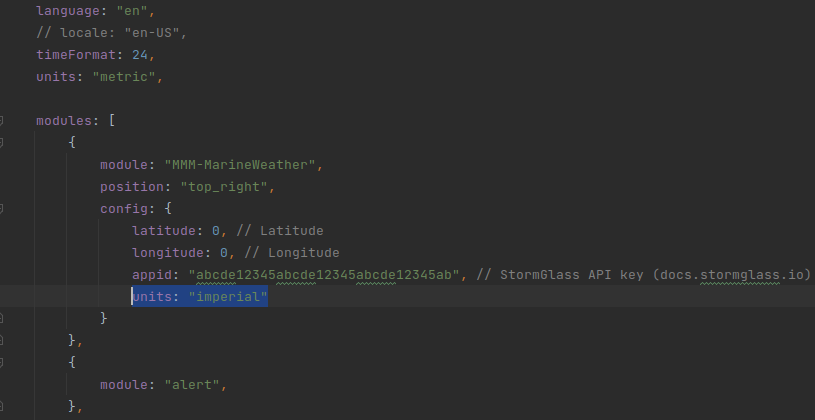
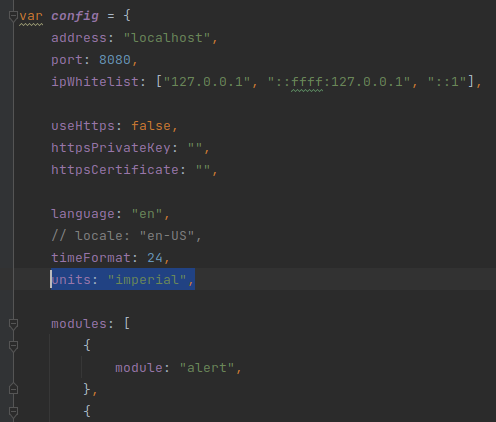
@r3d6 you have two options.
Either you change it globally for your mirror here (recommended, because it also controls the units for other modules):
Or only for this module specifically: