@sdetweil yes in the original version of MMM-voice
A New Chapter for MagicMirror: The Community Takes the Lead
Read the statement by Michael Teeuw here.
Read the statement by Michael Teeuw here.
 Offline
Posts
-
RE: MMM-voice wont register commands
-
RE: MMM-voice wont register commands
@sdetweil the original idea was that every supported module has it’s on mode, so modules can have the same commands without conflicts. And then you enter the mode and you can use commands of that module as long as you dont change the mode.
To change the mode you need to say the name of the mode as the first thing in your sentence, only the keyword can be before if necessery. Otherwise it will not detect a change mode
-
RE: MMM-voice wont register commands
@sdetweil the base module hides all modules. the mode has
voiceand those ones https://github.com/fewieden/MMM-voice/wiki/Supported-Modulesnot sure what rules apply for modifications of my module
-
RE: MMM-voice
@sdetweil I can tell you the same as I just told another user
as the author of MMM-voice I can tell you, that my module doesn’t support a command called hide clock at all. You are probably using hello-lucy, at least that’s a mod I’m aware of which enhances the commands. You can see the command list here https://github.com/fewieden/MMM-voice#usage
i also had problems due to my accent. you can also look into the dic file how the system expects you to pronounce it
-
RE: MMM-voice wont register commands
@shazglass as the author of MMM-voice I can tell you, that my module doesn’t support a command called
hide clockat all. You are probably using hello-lucy, at least that’s a mod I’m aware of which enhances the commands. You can see the command list here https://github.com/fewieden/MMM-voice#usage -
RE: MMM-voice
@sdetweil set
debug: truein the config and you will see what the mirror recognizes -
RE: Kalliope assistant + MM
@maxbachmann google is the default, but you can select others https://kalliope-project.github.io/kalliope/settings/settings/#speech-to-text-configuration
-
RE: Help with currentweather, remove these number
@tadeus1975 it’s sunrise and sunset. There is no config option for only hiding this, you would need to use a css rule in custom.css to hide it. There is only a config option called
onlyTemp, but this is also hiding the wind speed, wind direction, humidity and sunrise/set times. -
RE: Module Position
@maxbachmann you dont need to wait until its finished, git is a version control, so it should be used as early as possible.
-
RE: Module Position
@maxbachmann If you create a github repo, than I can make suggestions what you could improve
-
RE: MMM–Fuel Text alignment
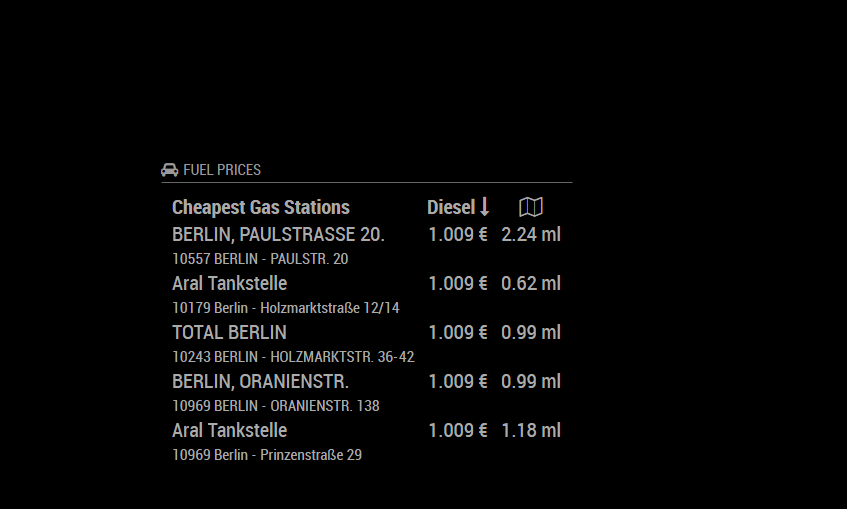
@vortex I put the modue in bottom_center and the stations are left aligned see picture, are you sure that you don’t have any rules that are overriding the styles already?
-
RE: Module Position
I can see that you are still refering to targetRegion, but it’s nowhere defined.
const region = document.querySelector(`div.region.${targetRegion} div.container`);modulename.hide()can’t work, in your case modulename is just a string and a string doesn’t have a hide function, what you want instead is calling the hide function of the module instance, which would be in your case something like:MM.getModules().enumerate((module) => { if (module.name === modulename) { module.hide(); } });There are more things to do, but what I spotted shouldn’t break anything.
-
RE: ReferenceError: Module is not defined...
@justjim1220 first you should remove your calendr link from the logs,
everyone is able to download your private calendar.If I remember correctly that youtube has settings to allow/prevent embedding maybe you have to change something there, as the player is there but the video not playing. Maybe it’s also just some videos that are not embedable.
-
RE: ReferenceError: Module is not defined...
@justjim1220 you have an issue here. you are trying to run
node yourmodule.js. First of all in MM it is used in the browser, sononode environment. Second the Module variable is nothing that comes from node or javascript itself it is a global variable for the MM thet gets placed in the browser too.What are you trying to achieve? Unit testing the module isolated. Run it without the MM project (does it make sense)? Why you are not setting it in the modules folder in MM and configure it in the config file to test it?
-
RE: Module Position
@maxbachmann short version: with es6 you should never use var. it has scope issues. const doesn’t work exactly like in other programming languages. It only prevents from assigning a new reference so strings integers booleans … are fixed. But objects and arrays can still be modified.
And you don’t want to keep this, it was only a placeholder for your notifications, thats why you thought is const always there.
const moduleToMove = 'clock';
const targetRegion = 'top.left';
you should also be carefull setting the variable
Moduleas it is a global variable of MM.I don’t get the part why you build the message string.
Also you should consider creating another if/else as
if (notification === 'HIDE_SHOW') {has nothing todo with changing positions of modules.Exactly what you are doing is bad it schould look more like this:
socketNotificationReceived: function(notification, payload) { if (notification === 'HIDE_SHOW') { const obj = JSON.parse(payload.data.toString()); const max = obj.slots.length; let HideShow; for (let i = 0; i < max; ++i){ if (obj.slots[i].slotName === "HIDE" || obj.slots[i].slotName === "SHOW") { HideShow = obj.slots[i].slotName; } } let module; for (let i = 0; i < max; ++i){ if (obj.slots[i].slotName === "MODULE") { module = obj.slots[i].value.value; break; } } // why do you build this message??? it's never used const Message = HideShow + "_" + module; const moduleToMove = 'clock'; const targetRegion = 'top.left'; MM.getModules().enumerate((module) => { if (module.name === moduleToMove) { const instance = document.getElementById(module.identifier); const region = document.querySelector(`div.region.${targetRegion} div.container`); region.appendChild(instance); //region.insertBefore(instance, region.childNodes[0]) region.style.display = 'block'; } }); this.loaded = true; this.sendNotification(Message); } if (notification === 'ERROR') { this.sendNotification('SHOW_ALERT', payload); } } -
RE: Module Position
@maxbachmann you can get all modules https://github.com/MichMich/MagicMirror/tree/master/modules#module-selection then iterate over them and when you find the module execute the cmds
const moduleToMove = 'clock';
const targetRegion = 'top.left';

MM.getModules().enumerate((module) => {
    if (module.name === moduleToMove) {
        const instance = document.getElementById(module.identifier);
        const region = document.querySelector(`div.region.${targetRegion} div.container`);
        region.appendChild(instance);
        region.style.display = 'block';
    }
});
something similar to this
-
RE: Module Position
@maxbachmann i wouldn’t place that code in other modules, you can perform that from your module for every module, this isn’t magicmirror related. its pure dom manipulation.
-
RE: Module Position
it is safe to always run the code so you don’t need to check if there is a module necessarily.
it is not related to the get dom function, you can put it where ever you want except node_helper (because its not executed in the browser)
can you post the code of your module or upload it to github, then i can have a look