@P-Bo726 Hi, first of all u have to use openHAB, if u do then its easy to get ur sitemap into MM. The response time is under one second for ex. if u want to switch a light on or off.
 T
Offline
T
Offline
A New Chapter for MagicMirror: The Community Takes the Lead
Read the statement by Michael Teeuw here.
Read the statement by Michael Teeuw here.
Posts
-
RE: MMM-Openhab
-
RE: SMA/Sunny portal Solar Module
@Magic_Pi Of course u can do that also with a graph. Openhab is an open system so u decide what u want to see in your own sitemap
-
RE: SMA/Sunny portal Solar Module
@Magic_Pi U would like something like this?
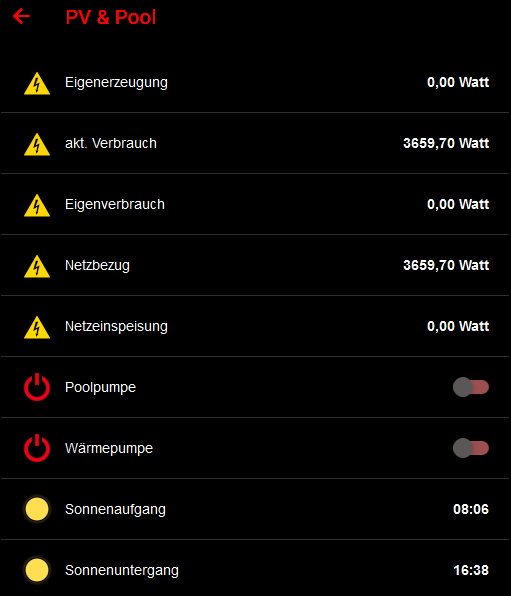
This is Openhab 2 (has a binding for SMA) integrated to MM with MMM-Openhab.
(Dont worry about the German language, my Openhab is German)
-
RE: config.js docent work anymore
@fischi87 NEIN, bestimmt nicht. War viel einfacher: location: “Strehla, Germany”, aus deiner config.
-
RE: config.js docent work anymore
@tbbear said in config.js docent work anymore:
@fischi87 Hi, schaut aus als kommst du aus Deutschland. Hast du schon mal die config.js Prüfung von Mykle1 gemacht. In den meisten Fällen ist es ein fehlendes oder eins zuviel Komma.
npm run config:check
-
RE: config.js docent work anymore
@fischi87 Hi, schaut aus als kommst du aus Deutschland. Hast du schon mal die config.js Prüfung von Mykle1 gemacht. In den meisten Fällen ist es ein fehlendes oder eins zuviel Komma.
-
MMM-Openhab
Description:
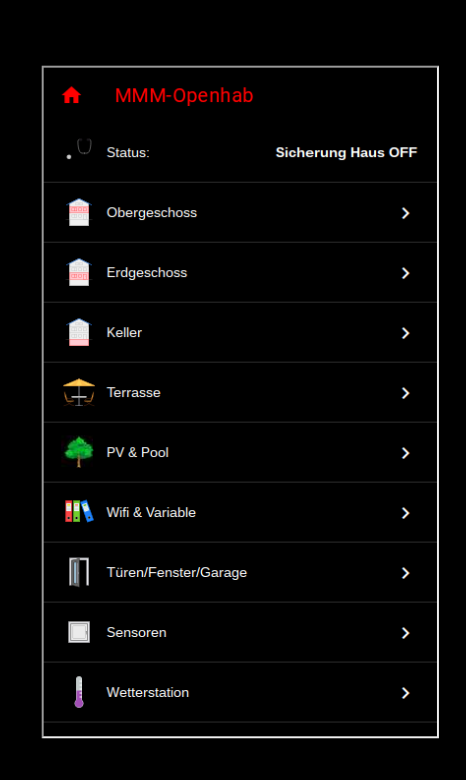
Full control of your Openhab System using (touchscreen, mouse or touchpad (but that’s only the beginning)
The module displays all values from your Openhab sitemap. You can also change
all values and switches (like lites, temperature and s.o.)Screenshots:
Download:
[card:tbbear/MMM-Openhab]
Version 1.0
-
RE: MMM-NOAA - Another Weather Module
@Peter The translation for the alerts depends on google translate, so at the moment we cant change this
-
RE: MMM-NOAA - Another Weather Module
@rezocharly ok, so its another problem.
First the lines “ALERT” and the “Warning Level:” are parts of ur language translation file. So add them their and it will show in the correct language. Here my de.json file from translation dir."***ALERT***":"*** Wetterwarnungen ***", "Warning Level: ":"Warnstufe: ",Second ur wind problem. This module depends on wunderground which is a network of personal wheaterstations. NOT every person who has a PWS has also a wind sensor. Maybe u try to select another
StationID which has one. (i had the same problem too)Third with alerts: false i have this in my config.js just before the line position: … and it works.
-
RE: MMM-NOAA - Another Weather Module
@rezocharly … if there is no wind than it will not be displayed so no wind 0 will appear
-
RE: MMM-NOAA - Another Weather Module
@planet4 The problems are fixed. Please load the aktual version.
-
RE: MMM-NOAA - Another Weather Module
@Mykle1 hahah thats true but they are the best, i have a iphone x and its unbelievable
-
RE: MMM-NOAA - Another Weather Module
@planet4 Hi, please try to select showWind: true it should fix your problem
-
RE: MMM-NOAA - Another Weather Module
@Mykle1 grrrrrrrrrrrrrrrrrrrrrrrrrr here we can go ice skating or building a snow man …
-
RE: Device ID for Alexa
@navyvette87 hi, the device id is how u called ur divice(product) during the amazon developer setup their u can find it but they changed the name its called Product ID now.
-
RE: I need help!!!!
@danwitz65 ok, lets fix it step by step:
- Rotate the screen (works for all normal displays, not for pi special and touchscreens)
Open a terminal and login to your pi
sudo nano /boot/config.txt
move all the way down to the end of the file
add the line: display_rotate=3
Press ctrl + o to save and ctrl + x to exit the fileNow do a reboot and you should have a screen tilted by the number of your desire:
0 = 0 degrees (the default value)
1 = 90 degrees
2 = 180 degrees
3 = 270 degreesThat’s it! Quick and easy.
-
RE: I need help!!!!
hi, so first of all does the screen rotate as u said? And than how did u made MM to start automaticly? Do u use pm or any other stuff? If u dont change your rotation does ur MM work ok?