@ELMAGO Hi, no problem let’s dive deeper. Can you please run the curl command manually on the console and paste the result here, please.
A New Chapter for MagicMirror: The Community Takes the Lead
Read the statement by Michael Teeuw here.
Read the statement by Michael Teeuw here.
 Offline
Posts
-
RE: JSON request module
-
RE: Replacing Radar Sensing module (RCWL-0516) in place of PIR Sensor
@Rags Hi,
I use this type of sensor for motion detection. Currently not connect to the mirror directly but I used it for years as PIR replacement.
It should work out-of-the-box with any PIR module. -
RE: JSON request module
@ELMAGO You can NOT enter the url directly into the Command module. You need to call a valid Shell Command.
In your case I will suggestcurl.The full command will be:
curl -vs http://192.168.100.244:3000/TEMPSALLE2So the command configuration should be something like:
{
   module: "MMM-CommandToNotification",
   disabled: false,
   config: {
    updateInterval: 10,
    commands: [
     {
      script: "/usr/bin/curl",
      args: "-vs  http://192.168.100.244:3000/TEMPSALLE2",
      timeout: 5,
      notifications: [
       "TEMPSALLE",
       ],
     },
     ]
   },
  },
As a result the output of the curl command will be send as notification “TEMPSALE”.
You can test the curl command in a terminal.
-
RE: JSON request module
@ELMAGO Hi,
You can use a simple curl command to fetch the data and get the data send as notification with my MMM-CommandToNotification module. The module supports to call commands periodically.
As you do have the data as payload of a notification then you can use my MMM-ValuesByNotification module to display it. This module is very powerful, allows parsing the payload as Json, selecting values in the Json with JSONPath syntax and even reformatting. -
RE: Online Radio
@tanvir586
Hi,first of all: Please do not edit any files in the module folder. You will get into problems with the next update. All CSS of the module can be overridden by copying the things you want to change to custom.css and edit it there.
second: Please use the ```YOUR CODE``` notation when pasting code.Now to your problem :beaming_face_with_smiling_eyes:
The size of thecontrolWrapperdepends of the buttons in it and their margin. So instead of changing thecontrolWrapperyou could reduce the size of the buttons instead:.mradio .controlWrapper .button { height: 30px; width: 30px; margin-left: 5px; margin-right: 5px; }If you want to reduce the size of the space between the stations and the buttons this is mostly the field where the stream information will be displayed (if provided and you are using mplayer to play, which you do not as i remember).
If do not want the stream information to be displayed you can set the the optionshowStreamInfotofalsein the module configuration. -
[MMM-MQTTbridge] A module to publish and receive MQTT messages
MMM-MQTTbridge
https://github.com/Tom-Hirschberger/MMM-MQTTbridge
MMM-MQTTbridge allows you to integrate your MagicMirror into your smart home system via MQTT protocol and manage MagicMirror via MQTT messages by converting them into MM Notifications and vise verse - listen to your MM’s Notifications and convert them into MQTT mesages.
So, this module for MagicMirror does the following:
Listens to MQTT messages from your MQTT broker and, if mqtt-message arrives, module sends MM Notifications based on the pre-configured mqtt-to-notification Dictionary rules.
Listens to the MM Notifications within your MagicMirror environment. If Notification arrives, module sends MQTT message based on the preconfigured notification-to-mqtt Dictionary rules.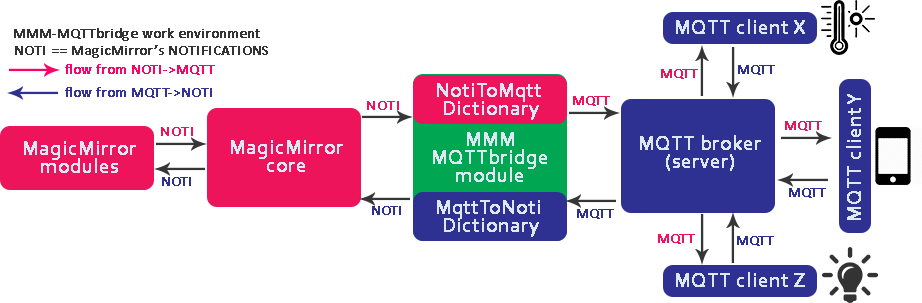
Download:
Version 2.2.4:
- updated jsonpath-plus and mqtt dependency
Version 2.2.3:
- bumped version of jsonpath-plus library to 10.1.0
Version 2.2.2:
- added a postinstall script which creates a copy of the imported JSONPath library cause MagicMirror only imports files with ending js and not cjs to fix JSONPath
Version 2.2.1:
- bumped jsonpath-plus library to version 10.0.1
- bumped mqtt library to version 5.10.1
- only print each event (received notification or received mqtt message) on console if debug is enabled, now
Version 2.2.0:
- fixed
inclcondition - introducing two new conditions
timeto suppress messages / notifications if they happen to quickly after each other andtdiffto send messages / notifications only if they changed or there is enough time gap between the last one - it is possible to configure notifications / messages which should be send after the module connected and subscribed successfully now
Version 2.1.0:
- it is possible the parse the input of MQTT messages as JSON now
- the JSON content of MQTT messages now can be filtered with JSONPath-Plus
- the payload of MQTT messages or notifications now can be formatted with a format string before further processing happens
- it is possible to configure complex conditions (equal, lower than, lower equal, greater, greater equal, includes, matches) for message and notification processing now
Version 2.0.0:
:information_source: This is the first release after the ownership of the module changed to Tom-Hirschberger
:warning: There are breaking changes in thenotiDictionary.jsandmqttDictionary.jswith this release. Make sure to save the two dict files before updating. The files will be ignored with future releases and there is no need to be careful with them after version 2.0.0! Please read the two sections in the Readme about the dictionaries.The following things changed:
- The way of how to configure how to ignore the payload of notifications and MQTT messages changed
- The way of how to configure how to send the payload of notifications as MQTT messages and the payload of MQTT messages as payload of notifications changed
- It is now possible to configure a “last will” message and define if you like a clean MQTT session (see http://www.steves-internet-guide.com/mqtt-clean-sessions-example/ for details) or any other of MQTT.js supported connection option
- It is now possible to configure a QoS value, the retain flag and any other of MQTT.js supported option for published MQTT messages (either in general or individual for single messages)
- It is now possible to configure a QoS value and any other of MQTT.js supported option for subscribed MQTT messages (either in general or individual for single topics)
- The paths of the dictionary files can be configured now and the dictionary files in the “dict” directory will be ignored during updates.
- If one of the dictionary files is missing or has syntax errors a warning is printed but the module starts with empty configuration (and does not crash the whole mirror anymore)
- The speed of the notification and message filter has been increased
-
RE: MMM-MQTTbridge
@Serge Hi,
as i am unable to modify the first post to announce new release i will start a new thread. Maybe you can link to it in the first post. -
RE: MMM-Fuel: Faded Display Box
The fading is hard coded to the template of the module.
As it is not configured in the modules CSS file you need to modify the template or make a issue at the modules github page and let the developer do it for you.Edit:
You need to change line 42 in “templates/MMM-Fuel.njk”from:
{% set fadeStyle = loop.index0 | fade(loop.length) %}to:
{% set fadeStyle = 1 %}But be aware that you will get into problems the next time you want to update the module!
Edit:
I opened a issue at the modules github page with a suggestion to the developer of how to realize the fading with CSS instead of the hard coded part.
If he accepts the change things can be controlled in the custom.css in the future -
RE: Does this Module still work?
@r3zi3lr
Hi, installed the module in my development environment a few minutes ago.
Everything works but make sure to runnpm installin the module folder.
The installation instructions in the readme of the module are wrong at this point as only the “async” package will be installed. -
RE: Widgit accessabililty
I am not sure what exactly is your question.
As sdetweil and JohnGalt already mentioned MagicMirror is a framework which is able to display additional information by including modules.
MagicMirror itself is one big website where all modules will be included.If you want to display a webpage on the mirror there are modules like my MMM-EmbedURL for it.
There are several HTML-elements for this purpose (iframe, webview, embed, object, etc.). The most popular and best supported one is iframe.
As the website that embeds a other website can access all elements and variables of the embedded one there can be some scurity issues (i.e. if somebody embeds the website of your online banking, presents it with a other address but can read and manipulate all of your input even if the transfer of the data is secured with https). Because of the security issues some sites forbid to be embedded. Others forbid it because they simply do not like it.
The electron browser (which is the default one if you do not run your mirror in “server only” mode) is the only one which supports “webview”. “webview” is a different approach where there is started a isolated process that displays the embeded website and the elements and variables are NOT accessible. Thats why electron ignores the flags of sites which not want to be embedded.Some sites allow to embed only parts of the page and provide the code to embed the parts. I.e. if you like to embed a YouTube video with autoplay you can hit the share button under the video, add “?autoplay=1” to the url and get code like this:
<iframe width="560" height="315" src="https://www.youtube.com/embed/dIHr96KqfDI?autoplay=1" title="YouTube video player" frameborder="0" allow="accelerometer; autoplay; clipboard-write; encrypted-media; gyroscope; picture-in-picture" allowfullscreen></iframe>There are similar options for i.e. Grafana panels and stuff like this.
In my MMM-EmbedURL module i provide a example of howto display a webpage that shows a webcam and position and size the embedded element to hide the header and footer of the website.
There are other modules of other developers to embed websites, too. You way want to take a look at the 3rd-party-modules page of the MagicMirror documentation.
There are listed a lot of modules (not all, but a lot) for different purposes.