Please look at this thread. I know it is hard to find, so I added the “windows” flag
https://forum.magicmirror.builders/topic/548/building-mirror-without-programing
Please look at this thread. I know it is hard to find, so I added the “windows” flag
https://forum.magicmirror.builders/topic/548/building-mirror-without-programing
@boblazer said in Do you use a PIR sensor? How do you hide it?:
@sdetweil said in Do you use a PIR sensor? How do you hide it?:
maybe you only need 2mm of that to make the sensor work…
Yeah, that’s my understanding. I can’t find the post but it was here on this site. A guy did some experiments to find the smallest size hole his PIR sensor actually required. He tried 1mm, 2mm and 4mm(?). He said it worked just fine with a 2mm hole.
You are referring to this one: https://forum.magicmirror.builders/topic/557/pir-sensor-behind-glass/33
@trividar
Nothing is impossible. Give it a try and ask for help if you are stuck
Welcome to our community.
The module has a very complete readme, please take a look here:
https://github.com/BenRoe/MMM-SystemStats/blob/master/README.md
I went to the web calendar on my computer (not on a smartphone or tablet!), went to settings (gear symbol top right) and clicked on options. The you see Publish Calendar and you are able to create the ics link.
You mean just showing an excerpt of the actual text? You could try to fiddle around with CSS using text-overflow: ellipsis; but this does not support multiline text. So it would be very ugly :) Besides that, this is not possible at this point.
Should be easy to implement something like maxLength: 200, to cut the text after 200 characters and to show a … at the end to indicate there is more text. I don’t see the use, as you cannot tap the … to see the whole text.
I submitted a Pull Request, let’s see if cowboysdude accepts my changes to his module :)
@okg21
“no helper modules found” is no error, not even a warning. Some modules do not need a node_helper.js file
Your major problem is your appid. The appid can be found when logging in to openweathermap.org. It looks like this:
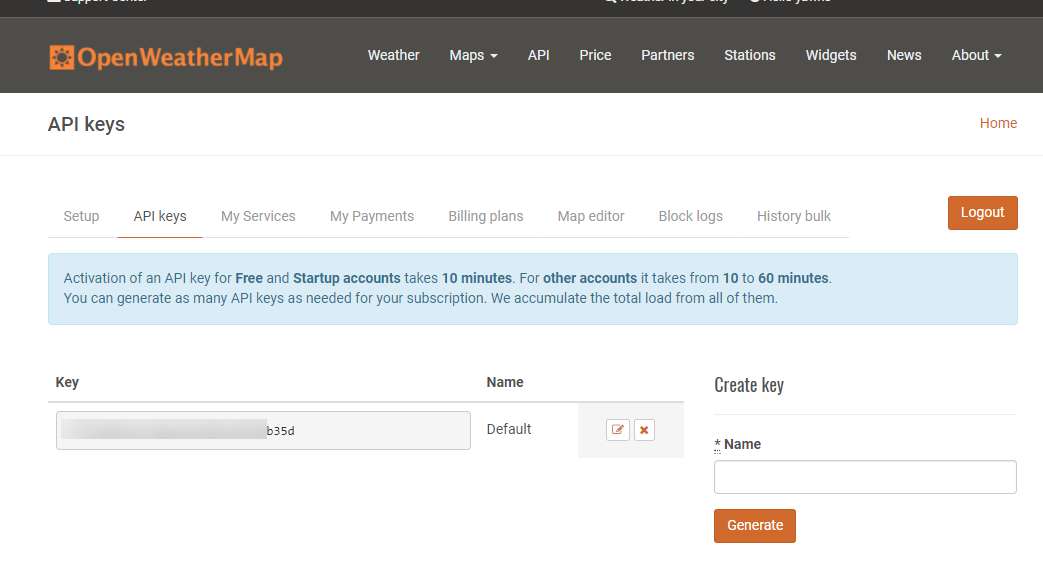
Please try to write timeFormat instead of timeformat, this is case sensitive :)
Also try to play around with urgency
https://github.com/MichMich/MagicMirror/tree/master/modules/default/calendar
@SebTota
cp -r source destination
If you want to, send it to me. I can take a look today or tomorrow.
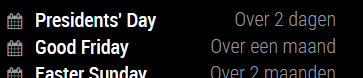
Yep, looks like I am right. This is found in moment.js locale settings. In this case it uses the future variable and M from relativeTime
//! moment.js locale configuration
//! locale : Dutch [nl]
//! author : Joris Röling : https://github.com/jorisroling
//! author : Jacob Middag : https://github.com/middagj

var monthsShortWithDots$2 = 'jan._feb._mrt._apr._mei_jun._jul._aug._sep._okt._nov._dec.'.split('_');
var monthsShortWithoutDots$2 = 'jan_feb_mrt_apr_mei_jun_jul_aug_sep_okt_nov_dec'.split('_');

var monthsParse$3 = [/^jan/i, /^feb/i, /^maart|mrt.?$/i, /^apr/i, /^mei$/i, /^jun[i.]?$/i, /^jul[i.]?$/i, /^aug/i, /^sep/i, /^okt/i, /^nov/i, /^dec/i];
var monthsRegex$4 = /^(januari|februari|maart|april|mei|april|ju[nl]i|augustus|september|oktober|november|december|jan\.?|feb\.?|mrt\.?|apr\.?|ju[nl]\.?|aug\.?|sep\.?|okt\.?|nov\.?|dec\.?)/i;

hooks.defineLocale('nl', {
    months : 'januari_februari_maart_april_mei_juni_juli_augustus_september_oktober_november_december'.split('_'),
    monthsShort : function (m, format) {
        if (!m) {
            return monthsShortWithDots$2;
        } else if (/-MMM-/.test(format)) {
            return monthsShortWithoutDots$2[m.month()];
        } else {
            return monthsShortWithDots$2[m.month()];
        }
    },

    monthsRegex: monthsRegex$4,
    monthsShortRegex: monthsRegex$4,
    monthsStrictRegex: /^(januari|februari|maart|mei|ju[nl]i|april|augustus|september|oktober|november|december)/i,
    monthsShortStrictRegex: /^(jan\.?|feb\.?|mrt\.?|apr\.?|mei|ju[nl]\.?|aug\.?|sep\.?|okt\.?|nov\.?|dec\.?)/i,

    monthsParse : monthsParse$3,
    longMonthsParse : monthsParse$3,
    shortMonthsParse : monthsParse$3,

    weekdays : 'zondag_maandag_dinsdag_woensdag_donderdag_vrijdag_zaterdag'.split('_'),
    weekdaysShort : 'zo._ma._di._wo._do._vr._za.'.split('_'),
    weekdaysMin : 'zo_ma_di_wo_do_vr_za'.split('_'),
    weekdaysParseExact : true,
    longDateFormat : {
        LT : 'HH:mm',
        LTS : 'HH:mm:ss',
        L : 'DD-MM-YYYY',
        LL : 'D MMMM YYYY',
        LLL : 'D MMMM YYYY HH:mm',
        LLLL : 'dddd D MMMM YYYY HH:mm'
    },
    calendar : {
        sameDay: '[vandaag om] LT',
        nextDay: '[morgen om] LT',
        nextWeek: 'dddd [om] LT',
        lastDay: '[gisteren om] LT',
        lastWeek: '[afgelopen] dddd [om] LT',
        sameElse: 'L'
    },
    relativeTime : {
        future : 'over %s',
        past : '%s geleden',
        s : 'een paar seconden',
        ss : '%d seconden',
        m : 'één minuut',
        mm : '%d minuten',
        h : 'één uur',
        hh : '%d uur',
        d : 'één dag',
        dd : '%d dagen',
        M : 'één maand',
        MM : '%d maanden',
        y : 'één jaar',
        yy : '%d jaar'
    },
    dayOfMonthOrdinalParse: /\d{1,2}(ste|de)/,
    ordinal : function (number) {
        return number + ((number === 1 || number === 8 || number >= 20) ? 'ste' : 'de');
    },
    week : {
        dow : 1, // Monday is the first day of the week.
        doy : 4  // The week that contains Jan 4th is the first week of the year.
    }
});
@qqqqqqqq
You are in the modules base folder, but you need to change into the specific module folder instead
Well, you need node.js on your Synology webserver. Searching the web it seems to be possible, but the node.js addon I found was rather old. Give it a try, you can’t break it ;)
@ryck said in Worldclock & Currency:
@yawns You can always use https://exchangeratesapi.io/ if you don’t want to make people get an apiKey…
Thanks for the heads up. I updated the module to use the new source instead.
Okay MM-Hans. After looking at vendor.js I noticed moment.js is loaded from "moment.js" : "node_modules/moment/min/moment-with-locales.js",
So if you go ahead, open "~/MagicMirror/vendor/node_modules/moment/min/moment-with-locales.js", and scroll down to line 10649 (no, I’m not kidding) and change één to een you are good to go.
@KMH0
Actually it is always the same thing.
cd ~/MagicMirror/modulesgit clone https://github.com/fewieden/MMM-ip.git. This downloads the repository and extracts it into a new folder.cd MMM-ip and run npm install (in this case it is not required … the readme should tell you to do so)Sidenote: If you run into trouble with your config file, you can always paste the content into http://jshint.com/. If everything is fine it will only show this which is fine:
One undefined variable
64	module
according to the synology wiki:
ipkg update; ipkg install nano
Interesting, looks very slim. I am not sure if I like the orange/pink color or not :)
It is a bit irritating where to put the config stuff. Some needs to go to config section directly, some need to go to the calendars section.
Please try this:
{
	module: 'calendar',
	classes: 'default everyone',
	// header: 'Termine',
	position: 'top_right',
	config: {
		displayRepeatingCountTitle: true,
		timeFormat: 'absolute',
		dateFormat: 'DD MMM',
		fullDayEventDateFormat:'DD MMM',
		showEnd: false,
		getRelative: 48,
		urgency: 2,
		calendars: [
			{
				url: 'https://calendar.google.com/calendar/XXX',
				symbol: 'calender',
				colored: true,
				maximumEntries: 5,
				repeatingCountTitle: 'Birthday'
			}
			]
	}
},