Looks very nice. I like the Y-Splitter to only have one power cord. That’s what I will try as well, when I start building the mirror.
What is the blue light thing?
Looks very nice. I like the Y-Splitter to only have one power cord. That’s what I will try as well, when I start building the mirror.
What is the blue light thing?
Sounds interesting. But everything I find in German online shops is way above 100€
A bit expensive for “just give it a try”
Let’s see how you go on with it.
Right, you need an active HDMI-VGA converter.
You could go for this: https://thepihut.com/products/raspberry-pi-hdmi-to-vga-convertor
However the “chain” looks a bit ugly (second image) and I could imagine it is a bit unsteady.
Or you go for this: https://www.pi-supply.com/product/gert-vga-666-hardware-vga-raspberry-pi/
However this blocks almost all GPIO ports and you need to solder it on your own, as it is a kit
nice one. very hillarious introduction video
The only thing that would annoy me is the beeping confirmation sound the voice recognition plays on key press and after it completed the command.
In addition to strawberry it looks like it is rather complicated getting access to the SiteSage API. Looking at various threads on the SiteSage support portal it requires approval from the sales guys and maybe a technical approval from your campus it department.
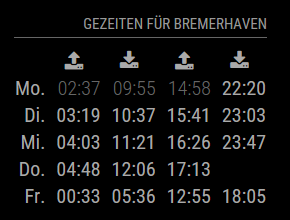
Since I was born in the north of Germany (Bremerhaven) and enjoy mudflat tours I wanted to generate a module showing high and low water. I tested it with some locations in Germany. This module derives predictions from worldtides.info for a given tide station
[card:yawnsde/MMM-WorldTides]
I would copy one of the other train/bus schedule modules, look at it’s structure and adapt it to your needs with another api call and data parsing.
@pmauchle said in Attach the monitor with glue to the mirror?:
Yeah of course I can use a frame, but I don’t want a frame ;) I already have a mirror with a frame! I bought some strong glue and It works perfectly :)
This thread is worthless without pics … ;)
Or you could present it in the Show your mirror category
@KirAsh4
so you designed, 3dprinted and built a one-hand-minirailgun driven by rubber bands? That’s crazy but awesome!
very interesting, I will try it this weekend. I’m just wondering why this is not documented on any forum or website, even though you can find several users with version mismatch issues.
Great finding, @James
wow, that looks fantastic!
several things:
like this:
getDom: function() {
	var wrapper = document.createElement("div");
	if(this.dataFile){
		var humidityRegExp = /Humidity = (.*?) %/ig;
		var humidity = humidityRegExp.exec(this.dataFile)[1];

		var temperatureRegExp = /Temperature = (.*?) *C/ig;
		var temperature = temperatureRegExp.exec(this.dataFile)[1];

		var spacer = document.createElement("span");
		spacer.innerHTML = " ";
		var temperature_symbol =  document.createElement("span");
		temperature_symbol.className = "fa fa-home";
		var humidity_symbol =  document.createElement("span");
		humidity_symbol.className = "fa fa-tint";

		wrapper.appendChild(temperature_symbol);
		var temperature_text = document.createElement("span");
		temperature_text.innerHTML = " " + temperature + "°C";
		wrapper.appendChild(temperature_text);

		wrapper.appendChild(spacer);

		wrapper.appendChild(humidity_symbol);
		var humidity_text = document.createElement("span");
		humidity_text.innerHTML = " " + humidity + "%";
		wrapper.appendChild(humidity_text);
	} else {
		wrapper.innerHTML = "No data";
	}
	return wrapper;
},
Should give you a house symbol for temperature inside and a droplet for humidity.
getDom: function() {
	var wrapper = document.createElement("div");

	var symbol =  document.createElement("span");
	symbol.className = "fa fa-home";
	wrapper.appendChild(symbol);

	return wrapper;
}
This will result in a “house symbol”
Open the configuration file (in bash type sudo nano /boot/config.txt) and look for disable_overscan
This is either commented with a # or set to 0
It should be disable-overscan=1
Be sure to look through the whole file, sometimes this setting appears more than once.
Reboot your pi and you should be good
Hm, maybe you could try this.
Put the file in the modules folder and open it with “./Test-temp.txt“
Additionally i would suggest to go with lowercase during testing to exclude case sensitive mistakes.
If you start the magic mirror with “npm start” in the console, do you see any error messages?
Wow, the microwave approach sounds good. Will this work behind the mirror?