A New Chapter for MagicMirror: The Community Takes the Lead
Read the statement by Michael Teeuw here.
  • Default Calendar dont show the private Google Calendar

    Unsolved
    4
    0 Votes
    4 Posts
    2k Views
    Mykle1M
    @dicous { disabled: false, module: "calendar", header: "Basti", position: "bottom_center", config: { calendars: [{ symbol:'calendar-check-o', url:'PUT YOUR URL FROM YOUR POST IN HERE AND IT WILL WORK' }] } }, [image: 1538007383407-screenshot-from-2018-09-26-20-13-04.png] You should edit your post to take out your private information
  • MMM-DHT-Sensor

    dht dht11
    14
    0 Votes
    14 Posts
    7k Views
    C
    This is my running config for this module: { module: "MMM-DHT-Sensor", position: "top_right", header: "Header", config: { sensorPin: 2, sensorType: 11, updateInterval: 60 * 60 * 1000, initialLoadDelay: 0, animationSpeed: 1000, units: "metric", relativeScale: 35, debug: false } },
  • mm-pir-hide-all module not fading on/off

    Unsolved fade pir motion sensor
    1
    0 Votes
    1 Posts
    750 Views
    C
    I have the module working but it is not fading, does anyone know why or what is wrong? All the code to make it work is there but for some reason it does not fade! Thanks for any help!
  • MMM-EFA-departures - not working since latest commits

    Unsolved
    1
    0 Votes
    1 Posts
    609 Views
    U
    since the latest commits, https://github.com/Dom1n1c/MMM-EFA-departures doesn’t work on my MM anymore. I have pretty standard parameters in my config, and commentend most of them out to see if its an issue with the parameters I am using, but no success. So I went back to the commit from January, which is working for me. Does anyone see that issue, too?
  • Help choosing more than one item from an array

    18
    1 Votes
    18 Posts
    7k Views
    S
    @justjim1220 the second. Don’t depend on users to do multiple entries
  • MMM-Button or MMM-Podcast not working

    Unsolved
    1
    0 Votes
    1 Posts
    530 Views
    D
    Hey there, I’m so sorry to open a new Post on this Topic. I literally tried everything but it doesn’t shows the Tagesschau video. { module: "MMM-Podcast", }, { module: "MMM-Button", config: { buttonPin: 6, } }, So I just changed the Pin to GPIO 6. Wiring : Gpio 6 ( Pin 31 ) and Gnd in the “pm2 logs mm” isn’t any entry when I press the Button. 0|mm | Initializing new module helper ... 0|mm | Module helper loaded: MMM-GQuotes 0|mm | Initializing new module helper ... 0|mm | Module helper loaded: newsfeed 0|mm | All module helpers loaded. 0|mm | Starting server on port 8080 ... 0|mm | Server started ... 0|mm | Connecting socket for: updatenotification 0|mm | Connecting socket for: calendar 0|mm | Starting node helper for: calendar 0|mm | Connecting socket for: MMM-Podcast 0|mm | Connecting socket for: MMM-Button 0|mm | Connecting socket for: MMM-Fuel 0|mm | Starting module helper: MMM-Fuel 0|mm | Connecting socket for: MMM-GQuotes 0|mm | Connecting socket for: newsfeed 0|mm | Starting module: newsfeed 0|mm | Sockets connected & modules started ... 0|mm | Launching application. 0|mm | libGL error: MESA-LOADER: failed to retrieve device information 0|mm | MESA-LOADER: failed to retrieve device information 0|mm | MESA-LOADER: failed to retrieve device information 0|mm | Create new calendar fetcher for url: https://calendar.google.com/calendar/ical/*** 0|mm | Create new news fetcher for url: http://rss.sueddeutsche.de/rss/Topthemen - Interval: 300000 It seems like the Module is not even started. If I put the Button on GPIO 5 ( Pin 29 ) like the Readme says my Pi freezes. Maybe you guys have any suggestions. Thank you so far.
  • Usb mic changing device number randomly

    1
    0 Votes
    1 Posts
    645 Views
    T
    I have this strange issue where my pi changes what device number my USB mic is using randomly. This of course means that the audio stops working after a reboot until I modify the file again. Any ideas what can be causing this. I dont have anything else plugged in to usb ports.
  • 3rd Party Addins not working

    1
    0 Votes
    1 Posts
    702 Views
    N
    Hi all, I have just set up my magic mirror and I have been able to alter the default modules to suite my region and preferences however I am having an issue with 3rd party addins. I must confess I am a bit of a Linux newb so I ahve done a fair amount of reading and copy pasting however I cannot get 3rd party modules to work. I am trying to run the web admin console and Spotify addin, I think I have configured both of them correctly and white listed my entire subnet however neither are working. I have missed something obvious in my config file shown below or done something else obvious? Thanks in advance. /* Magic Mirror Config Sample * * By Michael Teeuw http://michaelteeuw.nl * MIT Licensed. * * For more information how you can configurate this file * See https://github.com/MichMich/MagicMirror#configuration * */ var config = { address: "localhost", // Address to listen on, can be: // - "localhost", "127.0.0.1", "::1" to listen on loopback interface // - another specific IPv4/6 to listen on a specific interface // - "", "0.0.0.0", "::" to listen on any interface // Default, when address config is left out, is "localhost" port: 8080, ipWhitelist: ["127.0.0.1", "192.168.0.47", "::ffff:127.0.0.1", "::1", "::ffff:192.168.0.0/28"], // Set [] to allow all IP addresses // or add a specific IPv4 of 192.168.1.5 : // ["127.0.0.1", "::ffff:127.0.0.1", "::1", "::ffff:192.168.1.5"], // or IPv4 range of 192.168.3.0 --> 192.168.3.15 use CIDR format : // ["127.0.0.1", "::ffff:127.0.0.1", "::1", "::ffff:192.168.3.0/28"], language: "en", timeFormat: "12", units: "metric", modules: [ { module: "alert", }, { module: "updatenotification", position: "top_bar" }, { module: "clock", position: "top_left" }, { module: "MMM-Admin-Interface" }, { module: "calendar", header: "UK Calendar", position: "top_left", config: { calendars: [ { symbol: "calendar-check-o ", url: "https://www.calendarlabs.com/ical-calendar/ics/75/UK_Holidays.ics" } ] } }, { module: "compliments", position: "lower_third" }, { module: "currentweather", position: "top_right", config: { location: "Warrington, GB", locationID: "", //ID from http://www.openweathermap.org/help/city_list.txt appid: "c3d0b9bf707df523a21cd2f3bbd32f38" } }, { module: "weatherforecast", position: "top_right", header: "Weather Forecast", config: { location: "Warrington, GB", locationID: "", //ID from http://www.openweathermap.org/help/city_list.txt appid: "c3d0b9bf707df523a21cd2f3bbd32f38" } }, { module: "newsfeed", position: "bottom_bar", config: { feeds: [ { title: "BBC UK", url: "http://feeds.bbci.co.uk/news/uk/rss.xml" } ], showSourceTitle: true, showPublishDate: true } }, { module: "MMM-NowPlayingOnSpotify", position: "upper_third", config: { showCoverArt: "true", clientID: "944d74d0c4ed40e6bc3c030512fc5da3", clientSecret: "2519d1a6c42948d799a2a3e285a27246", accessToken: "BQCgTm2SwfeQmulLWj8JyZL9bSZsCPfwtn9AtVMvQdVM-Ic2xsqZ8iBKM2ZAdmgdlLgPxnoTSeVllTkmnViLAHkS0dVvmeTNM9nxR1pN6RHl0o2yf8x-j40TkK74BQ7K6fIA6kWIqW4RvC87x883Iup3adaNLw", refreshToken: "AQB14KZHEHIrNVyuHqUyrHr8b33IdvgpA8oeQ7T-T_xqCzdu08cpQ2m4QvCWsyuNTbeuK4IGTZANY2KdS-LDziWzyyts_vPr177fW4ru3zQsbVPrGebZTOOclUWo5gW46sR27w" } }, ] }; /*************** DO NOT EDIT THE LINE BELOW ***************/ if (typeof module !== "undefined") {module.exports = config;}

  • MyScoreboard

    Moved myscoreboard
    2
    0 Votes
    2 Posts
    2k Views
    X
    @darbos I believe that setting is to make the previous days’ games disappear. Are you wanting those games to stay on there? For how long? You could change the setting using the rolloverHours setting.
  • 0 Votes
    1 Posts
    888 Views
    S
    when i enter “npm start”, a blank screeen appears with dailog at top left corner as"unauthorized", please help me to solve this, i am a beginner to all the computer field
  • Default Calendar module shows wrong time format

    Unsolved
    1
    1
    0 Votes
    1 Posts
    797 Views
    AlvingerA
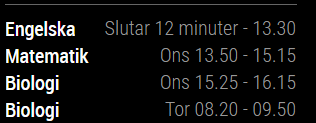
    I have a problem with the default calendar module. I am trying to show the kids’ school calendars with absolute starting and ending times. However, once a class has started the view changes to a relative starting time (but the information is relative to the ending time…) and an absolute ending time. This is the mirror display: (“Slutar 12 minuter” means “Ending in 12 minutes”, the screenshot was taken 13.18) [image: 1536751682336-b4407a27-51f0-4fdb-b71b-0d324793102f-image.png] And this is the corresponding config.js entry: module: "calendar", position: "bottom_left", header: "Schema", classes: "vardagsmorgon", config: { maximumNumberOfDays: 2, maximumEntries: 7, dateFormat: "ddd HH.mm", dateEndFormat: "HH.mm", showEnd: true, timeFormat: "absolute", getRelative: 0, fade: false, displaySymbol: false, calendars: [ { symbol: "calendar-o ", url: "..." }, What am I doing wrong? Or is this a bug within the calendar module?
  • Issue with some symbols with MMM-CalendarExt

    Solved
    4
    0 Votes
    4 Posts
    2k Views
    G
    Thanks! This is working :)
  • Access in MM Page on Windows maching

    Solved
    3
    0 Votes
    3 Posts
    1k Views
    A
    I was able to figure it out. following link did help me https://forum.magicmirror.builders/topic/8612/viewing-mirror-from-browser/3
  • MM + Alexa + Logitech C170?

    Solved
    9
    0 Votes
    9 Posts
    3k Views
    M
    Following the instructions from MMM Awesome Alexa by dolanmiu regarding the audio setup, on my asoundrc if I remember correctly, I used the following commands and this somehow solved my problem. pcm.!default { type asym playback.pcm "plughw:0" capture.pcm "plughw:1" }
  • This topic is deleted!

    Unsolved
    1
    0 Votes
    1 Posts
    3 Views
  • Use a local JSON file with MMM-JsonTable Module

    Solved
    8
    0 Votes
    8 Posts
    4k Views
    REBR
    @sdetweil said in Use a local JSON file with MMM-JsonTable Module: @reb those characters are called the BOM (Bill of Material)… added by advanced word processing editors… u can use Notepad++ to remove them too… u need to change editors to make sure you don’t add them back accidentally… @sdetweil Thanks for the info about removing the BOM (Byte Order Mark). I use an Explorer replacement program called Directory Opus which is awesome and one of the developers wrote a script that can be attached to a toolbar button that can add, remove or toggle the Byte Order Mark.
  • This topic is deleted!

    1
    0 Votes
    1 Posts
    8 Views
  • MMM-GoogleAssistant Custom Actions not working

    Solved google assistant actions google tasks google
    2
    0 Votes
    2 Posts
    2k Views
    Lorenzo_ZappaL
    No one? Please help
  • How to avoid screen turnin on (ServerRequest) PIR-Sensor

    Unsolved
    1
    0 Votes
    1 Posts
    797 Views
    C
    Hi guys, maybe you have a solution for my problem. I am running a Wordpress Site on my MagicMirror Pi. The PIR Sensor is working fine and turns screen on on movement and also turns off again. The problem is, every time someone visits my website (based on wordpress, apache 2), the screen turns on too. Is there a chance I can avoid this? Best Clemy
  • MM module loading stale data??

    Unsolved
    1
    0 Votes
    1 Posts
    646 Views
    M
    I have a node helper file that is doing this: const NodeHelper = require("node_helper"); const fs= require("fs"); module.exports = NodeHelper.create({ //here comes the part of the nodehelper after the 3 dots as posted above socketNotificationReceived: function(notification, payload) { if(notification === "START"){ this.config = payload; this.readData(); setInterval(() => { this.readData(); }, this.config.updateInterval); } }, readData: function (){ //to read a file to do the following fs.readFile('/container.html', 'utf8', (err, data) => { if (err) throw err; this.sendSocketNotification('DATA', data); }); } }) This seems to present the same info… despite changing what it is in the file: container.html Why is that? Isn’t think loading up on every npm start?