A New Chapter for MagicMirror: The Community Takes the Lead
Read the statement by Michael Teeuw here.
  • flashing mic initializing voice

    Unsolved
    1
    0 Votes
    1 Posts
    757 Views
    citizendevpiC
    Re: MMM-voiceafter i add the voive nodual all i get is a flashing mic with a line tru it and an initializing , what could be the issue?
  • MMM-darksky-hourly chang font size

    Unsolved
    1
    0 Votes
    1 Posts
    667 Views
    eniacE
    Hope somebody can help me. I think I have to do that with css, but I don’t know how. Within the calender Moduule you can use “tableclass” to change the apperance. not so in the dasrksky module … And im not very familiar with css …
  • Default Calender relative removes start time

    Solved
    14
    0 Votes
    14 Posts
    6k Views
    C
    @lavolp3 thanks i will try it!
  • Mmm-Wunderlist can't show individual lists

    Solved
    6
    0 Votes
    6 Posts
    2k Views
    C
    @joela85 this worked like a charm, I must have screwed up the code. I only have to figure out how to place them to not grow upwards when I add items but have a fixed height. Thanks
  • MMM-EasyPix Dom updateInterval fixed

    1
    0 Votes
    1 Posts
    759 Views
    Mykle1M
    First, an apology for neglecting this for so long. My bad, as the saying goes. The module will now respond to the updateInterval config option. git pull in the MMM-EasyPix directory or install as per the readme. https://github.com/mykle1/MMM-EasyPix
  • Calendar showing 12h time format instead of 24h

    2
    1
    0 Votes
    2 Posts
    1k Views
    lavolp3L
    Well I have found the problem. But it seems to have been resolved with a recent code update For those interested: getLocaleSpecification: function(timeFormat) { switch (timeFormat) { case 12: { return { longDateFormat: {LT: "h:mm A"} }; break; } case 24: { return { longDateFormat: {LT: "HH:mm"} }; break; } default: { return { longDateFormat: {LT: moment.localeData().longDateFormat("LT")} }; break; } } }, For case 24 The longDateFormat: hh:mm was wrong. It needs to be HH:mm. As said, was already changed. Thanks @MichMich
  • Calendar: Some symbols not working

    Unsolved
    4
    0 Votes
    4 Posts
    2k Views
    H
    Hi, You could also try the icon “futbol-o”. Have verified this in my own setup, seems to be working fine.
  • Problem with MMM-LocalTemperature using MMM-Lucy

    Moved
    6
    0 Votes
    6 Posts
    3k Views
    Mykle1M
    @johans If, as you say, you’ve made all the edits correctly, then it is still possible that the temperature module is conflicting in some way. I would try to troubleshoot if I could run that module. Try some things on your own if you feel comfortable doing so.
  • iFrame module cache clean

    Unsolved
    1
    0 Votes
    1 Posts
    705 Views
    R
    greetings, a lot of iFrame modules and it’s forks out there but a small question just arised, When viewing a web page using iframe where it’s cache being stored? I’ve actually used MMM-iframe module to view a memo notepad site and want to clean it’s cache, removing electron cache didn’t help…any help please
  • MMM-Remote-Control default to HIDE

    Unsolved
    3
    0 Votes
    3 Posts
    1k Views
    J
    @axled Thanks, but Remote-Control has the same functionality. What I want is a “Hide” status by default. Regards.
  • alarm clock on/off

    Unsolved
    4
    0 Votes
    4 Posts
    1k Views
    citizendevpiC
    @justjim1220 that deffinatly did not work for me
  • MMM-MyCommute not updating traffic times

    Unsolved
    2
    0 Votes
    2 Posts
    1k Views
    K
    This is my code and it updates with traffic as expected. { module: 'MMM-MyCommute', position: 'top_left', header: 'Commute', classes: 'default everyone', config: { apikey: 'xxxxxxx', origin: 'xxxxxx', moderateTimeThreshold: '1.15', poorTimeThreshold: '1.3', showSummary: true, destinations: [ { destination: 'xxxxxxx', label: 'Work', mode: 'driving', alternatives: true, startTime: '05:00', endTime: '09:00', hideDays: [0,2,5,6], color: '#9b59b6', }, { destination: 'xxxxxx', label: 'xxxxxx', mode: 'driving', alternatives: true, startTime: '05:00', endTime: '10:00', hideDays: [0,1,2,3,4,6], color: '#33B5FF', }, { destination: 'xxxxxx', label: 'xxxxxxx', mode: 'driving', alternatives: true, startTime: '05:00', endTime: '10:00', hideDays: [0,1,2,3,4,5], color: '#9b59b6', }, ] } },

  • Evening starts too early

    Unsolved compliments start time
    1
    0 Votes
    1 Posts
    926 Views
    M
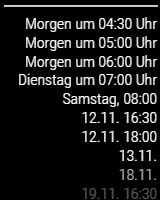
    Hi, Although I have set the afternoonEndTime to 18:00 (see below) the evening compliments start at 17:00. Anyone an idea what I’m doing wrong? Thanks, Hans. module: "compliments", position: "lower_third", config: { updateInterval: 3000, fadeSpeed: 1000, morningStartTime: 6, morningEndTime: 12, afternoonStartTime: 12, afternoonEndTime: 18, compliments: { morning: [
  • Darksky weather module not loading

    Unsolved
    18
    1
    0 Votes
    18 Posts
    9k Views
    Mykle1M
    @kaviish That’s odd because I entered your original lat and lon and it fired right up for me. Glad you got it sorted. :thumbsup:
  • MMM-NFL Issues

    Unsolved
    3
    0 Votes
    3 Posts
    1k Views
    D
    @strawberry-3-141 Just starting this very fun journey but you fixed it! Thank you very much and looking forward to finding out how I am actually messing up. Again thank you very much, have a good day!
  • MMM-Screencast

    2
    0 Votes
    2 Posts
    2k Views
    H
    Hi, I have the same problem using an USB soundcard. using the build-in speaker, the video plays flawlessly, switching to USB the video does not start. Did you find a solution?
  • MMM-AssistantMk2 how to enable voice activated

    Unsolved
    1
    0 Votes
    1 Posts
    759 Views
    sweupS
    Sorry for noob Q… I have installed MMM-AssistantMk2 but I don´t understand what it takes to make it voice activated. The module works fine if I click on the speaker icon but if I try to wake it up with “Ok, Google”, nothing happens. I tested the mic separately and it seams to work fine. My preferred setting would be that it always listen for “Ok, Google”. Is MMM-hotword required for this? Appreciate some guideness, thanks. Side Q - is it possible to tell MMM-AssistantMk2 to play Spotiy, and also to play it on a group of speakers?
  • MMM-PIR-SENSOR and MMM-REMOTE-CONTROL screen off issue

    Unsolved
    2
    0 Votes
    2 Posts
    1k Views
    A
    @Gooral I had a similar issue and found out, that MMM-PIR-Sensor and MMM-Remote-Control uses different commands for sleep/wakeup of monitor. MMM-Pir-Sensor: vcgencmd display_power 0 vcgencmd display_power 1 MMM-Remote-Control: tvservice -p tvservice -o In my case i was not able to wake up the screen by PIR when i send him to sleep by MMM-Remote-Control and the way back. Maybe this information helps. AxLED
  • MMM-PC-Stats

    Unsolved
    41
    3
    0 Votes
    41 Posts
    21k Views
    yawnsY
    @justjim1220 said in MMM-PC-Stats: @mykle1 Another question… How can be changed to show F°? Not really a big deal, mostly just curious… :upside-down_face: Just run sensors -f, at least this is working in debian, so I guess it should work in raspbian too Or, if you just want to convert Celcius to Fahrenheit, add some code to Mykles module like this temp = ((temp/5)*9)+32 ;) But then again, you could add a config option to toggle between Fahrenheit and Celsius and submit a pull request
  • MMM-PC-Stats issue...

    Unsolved
    3
    2
    0 Votes
    3 Posts
    1k Views
    Mykle1M
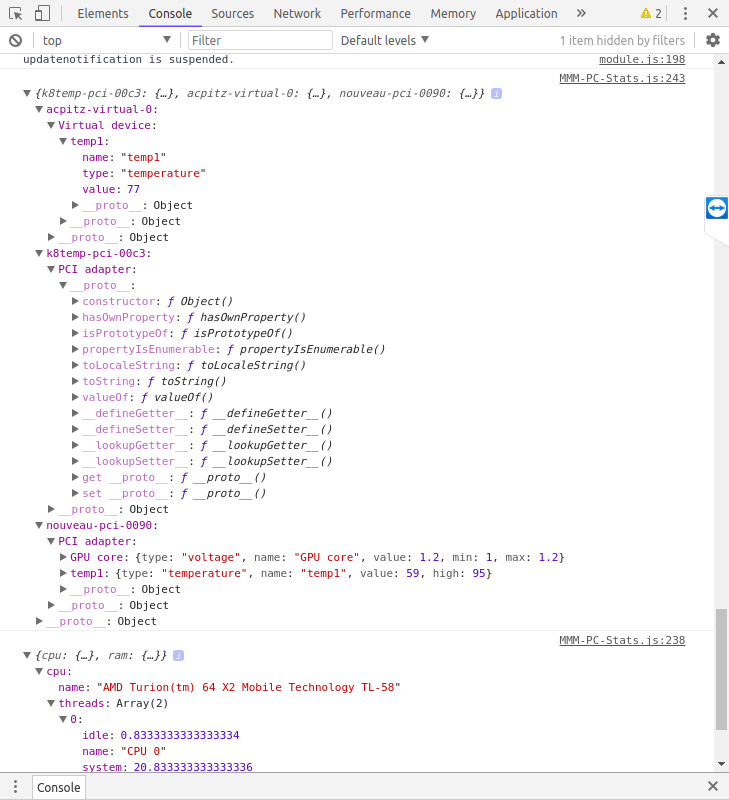
    And now the same screenshots from my dev machine [image: 1540426824298-screenshot-from-2018-10-24-19-54-44.png] [image: 1540426831410-screenshot-from-2018-10-24-19-56-10.png]