Read the statement by Michael Teeuw here.
Motion Detector
-
@danielis Actually got it to work now, changed to “updateInterval: 10000” from “updateInterval: 1000” and in diff-cam-engine.js I changed captureIntervalTime to 1000 instead of 100.
Made it easier on the RBP3 i think.
Downloaded MMM-SystemStats to keep check on sysload during config and it’s lookin’ good now.
Thanks for the help! I’ll comeback with a picture of the mirror as soon as my mirrorglas arrives. -
@oscarkindberg where is the updateinterval located?
-
@phoenixrising Sorry! I meant timeout: 10000 in config.js file. Copy pasted wrong part
-
@alexyak I’m using raspberry pi 3 with the camera module. And the motiondetection module.
Could not initiate the module before I ran sudo modprobe bcm2835-v4l2 but even after I never get any motion “score”.
I inspected the diffImageData it all contained 0,0,0,255 in series…
The camera works when using raspistill. Any hints of what I can test to debug the camera output within electro?
-
@Jhonte , post your config file.
-
@phoenixrising said in Motion Detector:
@Jhonte , post your config file.
/* Magic Mirror Config Sample * * By Michael Teeuw http://michaelteeuw.nl * MIT Licensed. */ var config = { port: 8080, ipWhitelist: ["127.0.0.1", "::ffff:127.0.0.1", "::1"], language: 'en', timeFormat: 24, units: 'metric', modules: [ { module: 'motiondetector' } ] }; /*************** DO NOT EDIT THE LINE BELOW ***************/ if (typeof module !== 'undefined') {module.exports = config;} -
@Jhonte , see oscarkindberg example. You are missing the config portion to your module config file. Ill dig mine up later when I have a chance.
-
@phoenixrising That is only an override for the defaults? Or am I missing something here. Working the same way with or without the config part.
-
Hey All,
I’ve followed all the instructions in this topic, and I’ve finally got it to work (RPi 3 + PS EYE camera) everything works well for a while, and then HDMI out stays inactive, moreover, the PS EYE Left LED (the blue one) shuts off, normal operation, both LEDs are ON, so there is definitely an issue with Raspbian itself, is there anyone which resolved this since the previous post ?
My config : https://pastebin.com/j7cKDBy3
-
Hi @alexyak !
Thanks for the module, it looks awesome!
I was trying to use it, at some point I could make it run, I mean, I can set the timeout and the monitor “wakes up” when the pi camera detects any movement.
But when the timeout reachs the limit time, the monitor get off, but after a few seconds it appears a message that says “not signal, cable disconect”.
Is there any way to avoid that alert?Kind regards
-
Never monitors turn off by themselve as soon as there is no signal or after a few minutes without signal. Mine was a old that did not turn on/off automatically.
I used wiringpi to activate a relais that turns the current of the monitor on and off. -
@danielis
Sorry I can’t get your point as English is not my first language.
What I’m saying is that when the camera does not detect any movement, and the timeout setted is out, the monitor does not show the mirror, but after a few seconds appears something like this:
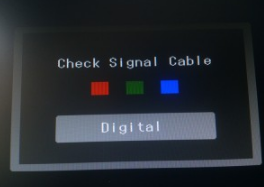
-
OK
But if there is a movement detected - is then the mirror shown?Why do you expect to see the mirror after the timeout?
The mirror must be on if there is a movement. And if there is no movement and the timeout is over, then is the mirror off.
That is what you want and what this module is doing.I think your problem is that as soon as the mirror is off, your monitor should turn off - right?
-
@danielis said in Motion Detector:
ur problem is that as soon as the mirror is off, your monito
Yes sir, that is my problem, the module seems to be working fine, but it is a bit annoying to see the alert when the mirror is off
-
Yes, that was what I tried to say in my first post yesterday.
I had the same problem.
Old monitors do not turn off by themselve if there is no signal. Newer monitor do turn off, and all is fine.My solution was tu use a relais to turn on/off the current of the monitor. Therefore I used a pin of the GPIOs to control the relais.
For controlling this GPIO pin I used the wiringpi library
I had to add some lines in the node_helper.js - please look at the lines with: exec("gpio -g …
pi@magicmirror:~/MagicMirror/modules/motiondetector $ more node_helper.js'use strict'; /* Magic Mirror * Module: MMM-PIR-Sensor * * By Paul-Vincent Roll http://paulvincentroll.com * MIT Licensed. */ const NodeHelper = require('node_helper'); const exec = require('child_process').exec; var moment = require('moment'); module.exports = NodeHelper.create( { start: function () { //this.started = false; exec("gpio -g write 4 1", null); console.log('motiondetector started ...'); console.log('monitor relais on'); }, activateMonitor: function () { exec("gpio -g write 4 1", null); console.log(moment().format() + ' monitor relais on'); //this.started = false; }, deactivateMonitor: function () { exec("gpio -g write 4 0", null); console.log(moment().format() + ' monitor relais off'); //this.started = false; }, socketNotificationReceived: function (notification) { //const self = this; if (notification === 'MOTION_DETECTED') { //const self = this; //this.started = true; this.activateMonitor(); } if (notification === 'DEACTIVATE_MONITOR') { //const self = this; //this.started = true; this.deactivateMonitor(); } } } ); -
@danielis Hi! I’ve tried, but still can’t get it. So I was thinking, instead of putting of the monitor, is it possible to show a black image for example?
So when it detects movement, the MM appears, and when not, a black photo is shown.
Is it possible? -
@pepemujica
There is a module called HideAll (or something similar) which simply hides all modules and leaves a black background. Maybe you want to try it -
Could someone please write up a working instruction for the motion detector with the rasperry pi camera? Not the pir sensor, need to make use of the camera somehow. :)
-
@alexyak Does this module switch off the pi, i’m only asking since i have Alexa running in the background which requires 3 terminals to be open all the time? If the pi goes into ‘standby’ or goes off i have to re-enter the information into the 3 terminals consecutively to get it up and running again. Thanks
Mick -
@Kimzer I wrote up a method using a version of Motion for the RasPi. It’s under the tutorials section of the forum. It’s a non-module solution, so there’s some weirdness involved. But I did get it to work with a Raspicam.
@mickyas - This module doesn’t switch off the pi, it just switches off the output to the monitor.





Hello! It looks like you're interested in this conversation, but you don't have an account yet.
Getting fed up of having to scroll through the same posts each visit? When you register for an account, you'll always come back to exactly where you were before, and choose to be notified of new replies (either via email, or push notification). You'll also be able to save bookmarks and upvote posts to show your appreciation to other community members.
With your input, this post could be even better 💗
Register Login