Read the statement by Michael Teeuw here.
MMM-Openhab
-
Description:
Full control of your Openhab System using (touchscreen, mouse or touchpad (but that’s only the beginning)
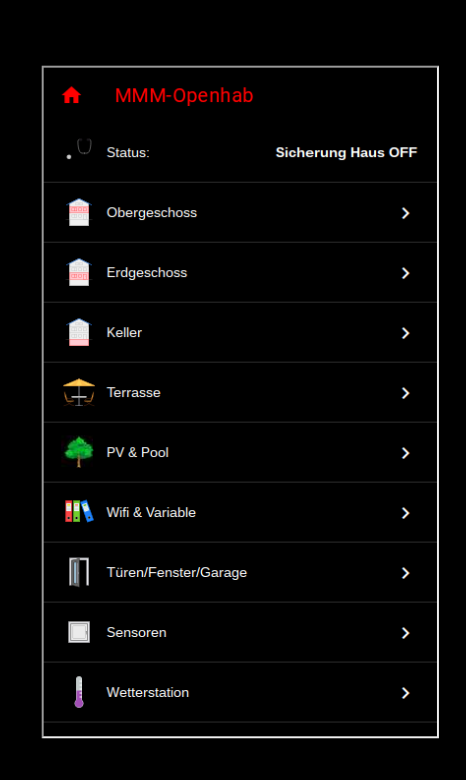
The module displays all values from your Openhab sitemap. You can also change
all values and switches (like lites, temperature and s.o.)Screenshots:
Download:
[card:tbbear/MMM-Openhab]
Version 1.0
Robert the Bear
-
Even if i have no OpenHAB System running, your module looks great :)
keep it up :) Well done -
@cruunnerr I agree, this is amazing!!!
-
This is your first module?
I give up! It looks spectacular! Exceptionally well done, Robert.
Congratulations!
-
This module looks awesome. I’m new to openHAB, can you provide some more details about how to find my OpenHAB site map, edit site map and use the correct URL in config file? Also how is the response time on a RPI 3 with other modules running.
-
@P-Bo726 Hi, first of all u have to use openHAB, if u do then its easy to get ur sitemap into MM. The response time is under one second for ex. if u want to switch a light on or off.
-
For the URL is that my OpenHAB basicui, paperui, etc?
-
@P-Bo726 the url is the same u would call in your browser to get your basicui sitemap, only with (see in readme) a little modification, thats why i recomment to copy your basicui sitemap for ex. my def. sitemap is wr.sitemap and i did a copy to MMM.sitemap. In this add the extra line like said in the readme.
-
Im am using an openhabianpi Server on a Raspi2. Now i build a MagicMirror und i was happy to find your MMM Openhab Modul.
i configured everything like you told, but my Raspi didn´t find the MMM-View.html File. The Mirror shows the MMM-Sitemap but it has a white background und at the Top of the Module it shows … cant find MMM-View.htmldo you have any ideas whats wrong ?
sorry for my not so good english its not my main language
greets
Orakel -
@orakel Hi, thank’s for using my module. Please check if your MMM-View.html file is in the right directory and it has the same
owner and group that u use to run your MM. -
thx for your response
@tbbear so i have changed the owner and group from MMM-View.html from openhabian to openhab. same problem like before. you wrote that i have to change the owner and group like the owner i use on my MM, but i can´t change the owner to the owner pi.
is there any other idea, i really like to use your module.
greeting Orakel
-
@orakel of course, i’m sorry i ment to change it to the same owner u use for openhab.
-
@orakel U are using openhab2? The view file is in the directory …/html? I am sure its only a access problem.
-
hi tbbear.
yes i am using openhab2 on a raspi2.
the MMM-View.html is in the /html directory and the css dir is in the /html directory 2.
both html file and the css directory are owner of the openhab user on the openhab2 server.
wenn i open my MMM Sitemap within the PaperUI i can see my sitemap but at the top of it it saysHTTP ERROR 404
Problem accessing /static/MMM-View.html. Reason: Not Foundi have to change to url in my config.js from http://… to http://… to see the Modul on the MagicMirror but i looks the same like in the paperUI view.
white background… but i want it black with white fonts
i tried to put the html file and the css directory into /icon/classic/ directory and changed the IP Adresse to localhost. i must do that for the Image Show in a sitemap. Now i have no errors viewing the Modul in the Mirror but it´s still white… like the sitemaps always shown in the paperUI from openhab2. But in the BasicUI view of the sitemap, if i move the mouse cursor to the top it appears that the localhost has refused the connection.
i don´t know what i shoul do to get the modul working… still any ideas ?
greetings
-
@orakel Can u try something: Replace the dir name ‘static’ in the files MMM-sitemap and in MMM-View with ‘html’
-
i did it before…it´s the same… i think i can´t use your module but i would like.
is there anything else needed in openhab ? http binding ? web server ? anything else ?
i tried to install another instance of MagicMirror on a WIndowsPC and its the same probleme here with the MMM-Openhab module so i think it´s an openhab problem -
after updating my openhab server your module works !!! i am so happy that it works.
but there is still one little problem, when i am using your MMM-View.html and your MMM-Style.css.
when i open my sitemap in the paperui it looks like it should. with one word awesome.
but in my magicmirror its still white.
but when i am using the mystyle.css and DarkTheme.html it works in the MagicMirror too.
i dont know how to insert the code … but i found them in an openhab forum. -
Hello,
i tried this module today.Where is the example sitemap file after installing the module ?
Regards
Jürgen
-
@LordMM Hi Jürgen, looks like you speak german. Also das Beispiel ist in der readme mehr ist nicht nötig. Gruß Robert
-
I am running OH2 and just ran across your article about interfacing OH2 with MagicMirror. First of all thank you for this program. I’m just starting to use Magic Mirror.
Questions:
I have installed your code into Magic Mirror.
I have added your code to the MM config.js file
I have added the 2 files to my OH2 html directory.
Where I ran into trouble is in adding the code to my sitemap file.
You indicate that this added to the beginning of that code:sitemap MMM label="MMM-Openhab" { // Set for MMM-Openhab Webview url="/static/MMM-View.html" ... }DO I replace my original code :
sitemap ourhome label="Our Home" {

    Frame label="Today" {
        Text item=Date icon="calendar"
        Text item=Time  icon="time"

    }
with your above code? If I do this then my OH2 will not start. Am I missing something? Thank you for any information!
John





Hello! It looks like you're interested in this conversation, but you don't have an account yet.
Getting fed up of having to scroll through the same posts each visit? When you register for an account, you'll always come back to exactly where you were before, and choose to be notified of new replies (either via email, or push notification). You'll also be able to save bookmarks and upvote posts to show your appreciation to other community members.
With your input, this post could be even better 💗
Register Login