MagicMirror Forum
    • Recent
    • Tags
    • Unsolved
    • Solved
    • MagicMirror² Repository
    • Documentation
    • 3rd-Party-Modules
    • Donate
    • Discord
    • Register
    • Login
    A New Chapter for MagicMirror: The Community Takes the Lead
    Read the statement by Michael Teeuw here.

    My mirror from Montreal

    Scheduled Pinned Locked Moved Show your Mirror
    22 Posts 5 Posters 14.4k Views 4 Watching
    Loading More Posts
    • Oldest to Newest
    • Newest to Oldest
    • Most Votes
    Reply
    • Reply as topic
    Log in to reply
    This topic has been deleted. Only users with topic management privileges can see it.
    • Mykle1M Offline
      Mykle1 Project Sponsor Module Developer @lpgjg
      last edited by

      @lpgjg

      Well done, sir. :thumbsup:

      Create a working config
      How to add modules

      1 Reply Last reply Reply Quote 0
      • jcasmanJ Offline
        jcasman @lpgjg
        last edited by

        @lpgjg Thanks for posting all the details. Glad you kept going even with the cabling/shorting issue. The Spot the Station module is a great idea. I’ve gone here to install it: https://github.com/mykle1/MMM-ISS I noticed another cool looking module in your screenshots. What’s the one with the nice astronomy images (Earth and Moon)?

        Thank you!

        Mykle1M 1 Reply Last reply Reply Quote 0
        • L Offline
          lpgjg
          last edited by

          The Earth and Moon modules I used are found in the 3rd party modules list:
          https://github.com/MichMich/MagicMirror/wiki/3rd-party-modules

          These are them specifically:
          https://github.com/mykle1/MMM-EARTH
          https://github.com/spectroman/mmm-moon-phases

          1 Reply Last reply Reply Quote 1
          • Mykle1M Offline
            Mykle1 Project Sponsor Module Developer @jcasman
            last edited by

            @jcasman

            I prefer the MMM-Lunartic module for the moon. :-)

            Create a working config
            How to add modules

            1 Reply Last reply Reply Quote 1
            • jcasmanJ Offline
              jcasman
              last edited by jcasman

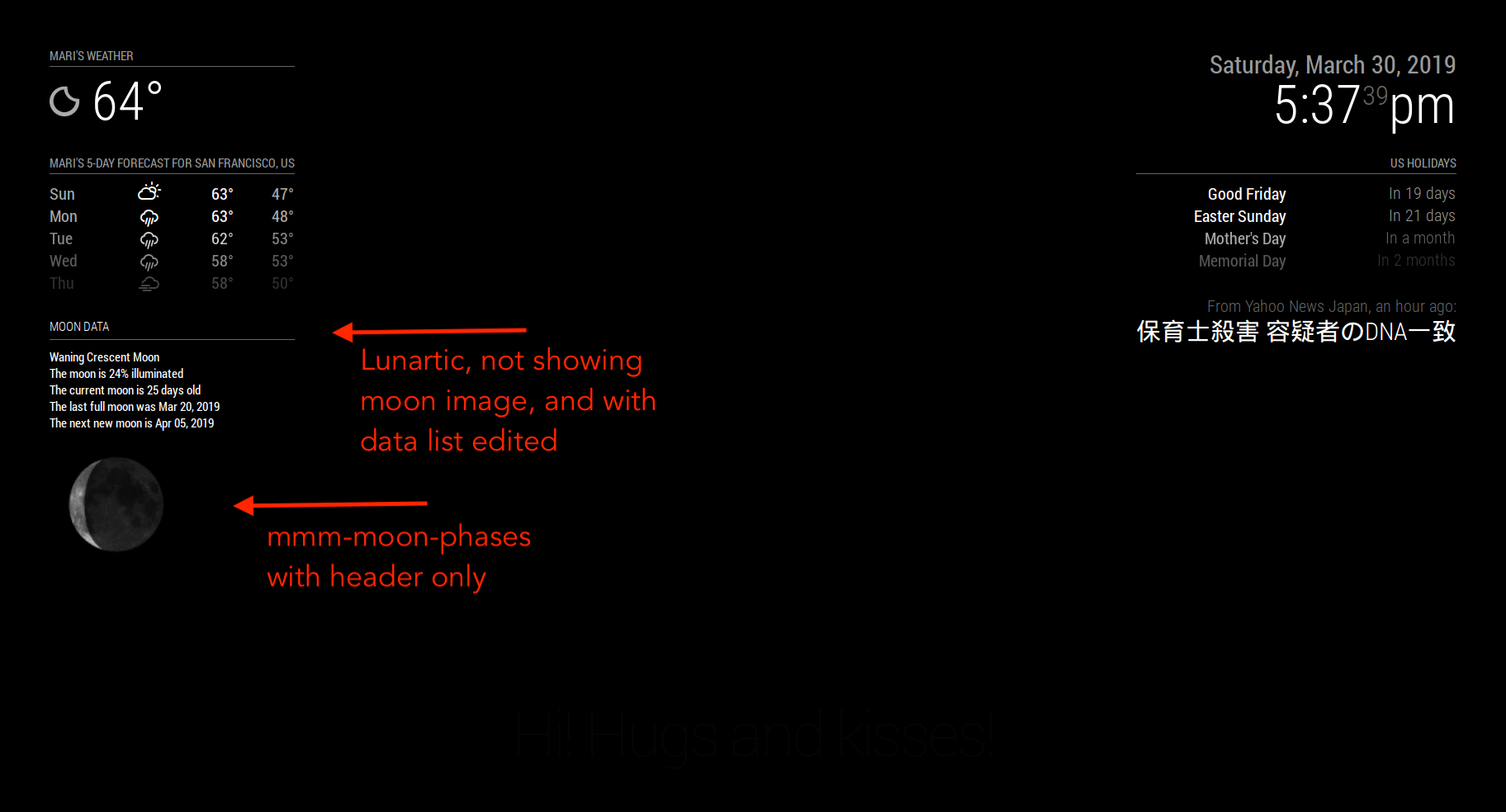
              Thanks to @lpgjg and @Mykle1 - Really appreciate the suggestions. I’ve installed mmm-moon-phases. It’s great. I installed MMM-Lunartic, and love all the extra stats. I’m struggling in CSS to get the moon image closer to the header (or a module above it). It’s just an aesthetic change. Seems like maybe the image itself has a larger border. Would like to fix that but otherwise, super cool. Thank you @Mykle1 for making such a fun module.

              Mykle1M 1 Reply Last reply Reply Quote 0
              • Mykle1M Offline
                Mykle1 Project Sponsor Module Developer @jcasman
                last edited by Mykle1

                @jcasman

                Use these in your custom.css file and adjust accordingly.

                .MMM-Lunartic img.photo {
                  max-width: 100%;
                  margin-left: 0px;          /* Precisely align moon picture with these */
                  margin-right: 0px;
                  margin-top: 0px;        
                  margin-bottom: 0px;
                }
                

                Yes, the image is contained in a black square (outer space?) so moving it into the region of another module might cover the other module. If so, you switch the order in the config.js for both modules (move the earlier entry to after) so that the black border of the MMM-Lunartic module will be covered by the other module.

                Create a working config
                How to add modules

                jcasmanJ 1 Reply Last reply Reply Quote 0
                • L Offline
                  lpgjg
                  last edited by

                  This is good to know, I also had issues with the margins since I wanted it to look as if the moon was in orbit around the earth. Eventually, I gave up and made it work with mmm-moon-phase. I will probably go back an change it now that I know how to make it work.

                  thanks Mykle1

                  Mykle1M 1 Reply Last reply Reply Quote 0
                  • Mykle1M Offline
                    Mykle1 Project Sponsor Module Developer @lpgjg
                    last edited by

                    @lpgjg

                    No worries, mate. Use what works for you. I’d like to see a pic of “the moon in orbit around the earth” when you’re done. Have fun.

                    Create a working config
                    How to add modules

                    L 1 Reply Last reply Reply Quote 0
                    • jcasmanJ Offline
                      jcasman @Mykle1
                      last edited by

                      @Mykle1 Thanks for pointing out your css file. I mucked around in it quite a bit. Changing the margin settings did not, unfortunately, seem to change the effect very much. I was able to make it overlap with a module above it, like you pointed out. I tried negative numbers, like the examples in the comments. I ended up hiding the moon image in MMM-Lunartic, setting display: none; in the css file, but using it to display the (very cool) data about the current phase of the moon and more. I am using mmm-moon-phases to display the image of the moon. This ends up with the proper “tightness” for the moon image. (Again, this is just one person’s aesthetic change.) Thanks for making both the module, the MMM-Lunartic.js and .css files so accessible. It’s been super fun tweaking the display.

                      Mykle1M 1 Reply Last reply Reply Quote 1
                      • Mykle1M Offline
                        Mykle1 Project Sponsor Module Developer @jcasman
                        last edited by

                        @jcasman

                        Excellent! Are you going to take a picture/screenshot so I can see the end result?

                        Create a working config
                        How to add modules

                        jcasmanJ 1 Reply Last reply Reply Quote 0
                        • jcasmanJ Offline
                          jcasman @Mykle1
                          last edited by jcasman

                          @Mykle1 Here you go!

                          0_1553993867763_Using MMM-Lunartic.png

                          Mykle1M L 2 Replies Last reply Reply Quote 2
                          • Mykle1M Offline
                            Mykle1 Project Sponsor Module Developer @jcasman
                            last edited by

                            @jcasman

                            Well done. :thumbsup:

                            Create a working config
                            How to add modules

                            jcasmanJ 1 Reply Last reply Reply Quote 0
                            • jcasmanJ Offline
                              jcasman @Mykle1
                              last edited by

                              @Mykle1 Thanks for all the work on MMM-Lunartic and providing it to the community. Really fun.

                              1 Reply Last reply Reply Quote 0
                              • bheplerB Offline
                                bhepler Module Developer
                                last edited by

                                Good looking mirror! Well done, sir.

                                jcasmanJ 1 Reply Last reply Reply Quote 0
                                • jcasmanJ Offline
                                  jcasman @bhepler
                                  last edited by

                                  @bhepler Hey, thanks! :-)

                                  1 Reply Last reply Reply Quote 0
                                  • L Offline
                                    lpgjg @jcasman
                                    last edited by

                                    @jcasman Nicely done.

                                    1 Reply Last reply Reply Quote 1
                                    • L Offline
                                      lpgjg @Mykle1
                                      last edited by

                                      @Mykle1 I only got as close as the pic I posted…with the Earth and moon to the top left of it.

                                      1 Reply Last reply Reply Quote 0
                                      • L Offline
                                        lpgjg
                                        last edited by

                                        Is there anyway to make the background of MMM-ISS module transparent?

                                        I would like just the letters and values to come through and just have a mirror affect in the background.

                                        jcasmanJ 1 Reply Last reply Reply Quote 0
                                        • jcasmanJ Offline
                                          jcasman @lpgjg
                                          last edited by jcasman

                                          @lpgjg It looks like the MMM-ISS module depends on the NASA widget. Doesn’t appear you can change that. I found a module called MMM-ISS-Information which has the option to set ‘iss-map: false’ This might be what you’re aiming at. I have not tested it, however.

                                          1 Reply Last reply Reply Quote 0

                                          Hello! It looks like you're interested in this conversation, but you don't have an account yet.

                                          Getting fed up of having to scroll through the same posts each visit? When you register for an account, you'll always come back to exactly where you were before, and choose to be notified of new replies (either via email, or push notification). You'll also be able to save bookmarks and upvote posts to show your appreciation to other community members.

                                          With your input, this post could be even better 💗

                                          Register Login

                                          • 1
                                          • 2
                                          • 1 / 2
                                          • First post
                                            Last post
                                          Enjoying MagicMirror? Please consider a donation!
                                          MagicMirror created by Michael Teeuw.
                                          Forum managed by Sam, technical setup by Karsten.
                                          This forum is using NodeBB as its core | Contributors
                                          Contact | Privacy Policy