Read the statement by Michael Teeuw here.
MMM-OpenWeatherForecast - Replacement for MMM-DarkSkyForecast
-
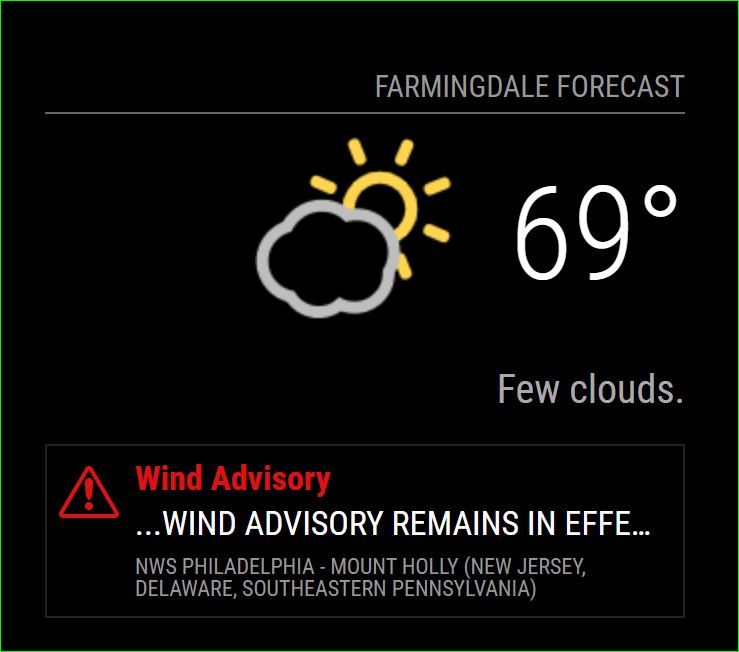
@j-e-f-f Last thing is it possible to just get the red to display and nothing else? Yea that’s right it’s FN 69 out here in NJ!
-
concerning the duplicate weather alerts and mix up between german and english I got an answer from openweathermap.org:
Currently we receive data in such format from the provider. The development team is working on the new version of alerts, which should eliminate such behavior. -
@mielu80 said in MMM-OpenWeatherForecast - Replacement for MMM-DarkSkyForecast:
It is somehow possible to show the unit of measurement for the temperature (in my case, “C” for Celsius) ?
Yes. You can do that in your
custom.cssfile.For the big current temperature display:
.MMM-OpenWeatherForecast .current-conditions-wrapper .current.temperature:after {
    content: "C";
}
In the extra current conditions Hi/Lo display:
.MMM-OpenWeatherForecast .extra-current-conditions-wrapper  . temperature-container . high-temperature:after,
.MMM-OpenWeatherForecast .extra-current-conditions-wrapper  . temperature-container . low-temperature:after {
    content: "C";
}
In the hourly forecast items:
.MMM-OpenWeatherForecast .forecast-item.hourly .temperature-container:after {
    content: "C";
}
In the daily forecast Hi/Lo display:
.MMM-OpenWeatherForecast .forecast-item.daily .high-temperature:after,
.MMM-OpenWeatherForecast .forecast-item.daily .low-temperature:after {
    content: "C";
}
In all of the examples above, whatever you specify for
contentwill be displayed. So if you wantedFfor Fahrenheit, you would specifycontent: "F"; -
@swvalenti said in MMM-OpenWeatherForecast - Replacement for MMM-DarkSkyForecast:
Last thing is it possible to just get the red to display and nothing else?
Yes, you can do this in your
custom.cssfile.To hide the description and alert source:
.MMM-OpenWeatherForecast .weather-alert .weather-alert-description,
.MMM-OpenWeatherForecast .weather-alert .weather-alert-source {
    display: none;
}
To change the size of the red title text:
.MMM-OpenWeatherForecast .weather-alert .weather-alert-title {
   font-size: 17px; /* adjust this */
}
alternatively, to change the size of the alert icon:
.MMM-OpenWeatherForecast .weather-alert {
    background-size: 30px 26px;  /* width height */
    background-position: 6px 10px;  /* top left */
}
If you change the size of the icon, you may want to adjust the title padding as well:
.MMM-OpenWeatherForecast .weather-alert .weather-alert-title {
  padding-left: 36px; /* adjust this */
}
EVERYTHING is in this module has a CSS class applied to it so you can tailor every last little bit to your specific needs. Take a look at
MMM-OpenWeatherForecast.cssfor existing CSS rules andmmm-openweather-forecast.njkto see what classes have been applied to which UI elements. -
Just a quick thanks for the module !
-
I’m looking to see if I can get just a truncated text-based description of the upcoming weather.
When I search for a location on the openweathermap.org site, I do see the site gathers this data “Heavy intensity rain. Moderate breeze. The high will be 68°F, the low will be 50°F.”, which is exactly what I’m looking to display on my mirror, but I don’t see how this might be communicated via the API.
On OWM’s page, I don’t even see this data provided in the sample API calls provided. Is there a way for your module to provide this data or does this require one of the paid APIs? Thank you for all of the effort you’ve put into this.
-
So I am working on two mirrors. The first set up this module with no problem I created a new api key for the second mirror and when the forecast shows, its missing a day. Today is Friday but when I use this config, the first date showing up in the forecast is Sunday. Makes no sense.
Help please
{ module: "MMM-OpenWeatherMapForecast", header: "Kansas City Weather", position: "top_right", classes: "default everyone", disabled: false, config: { apikey: "xxxxxxxxxxx", latitude: "39.0997", longitude: "94.5786", iconset: "5c", concise: false, maxDailiesToShow: 5, showHourlyForecast: false, forecastLayout: "table" } }, -
@j-e-f-f
Big thanks to you,sir !
Now the module is just perfect for me,everything is exactly as I wished. -
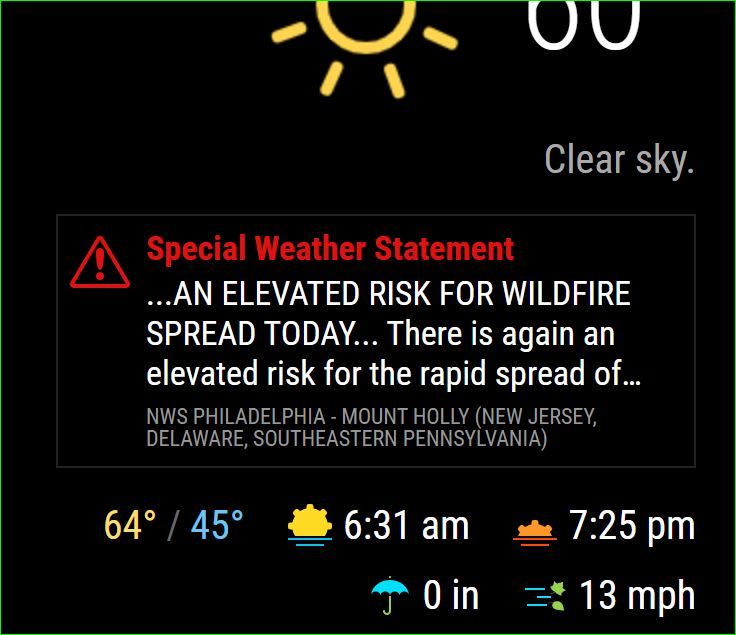
@j-e-f-f here is my config and see the picture, I would like to only see the alert in red and the first line “elevated risk of wildfire”. That doable? Sorry for all the questions on this I’m trying to work the problem.
.MMM-OpenWeatherForecast .weather-alert .weather-alert-description {
    display: 1;
},
.MMM-OpenWeatherForecast .weather-alert .weather-alert-source {
    display: none;
},
.MMM-OpenWeatherForecast .weather-alert .weather-alert-description {
  -webkit-line-clamp: 2; /* adjust this as desired */
}
-
Just starting to use it, changed few settings and I’m all set.
Great job! -
Great module thank you …Jeff
-
I am finding a weird quirk. For the future forecast days once noon local time hits, the next day forecast disappears
Today it showed Friday as a forecast day, after noon hit the next 3 days shown in forecast are sat, sun & Mon.
My config is posted above
-
@motdog let me look into this. My code assumes the first daily forecast is “today” and starts with the second one in the collection. It’s possible this is something the API does and I just hadn’t noticed before. It would make sense because I’ve typically worked on this module during the morning. Will test later.
-
@j-e-f-f can it be a timezone issue?
are the APIs expecting time in UTC? Moment does operates on user timezone (or browser timezone in this case) -
@0m4r If it is then it’s a bug in the API. The API is supposed to return all data time shifted to the time zone for the long/lat you specify.
I should know more soon. Running a test right now and just waiting for the clock to tick past noon.
-
@0m4r Still troubleshooting this. I don’t see this happening when I use my own long/lat. Will try with yours, but I will need to wait until it ticks past 12:00pm your time. (I’m in London, so will need to check later this evening).
One thing I did notice, though… the long lat you have in your config is for Shanghai, China, not Kansas City. You forgot the “minus” sign in front of the longitude property. Maybe that fixes it?
-
@j-e-f-f I think you want to mention @motdog, not me :)
-
@j-e-f-f I think that is the problem. I’ll keep you posted
-
@0m4r Yes indeed!
@motdog the more I think about it, it makes sense that the issue you’re seeing is a result of the missing minus sign in your longitude. Essentially, you’re shifting what you’re expecting by exactly 12 hours, meaning that when it’s noon in Kansas city, it’s midnight in Shanghai, hence moving to the next day, and explains why your dailies are shifting by one after 12:00 pm for you.
-
@j-e-f-f did you see my previous post is that at all doable?





Hello! It looks like you're interested in this conversation, but you don't have an account yet.
Getting fed up of having to scroll through the same posts each visit? When you register for an account, you'll always come back to exactly where you were before, and choose to be notified of new replies (either via email, or push notification). You'll also be able to save bookmarks and upvote posts to show your appreciation to other community members.
With your input, this post could be even better 💗
Register Login