MagicMirror Forum
    • Recent
    • Tags
    • Unsolved
    • Solved
    • MagicMirror² Repository
    • Documentation
    • 3rd-Party-Modules
    • Donate
    • Discord
    • Register
    • Login
    A New Chapter for MagicMirror: The Community Takes the Lead
    Read the statement by Michael Teeuw here.

    My mirror from Montreal

    Scheduled Pinned Locked Moved Show your Mirror
    22 Posts 5 Posters 16.2k Views 4 Watching
    Loading More Posts
    • Oldest to Newest
    • Newest to Oldest
    • Most Votes
    Reply
    • Reply as topic
    Log in to reply
    This topic has been deleted. Only users with topic management privileges can see it.
    • C
      cyberphox
      last edited by

      great job fellow Canuck!

      Full time Dad, DJ and entertainer and lover of technology.

      L 1 Reply Last reply
      Reply Quote 0
      • L
        lpgjg @cyberphox
        last edited by

        @cyberphox Thanks,

        Mykle1M 1 Reply Last reply
        Reply Quote 0
        • Mykle1M
          Mykle1 Project Sponsor Module Developer @lpgjg
          last edited by

          @lpgjg

          Well done, sir. :thumbsup:

          Create a working config
          How to add modules

          1 Reply Last reply
          Reply Quote 0
          • jcasmanJ
            jcasman @lpgjg
            last edited by

            @lpgjg Thanks for posting all the details. Glad you kept going even with the cabling/shorting issue. The Spot the Station module is a great idea. I’ve gone here to install it: https://github.com/mykle1/MMM-ISS I noticed another cool looking module in your screenshots. What’s the one with the nice astronomy images (Earth and Moon)?

            Thank you!

            Mykle1M 1 Reply Last reply
            Reply Quote 0
            • L
              lpgjg
              last edited by

              The Earth and Moon modules I used are found in the 3rd party modules list:
              https://github.com/MichMich/MagicMirror/wiki/3rd-party-modules

              These are them specifically:
              https://github.com/mykle1/MMM-EARTH
              https://github.com/spectroman/mmm-moon-phases

              1 Reply Last reply
              Reply Quote 1
              • Mykle1M
                Mykle1 Project Sponsor Module Developer @jcasman
                last edited by

                @jcasman

                I prefer the MMM-Lunartic module for the moon. :-)

                Create a working config
                How to add modules

                1 Reply Last reply
                Reply Quote 1
                • jcasmanJ
                  jcasman
                  last edited by jcasman

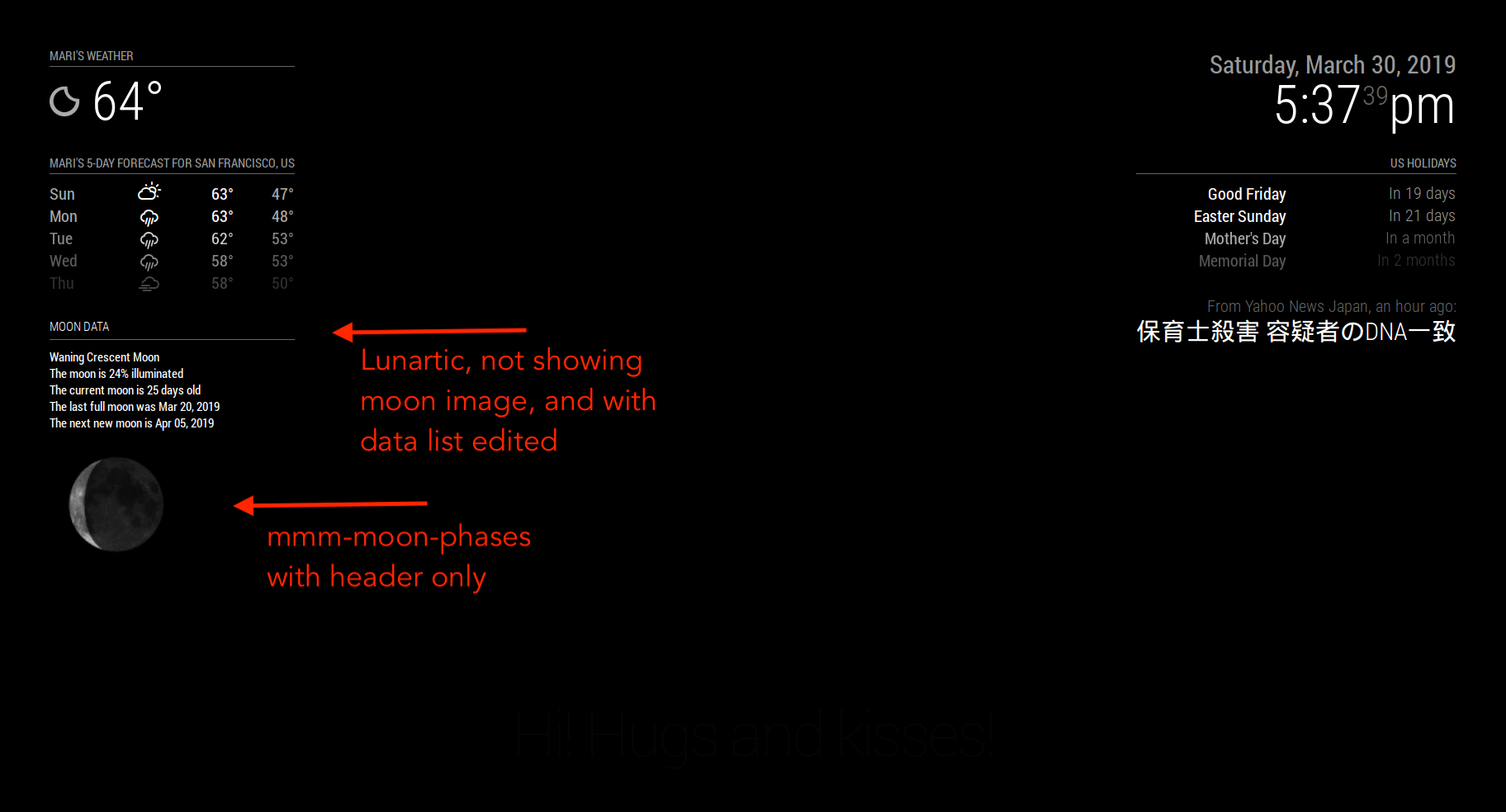
                  Thanks to @lpgjg and @Mykle1 - Really appreciate the suggestions. I’ve installed mmm-moon-phases. It’s great. I installed MMM-Lunartic, and love all the extra stats. I’m struggling in CSS to get the moon image closer to the header (or a module above it). It’s just an aesthetic change. Seems like maybe the image itself has a larger border. Would like to fix that but otherwise, super cool. Thank you @Mykle1 for making such a fun module.

                  Mykle1M 1 Reply Last reply
                  Reply Quote 0
                  • Mykle1M
                    Mykle1 Project Sponsor Module Developer @jcasman
                    last edited by Mykle1

                    @jcasman

                    Use these in your custom.css file and adjust accordingly.

                    .MMM-Lunartic img.photo {
                      max-width: 100%;
                      margin-left: 0px;          /* Precisely align moon picture with these */
                      margin-right: 0px;
                      margin-top: 0px;        
                      margin-bottom: 0px;
                    }
                    

                    Yes, the image is contained in a black square (outer space?) so moving it into the region of another module might cover the other module. If so, you switch the order in the config.js for both modules (move the earlier entry to after) so that the black border of the MMM-Lunartic module will be covered by the other module.

                    Create a working config
                    How to add modules

                    jcasmanJ 1 Reply Last reply
                    Reply Quote 0
                    • L
                      lpgjg
                      last edited by

                      This is good to know, I also had issues with the margins since I wanted it to look as if the moon was in orbit around the earth. Eventually, I gave up and made it work with mmm-moon-phase. I will probably go back an change it now that I know how to make it work.

                      thanks Mykle1

                      Mykle1M 1 Reply Last reply
                      Reply Quote 0
                      • Mykle1M
                        Mykle1 Project Sponsor Module Developer @lpgjg
                        last edited by

                        @lpgjg

                        No worries, mate. Use what works for you. I’d like to see a pic of “the moon in orbit around the earth” when you’re done. Have fun.

                        Create a working config
                        How to add modules

                        L 1 Reply Last reply
                        Reply Quote 0
                        • jcasmanJ
                          jcasman @Mykle1
                          last edited by

                          @Mykle1 Thanks for pointing out your css file. I mucked around in it quite a bit. Changing the margin settings did not, unfortunately, seem to change the effect very much. I was able to make it overlap with a module above it, like you pointed out. I tried negative numbers, like the examples in the comments. I ended up hiding the moon image in MMM-Lunartic, setting display: none; in the css file, but using it to display the (very cool) data about the current phase of the moon and more. I am using mmm-moon-phases to display the image of the moon. This ends up with the proper “tightness” for the moon image. (Again, this is just one person’s aesthetic change.) Thanks for making both the module, the MMM-Lunartic.js and .css files so accessible. It’s been super fun tweaking the display.

                          Mykle1M 1 Reply Last reply
                          Reply Quote 1
                          • Mykle1M
                            Mykle1 Project Sponsor Module Developer @jcasman
                            last edited by

                            @jcasman

                            Excellent! Are you going to take a picture/screenshot so I can see the end result?

                            Create a working config
                            How to add modules

                            jcasmanJ 1 Reply Last reply
                            Reply Quote 0
                            • jcasmanJ
                              jcasman @Mykle1
                              last edited by jcasman

                              @Mykle1 Here you go!

                              0_1553993867763_Using MMM-Lunartic.png

                              Mykle1M L 2 Replies Last reply
                              Reply Quote 2
                              • Mykle1M
                                Mykle1 Project Sponsor Module Developer @jcasman
                                last edited by

                                @jcasman

                                Well done. :thumbsup:

                                Create a working config
                                How to add modules

                                jcasmanJ 1 Reply Last reply
                                Reply Quote 0
                                • jcasmanJ
                                  jcasman @Mykle1
                                  last edited by

                                  @Mykle1 Thanks for all the work on MMM-Lunartic and providing it to the community. Really fun.

                                  1 Reply Last reply
                                  Reply Quote 0
                                  • B
                                    bhepler Module Developer
                                    last edited by

                                    Good looking mirror! Well done, sir.

                                    jcasmanJ 1 Reply Last reply
                                    Reply Quote 0
                                    • jcasmanJ
                                      jcasman @bhepler
                                      last edited by

                                      @bhepler Hey, thanks! :-)

                                      1 Reply Last reply
                                      Reply Quote 0
                                      • L
                                        lpgjg @jcasman
                                        last edited by

                                        @jcasman Nicely done.

                                        1 Reply Last reply
                                        Reply Quote 1
                                        • L
                                          lpgjg @Mykle1
                                          last edited by

                                          @Mykle1 I only got as close as the pic I posted…with the Earth and moon to the top left of it.

                                          1 Reply Last reply
                                          Reply Quote 0
                                          • L
                                            lpgjg
                                            last edited by

                                            Is there anyway to make the background of MMM-ISS module transparent?

                                            I would like just the letters and values to come through and just have a mirror affect in the background.


                                            jcasmanJ 1 Reply Last reply
                                            Reply Quote 0

                                            Hello! It looks like you're interested in this conversation, but you don't have an account yet.

                                            Getting fed up of having to scroll through the same posts each visit? When you register for an account, you'll always come back to exactly where you were before, and choose to be notified of new replies (either via email, or push notification). You'll also be able to save bookmarks and upvote posts to show your appreciation to other community members.

                                            With your input, this post could be even better 💗

                                            Register Login

                                            • 1
                                            • 2
                                            • 1 / 2
                                            • First post
                                              Last post
                                            Enjoying MagicMirror? Please consider a donation!
                                            MagicMirror created by Michael Teeuw.
                                            Forum managed by Sam, technical setup by Karsten.
                                            This forum is using NodeBB as its core | Contributors
                                            Contact | Privacy Policy