MagicMirror Forum
    • Recent
    • Tags
    • Unsolved
    • Solved
    • MagicMirror² Repository
    • Documentation
    • 3rd-Party-Modules
    • Donate
    • Discord
    • Register
    • Login
    A New Chapter for MagicMirror: The Community Takes the Lead
    Read the statement by Michael Teeuw here.

    MMM-HomeAssistant-Sensors (Development) - Show your HA Sensors on your Mirror

    Scheduled Pinned Locked Moved Utilities
    66 Posts 19 Posters 50.1k Views 21 Watching
    Loading More Posts
    • Oldest to Newest
    • Newest to Oldest
    • Most Votes
    Reply
    • Reply as topic
    Log in to reply
    This topic has been deleted. Only users with topic management privileges can see it.
    • I Offline
      Ivanov_d @Ivanov_d
      last edited by Ivanov_d

      @Snille I think that I found out what the issue might be (at least for my case). I turned on debugging and here is what popped-up:

      0|MagicMirror  | [19.02.2022 12:34.16.715] [ERROR] 
      0|MagicMirror  | MMM-homeassistant-sensors ERROR: Error: certificate has expired
      0|MagicMirror  |     at TLSSocket.onConnectSecure (_tls_wrap.js:1501:34)
      0|MagicMirror  |     at TLSSocket.emit (events.js:315:20)
      0|MagicMirror  |     at TLSSocket._finishInit (_tls_wrap.js:936:8)
      0|MagicMirror  |     at TLSWrap.ssl.onhandshakedone (_tls_wrap.js:710:12) {
      0|MagicMirror  |   code: 'CERT_HAS_EXPIRED'
      0|MagicMirror  | }
      0|MagicMirror  | [19.02.2022 12:34.16.721] [ERROR] 
      0|MagicMirror  | Whoops! There was an uncaught exception...
      0|MagicMirror  | [19.02.2022 12:34.16.727] [ERROR] 
      0|MagicMirror  | TypeError: Cannot read property 'statusCode' of undefined
      0|MagicMirror  |     at Request._callback (/home/pi/MagicMirror/modules/MMM-homeassistant-sensors/node_helper.js:22:77)
      0|MagicMirror  |     at self.callback (/home/pi/MagicMirror/modules/MMM-homeassistant-sensors/node_modules/request/request.js:185:22)
      0|MagicMirror  |     at Request.emit (events.js:315:20)
      0|MagicMirror  |     at Request.onRequestError (/home/pi/MagicMirror/modules/MMM-homeassistant-sensors/node_modules/request/request.js:877:8)
      0|MagicMirror  |     at ClientRequest.emit (events.js:315:20)
      0|MagicMirror  |     at TLSSocket.socketErrorListener (_http_client.js:426:9)
      0|MagicMirror  |     at TLSSocket.emit (events.js:315:20)
      0|MagicMirror  |     at emitErrorNT (internal/streams/destroy.js:92:8)
      0|MagicMirror  |     at emitErrorAndCloseNT (internal/streams/destroy.js:60:3)
      0|MagicMirror  |     at processTicksAndRejections (internal/process/task_queues.js:84:21)
      

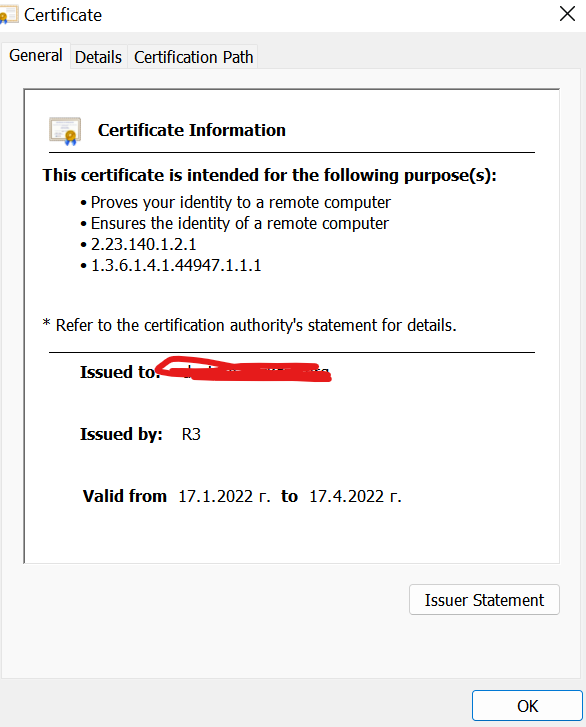
      The certificate is valid though:
      34fa0f78-0e55-4957-a4bd-fc5e9d345303-image.png

      1 Reply Last reply Reply Quote 0
      • I Offline
        Ivanov_d @Snille
        last edited by

        @snille said in MMM-HomeAssistant-Sensors (Development) - Show your HA Sensors on your Mirror:

        curl -X GET -H “Authorization: Bearer VeRy-LoNg-API-ToKen” -H “Content-Type: application/json” http://ha-IP:8123/api/states

        Same here … I get all states with the following URLs:

        https://myhome.org:443/api/states
        https://myhome/api/states

        However, when I try to use the local IP I can’t and that is normal as the certificate is not for that domain:

        pi@raspberrypi:~ $ curl -X GET -H "Authorization: Bearer long-token" -H "Content-Type: application/json" https://192.168.1.19:443/api/states
        curl: (7) Failed to connect to 192.168.1.19 port 443: Connection refused
        
        pi@raspberrypi:~ $ curl -X GET -H "Authorization: Bearer long-token" -H "Content-Type: application/json" https://192.168.1.19:8123/api/states
        curl: (60) SSL: no alternative certificate subject name matches target host name '192.168.1.19'
        More details here: https://curl.haxx.se/docs/sslcerts.html
        
        curl failed to verify the legitimacy of the server and therefore could not
        establish a secure connection to it. To learn more about this situation and
        how to fix it, please visit the web page mentioned above.
        

        What is wierd though is that although using SSL, the default port is still 8123, however, the connection is secured

        SnilleS 1 Reply Last reply Reply Quote 0
        • SnilleS Offline
          Snille Module Developer @Ivanov_d
          last edited by

          @ivanov_d Interesting… Maybe it’s a package missing, but that would not explain why the non SSL connections would fail…
          I found another ting, if you don’t have the “clock” module enabled, the “moment.js” is not loaded, and therefore errors out my module (that uses the moment function)… So I have to fix that somehow as well… :)

          If you cant find it, make it and share it!
          Modules: MMM-homeassistant-sensors, MMM-Modulebar, MMM-Profilepicture, MMM-Videoplayer

          I 1 Reply Last reply Reply Quote 0
          • I Offline
            Ivanov_d @Snille
            last edited by

            @snille in my case non-SSL connections don’t fail, only SSL ones. Any idea how to find which package might be missing or outdated? My coding skills are a bit rusty :D

            SnilleS 1 Reply Last reply Reply Quote 0
            • SnilleS Offline
              Snille Module Developer @Ivanov_d
              last edited by Snille

              @ivanov_d Nah… Not really, never been down the SSL rabbit hole… :) I have just forked this module and “fixed” the things I needed… I hope someone else can give some tips (PR:s)… My javascript skills are not that great ether… :)

              If you cant find it, make it and share it!
              Modules: MMM-homeassistant-sensors, MMM-Modulebar, MMM-Profilepicture, MMM-Videoplayer

              SnilleS 1 Reply Last reply Reply Quote 0
              • SnilleS Offline
                Snille Module Developer @Snille
                last edited by

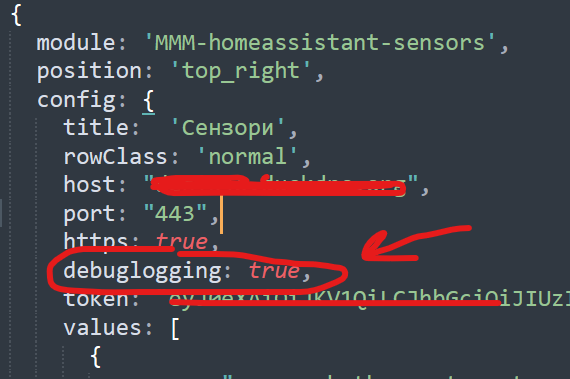
                Now it’s working again… On both mu mirrors… I don’t understand why… I fixed the “moment” problem at least, I hope… Pushed that… But I guess it’s still the SSL problems left. But I can’t replicate it. @Ivanov_d Where did you set the debug flag to get the errors?

                If you cant find it, make it and share it!
                Modules: MMM-homeassistant-sensors, MMM-Modulebar, MMM-Profilepicture, MMM-Videoplayer

                I 1 Reply Last reply Reply Quote 0
                • I Offline
                  Ivanov_d @Snille
                  last edited by

                  @snille in the config.js:

                  c1f76c95-765d-49e9-8755-361f904e1fdf-image.png

                  1 Reply Last reply Reply Quote 1
                  • I Offline
                    Ivanov_d
                    last edited by

                    I finally found out what the issue is. It was an electron bug that is fixed in MM v. 2.18 (I was using an older version). Now everything works.

                    1 Reply Last reply Reply Quote 1
                    • P Offline
                      proxxym
                      last edited by

                      Hello,
                      is posible to increase the size of fonts?
                      something like …small , medium, large…
                      Thanks,

                      I 1 Reply Last reply Reply Quote 0
                      • I Offline
                        Ivanov_d @proxxym
                        last edited by

                        @proxxym
                        afaf132e-851b-4ccb-b36b-1d2bebbfd5fc-image.png

                        P 1 Reply Last reply Reply Quote 1
                        • cowboysdudeC Offline
                          cowboysdude Module Developer
                          last edited by

                          Been working great for me! I had to change some entities today and it’s still chuggin along :)

                          1 Reply Last reply Reply Quote 1
                          • P Offline
                            proxxym @Ivanov_d
                            last edited by

                            @Ivanov_d Thanks,
                            for me big font is to smal :).
                            an extra large font or something similar was needed

                            S I 2 Replies Last reply Reply Quote 0
                            • S Offline
                              sdetweil @proxxym
                              last edited by

                              @proxxym I don’t know, but you can use the developers window to learn what needs to be changed, and test it out

                              see
                              https://forum.magicmirror.builders/topic/14862/help-with-a-couple-css-issues?_=1650634458947

                              Sam

                              How to add modules

                              learning how to use browser developers window for css changes

                              1 Reply Last reply Reply Quote 0
                              • I Offline
                                Ivanov_d @proxxym
                                last edited by Ivanov_d

                                @proxxym open the following file:

                                ~/MagicMirror/modules/MMM-homeassistant-sensors/MMM-homeassistant-sensors.css
                                

                                find the following lines:

                                .ha-small {
                                  font-size: 15px;
                                  line-height: 18px;
                                  font-weight: bold;
                                  color: #999
                                }
                                
                                .ha-normal {
                                  font-size: 20px;
                                  line-height: 25px;
                                  color: #999
                                }
                                
                                .ha-big {
                                  font-size: 22px;
                                  line-height: 26px;  
                                  color: #999
                                }
                                

                                and either change the .ha-big font-size from 22px to something bigger (e.g. 30px, 36px, etc.)

                                or add a completely separate style:

                                .ha-extra-big {
                                  font-size: 36px;
                                  line-height: 30px;  
                                  color: #999
                                }
                                

                                and change this in your config

                                rowClass = 'extra-big'
                                
                                S 1 Reply Last reply Reply Quote 0
                                • S Offline
                                  sdetweil @Ivanov_d
                                  last edited by

                                  @Ivanov_d OR the better way, never change files supplied by mm or a module(as this breaks upgrades or fix distribution). the system is designed to support your local changes

                                  edit ~/MagicMirror/css/custom.css
                                  (if it doesn’t exist, create it)

                                  add all those definitions but add the module name (and a space) in front of each

                                  .MMM-HomeAssistant-Sensors

                                  notice the leading dot

                                  Sam

                                  How to add modules

                                  learning how to use browser developers window for css changes

                                  I 1 Reply Last reply Reply Quote 2
                                  • I Offline
                                    Ivanov_d @sdetweil
                                    last edited by

                                    @sdetweil duly noted and agreed. That approach is the right one.

                                    1 Reply Last reply Reply Quote 1
                                    • cowboysdudeC Offline
                                      cowboysdude Module Developer
                                      last edited by cowboysdude

                                      This goes into your custom.css file in the css directory.
                                      You can change size, color, font weight and line height. You may need to make changes to these depending on how you want it to look.
                                      Remember when you change the font size you’ll need to change line-height size as well… Line height should be bigger then font size ;)

                                      .MMM-HomeAssistant-Sensors .ha-small {
                                        font-size: 22px;
                                        line-height: 18px;
                                        font-weight: bold;
                                        color: #fff
                                      }
                                      
                                      .MMM-HomeAssistant-Sensors .ha-normal {
                                        font-size: 30px;
                                        line-height: 25px;
                                        color: #fff
                                      }
                                      
                                      .MMM-HomeAssistant-Sensors .ha-big {
                                        font-size: 42px;
                                        line-height: 26px;  
                                        color: #fff
                                      }
                                      
                                      1 Reply Last reply Reply Quote 0
                                      • luisestradaL Offline
                                        luisestrada
                                        last edited by

                                        Hi, this is not an issue but a question. I have a bunch of lights and I’d like to hide them when they are off, just to show them when they are on.

                                        Is this possible?

                                        SnilleS 1 Reply Last reply Reply Quote 0
                                        • SnilleS Offline
                                          Snille Module Developer @luisestrada
                                          last edited by

                                          @luisestrada Yes, however, It can only be “one” control sensor / HA-module. So, if you have a bunch of lights, and you want to have only one “show” only when that specific light is “on”. You will have to add the module one time / light…
                                          But if you have a specific light that you want to use as a “control sensor” for all the lights, only one module is needed…
                                          I think you could also use an “icon” and some trickery to only show an Icon when the light is lit and when it’s not, not show anything… But not sure… :)

                                          If you cant find it, make it and share it!
                                          Modules: MMM-homeassistant-sensors, MMM-Modulebar, MMM-Profilepicture, MMM-Videoplayer

                                          J 1 Reply Last reply Reply Quote 1
                                          • J Offline
                                            joecas65 @Snille
                                            last edited by

                                            @Snille Hi, is it possible to add a line separator between sensors ?
                                            thanks

                                            luisestradaL 1 Reply Last reply Reply Quote 0

                                            Hello! It looks like you're interested in this conversation, but you don't have an account yet.

                                            Getting fed up of having to scroll through the same posts each visit? When you register for an account, you'll always come back to exactly where you were before, and choose to be notified of new replies (either via email, or push notification). You'll also be able to save bookmarks and upvote posts to show your appreciation to other community members.

                                            With your input, this post could be even better 💗

                                            Register Login

                                            • 1
                                            • 2
                                            • 3
                                            • 4
                                            • 3 / 4
                                            • First post
                                              Last post
                                            Enjoying MagicMirror? Please consider a donation!
                                            MagicMirror created by Michael Teeuw.
                                            Forum managed by Sam, technical setup by Karsten.
                                            This forum is using NodeBB as its core | Contributors
                                            Contact | Privacy Policy