MagicMirror Forum
    • Recent
    • Tags
    • Unsolved
    • Solved
    • MagicMirror² Repository
    • Documentation
    • 3rd-Party-Modules
    • Donate
    • Discord
    • Register
    • Login
    A New Chapter for MagicMirror: The Community Takes the Lead
    Read the statement by Michael Teeuw here.

    Fresh Install

    Scheduled Pinned Locked Moved General Discussion
    49 Posts 6 Posters 19.6k Views 6 Watching
    Loading More Posts
    • Oldest to Newest
    • Newest to Oldest
    • Most Votes
    Reply
    • Reply as topic
    Log in to reply
    This topic has been deleted. Only users with topic management privileges can see it.
    • S Offline
      sdetweil @johnnyboy
      last edited by

      @johnnyboy # is a comment, so whatever is after # on that line is ignored

      Sam

      How to add modules

      learning how to use browser developers window for css changes

      johnnyboyJ 1 Reply Last reply Reply Quote 0
      • johnnyboyJ Offline
        johnnyboy @sdetweil
        last edited by

        @sdetweil

        Yeah… the text that says " File name to write: /boot/config.tx"
        That is hard written in grey… below that it gives options… G get help C cancel M-D Dos Format M-M Mac format M-A Append M-P Prepend M-B Backup file ^ to files

        S 1 Reply Last reply Reply Quote 0
        • S Offline
          sdetweil @johnnyboy
          last edited by

          @johnnyboy yes, just confirming the filename, you can change it if u need to… you can edit a NEW file and have NO name specified in advance…

          Sam

          How to add modules

          learning how to use browser developers window for css changes

          johnnyboyJ 1 Reply Last reply Reply Quote 0
          • johnnyboyJ Offline
            johnnyboy @sdetweil
            last edited by johnnyboy

            @sdetweil said in Fresh Install:

            @johnnyboy yes, just confirming the filename, you can change it if u need to… you can edit a NEW file and have NO name specified in advance…

            So how do i proceed? If I click ^cancel, i go back to my entry… then as soon as i click ^o to save, it goes to thst part that says file name…
            I cannot save and exit past there.

            I cannot hit ^x to exit as it wont work there… as if i need to select an option from the boxes below… I can only select ^c to cancel and go back.

            S 1 Reply Last reply Reply Quote 0
            • S Offline
              sdetweil @johnnyboy
              last edited by

              @johnnyboy you hit enter
              then it saves the file

              then u hit ctrl-x to exit the editor

              Sam

              How to add modules

              learning how to use browser developers window for css changes

              johnnyboyJ 1 Reply Last reply Reply Quote 0
              • johnnyboyJ Offline
                johnnyboy @sdetweil
                last edited by johnnyboy

                @sdetweil said in Fresh Install:

                @johnnyboy you hit enter
                then it saves the file

                then u hit ctrl-x to exit the editor

                Ok… but I just re-booted… then back into terminal… back into boot config.txt… and there is display_rotate=1 right at very top of the config.txt window in terminal…
                I also looked into File Manager - Boot - and see there is another 2 x saved copys of config.txt docs…

                So it seems it did save, but not executed to portrait on re-boot?

                S 1 Reply Last reply Reply Quote 0
                • S Offline
                  sdetweil @johnnyboy
                  last edited by

                  @johnnyboy ok, I can’t help with that. I searched for instructions and passed them along… I don’t have any portrait on pi… I do on ubuntu, but they have a UI that does it live… click, push a button

                  Sam

                  How to add modules

                  learning how to use browser developers window for css changes

                  1 Reply Last reply Reply Quote 0
                  • Mykle1M Offline
                    Mykle1 Project Sponsor Module Developer
                    last edited by Mykle1

                    display_rotate=1

                    Isn’t display_rotate=1 landscape? Wouldn’t portrait be display_rotate=0?

                    scratching my head

                    Create a working config
                    How to add modules

                    S 1 Reply Last reply Reply Quote 0
                    • S Offline
                      sdetweil @Mykle1
                      last edited by

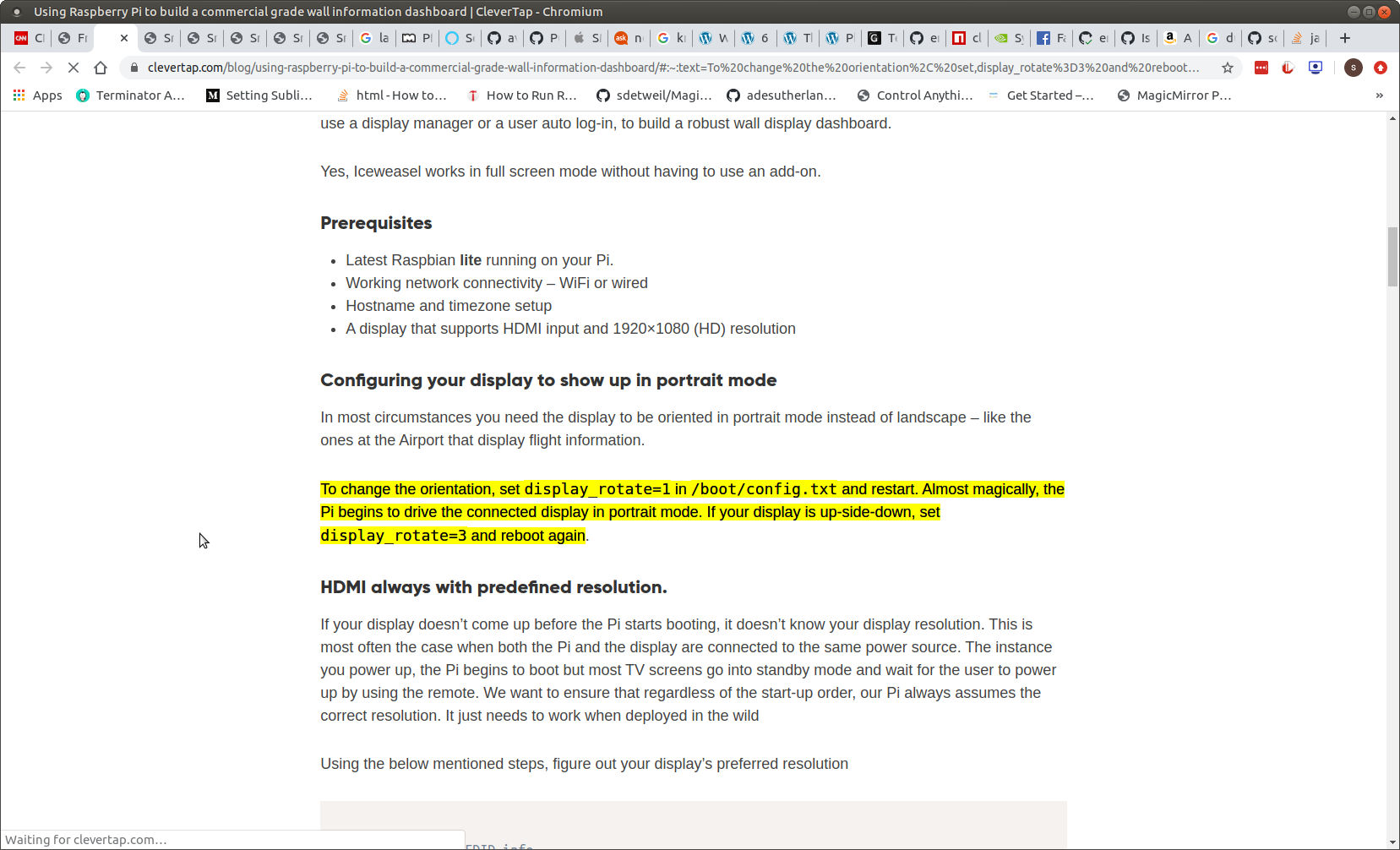
                      @Mykle1 pages says

                      Screenshot at 2020-06-12 14-47-38.png

                      Sam

                      How to add modules

                      learning how to use browser developers window for css changes

                      Mykle1M 1 Reply Last reply Reply Quote 0
                      • Mykle1M Offline
                        Mykle1 Project Sponsor Module Developer @sdetweil
                        last edited by

                        @sdetweil

                        My bad. Senior moment. :-)

                        Create a working config
                        How to add modules

                        johnnyboyJ 1 Reply Last reply Reply Quote 0
                        • johnnyboyJ Offline
                          johnnyboy @Mykle1
                          last edited by

                          @Mykle1

                          😔… oh well… my new lease of life with my MM was very short lived.

                          My mirror is fixed in portrait… so having the system in Lanscape is of no use to me at all.

                          Surely not every user here is using MM in Landscape?

                          S 1 Reply Last reply Reply Quote 0
                          • S Offline
                            sdetweil @johnnyboy
                            last edited by

                            @johnnyboy no… just that we TWO don’t know how to fix it…

                            Sam

                            How to add modules

                            learning how to use browser developers window for css changes

                            johnnyboyJ 1 Reply Last reply Reply Quote 0
                            • johnnyboyJ Offline
                              johnnyboy @sdetweil
                              last edited by

                              @sdetweil

                              Ok… well can only thank you for your great help on this… at least I have an updated Pi.

                              Should I start a new thread asking about portrait mode? Doubt everyone is reading this thread and would comment on how to achieve that?

                              S 1 Reply Last reply Reply Quote 0
                              • S Offline
                                sdetweil @johnnyboy
                                last edited by

                                @johnnyboy updated pi? did u use my upgrade script?

                                Sam

                                How to add modules

                                learning how to use browser developers window for css changes

                                johnnyboyJ 1 Reply Last reply Reply Quote 0
                                • johnnyboyJ Offline
                                  johnnyboy @sdetweil
                                  last edited by

                                  @sdetweil said in Fresh Install:

                                  @johnnyboy updated pi? did u use my upgrade script?

                                  Ahhhhhhh… no, only the install… i shall go and see the upgrade script now.

                                  S 1 Reply Last reply Reply Quote 0
                                  • S Offline
                                    sdetweil @johnnyboy
                                    last edited by sdetweil

                                    @johnnyboy install is for new, upgrade is for previous installed, get to latest
                                    so you would have to rename the folders back before trying

                                    we have a version update every 3 months… you can imagine the trouble folks run into

                                    Sam

                                    How to add modules

                                    learning how to use browser developers window for css changes

                                    johnnyboyJ 1 Reply Last reply Reply Quote 0
                                    • johnnyboyJ Offline
                                      johnnyboy @sdetweil
                                      last edited by

                                      @sdetweil said in Fresh Install:

                                      @johnnyboy install is for new, upgrade is for previous installed, get to latest
                                      so you would have to rename the folders back before trying

                                      we have a version update every 3 months… you can imagine the trouble folks run into

                                      Yeah, I renamed original MM folder, and just started afresh with your Install script to give me a fresh start… just incase there were any bits that would take forever to find, then fix, on old MM…

                                      just done the upgrade before seeing your reply, and obviously it reported that no modules found needing npm refresh.

                                      Fingers x there is a Portrait fix going about, as cannot afford another build in Landscape mode

                                      evroomE 1 Reply Last reply Reply Quote 0
                                      • evroomE Online
                                        evroom @johnnyboy
                                        last edited by

                                        @johnnyboy said in Fresh Install:

                                        Fingers x there is a Portrait fix going about, as cannot afford another build in Landscape mode

                                        Hi,

                                        Please read this thread:

                                        https://forum.magicmirror.builders/topic/9730/led-monitor-vertical-setup-how?_=1591998940597

                                        Perhaps it helps .

                                        MagicMirror version: 2.33.0
                                        Raspberry Pi 4 Model B Rev 1.5 (8 GB RAM)
                                        Raspbian GNU/Linux 12 (bookworm)

                                        Test environment:
                                        MagicMirror version: v2.33.0
                                        Raspberry Pi 3 Model B Plus Rev 1.3 (1 GB RAM)
                                        Raspbian GNU/Linux 12 (bookworm)

                                        1 Reply Last reply Reply Quote 1
                                        • BKeyportB Offline
                                          BKeyport Module Developer
                                          last edited by

                                          You may have to use the display utility within the desktop manager. see here: https://pimylifeup.com/raspberry-pi-rotate-screen/

                                          The "E" in "Javascript" stands for "Easy"

                                          johnnyboyJ 1 Reply Last reply Reply Quote 1
                                          • johnnyboyJ Offline
                                            johnnyboy @BKeyport
                                            last edited by johnnyboy

                                            @sdetweil
                                            @BKeyport
                                            @evroom

                                            Thanks for your time on this guys…
                                            I saw reply’s on my other post too, so will be getting this done today.

                                            I remember back a couple years when I first did this, that I had to adjust the modules to fit, and adjust screen to edges/frame… so no doubt this will need done again within CSS… but I have a back up of all my folders, so will have these on hand to help with that.

                                            Again, thanks to all for your time… and I will report back on my progress.

                                            johnnyboyJ 1 Reply Last reply Reply Quote 0

                                            Hello! It looks like you're interested in this conversation, but you don't have an account yet.

                                            Getting fed up of having to scroll through the same posts each visit? When you register for an account, you'll always come back to exactly where you were before, and choose to be notified of new replies (either via email, or push notification). You'll also be able to save bookmarks and upvote posts to show your appreciation to other community members.

                                            With your input, this post could be even better 💗

                                            Register Login

                                            • 1
                                            • 2
                                            • 3
                                            • 2 / 3
                                            • First post
                                              Last post
                                            Enjoying MagicMirror? Please consider a donation!
                                            MagicMirror created by Michael Teeuw.
                                            Forum managed by Sam, technical setup by Karsten.
                                            This forum is using NodeBB as its core | Contributors
                                            Contact | Privacy Policy