MagicMirror Forum
    • Recent
    • Tags
    • Unsolved
    • Solved
    • MagicMirror² Repository
    • Documentation
    • 3rd-Party-Modules
    • Donate
    • Discord
    • Register
    • Login
    A New Chapter for MagicMirror: The Community Takes the Lead
    Read the statement by Michael Teeuw here.

    MMM-Worldclock

    Scheduled Pinned Locked Moved Utilities
    39 Posts 9 Posters 18.9k Views 9 Watching
    Loading More Posts
    • Oldest to Newest
    • Newest to Oldest
    • Most Votes
    Reply
    • Reply as topic
    Log in to reply
    This topic has been deleted. Only users with topic management privileges can see it.
    • J Offline
      JohnGalt
      last edited by

      Hummm - It looks like the forum stripped out leading tabs and/or spaces, but the content look OK…

      BKeyportB 1 Reply Last reply Reply Quote 0
      • BKeyportB Offline
        BKeyport Module Developer @JohnGalt
        last edited by

        @JohnGalt didn’t mark it as code… use ``` at the beginning and ending of the code to show it as pasted.

        To remove the home timezone, just remove it, including the opening and closing bracket.

        You don’t need to specify your local time zone. In my examples, I only use MMM-Worldclock to display the time on my mirror, so I need a local view. I pasted the code adjustment below, didn’t retab it, and I may have missed a few “adjusted” quotes, so if MM don’t like it, check the quotes.

        clocks: [
        {
        title: "Italy",
        timezone: "Europe/Rome",
        flag: "it",
        },
        {
        title: "Durban, So Africa", // Too long title could cause ugly text align.
        timezone: "Africa/Johannesburg", //When omitted, Localtime will be displayed. It might be not your purporse, I bet.
        flag: "za",
        },
        { 
        title: "Aruba",
        timezone: "America/Curacao",
        flag: "aw",
        },


        The "E" in "Javascript" stands for "Easy"

        J 1 Reply Last reply Reply Quote 0
        • J Offline
          JohnGalt @BKeyport
          last edited by

          @bkeyport - Thanks! It works as you describe. I thought I had already tried removing that code to no avail, but obviously hadn’t. Thanks again!

          1 Reply Last reply Reply Quote 0
          • BKeyportB Offline
            BKeyport Module Developer @BKeyport
            last edited by

            NOTICE: As of the current moment, this module is not behaving well with MagicMirror 2.16. The module comes up smaller than intended.

            As such, the workaround is as follows:

            in custom.css

            .MMM-Worldclock .main {
              font-size: 1.65rem;
            }
            
            .MMM-Worldclock .caption {
              font-size: 1rem;
            }
            

            Hopefully the font generation in MagicMirror will go back to normal in a couple of releases. Of course, you can adjust the font sizes as you please.

            The "E" in "Javascript" stands for "Easy"

            1 Reply Last reply Reply Quote 0
            • M Offline
              MacG
              last edited by

              It’s a superb module but needs some CSS adjustments. Thanks for the helpful hints here in the thread.

              Is it possible to update the clock only when the time has changed? The current refresh is every second, but I only use a clock with hours and minutes.

              That might also lower the load on the browser and it would probably be helpful for CSS customizations via the browser developer tools.
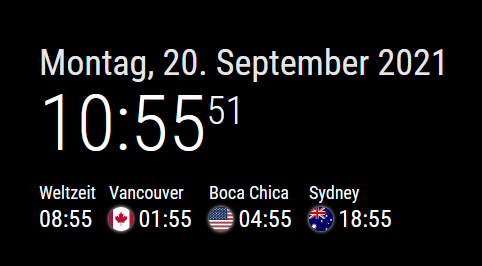
              MMM-Worldclock.png

              BKeyportB S 2 Replies Last reply Reply Quote 0
              • BKeyportB Offline
                BKeyport Module Developer @MacG
                last edited by BKeyport

                @macg I doubt there’d be any performance boost, as the whole browser/javascript is constantly scanning for changes. The original code this is based on used the second for the refresh as it assumes the second would be the minimum displayed unit.

                There’s really no such thing as idle anymore.

                As for CSS - please, adjust it, adding to your custom.css file - and publish what you do here. Sean’s CSS is good, mine is weaker, but I’m learning and playing at the pace my job allows. Changes that I evaluate would help the core will be included.

                The "E" in "Javascript" stands for "Easy"

                M 1 Reply Last reply Reply Quote 0
                • M Offline
                  MacG @BKeyport
                  last edited by

                  @bkeyport By updating all of a second, I didn’t get to all the style classes with Chromium’s developer tools. But luckily you had already posted the essential ones.

                  I cared about the horizontal layout and yours has been tweaked a bit. The first clock with UTC time didn’t get a flag or globe, so it didn’t need to be as wide as the others. The text color and size were adjusted with MM variables. The size is 6px smaller than my standard (24px). The time difference to UTC time was hidden. With “display: none” I had no success, therefore my way over the transparent text.

                  At the config.js is:
                  style: ‘top’,
                  offsetTimezone: null,

                  And here al my lines for the custom.css:

                  /* Arrange clocks horizontally */
                  .MMM-Worldclock .worldtime {
                        display: flex;
                        flex-direction: row;
                  }
                  .MMM-Worldclock .world{
                        width: 100px;
                  }
                  .MMM-Worldclock .world-0{  /* 1st clock = UTC clock */
                        width: 70px;
                  }
                  
                  /* Time title font color and size */
                  .MMM-Worldclock .zone {
                        font-size: calc(var(--font-size) - 6px);
                        color: var(--color-text-bright);
                  }
                  
                  /* Hide time difference to UTC */
                  .MMM-Worldclock .gap {
                        font-size: 1px;
                        color: transparent;
                  

                  The screenshot of this is in my previous post.

                  For the time zones, I looked here to see which ones are accepted. At first, I thought that America/Texas or America/Houston would be possible. But this is not the case.

                  S BKeyportB 2 Replies Last reply Reply Quote 0
                  • S Offline
                    sdetweil @MacG
                    last edited by

                    @macg America/Texas, Houston is really America/Chicago

                    Sam

                    How to add modules

                    learning how to use browser developers window for css changes

                    1 Reply Last reply Reply Quote 0
                    • BKeyportB Offline
                      BKeyport Module Developer @MacG
                      last edited by

                      @macg They went for the biggest city in the timezone. I’m annoyed by that too. Los Angeles shouldn’t represent all of Pacific Time, damnit.

                      The "E" in "Javascript" stands for "Easy"

                      1 Reply Last reply Reply Quote 0
                      • S Offline
                        SoleLo @MacG
                        last edited by

                        @macg can you share how you got them to be horizonal?

                        M 1 Reply Last reply Reply Quote 0
                        • M Offline
                          MacG @SoleLo
                          last edited by

                          @solelo With the first eight lines of the posted snippet of my custom.css, you get the horizontal representation. Copy them into your custom.css and adjust the pixel width.

                          @BKeyport Pick Vancouver or the time zone itself (PST8PDT). :winking_face: That’s why I found the list of possibilities so helpful.

                          @sdetweil Yes, I had chosen the Windy City then, too.

                          S 1 Reply Last reply Reply Quote 0
                          • S Offline
                            SoleLo @MacG
                            last edited by SoleLo

                            @macg Thanks! I added it to my custom.css but it didn’t change. Is there anything else I should be checking?

                            M 1 Reply Last reply Reply Quote 0
                            • M Offline
                              MacG @SoleLo
                              last edited by

                              @solelo Actually, no. For completeness here are my settings from config.js:

                              		{
                              			module: 'MMM-Worldclock',
                              			position: 'top_left', // This can be any of the regions, best in top_left or top_right regions
                              			config: {
                              			// See 'Configuration options' for more information.
                              				timeFormat: 'HH:mm', //Global time format, as defined in moment.js format()
                              				style: 'top', // Which way do you want the flag and description from the clock? choices are 'top', 'left','right','bottom'
                              				offsetTimezone: null, // Timezone you want to show the difference from. null, "", or omitted from config will be UTC.
                              				clocks: [
                              					{
                              						title: "Weltzeit",
                              						timezone: "UTC",
                              						// timeFormat: "HH:mm MM/DD", // Time format override. 
                              						// altflag: "world.png" // if you'd like a flag from a file on your mirror device. 
                              					},
                              					{
                              						title: "Vancouver", // Too long of a title could cause bad text align.
                              						timezone: "America/Vancouver",
                              						flag: "ca", // If you'd like a flag from the standard library 
                              					},
                              					{
                              						title: "Boca Chica", // Too long of a title could cause bad text align.
                              						timezone: "America/Chicago", //When omitted, Local time will be displayed. 
                              						flag: "us", // If you'd like a flag from the standard library 
                              					},
                              					{
                              						title: "Sydney", // Too long of a title could cause bad text align.
                              						timezone: "Australia/Sydney",
                              						flag: "au", // If you'd like a flag from the standard library 
                              					},
                              				]
                              			},
                              		},
                              

                              Did you restart MM or do a reload (Ctrl-R)?

                              S 1 Reply Last reply Reply Quote 0
                              • S Offline
                                SoleLo @MacG
                                last edited by

                                @macg mm world clock.JPG

                                I added your custom css but the title is showing overlapped and I have it as style left, should I change it to top like yours?

                                M 1 Reply Last reply Reply Quote 0
                                • M Offline
                                  MacG @SoleLo
                                  last edited by

                                  @solelo Adjust the width to 200px

                                   .MMM-Worldclock .world {
                                         width: 200px;
                                   }
                                  

                                  The module may also have an alignment problem on the right side. Further customization of custom.css may be required.

                                  S 1 Reply Last reply Reply Quote 0
                                  • S Offline
                                    SoleLo @MacG
                                    last edited by

                                    @macg Ok thanks I’ll mess around with it some more and see if I can get it customized. I figured it was simple as adding your custom css snippet in but I guess not

                                    M S 2 Replies Last reply Reply Quote 0
                                    • M Offline
                                      MacG @SoleLo
                                      last edited by

                                      @solelo Just try to set the width higher and higher, eventually nothing will overlap anymore. But it will probably be quite wide, with the cities next to the time. Maybe that’s why style: ‘top’ is the better choice.

                                      1 Reply Last reply Reply Quote 0
                                      • S Offline
                                        sdetweil @SoleLo
                                        last edited by

                                        @solelo see this

                                        https://forum.magicmirror.builders/topic/14862/help-with-a-couple-css-issues?_=1632064035932

                                        u can change the styles livee and then save it to custom.css…

                                        note that you can doc the dev window at the bottom too, using the 3 dot menu next to the X to close the dev window

                                        Sam

                                        How to add modules

                                        learning how to use browser developers window for css changes

                                        1 Reply Last reply Reply Quote 0
                                        • M Offline
                                          MacG
                                          last edited by

                                          A supplement to the development tools. When you open it, you can select “Sources” and pause script execution with the “pause button” or F8 in the lower third. This makes it easier to get through all the style classes, which otherwise update every second.

                                          1 Reply Last reply Reply Quote 0
                                          • goldyfruitG Offline
                                            goldyfruit Project Sponsor
                                            last edited by

                                            I used to install the original woldclock module, just switched to this one and it worked out of the box.

                                            Thanks for the work. :clapping_hands:

                                            Build smart things with magic and love! | https://smartgic.io

                                            1 Reply Last reply Reply Quote 0

                                            Hello! It looks like you're interested in this conversation, but you don't have an account yet.

                                            Getting fed up of having to scroll through the same posts each visit? When you register for an account, you'll always come back to exactly where you were before, and choose to be notified of new replies (either via email, or push notification). You'll also be able to save bookmarks and upvote posts to show your appreciation to other community members.

                                            With your input, this post could be even better 💗

                                            Register Login

                                            • 1
                                            • 2
                                            • 1 / 2
                                            • First post
                                              Last post
                                            Enjoying MagicMirror? Please consider a donation!
                                            MagicMirror created by Michael Teeuw.
                                            Forum managed by Sam, technical setup by Karsten.
                                            This forum is using NodeBB as its core | Contributors
                                            Contact | Privacy Policy