Read the statement by Michael Teeuw here.
[MMM-PIR-Sensor] Install failing
-
@Bangee said in MMM-PIR-Sensor - White Screen:
ok so lets go step by step:
cd ~/MagicMirror/modules/now we will remove the PIR folder:
rm -rf MMM-PIR-Sensorand from here, we’re going to reinstall the MMM-PIR-Sensor modul:
git clone https://github.com/paviro/MMM-PIR-Sensor.git
cd MMM-PIR-Sensorrun the following cmd here:
npm installand wait, this can take a few minutes.Now you’ll have to add pi to gpio
sudo useradd -g pi gpioand reboot your Raspi:
sudo rebootYou’ll have to connect your PIR Sensor the right way with your Raspi.
I’ve connected my PIR Sensor on the following Pins:

I’ve got a Pi2 and use Pin 2 for power, Pin 6 for Ground and Pin 15 for Data.
– correctin grn pin
and dont forget to add the config :-)
Attempts to remove and install the module again as the user @Bangee said
Worked with me
-
This post is deleted! -
@H3L1o150 @Bangee I am still having problems with the MMM-PIR-Sensor module. I added the default module to the config.js:
{
module: ‘MMM-PIR-Sensor’,
config: {
// See ‘Configuration options’ for more information.
}
},
When I then start the npm I get this error:
Starting MagicMirror: v2.1.0
Loading config …
Loading module helpers …
WARNING! Could not load config file. Starting with default configuration. Error found: Error: Module version mismatch. Expected 50, got 48.
Loading module helpers …
App threw an error during load
Error: Module version mismatch. Expected 50, got 48.
at Error (native)
at process.module.(anonymous function) [as dlopen] (ELECTRON_ASAR.js:173:20)
at Object.Module._extensions…node (module.js:583:18)
at Object.module.(anonymous function) [as .node] (ELECTRON_ASAR.js:173:20)
at Module.load (module.js:473:32)
at tryModuleLoad (module.js:432:12)
at Function.Module._load (module.js:424:3)
at Module.require (module.js:483:17)
at require (internal/module.js:20:19)
at bindings (/home/pi/MagicMirror/modules/MMM-PIR-Sensor/node_modules/bindings/bindings.js:76:44)
Whoops! There was an uncaught exception…
Error: Module version mismatch. Expected 50, got 48.
at Error (native)
at process.module.(anonymous function) [as dlopen] (ELECTRON_ASAR.js:173:20)
at Object.Module._extensions…node (module.js:583:18)
at Object.module.(anonymous function) [as .node] (ELECTRON_ASAR.js:173:20)
at Module.load (module.js:473:32)
at tryModuleLoad (module.js:432:12)
at Function.Module._load (module.js:424:3)
at Module.require (module.js:483:17)
at require (internal/module.js:20:19)
at bindings (/home/pi/MagicMirror/modules/MMM-PIR-Sensor/node_modules/bindings/bindings.js:76:44)
MagicMirror will not quit, but it might be a good idea to check why this happened. Maybe no internet connection?
If you think this really is an issue, please open an issue on GitHub: https://github.com/MichMich/MagicMirror/issues
Launching application.
When I leave the module out of the config.js everything works fine again. Any help is appreciated.
-
@kerijn `
cd ~/MagicMirror
npm list
look for electron to find out your version number
cd modules/MMM-PIR-Sensor
npm rebuild --runtime=electron --target=XXX --disturl=https://atom.io/download/atom-shell --build-from-source
Replace XXX with the version you found in step 1
-
@yawns said in MMM-PIR-Sensor Install failing:
npm rebuild --runtime=electron --target=XXX --disturl=https://atom.io/download/atom-shell --build-from-source
Thank you @yawns .
I did your code lines and got:npm ERR! peer dep missing: grunt@~0.4.0, required by grunt-yamllint@0.2.0and
npm WARN prefer global node-gyp@3.5.0 should be installed withThen i repeated
npm installin pi@magicpi:~/MagicMirror/modules/MMM-PIR-Sensor $
and got againthis errors:> Magic-Mirror-Module-PIR-Sensor@1.1.0 postinstall /home/pi/MagicMirror/modules/MMM-PIR-Sensor > electron-rebuild -e ../../node_modules/electron-prebuilt An unhandled error occurred inside electron-rebuild Unable to find electron-prebuilt's version number, either install it or specify an explicit version Error: Unable to find electron-prebuilt's version number, either install it or specify an explicit version at _callee$ (/home/pi/MagicMirror/modules/MMM-PIR-Sensor/node_modules/electron-rebuild/lib/cli.js:74:17) at tryCatch (/home/pi/MagicMirror/modules/MMM-PIR-Sensor/node_modules/babel-runtime/node_modules/regenerator-runtime/runtime.js:63:40) at GeneratorFunctionPrototype.invoke [as _invoke] (/home/pi/MagicMirror/modules/MMM-PIR-Sensor/node_modules/babel-runtime/node_modules/regenerator-runtime/runtime.js:337:22) at GeneratorFunctionPrototype.prototype.(anonymous function) [as next] (/home/pi/MagicMirror/modules/MMM-PIR-Sensor/node_modules/babel-runtime/node_modules/regenerator-runtime/runtime.js:96:21) at GeneratorFunctionPrototype.tryCatcher (/home/pi/MagicMirror/modules/MMM-PIR-Sensor/node_modules/bluebird/js/release/util.js:16:23) at PromiseSpawn._promiseFulfilled (/home/pi/MagicMirror/modules/MMM-PIR-Sensor/node_modules/bluebird/js/release/generators.js:97:49) at /home/pi/MagicMirror/modules/MMM-PIR-Sensor/node_modules/bluebird/js/release/generators.js:201:15 at Object.<anonymous> (/home/pi/MagicMirror/modules/MMM-PIR-Sensor/node_modules/electron-rebuild/lib/cli.js:197:4) at Module._compile (module.js:570:32) at Object.Module._extensions..js (module.js:579:10) at Module.load (module.js:487:32) at tryModuleLoad (module.js:446:12) at Function.Module._load (module.js:438:3) at Module.runMain (module.js:604:10) at run (bootstrap_node.js:394:7) at startup (bootstrap_node.js:149:9) npm ERR! Linux 4.4.38-v7+ npm ERR! argv "/usr/bin/nodejs" "/usr/bin/npm" "install" npm ERR! node v6.9.4 npm ERR! npm v4.1.1 npm ERR! code ELIFECYCLE npm ERR! Magic-Mirror-Module-PIR-Sensor@1.1.0 postinstall: `electron-rebuild -e ../../node_modules/electron-prebuilt` npm ERR! Exit status 255 npm ERR! npm ERR! Failed at the Magic-Mirror-Module-PIR-Sensor@1.1.0 postinstall script 'electron-rebuild -e ../../node_modules/electron-prebuilt'. npm ERR! Make sure you have the latest version of node.js and npm installed. npm ERR! If you do, this is most likely a problem with the Magic-Mirror-Module-PIR-Sensor package, npm ERR! not with npm itself. npm ERR! Tell the author that this fails on your system: npm ERR! electron-rebuild -e ../../node_modules/electron-prebuilt npm ERR! You can get information on how to open an issue for this project with: npm ERR! npm bugs Magic-Mirror-Module-PIR-Sensor npm ERR! Or if that isn't available, you can get their info via: npm ERR! npm owner ls Magic-Mirror-Module-PIR-Sensor npm ERR! There is likely additional logging output above. npm ERR! Please include the following file with any support request: npm ERR! /home/pi/MagicMirror/modules/MMM-PIR-Sensor/npm-debug.log -
@nemesismega i am getting this error while install the PIR module, all other modules working fine
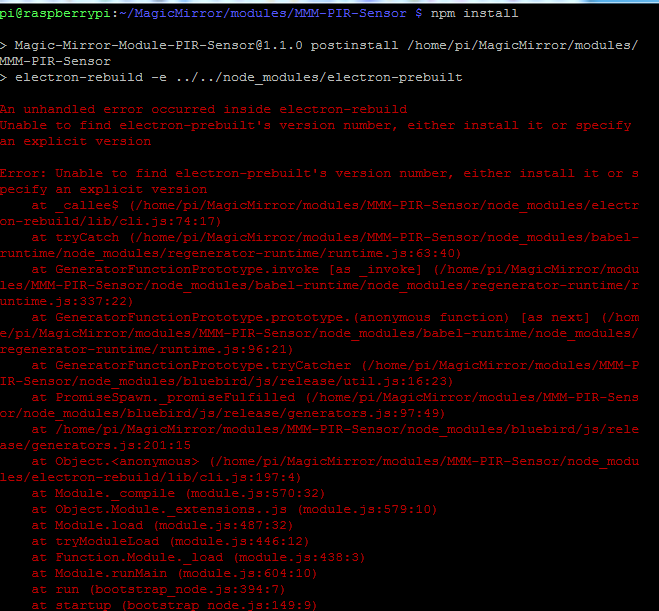
-
@shashank said in PIR-Sensor - put your mirror to sleep if not used:
@nemesismega i am getting this error while install the PIR module, all other modules working fine
i have nearly a similar problem: https://forum.magicmirror.builders/post/12024
-
@yawns Thank you very much for your help but infortunately this didn’t work. I now cannot start Magicmirror anymore even without the MMM-PIR-Sensor module… See error below. I also got the same warning as @fox with missing grunt@…
pi@MyPi:~/MagicMirror $ npm start > magicmirror@2.1.0 start /home/pi/MagicMirror > electron js/electron.js npm ERR! Linux 4.4.43-v7+ npm ERR! argv "/usr/bin/nodejs" "/usr/bin/npm" "start" npm ERR! node v6.9.4 npm ERR! npm v3.10.10 npm ERR! code ELIFECYCLE npm ERR! magicmirror@2.1.0 start: `electron js/electron.js` npm ERR! Exit status 1 npm ERR! npm ERR! Failed at the magicmirror@2.1.0 start script 'electron js/electron.js'. npm ERR! Make sure you have the latest version of node.js and npm installed. npm ERR! If you do, this is most likely a problem with the magicmirror package, npm ERR! not with npm itself. npm ERR! Tell the author that this fails on your system: npm ERR! electron js/electron.js npm ERR! You can get information on how to open an issue for this project with: npm ERR! npm bugs magicmirror npm ERR! Or if that isn't available, you can get their info via: npm ERR! npm owner ls magicmirror npm ERR! There is likely additional logging output above. npm ERR! Please include the following file with any support request: npm ERR! /home/pi/MagicMirror/npm-debug.log -
I now did a full new installation of MagicMirror with the defauls config.js and got the same error.
pi@MyPi:~/MagicMirror $ npm start > magicmirror@2.1.0 start /home/pi/MagicMirror > electron js/electron.js npm ERR! Linux 4.4.43-v7+ npm ERR! argv "/usr/bin/nodejs" "/usr/bin/npm" "start" npm ERR! node v6.9.4 npm ERR! npm v3.10.10 npm ERR! code ELIFECYCLE npm ERR! magicmirror@2.1.0 start: `electron js/electron.js` npm ERR! Exit status 1 npm ERR! npm ERR! Failed at the magicmirror@2.1.0 start script 'electron js/electron.js'. npm ERR! Make sure you have the latest version of node.js and npm installed. npm ERR! If you do, this is most likely a problem with the magicmirror package, npm ERR! not with npm itself. npm ERR! Tell the author that this fails on your system: npm ERR! electron js/electron.js npm ERR! You can get information on how to open an issue for this project with: npm ERR! npm bugs magicmirror npm ERR! Or if that isn't available, you can get their info via: npm ERR! npm owner ls magicmirror npm ERR! There is likely additional logging output above. npm ERR! Please include the following file with any support request: npm ERR! /home/pi/MagicMirror/npm-debug.log -
-
@kerijn @fox I think I fixed this issue before, it comes from the changes the Magic Mirror version
2.1.0introduced. I am not sure, but I think the changes neccessary are almost as simple as here. Will have to test this at home though. Maybe there was something else needed.Helpful sticky: How to troubleshoot
-
@Jopyth said in MMM-PIR-Sensor Install failing:
@kerijn @fox I think I fixed this issue before, it comes from the changes the Magic Mirror version
2.1.0introduced. I am not sure, but I think the changes neccessary are almost as simple as here. Will have to test this at home though. Maybe there was something else needed.Thank you. That fixes the problem for me ! :)
-
@Jopyth This worked for me for the installation as well. Thank you! However, the sensor does not seem to do anything. How can I check whether the sensor is working properly?
-
@kerijn said in [MMM-PIR-Sensor] Install failing:
@Jopyth This worked for me for the installation as well. Thank you! However, the sensor does not seem to do anything. How can I check whether the sensor is working properly?
I have the same problem
-
@Makradon @kerijn I found this. I think you could save this as
test.pysomewhere on your Pi and see if the output changes when you move and don’t move (set the pin number in the second line) after your start it withpython test.py:import RPi.GPIO as GPIO pin = 11 GPIO.setwarnings(False) GPIO.setmode(GPIO.BOARD) GPIO.setup(pin, GPIO.IN) #Read output from PIR motion sensor while True: i=GPIO.input(pin) if i==0: #When output from motion sensor is LOW print "No intruders",i time.sleep(0.1) elif i==1: #When output from motion sensor is HIGH print "Intruder detected",i time.sleep(0.1) -
-
@thoimi Check for the correct wiring (PIN-Numbers can be confusing, there is the BCM numbering and the other one), also make sure GND and 5V are conncted correctly, adjust sensitivity to maximum and time to minimum (so it hopefully switch back and forth quickly), try covering up the sensor under a bowl or something and then put your hand in to test.
When I set up the sensor, I also searched for the error for hours, and at the end my problem was the sensor was plugged into pin 4 (BCM) and not 7 as I thought. Also I think you need to remove the
, pull_up_down=GPIO.PUD_DOWNpart (PIR example). -
@Jopyth Thank you for your quick reply! :)
I tried for hours now… I think it’s connected correctly, because when I’m switching the pin-number in the script the script shows me always “0” - with the correct pin-number it shows me “1”…
I also put the sensor in a box - always shows me “1”… completely strange… :/ -
@thoimi
It shows1because of the pull up resistor. Try removing that part, check my edited post above.Edit: The
1does not mean it is wired correctly, it just shows 1 because of the pull up resistor. -
@Jopyth
thank you for the updated script!
the new script also shows me “Intruder detected” … i tried many variations of time and sensitivity adjustments…I found another script on the internet:
from gpiozero import MotionSensor

pir = MotionSensor(4)
while True:
    if pir.motion_detected:
        print("Motion detected!")
This script shows me also the “Motion detected” all the time…
Maybe the PIR-Sensor itself is the problem… I will try with another Sensor next week :(



Hello! It looks like you're interested in this conversation, but you don't have an account yet.
Getting fed up of having to scroll through the same posts each visit? When you register for an account, you'll always come back to exactly where you were before, and choose to be notified of new replies (either via email, or push notification). You'll also be able to save bookmarks and upvote posts to show your appreciation to other community members.
With your input, this post could be even better 💗
Register Login