Read the statement by Michael Teeuw here.
MMM-Domoticz-ext: interact with Domoticz
-
Hi and thanks again for your efforts.
Gauge swapping positions
I can confirm that this occurs occasionally, on a manual browser refresh if seems to have a 15% chance of occurring. ( i did 30 refreshes. and got 2 swaps) i only see the last 2 gauges, out of the 5 that i have showing, do the swap.Custom Gauges
These work well and as expected. - thank you!
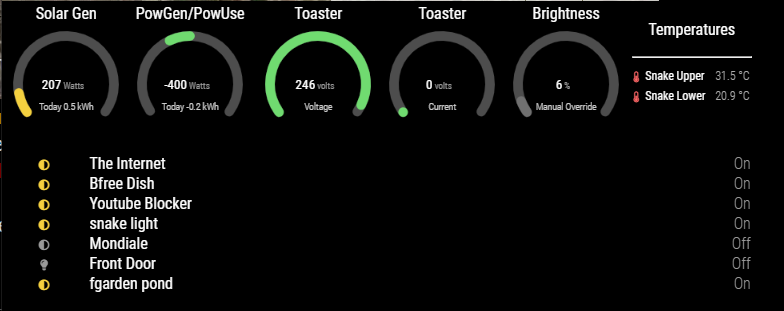
here is the config I am using:
            {
                      module: "MMM-Domoticz-ext",
                      //header: "Domoticz - new",
                      //position: "bottom_left",
                      position: "bottom_bar",
                      config: {
                            apiBase: "10.60.2.252",
                            apiPort: "8080",
                            //apiUser: "XXXX",              // only works with domoticz "Setup|Settngs|Website protection = "Basic auth" add the MM Ip to the "Local Networks" list to allow access with no auth, then all sensors will be listed.
                            //apihPW: "YYYY",
                            //alwaysShowDashboard: true,
                            horizontal: "true",
                            columnCount: 3,
                            displayType: "all",     // show all switchs/lights status
                            //displayType: "dashboard",     // dashboard
                            //dashboardColumnCount: 3,
                            //switchIcon: "lightbulb",
                            weather: {
                            devices: [ "199", "200" ],    //snake temps
                                    weatherLabel: "Temperatures",
                                    gaugeWidth: 200,
                                    gaugeWindAppendText: "km/h",
                                    rainSuffix: "mm",
                            },
                            utilities: {
                                    utilityLabel: "Gas - Water - Elec",
                                    showLabel: false,
                                    devices: [
                                    {
                                            idx: "164",
                                            deviceHeader: "Solar Gen",
                                            useHeaderSymbol: false,
                                            headerSymbol: "solar-panel",
                                            counterTodayLabel: "Today",
                                            gaugeMinValue: 0,
                                            gaugeMaxValue: 2000,
                                            gaugeAppendText: "Watts",
                                            gaugeWidth: 150,
                                            lineWidth: 12,
                                            markerWidth: 12,
                                            markerColor: "#F4D03F"
                                    },
                                    {
                                            idx: "191",
                                            deviceHeader: "PowGen/PowUse",
                                            useHeaderSymbol: false,
                                            headerSymbol: "solar-panel",
                                            counterTodayLabel: "Today",
                                            gaugeMinValue: -2000,
                                            gaugeMaxValue: 2000,
                                            gaugeAppendText: "Watts",
                                            gaugeWidth: 150,
                                            lineWidth: 12,
                                            markerWidth: 12,
                                            markerColor: "#F4003F"
                                    },
                                    ],
                            },
                            customGauges: {
                                    headerLabel: "Monitoring",
                                    showLabel: false,
                                    devices: [
                                      {
                                        idx: "209",
                                        deviceHeader: "Toaster",
                                        lowerText: "Voltage",
                                        gaugeAppendText: "volts",
                                        gaugeMaxValue: 255,
                                        gaugeWidth: 150,
                                        lineWidth: 12,
                                        markerWidth: 12,
                                        markerColor: "#70db70"

                                      },
                                      {
                                        idx: "208",
                                        deviceHeader: "Toaster",
                                        gaugeAppendText: "Amps",
                                        lowerText: "Current",
                                        gaugeAppendText: "volts",
                                        gaugeMaxValue: 16,
                                        gaugeWidth: 150,
                                        lineWidth: 12,
                                        markerWidth: 12,
                                        markerColor: "#70db70"
                                      },
                                    {
                                        idx: "232",
                                        deviceHeader: "Brightness",
                                        lowerText: "Manual Override",
                                        gaugeAppendText: "%",
                                        gaugeMaxValue: 100,
                                        gaugeWidth: 150,
                                        lineWidth: 12,
                                        markerWidth: 12,
                                        markerColor: "#707070",
                                      },
                                    ],

                            },
                            rooms: [
                                    { idx: "17", name: "Status" },  // can only show switch status,, breaks if temp. in room?
                                    //{ idx: "14", name: "Testing" },
                            ],
                      },
            },
– Peter
-
Hi Peter,
Great it is working out for you! In the config there is a question that the lower part breaks when it encounters a temperature. Is that right? It should be able to show temperatures as well.
-
Hi
rooms: [
                                    { idx: "17", name: "Status" },  // can only show switch status,, breaks if temp. in room?
                                    //{ idx: "14", name: "Testing" },
                 ],
I have a “room” plan set in Domoticz that contains various virtual devices, if i add a temperature device to it, the list of devices shown in MM stops at that device.
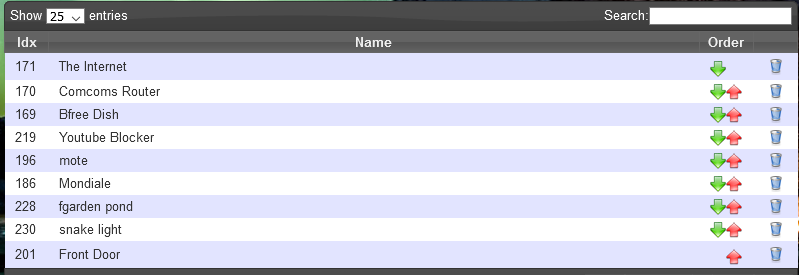
With “mote” (temp & humidity) sensor in the room
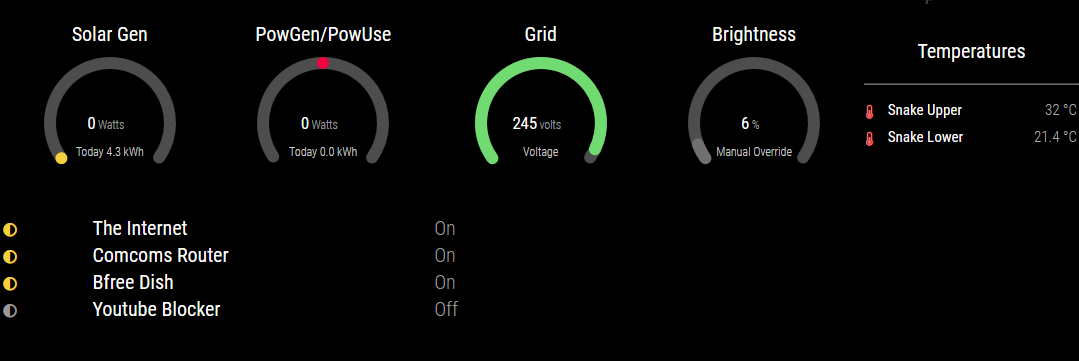
With no mote in the room.
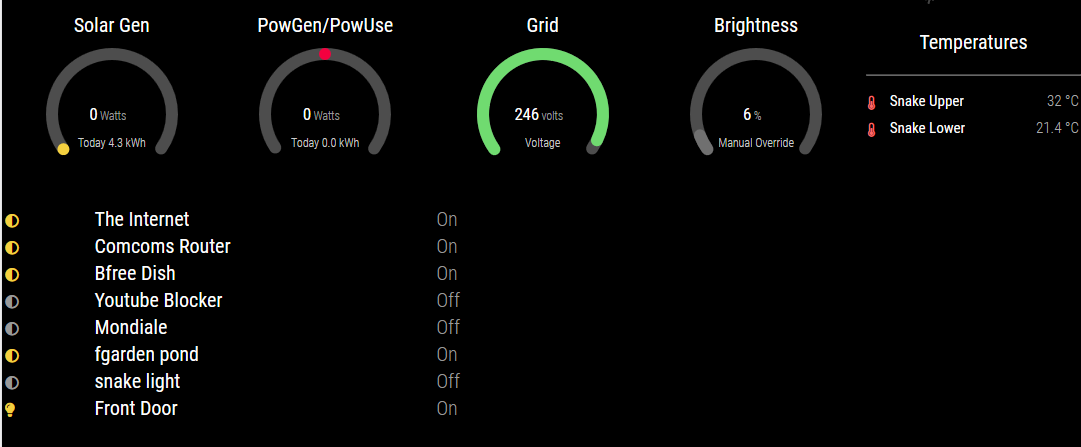
Please note: I have used custom css to shrink the members of the room to a more compact left justified list, rather than spread across the whole width of the screen.
regards Peter
-
I can have a look at the temp/hum issue. I have several of these sensors myself and they do work in this layout. I would need the JSON-output of the specified device to figure out the problem.
-
I tried, but am unable to reproduce your problem. If you would like me to have a look, please post the JSON result for the device “mote”.
-
Hi
Sorry for the delayed response.
It appears that the issue occurs when there is no temperature or humidity data in the json output.
the sensor had no data while i was initially testing. After collecting some data it works as expected.
sample json data:pi@MM-lite:~$ curl "http://10.60.2.252:8080/json.htm?type=devices&rid=196" { "ActTime" : 1623221642, "AstrTwilightEnd" : "18:46", "AstrTwilightStart" : "05:45", "CivTwilightEnd" : "17:46", "CivTwilightStart" : "06:45", "DayLength" : "10:07", "NautTwilightEnd" : "18:16", "NautTwilightStart" : "06:15", "ServerTime" : "2021-06-09 14:54:02", "SunAtSouth" : "12:16", "Sunrise" : "07:12", "Sunset" : "17:19", "app_version" : "2020.2 (build 12917)", "result" : [ { "AddjMulti" : 1.0, "AddjMulti2" : 1.0, "AddjValue" : 0.0, "AddjValue2" : 0.0, "BatteryLevel" : 255, "CustomImage" : 0, "Data" : "0, 27.0", "Description" : "temperature and humidity in my office. polled from mqtt", "Favorite" : 0, "HardwareDisabled" : false, "HardwareID" : 3, "HardwareName" : "virtual hardware", "HardwareType" : "Dummy (Does nothing, use for virtual switches only)", "HardwareTypeVal" : 15, "ID" : "14114", "LastUpdate" : "2021-01-04 17:58:14", "Name" : "mote", "Notifications" : "false", "PlanID" : "0", "PlanIDs" : [ 0 ], "Protected" : false, "ShowNotifications" : true, "SignalLevel" : "-", "SubType" : "THGN122/123/132, THGR122/228/238/268", "Timers" : "false", "Type" : "Temp + Humidity", "TypeImg" : "temperature", "Unit" : 1, "Used" : 1, "XOffset" : "0", "YOffset" : "0", "idx" : "196" } ], "status" : "OK", "title" : "Devices" }With Temperature and humidity
pi@MM-lite:~$ curl "http://10.60.2.252:8080/json.htm?type=devices&rid=196"
{
        "ActTime" : 1623222662,
        "AstrTwilightEnd" : "18:46",
        "AstrTwilightStart" : "05:45",
        "CivTwilightEnd" : "17:46",
        "CivTwilightStart" : "06:45",
        "DayLength" : "10:07",
        "NautTwilightEnd" : "18:16",
        "NautTwilightStart" : "06:15",
        "ServerTime" : "2021-06-09 15:11:02",
        "SunAtSouth" : "12:16",
        "Sunrise" : "07:12",
        "Sunset" : "17:19",
        "app_version" : "2020.2 (build 12917)",
        "result" :
        [
                {
                        "AddjMulti" : 1.0,
                        "AddjMulti2" : 1.0,
                        "AddjValue" : 0.0,
                        "AddjValue2" : 0.0,
                        "BatteryLevel" : 14,
                        "CustomImage" : 0,
                        "Data" : "32.2 C, 34 %",
                        "Description" : "temperature and humidity in my office. polled from mqtt",
                        "DewPoint" : "14.35",
                        "Favorite" : 0,
                        "HardwareDisabled" : false,
                        "HardwareID" : 3,
                        "HardwareName" : "virtual hardware",
                        "HardwareType" : "Dummy (Does nothing, use for virtual switches only)",
                        "HardwareTypeVal" : 15,
                        "HaveTimeout" : false,
                        "Humidity" : 34,
                        "HumidityStatus" : "Comfortable",
                        "ID" : "14114",
                        "LastUpdate" : "2021-06-09 15:10:35",
                        "Name" : "mote",
                        "Notifications" : "false",
                        "PlanID" : "0",
                        "PlanIDs" :
                        [
                                0
                        ],
                        "Protected" : false,
                        "ShowNotifications" : true,
                        "SignalLevel" : "-",
                        "SubType" : "THGN122/123/132, THGR122/228/238/268",
                        "Temp" : 32.19,
                        "Timers" : "false",
                        "Type" : "Temp + Humidity",
                        "TypeImg" : "temperature",
                        "Unit" : 1,
                        "Used" : 1,
                        "XOffset" : "0",
                        "YOffset" : "0",
                        "idx" : "196",
                        "trend" : 1
                }
        ],
        "status" : "OK",
        "title" : "Devices"
}
mote sensor appears now, above the snake enclosure light.
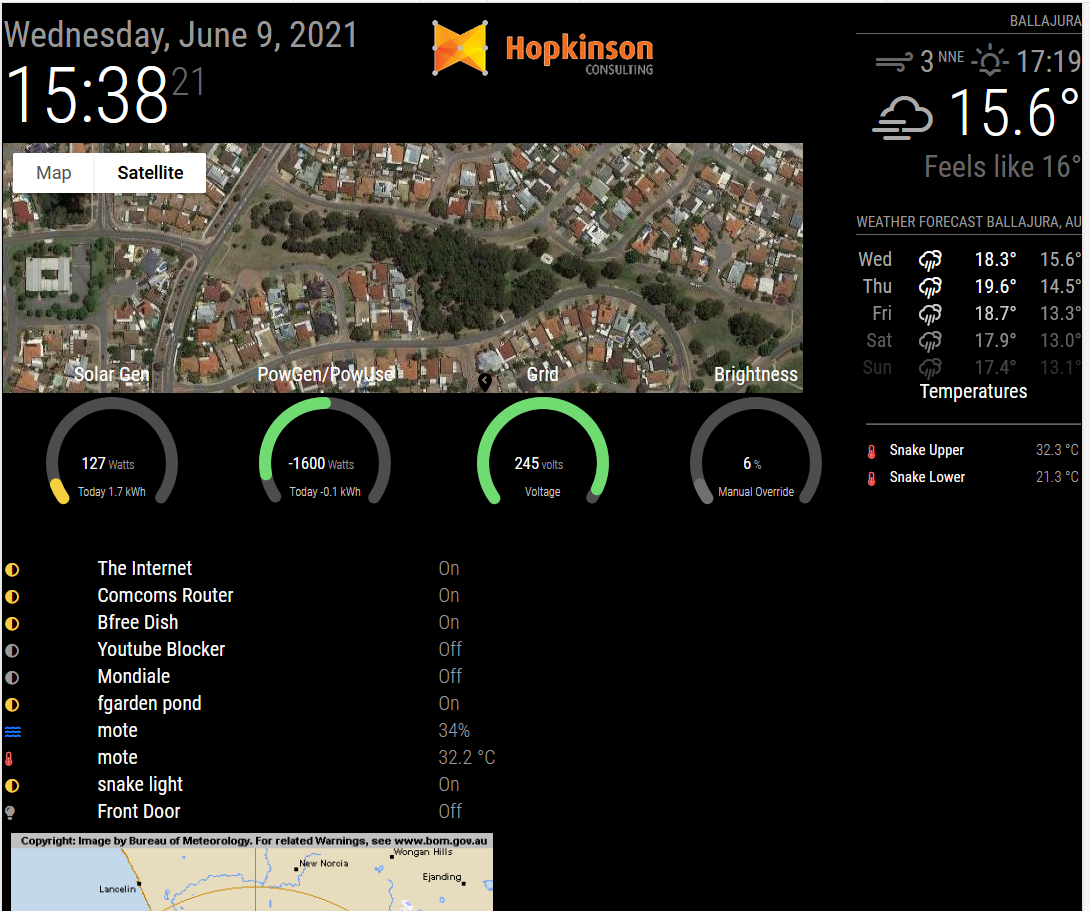
thanks again for your attention
-
Hi tanks for great module. I have a small problem with the counter today from the power consumption. this doesn’t show me the amount of use of the day. Gas and water working fine. see screenshot. Do you have a solution, or where I have to search? !!
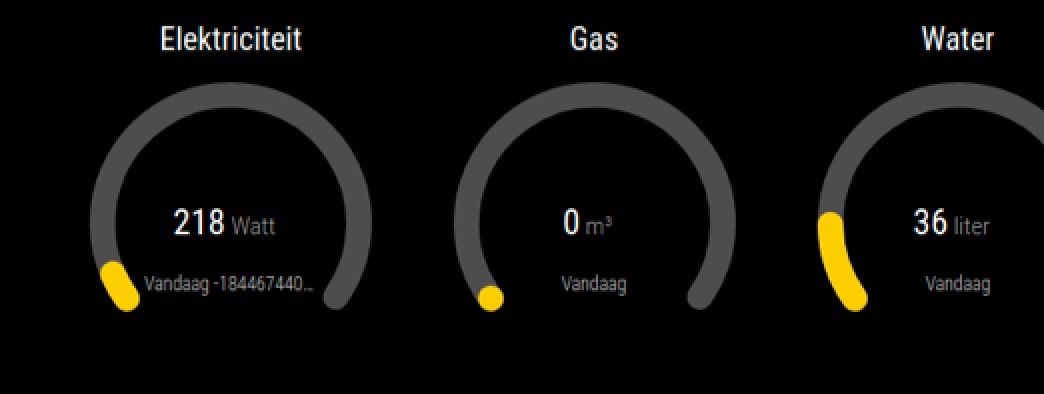
-
This post is deleted! -
Alle data is retrieved from the JSON response. Could you post it for the electricity counter?
-
Hi everyone, please help with setting up customs.css
Can anyone advise me how to change the font and icon size only for the first three rooms? (Red marked)
I would also need to delete the dividing lines marked in green.
I will be very grateful for more detailed advice.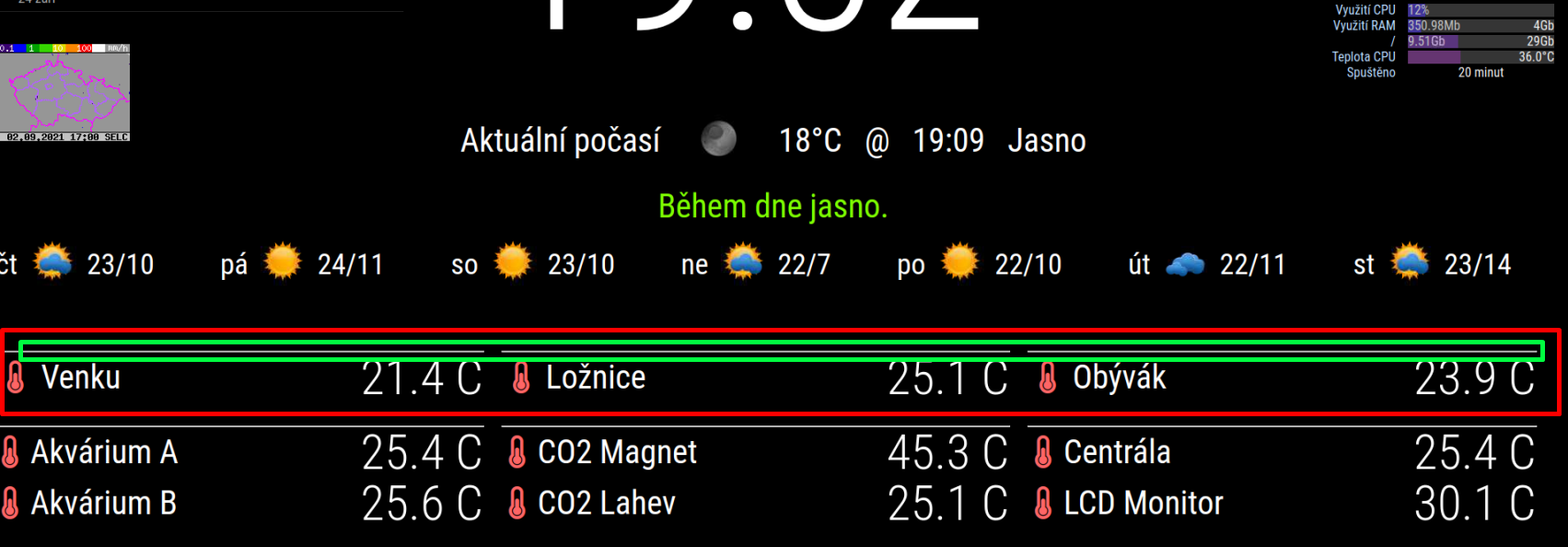
customs.css
.domoCellState {
  text-align: right;
vertical-align: center;
  padding-left: 10px;
font-size: 300%; 			/* velikost čísla teploměru */
color: #FFFFFF;
line-height: 100%;

}

.domoIconDiv {
  padding-right: 5px;
  font-size: 200%;                        /* velikost ikony teploměru */
  vertical-align: center;
}

.domoCell {
  text-align: left;
  vertical-align: center;
 font-size: 200%;			/* velikost pisma popisku teplomeru - vedle ikony teploměru */
line-height: 100%;
}


.domoRoomCell {
  vertical-align: center;
  padding-right: 20px;
font-size: 0%;			/* velikost pisma nadpisu room */
}
Config.js
the room numbers for which I would like to change the font size are idx 1, 8, 9{ module: "MMM-Domoticz-ext", position: "bottom_bar", config: { apiBase: "192.168.2.80", apiPort: "8081", updateInterval: 15, displayType: "room", alwaysShowDashboard: false, alwaysShowActions: false, showButtons: false, horizontal: true, columnCount: 3, dashboardColumnCount: 12, maxTitleLength: 18, rooms: [ { idx: "1" }, { idx: "9" }, { idx: "8" }, { idx: "11" }, { idx: "12" }, { idx: "13" }, ], } },Another question is whether it is possible to replace the character C with ° (character Celsius)
-
I don’t think it is possible to just change the font for the first lines. All are in the same class.
-
How to remove the lines (marked in green) I have already come.
using this codehr.domoDivider { display: none; }If it is not possible to change the font size of only the first three sensors, it is possible to run 2 instances of the module in config.js, but I do not know how to distinguish these instances in customs.css
-
I think this is also not possible, but I’m not an css expert. Maybe others have soms ideas.
You could create your own module based on the code and modify that css.
-
@goedh452
yes, I’m just trying to create a new mmm-domoticz-ext-2 module, but even if I replace the text mmm-domoticz-ext with mmm-domoticz-ext-2 in all files, it doesn’t work. then it would be easy in CSS to assign a font size to each module. I’m not a programmer either. I have to follow the trial and error method -
@goedh452 said in MMM-Domoticz-ext: interact with Domoticz:
You could create your own module based on the code and modify that css.
I can’t get the copied module up and running, it still reports loading. Basic methods for copying a module fail. Can you advise me how to copy the module?

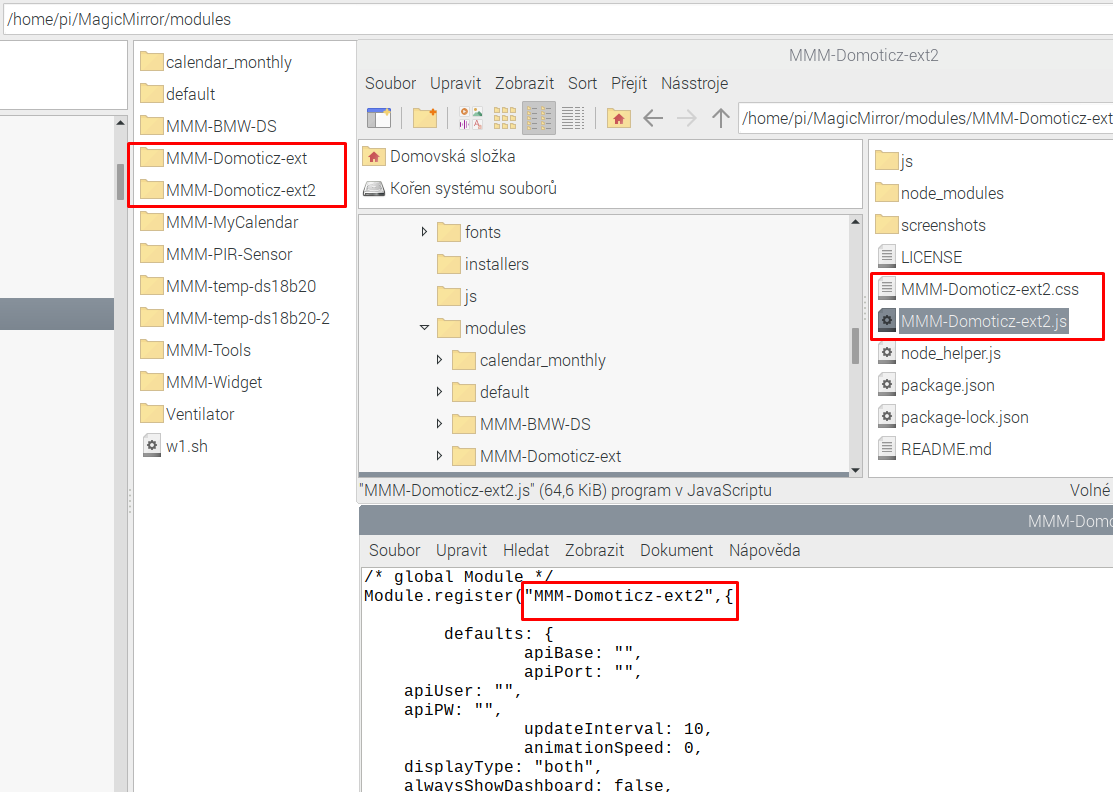
{ module: "MMM-Domoticz-ext", position: "bottom_bar", config: { apiBase: "192.168.2.80", apiPort: "8081", updateInterval: 15, displayType: "room", alwaysShowDashboard: false, alwaysShowActions: false, showButtons: false, horizontal: true, columnCount: 3, dashboardColumnCount: 12, maxTitleLength: 18, rooms: [ { idx: "1" }, { idx: "9" }, { idx: "8" }, ], } }, { module: "MMM-Domoticz-ext2", position: "bottom_bar", config: { apiBase: "192.168.2.80", apiPort: "8081", updateInterval: 20, displayType: "room", alwaysShowDashboard: false, alwaysShowActions: false, showButtons: false, horizontal: true, columnCount: 3, dashboardColumnCount: 12, maxTitleLength: 18, rooms: [ { idx: "11" }, { idx: "12" }, { idx: "13" }, ], } }, -
@majsoft
I found that both mmm-domoticz-ext and mmm-domoticz-ext2 work separately for both modulesIf I enter them both at once in config.js it always works only the one that is written as the last one. Can anyone help please?
-
@goedh452
Sorry for late reaction. Here is the file you request. I think I uploaded wrong, but I hope you can do something with it.{
“ActTime” : 1630944398,
“AstrTwilightEnd” : “22:12”,
“AstrTwilightStart” : “04:58”,
“CivTwilightEnd” : “20:46”,
“CivTwilightStart” : “06:24”,
“DayLength” : “13:14”,
“NautTwilightEnd” : “21:27”,
“NautTwilightStart” : “05:43”,
“ServerTime” : “2021-09-06 18:06:38”,
“SunAtSouth” : “13:35”,
“Sunrise” : “06:58”,
“Sunset” : “20:12”,
“app_version” : “2021.1”,
“result” :
[
{
“AddjMulti” : 1.0,
“AddjMulti2” : 1.0,
“AddjValue” : 0.0,
“AddjValue2” : 0.0,
“BatteryLevel” : 255,
“Counter” : “5077.807”,
“CounterDeliv” : “0.000”,
“CounterDelivToday” : “18446744073709552.000 kWh”,
“CounterToday” : “2.151 kWh”,
“CustomImage” : 0,
“Data” : “2794757;2283050;6;0;123;0”,
“Description” : “”,
“Favorite” : 1,
“HardwareDisabled” : false,
“HardwareID” : 2,
“HardwareName” : “Smart Meter”,
“HardwareType” : “P1 Smart Meter USB”,
“HardwareTypeVal” : 4,
“HaveTimeout” : false,
“ID” : “0001”,
“LastUpdate” : “2021-09-06 18:06:38”,
“Name” : “Power”,
“Notifications” : “false”,
“PlanID” : “4”,
“PlanIDs” :
[
4
],
“Protected” : false,
“ShowNotifications” : true,
“SignalLevel” : “-”,
“SubType” : “Energy”,
“SwitchTypeVal” : 0,
“Timers” : “false”,
“Type” : “P1 Smart Meter”,
“TypeImg” : “counter”,
“Unit” : 1,
“Usage” : “123 Watt”,
“UsageDeliv” : “0 Watt”,
“Used” : 1,
“XOffset” : “0”,
“YOffset” : “0”,
“idx” : “1”
}
],
“status” : “OK”,
“title” : “Devices”
} -
I see what’s the problem. For the usage per day the CounterToday and CounterDelivToday are substracted. The value for your CounterDelivToday has a very strange value. Only option would be that such values are set to 0 in the code.
-
can I do that by my own? I have idee how, but maybe with some help from you? Thans for quick answer.
-
@maxs I’ll see what I can do and let you know when you can download the new code from GitHub.

Hello! It looks like you're interested in this conversation, but you don't have an account yet.
Getting fed up of having to scroll through the same posts each visit? When you register for an account, you'll always come back to exactly where you were before, and choose to be notified of new replies (either via email, or push notification). You'll also be able to save bookmarks and upvote posts to show your appreciation to other community members.
With your input, this post could be even better 💗
Register Login