MagicMirror Forum
    • Recent
    • Tags
    • Unsolved
    • Solved
    • MagicMirror² Repository
    • Documentation
    • 3rd-Party-Modules
    • Donate
    • Discord
    • Register
    • Login
    A New Chapter for MagicMirror: The Community Takes the Lead
    Read the statement by Michael Teeuw here.

    MMM-OpenWeatherForecast - Replacement for MMM-DarkSkyForecast

    Scheduled Pinned Locked Moved Utilities
    256 Posts 55 Posters 631.3k Views 57 Watching
    Loading More Posts
    • Oldest to Newest
    • Newest to Oldest
    • Most Votes
    Reply
    • Reply as topic
    Log in to reply
    This topic has been deleted. Only users with topic management privileges can see it.
    • karsten13K Offline
      karsten13 @OberfragGER
      last edited by

      @oberfragger

      label_sunriseTimeFormat: "k:mm",

      O 1 Reply Last reply Reply Quote 0
      • O Offline
        OberfragGER @karsten13
        last edited by OberfragGER

        @karsten13 said in MMM-OpenWeatherForecast - Replacement for MMM-DarkSkyForecast:

        label_sunriseTimeFormat: “k:mm”,

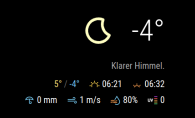
        Not working: :(
        9b0ed868-aae5-49ac-a1f7-d72e062a7f02-image.png

        			iconset: "3c",
        			label_hourlyTimeFormat: "k[ Uhr]",
        			label_sunriseTimeFormat: "hh:mm",
        			label_sunsetTimeFormat: "k:mm",
        			label_days: ["So", "Mo", "Di", "Mi", "Do", "Fr", "Sa"]
        			}
        

        i also tried:

        label_sunsetTimeFormat: "hh:mm",
        

        also not working. The sunset on top is still not in german timeformat.

        karsten13K J 2 Replies Last reply Reply Quote 0
        • karsten13K Offline
          karsten13 @OberfragGER
          last edited by

          @oberfragger said in MMM-OpenWeatherForecast - Replacement for MMM-DarkSkyForecast:

          label_sunsetTimeFormat

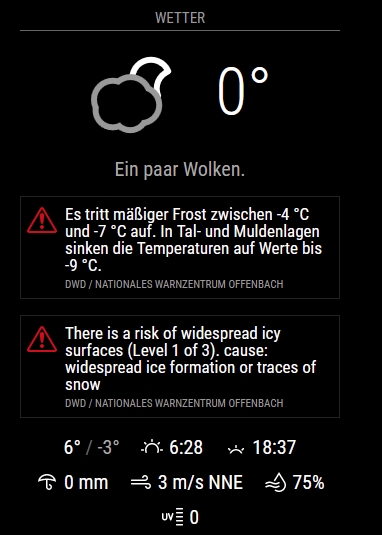
          there is no property label_sunsetTimeFormat, only label_sunriseTimeFormat, remove the not existing one …
          d1b0cc54-be27-4628-a6eb-85bd015ccd6c-grafik.png

          1 Reply Last reply Reply Quote 0
          • J Offline
            j.e.f.f Project Sponsor Module Developer @OberfragGER
            last edited by

            @oberfragger

            There is only one property that is used for both sunrise and sunset: label_sunriseTimeFormat. In your example above, you’ve specified hh:mm for this property, which displays 12h time, not 24h time.

            Change your config from this:

            iconset: "3c",
            label_hourlyTimeFormat: "k[ Uhr]",
            label_sunriseTimeFormat: "hh:mm",
            label_sunsetTimeFormat: "k:mm",
            label_days: ["So", "Mo", "Di", "Mi", "Do", "Fr", "Sa"]
            

            to this:

            iconset: "3c",
            label_hourlyTimeFormat: "k[ Uhr]",
            label_sunriseTimeFormat: "k:mm",  // change the format for this one 
            label_days: ["So", "Mo", "Di", "Mi", "Do", "Fr", "Sa"]
            
            O 1 Reply Last reply Reply Quote 1
            • J Offline
              j.e.f.f Project Sponsor Module Developer @shiryu1031
              last edited by

              @shiryu1031 The screenshots you see in GitHub were incorrect. My old code for Dark Sky was using km/h, and I hadn’t replaced the label with m/s when I took these screen shots. So the screenshots are actually illustrating a bug! The actual speed value shown is m/s, but the label is incorrect as km/h. :beaming_face_with_smiling_eyes:

              I thought about it, and it would take me just as much time to fix the screen shots as it would to add the capability to convert m/s into km/h. So now there is a new config parameter: displayKmhForWind. If you add this to your config and set it to true, m/s wind speed will be converted and displayed as km/h. This parameter only works when units is set to "metric" or "standard". If you’re using "imperial" you will always see mph.

              Do a git pull in your installed MMM-OpenWeatherForecast directory to get the updated code.

              1 Reply Last reply Reply Quote 0
              • J Offline
                j.e.f.f Project Sponsor Module Developer @swvalenti
                last edited by

                @swvalenti I’ve made a modification that now truncates alerts to no more than 3 lines of description. This is controlled with CSS so if you’ve like to adjust this for more or less lines, you can do so in your custom CSS file as follows:

                .MMM-OpenWeatherForecast .weather-alert .weather-alert-description {
                  -webkit-line-clamp: 3; /* adjust this as desired */
                }
                

                do a git pull in your installed MMM-OpenWeatherForecast directory to get the latest code.

                swvalentiS 1 Reply Last reply Reply Quote 0
                • O Offline
                  OberfragGER @j.e.f.f
                  last edited by

                  @j-e-f-f Thx a lot! Its working now as expected.

                  1 Reply Last reply Reply Quote 0
                  • swvalentiS Offline
                    swvalenti Project Sponsor @j.e.f.f
                    last edited by

                    @j-e-f-f thanks bro!

                    1 Reply Last reply Reply Quote 0
                    • M Offline
                      mielu80
                      last edited by

                      Hello,

                      It is somehow possible to show the unit of measurement for the temperature (in my case, “C” for Celsius) ?

                      Thank you.

                      swvalentiS J 2 Replies Last reply Reply Quote 0
                      • swvalentiS Offline
                        swvalenti Project Sponsor @mielu80
                        last edited by

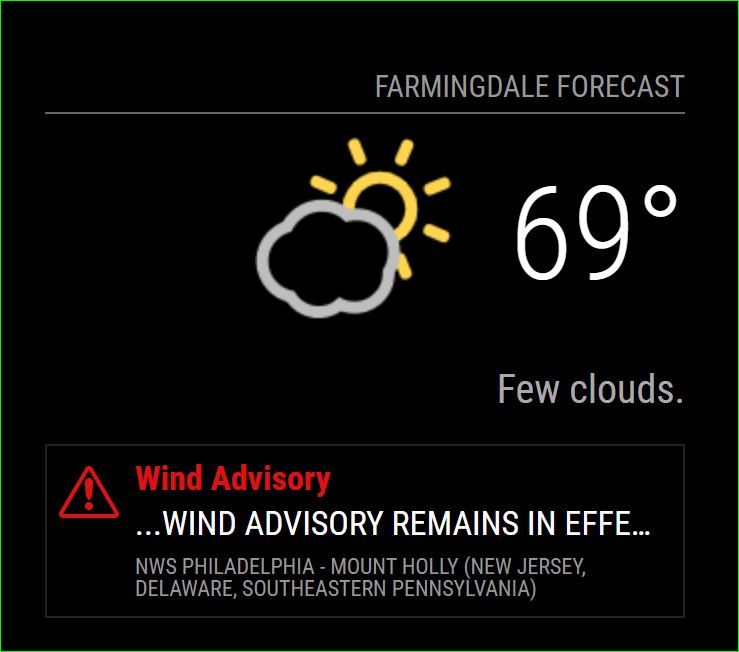
                        @j-e-f-f Last thing is it possible to just get the red to display and nothing else? Yea that’s right it’s FN 69 out here in NJ!
                        Capture.JPG

                        J 1 Reply Last reply Reply Quote 0
                        • karsten13K Offline
                          karsten13
                          last edited by

                          concerning the duplicate weather alerts and mix up between german and english I got an answer from openweathermap.org:

                          Currently we receive data in such format from the provider. The development team is working on the new version of alerts, which should eliminate such behavior.

                          1 Reply Last reply Reply Quote 0
                          • J Offline
                            j.e.f.f Project Sponsor Module Developer @mielu80
                            last edited by j.e.f.f

                            @mielu80 said in MMM-OpenWeatherForecast - Replacement for MMM-DarkSkyForecast:

                            It is somehow possible to show the unit of measurement for the temperature (in my case, “C” for Celsius) ?

                            Yes. You can do that in your custom.css file.

                            For the big current temperature display:

                            .MMM-OpenWeatherForecast .current-conditions-wrapper .current.temperature:after {
                                content: "C";
                            }
                            

                            In the extra current conditions Hi/Lo display:

                            .MMM-OpenWeatherForecast .extra-current-conditions-wrapper  . temperature-container . high-temperature:after,
                            .MMM-OpenWeatherForecast .extra-current-conditions-wrapper  . temperature-container . low-temperature:after {
                                content: "C";
                            }
                            

                            In the hourly forecast items:

                            .MMM-OpenWeatherForecast .forecast-item.hourly .temperature-container:after {
                                content: "C";
                            }
                            

                            In the daily forecast Hi/Lo display:

                            .MMM-OpenWeatherForecast .forecast-item.daily .high-temperature:after,
                            .MMM-OpenWeatherForecast .forecast-item.daily .low-temperature:after {
                                content: "C";
                            }
                            

                            In all of the examples above, whatever you specify for content will be displayed. So if you wanted F for Fahrenheit, you would specify content: "F";

                            M 1 Reply Last reply Reply Quote 0
                            • J Offline
                              j.e.f.f Project Sponsor Module Developer @swvalenti
                              last edited by

                              @swvalenti said in MMM-OpenWeatherForecast - Replacement for MMM-DarkSkyForecast:

                              Last thing is it possible to just get the red to display and nothing else?

                              Yes, you can do this in your custom.css file.

                              To hide the description and alert source:

                              .MMM-OpenWeatherForecast .weather-alert .weather-alert-description,
                              .MMM-OpenWeatherForecast .weather-alert .weather-alert-source {
                                  display: none;
                              }
                              

                              To change the size of the red title text:

                              .MMM-OpenWeatherForecast .weather-alert .weather-alert-title {
                                 font-size: 17px; /* adjust this */
                              }
                              

                              alternatively, to change the size of the alert icon:

                              .MMM-OpenWeatherForecast .weather-alert {
                                  background-size: 30px 26px;  /* width height */
                                  background-position: 6px 10px;  /* top left */
                              }
                              

                              If you change the size of the icon, you may want to adjust the title padding as well:

                              .MMM-OpenWeatherForecast .weather-alert .weather-alert-title {
                                padding-left: 36px; /* adjust this */
                              }
                              

                              EVERYTHING is in this module has a CSS class applied to it so you can tailor every last little bit to your specific needs. Take a look at MMM-OpenWeatherForecast.css for existing CSS rules and mmm-openweather-forecast.njk to see what classes have been applied to which UI elements.

                              1 Reply Last reply Reply Quote 0
                              • J Offline
                                julien-vancouver
                                last edited by

                                Just a quick thanks for the module !

                                1 Reply Last reply Reply Quote 0
                                • P Offline
                                  pwalsh2202
                                  last edited by pwalsh2202

                                  I’m looking to see if I can get just a truncated text-based description of the upcoming weather.

                                  When I search for a location on the openweathermap.org site, I do see the site gathers this data “Heavy intensity rain. Moderate breeze. The high will be 68°F, the low will be 50°F.”, which is exactly what I’m looking to display on my mirror, but I don’t see how this might be communicated via the API.

                                  On OWM’s page, I don’t even see this data provided in the sample API calls provided. Is there a way for your module to provide this data or does this require one of the paid APIs? Thank you for all of the effort you’ve put into this.

                                  J 1 Reply Last reply Reply Quote 0
                                  • M Offline
                                    motdog
                                    last edited by

                                    So I am working on two mirrors. The first set up this module with no problem I created a new api key for the second mirror and when the forecast shows, its missing a day. Today is Friday but when I use this config, the first date showing up in the forecast is Sunday. Makes no sense.

                                    Help please

                                    	{
                                    			  module: "MMM-OpenWeatherMapForecast",
                                    			  header: "Kansas City Weather",
                                    			  position: "top_right",
                                    			  classes: "default everyone",
                                    			  disabled: false,
                                    			  config: {
                                    			    apikey: "xxxxxxxxxxx",
                                    			    latitude: "39.0997",
                                    			    longitude: "94.5786",      
                                    			    iconset: "5c",
                                    		            concise: false,
                                    			    maxDailiesToShow: 5,
                                    			    showHourlyForecast: false,
                                    			    forecastLayout: "table"
                                      }
                                    },
                                    
                                    1 Reply Last reply Reply Quote 0
                                    • M Offline
                                      mielu80 @j.e.f.f
                                      last edited by

                                      @j-e-f-f
                                      Big thanks to you,sir !
                                      Now the module is just perfect for me,everything is exactly as I wished.

                                      1 Reply Last reply Reply Quote 0
                                      • swvalentiS Offline
                                        swvalenti Project Sponsor
                                        last edited by

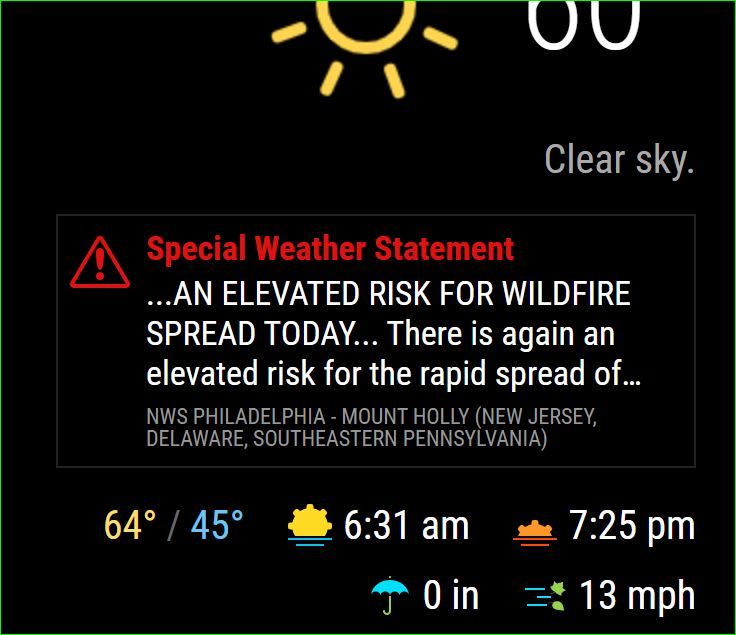
                                        @j-e-f-f here is my config and see the picture, I would like to only see the alert in red and the first line “elevated risk of wildfire”. That doable? Sorry for all the questions on this I’m trying to work the problem.

                                        .MMM-OpenWeatherForecast .weather-alert .weather-alert-description {
                                            display: 1;
                                        },
                                        .MMM-OpenWeatherForecast .weather-alert .weather-alert-source {
                                            display: none;
                                        },
                                        .MMM-OpenWeatherForecast .weather-alert .weather-alert-description {
                                          -webkit-line-clamp: 2; /* adjust this as desired */
                                        }
                                        

                                        Capture.JPG

                                        J 1 Reply Last reply Reply Quote 0
                                        • goldyfruitG Offline
                                          goldyfruit Project Sponsor
                                          last edited by

                                          Just starting to use it, changed few settings and I’m all set.
                                          Great job!

                                          Build smart things with magic and love! | https://smartgic.io

                                          1 Reply Last reply Reply Quote 0
                                          • StoffbeuteluweS Offline
                                            Stoffbeuteluwe Project Sponsor
                                            last edited by

                                            Great module thank you …Jeff

                                            1 Reply Last reply Reply Quote 0

                                            Hello! It looks like you're interested in this conversation, but you don't have an account yet.

                                            Getting fed up of having to scroll through the same posts each visit? When you register for an account, you'll always come back to exactly where you were before, and choose to be notified of new replies (either via email, or push notification). You'll also be able to save bookmarks and upvote posts to show your appreciation to other community members.

                                            With your input, this post could be even better 💗

                                            Register Login

                                            • 1
                                            • 2
                                            • 3
                                            • 4
                                            • 5
                                            • 12
                                            • 13
                                            • 3 / 13
                                            • First post
                                              Last post
                                            Enjoying MagicMirror? Please consider a donation!
                                            MagicMirror created by Michael Teeuw.
                                            Forum managed by Sam, technical setup by Karsten.
                                            This forum is using NodeBB as its core | Contributors
                                            Contact | Privacy Policy