Read the statement by Michael Teeuw here.
MMM-CalendarExt3
-
Hello everyone
I hope you can help me. I’m trying to get the calendar to display in Calendar Ext3.
This is what my configuration looks like
{ module: "calendar", position: "top_left", config: { broadcastPastEvents: true, // <= IMPORTANT to see past events calendars: [ { url: "https://calendar.google.com/calendar/ical/....................ics", name: "Andreas", // <= RECOMMENDED to assign name color: "red" // <= RECOMMENDED to assign color } ] } }, { module: "MMM-CalendarExt3", position: "bottom_bar", title: "", config: { mode: "month", instanceId: "basicCalendar", locale: 'de-CH', maxEventLines: 5, firstDayOfWeek: 1, calendarSet: ['Andreas'], } }, -
@CyruS1337 did you install the fix?
-
Great, it worked. I have one more question.
Do I have to use the “calendar” module from MagicMirror, or would the MMM-MyCalendar module also work?{ module: "MMM-MyCalendar", position: "bottom_right", // This can be any of the regions. Best results in left or right regions. header: 'Kalender Andreas', config: { colored: true, maxTitleLength: 30, maximumEntries: 4, displayRepeatingCountTitle: true, timeFormat: "HH:mm", dateFormat: "DD:MM:YYYY", joiningWord: "um", calendars: [ { url: 'https://calendar.google.com/calendar/ical/................./basic.ics', color: "#5b53d4", symbol: 'calendar', auth: { user: 'username', pass: 'superstrongpassword', method: 'basic' } }, ], } }, { module: "MMM-MyCalendar", position: "bottom_right", // This can be any of the regions. Best results in left or right regions. header: 'Kalender Daniela & Andreas', config: { colored: true, maxTitleLength: 30, maximumEntries: 4, displayRepeatingCountTitle: true, timeFormat: "HH:mm", dateFormat: "DD:MM:YYYY", joiningWord: "um", calendars: [ { url: 'https://calendar.google.com/calendar/ical/................./basic.ics', color: "#f05db0", symbol: 'calendar', auth: { user: 'username', pass: 'superstrongpassword', method: 'basic' } }, ], } }, -
@CyruS1337 MAYBE it will work, but it is a clone of the default cal from 3 years ago, with the broken repeating schedule code…
which I just fixed in the latest release 2.30.0, Jan 1… -
@sdetweil thanks a lot. It works
-
Hi,
CSS is driving my crazy.
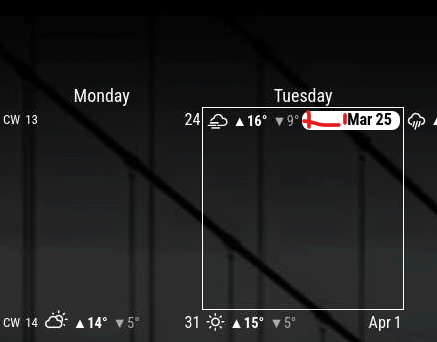
As you can see in the above screenshot, today (Tuesday) the top (weather, today’s Date & Month) take up the entire width.
This is fine.
The “problem” was yesterday with the additional “CW13” which led to overlapping.
I was wondering; if I could minimize the padding around the current date (the red area in the screenshot), theoretically the space should be big enough for all info to be next to each otherI tried adjusting the css
.CX3 .today .cellDate {
  padding: 1px 8px;
  }
but unfortunately, that did not have any effect.
Can somebody point me in the right direction ?
Thanks -
@p1lspeda I do not know , but you can use the developers window to fiddle with css changes live
see the second link in my signature below
also see this topic where we discussed css and the dev window just a couple days ago
https://forum.magicmirror.builders/topic/19559/css-modifications-on-a-module-which-has-no-own-css-styles -
I think you’ll find that it’s because of the
.cellDateproperty - it’s set toflex-grow: 3Almost everything on that line is also connected to
.cellHeader.I disable the CW line manually (from habit, don’t know if it’s an option to do in config) along with a few other modifications (including eliminating weather through config):
.CX3 .cellHeader {
  text-align: right;
  height: var(--cellheaderheight);
  padding: 2px;
  display: flex;
  flex-direction: row;
  justify-content: space-between;
  font-size: 100%;
}

/* Disable CW date */
.CX3 .cw {
	display: none;
}
This results in the header taking up the entire space.
Look for the .cellHeader properties in the main CSS file, and copy them over to your custom.css to mess with them all you want and see what happens.
Pay special attention to justify-content in
.cellHeaderin combination with theflex-growin.cellDate -
@BKeyport you can override in dev window, no need to copy
-
@sdetweil right, but once you have the changes you want, you have to figure out how to implement them, and I’ve noticed with CX3 and some other modules, sometimes the dev window flat out lies where to stuff the CSS for final.
-
@BKeyport you copy/paste from the top right to custom.css
with the selected selector from right of bottom left pane w the modulename class prefixwill post images later, in car now
-
@BKeyport never seen it lie
-
Thanks folks,
much appreciated that you invest your free-time to help simpletons like me.
My custom.css now includes.CX3 .cellHeader .cellDate { flex-grow: 0; } .CX3 .cw::before { content: "CW"; margin-right: 0px; }which seems to achieve what I was/am looking for.
-
@BKeyport here is my dev window steps
the background area for the today highlight is smaller than the font size (set with the cx3-… properties)
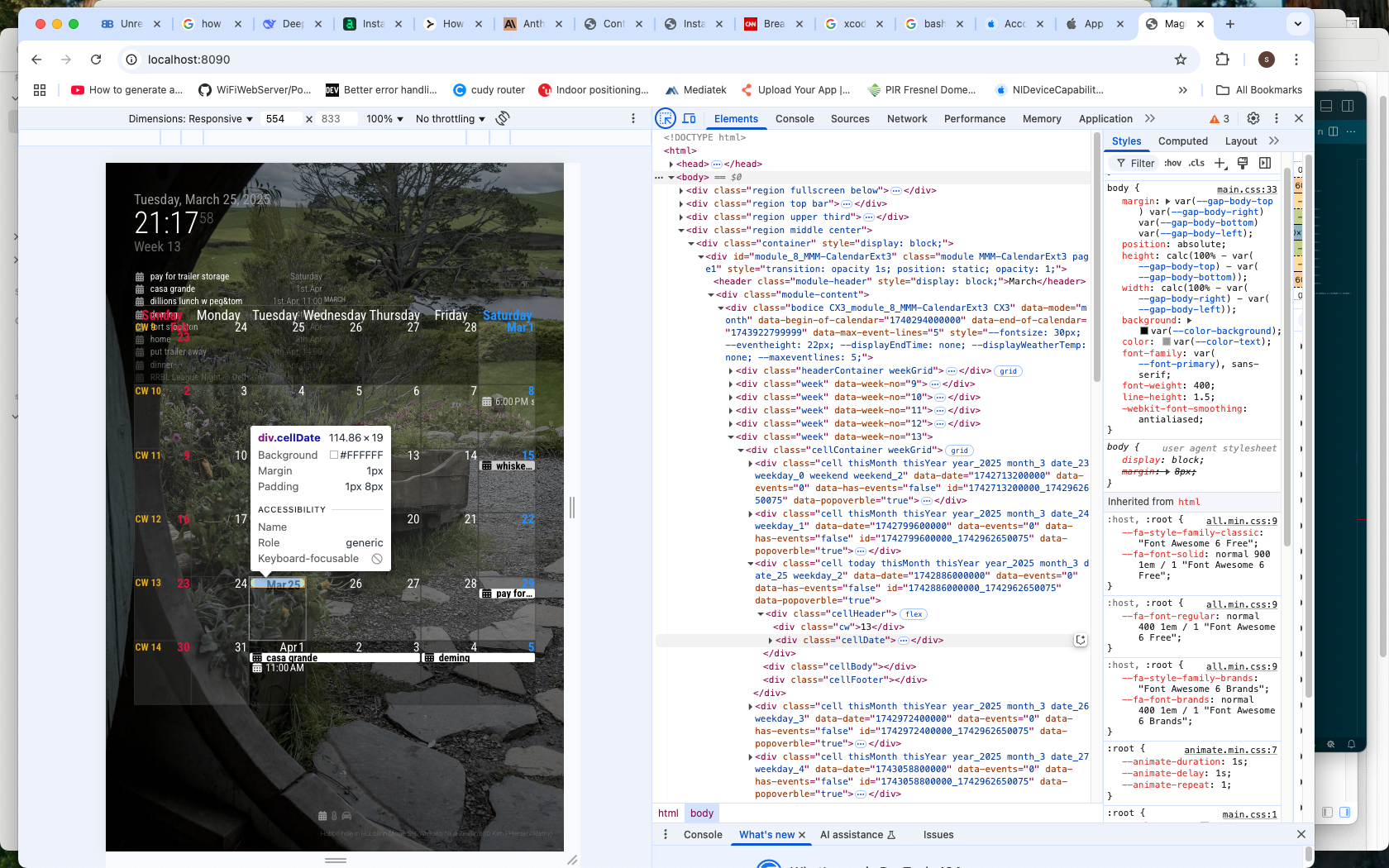
now w the element selected
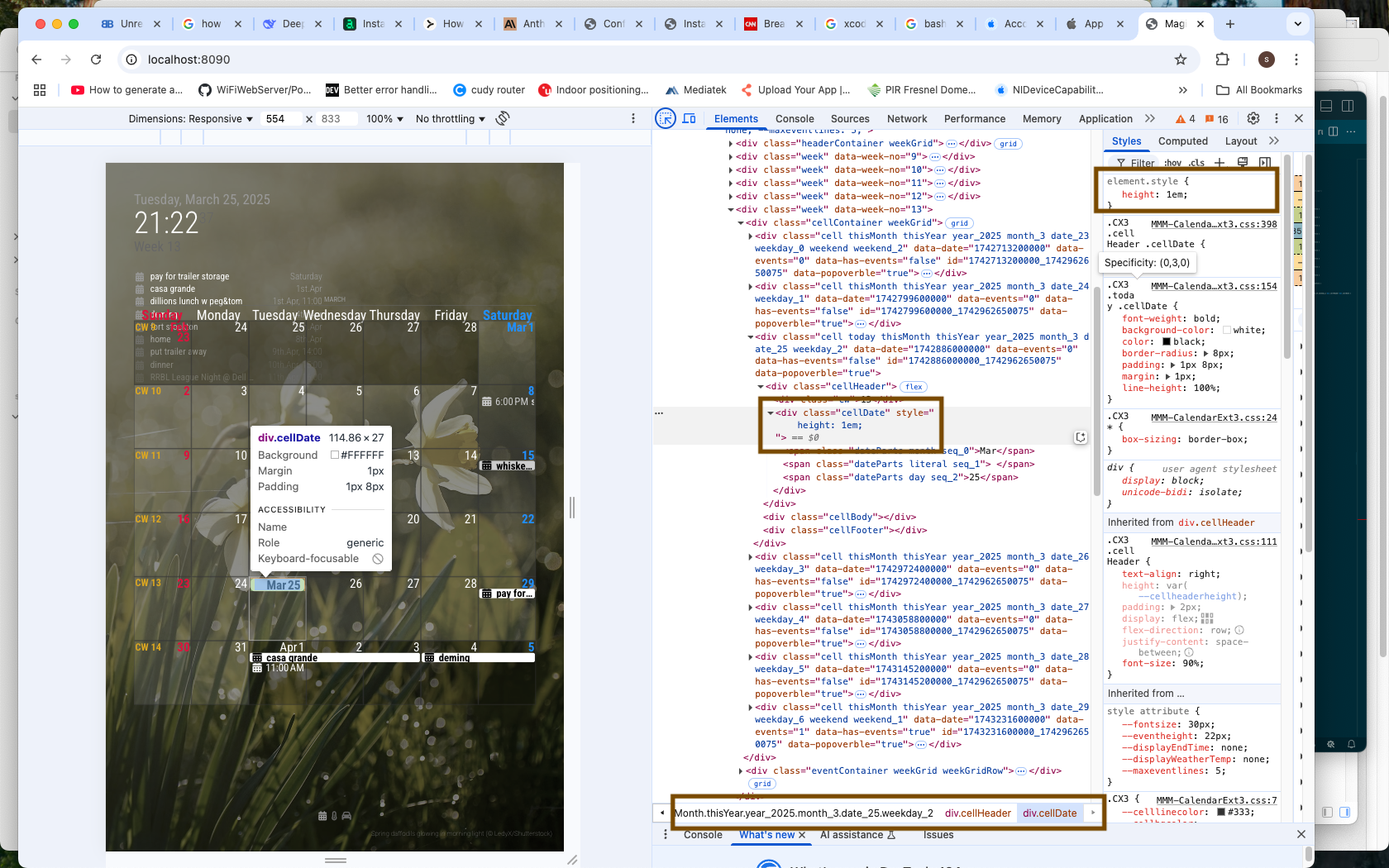
can’t copy/paste the selector list bottom,
so copy the element it self
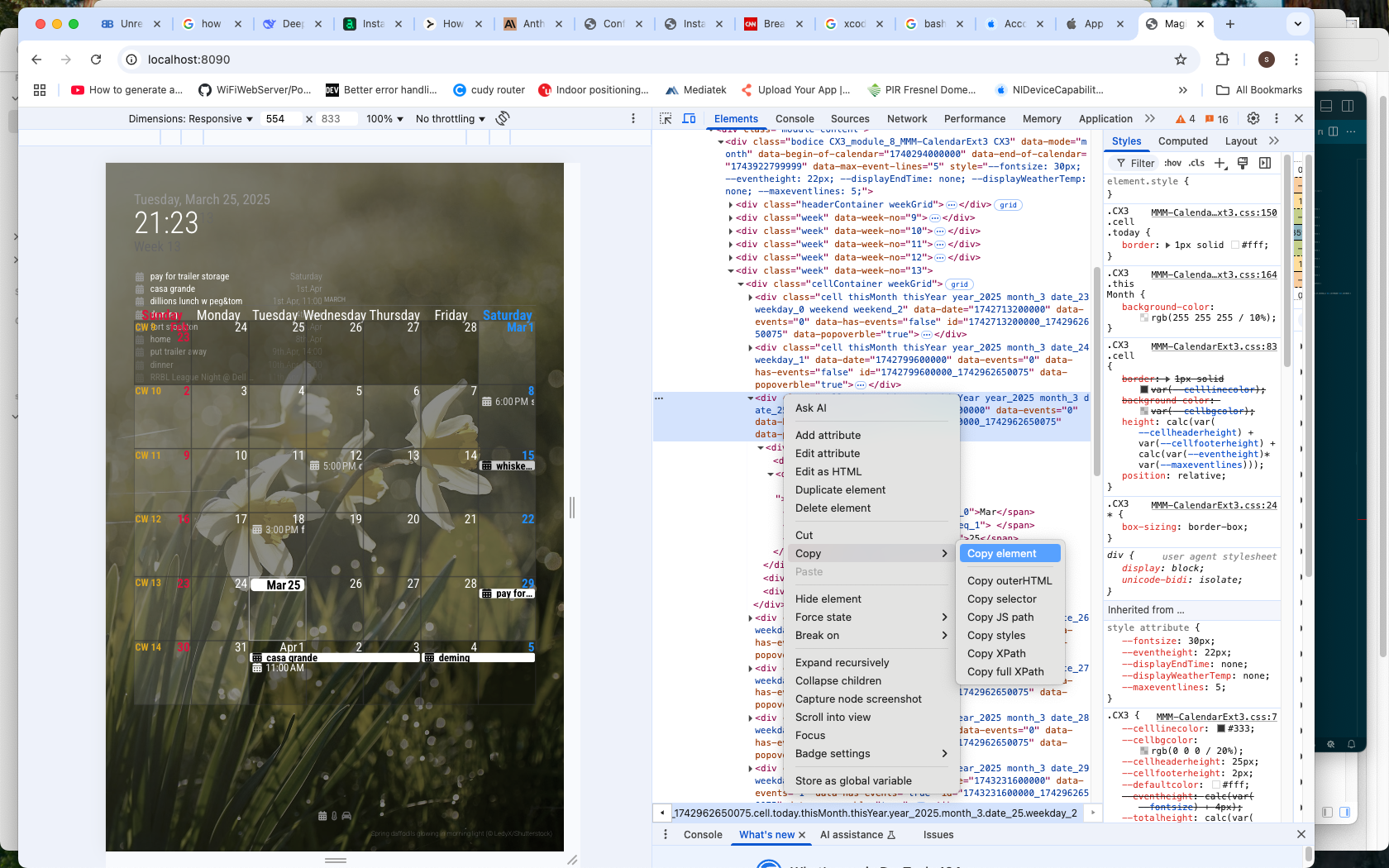
and paste into editor on custom.css

now keep/remove the text to match the bottom selector row
div .cell.today.thisMonth.thisYear.year_2025.month_3.date_25.weekday_2 div.cellHeader div.cellDateadd the module name in front
.CX3 div .cell.today.thisMonth.thisYear.year_2025.month_3.date_25.weekday_2 div.cellHeader div.cellDate {

}
then copy the change in the dev window
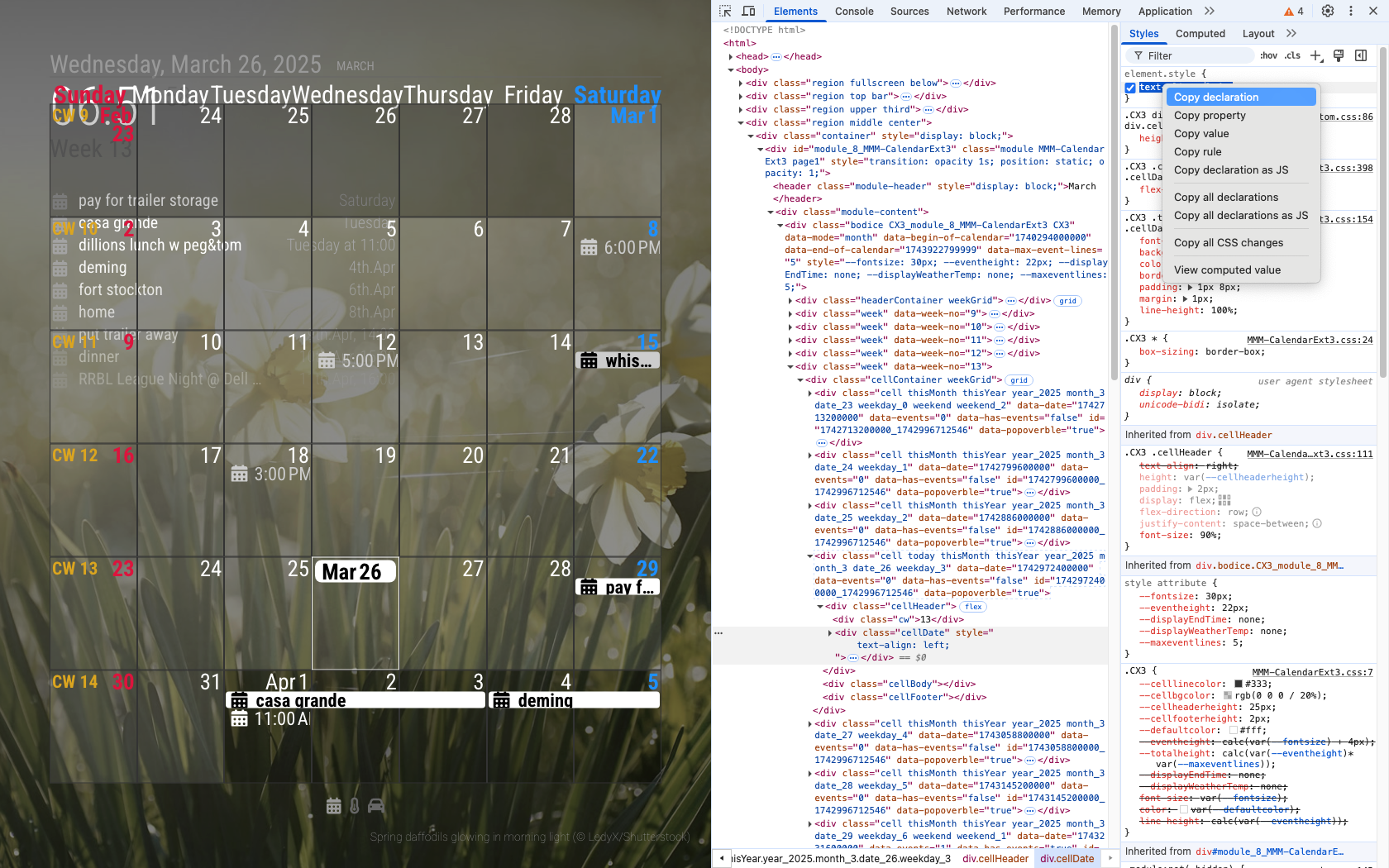
and paste into custom.css inside the braces of the thing you just added
.CX3 div .cell.today.thisMonth.thisYear.year_2025.month_3.date_25.weekday_2 div.cellHeader div.cellDate {
 height: 1em;
text-align: left;
}
now. you MIGHT know (or not) that we ONLY need to target the ‘today’ and ‘celldate’ classes , not JUST this ACTUAL date (mar 25)
so we should shorten the selector… so it also works tomorrow
.CX3 div .cell.today div.cellDate {
 height: 1em;
}
every module it different, so it takes some thinking about what you are seeing
-
Hi - I have struggled with this for the past 24 hours and I cannot figure it. If someone can provide me ELI5 instructions I would appreciate it as CSS is not my strong suit. I am changing things in the custom.css file - perhaps what I want to do cannot be changed there.
I would like to change the width and height of the calendar boxes, regardless of the data in them. I have figured out how to increase font size, but the cell/box size does not grow dynamically as thought it would. Any help appreciated.
.CX3 { font-size: 20px; } -
@cricket you need to change the – variables he has defined… see the README.md file
https://github.com/MMRIZE/MMM-CalendarExt3?tab=readme-ov-file#styling-with-cssfrom configuration means
fontSize '18px' Default font size of this module. eventHeight '22px' The height of each event. -
@sdetweil
Believe me I have and have looked at it at least times, I simply don’t understand how to achieve what I am asking. I have figured out the font size by what I included above. But I don’t understand how change the size of the day cell/box even if it is empty. -
@cricket so, ‘simple’ way is to add more event lines to the box which will make it taller
maxeventlines: 10 or whatever
maxevents*lineHeight = size of box.
lineHeight = fontsize+4 (in the default config)all of the important values are configurable in the module config, so you dont have to mess with css for this
-
@sdetweil said in MMM-CalendarExt3:
@cricket so, ‘simple’ way is to add more event lines to the box which will make it taller
maxeventlines: 10 or whatever
maxevents*lineHeight = size of box.
lineHeight = fontsize+4 (in the default config)all of the important values are configurable in the module config, so you dont have to mess with css for this
Thank you very much for this - I will give this a go!
-
@sdetweil
Outstanding - this did exactly what I was looking for. I also a the appreciate the explanation. I am catching on slowly!


Hello! It looks like you're interested in this conversation, but you don't have an account yet.
Getting fed up of having to scroll through the same posts each visit? When you register for an account, you'll always come back to exactly where you were before, and choose to be notified of new replies (either via email, or push notification). You'll also be able to save bookmarks and upvote posts to show your appreciation to other community members.
With your input, this post could be even better 💗
Register Login