Read the statement by Michael Teeuw here.
1 old noob + 1 rPi = I can't believe I did it! (revisited)
-
This post is deleted! -
@johnnyboy I had to format my brain to use Linux and learn JS… LOL BUT I’m doing it!
I’m used to Windows and PHP… While the both offer great things learning something new can be fun and frustrating… But hang in there if you have questions someone is usually there to answer!
-
@Everyone
1.1k views! That just made my day. Yeah, baby! :eyes:
-
This post is deleted! -
@johnnyboy
The pictures are there, the forum is just not showing them currently.
I fixed the image links in the opening post manually -
This post is deleted! -
@johnnyboy said in 1 old noob + 1 rPi = I can’t believe I did it! (revisited):
Hey bud… what post had your updated MM pictures that showed your finished WunderGround module… the one where you added colours? iirc there was a tip there too to change the colors?
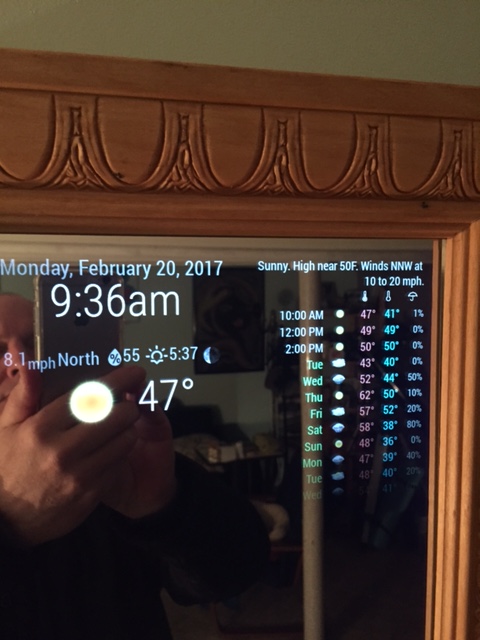
I don’t know where that post is so here’s what I think you are looking for. This goes in your custom.css file to change the colors for max-temp, min-temp and day. The colors you choose are up to you.
.MMM-WunderGround .max-temp {
  color: #f66;
}

.MMM-WunderGround .min-temp {
  color: #0ff;
}

.MMM-WunderGround .day {
  color: #6f6;
}
That gives you this.
-
@yawns said in 1 old noob + 1 rPi = I can’t believe I did it! (revisited):
The pictures are there, the forum is just not showing them currently.
I fixed the image links in the opening post manuallyThey seem to be working now. Thanks yawns. :thumbsup:
-
@johnnyboy said in 1 old noob + 1 rPi = I can’t believe I did it! (revisited):
so maybe furum still buggy?
My Weather icons look nothing like yours… so do I need to update WunderGround?Yes, I think there is an issue with pictures displaying but the moderators/administrators are aware of that and are looking into it. Make sure you have coloricon: true, set in your config.js file in the WunderGround array. If that doesn’t do it then maybe you do need to update WunderGround. In that case, in your terminal
~/MagicMirror/modules/MMM-WunderGround $ git pull
That will update your WunderGround, if it needs it
-
@johnnyboy said in 1 old noob + 1 rPi = I can’t believe I did it! (revisited):
Also… whats with the time being wrong? Its been stuck on 17.20 ?
That’s your sunset/sunrise time, from the Wunderground module. is your clock module installed.enable?
-
@johnnyboy said in 1 old noob + 1 rPi = I can’t believe I did it! (revisited):
Also… whats with the time being wrong? Its been stuck on 17.20 ?
Is this not in your config.js file?
{ module: 'clock', position: 'top_center' }, -
@johnnyboy said in 1 old noob + 1 rPi = I can’t believe I did it! (revisited):
Your a mind reader from across the pond lol… I was thinking about changing the clock over to centre 5 mins ago…
I wasn’t suggesting that you move the clock. I was only inquiring if you had the clock installed because you thought that the sunset time was the clock, stuck at 17:20
-
Hi! I’m not able to find inside amazon, this king of acrylic plastic. Can you put the link please ?
-
-
This post is deleted! -
@johnnyboy said in 1 old noob + 1 rPi = I can’t believe I did it! (revisited):
change out the calendar for something else or see if calender is editable?
Well, that’s the beauty of having modules. You can always change them to something more to your liking. I like the calendar because it allows me to link my Google calendar into it, so I see my events (birthdays, weddings, party dates, etc) as well as the US Holidays. You can also change the dates from relative (in 22 days) to absolute (Mar 14th) in the config’js file, which is nice. And there’s always the custom.css file for coloring, positioning, sizing, etc.
Initially, my biggest problem was wanting to put as many modules as I could fit on the screen, but I soon realized that it looked too busy, too cluttered. So, I decided less is more. I decided what modules were really important to me and where I wanted them. I’m happy with my design
-
This post is deleted! -
This post is deleted! -
body {

}

.MMM-WunderGround .max-temp {
  color: #f66;
}

.MMM-WunderGround .min-temp {
  color: #0ff;
}

.MMM-WunderGround .day {
  color: #6f6;
}
That’s my custom.css entry for coloring
-
This post is deleted!



Hello! It looks like you're interested in this conversation, but you don't have an account yet.
Getting fed up of having to scroll through the same posts each visit? When you register for an account, you'll always come back to exactly where you were before, and choose to be notified of new replies (either via email, or push notification). You'll also be able to save bookmarks and upvote posts to show your appreciation to other community members.
With your input, this post could be even better 💗
Register Login