MagicMirror Forum
    • Recent
    • Tags
    • Unsolved
    • Solved
    • MagicMirror² Repository
    • Documentation
    • 3rd-Party-Modules
    • Donate
    • Discord
    • Register
    • Login
    A New Chapter for MagicMirror: The Community Takes the Lead
    Read the statement by Michael Teeuw here.

    1 old noob + 1 rPi = I can't believe I did it! (revisited)

    Scheduled Pinned Locked Moved Show your Mirror
    193 Posts 29 Posters 439.4k Views 28 Watching
    Loading More Posts
    • Oldest to Newest
    • Newest to Oldest
    • Most Votes
    Reply
    • Reply as topic
    Log in to reply
    This topic has been deleted. Only users with topic management privileges can see it.
    • Mykle1M Offline
      Mykle1 Project Sponsor Module Developer @cowboysdude
      last edited by

      @cowboysdude said in 1 old noob + 1 rPi = I can’t believe I did it! (revisited):

      It was quite humorous…

      Hell yeah. Tim Allen at his best. :thumbsup:

      Create a working config
      How to add modules

      1 Reply Last reply Reply Quote 1
      • Mykle1M Offline
        Mykle1 Project Sponsor Module Developer @johnnyboy
        last edited by Mykle1

        @johnnyboy said in 1 old noob + 1 rPi = I can’t believe I did it! (revisited):

        can you paste what you put in the MMM- simple-logo

                    {
        		module: 'MMM-SimpleLogo',
        		position: 'bottom_left',  	// This can be any of the regions.
        		fileUrl: "modules/MMM-SimpleLogo/public/yes.jpg",
        		config: {
                           width: "275px",
        		// The config property is optional.
        		// See 'Configuration options' for more information.
        		}
        	},
        	{
        		module: 'MMM-SimpleLogo',
        		position: 'bottom_right',	// This can be any of the regions.
        		config: {
                            width: "275px",
        		fileUrl: "modules/MMM-SimpleLogo/public/starship.jpg",
        		// The config property is optional.
        		// See 'Configuration options' for more information.
        		}
        	},
        

        I have 2 entries in my config.js file for MMM-SimpleLogo. One for each picture that I want to display. You can see each of their positions. You can see where I keep the picture files (fileUrl). I believe that if you change the width: then the height will automatically adjust, keeping the aspect ratio of the picture.

        One thing to keep in mind. Two entries using the same position. The earlier one in the config.js ( I call it HIGHER)
        will be above (higher) on your display. I hope this makes sense. I don’t know why the width: entries look indented. Mine are aligned with config: above

        Create a working config
        How to add modules

        johnnyboyJ 1 Reply Last reply Reply Quote 0
        • johnnyboyJ Offline
          johnnyboy @Mykle1
          last edited by johnnyboy

          This post is deleted!
          Mykle1M 1 Reply Last reply Reply Quote 0
          • Mykle1M Offline
            Mykle1 Project Sponsor Module Developer @johnnyboy
            last edited by

            @johnnyboy said in 1 old noob + 1 rPi = I can’t believe I did it! (revisited):

            I have been lurking on here for a while now picking up hints and tips along the way

            You don’t have to lurk. Step into the light. No really, this place is just full of helpful, brilliant people. Any problems I encountered were immediately addressed when I posted my questions. I’m basically done with my (1st) mirror but I’m sticking around to try to repay those that helped, or continue to help me, by helping others, if I can.

            Create a working config
            How to add modules

            cowboysdudeC 1 Reply Last reply Reply Quote 1
            • cowboysdudeC Offline
              cowboysdude Module Developer @Mykle1
              last edited by

              @Mykle1 Yes they were because they like doing this and because you asked nicely ;)

              We’ve had a few that ‘demanded’… they didn’t last long here… LOL

              This is a labor of love for many… There are so many other really great people here. So yes step into the light and ask questions… it’s how we learn!

              johnnyboyJ 1 Reply Last reply Reply Quote 1
              • johnnyboyJ Offline
                johnnyboy @cowboysdude
                last edited by johnnyboy

                This post is deleted!
                cowboysdudeC 1 Reply Last reply Reply Quote 1
                • cowboysdudeC Offline
                  cowboysdude Module Developer @johnnyboy
                  last edited by

                  @johnnyboy I had to format my brain to use Linux and learn JS… LOL BUT I’m doing it!

                  I’m used to Windows and PHP… While the both offer great things learning something new can be fun and frustrating… But hang in there if you have questions someone is usually there to answer!

                  Mykle1M 1 Reply Last reply Reply Quote 1
                  • Mykle1M Offline
                    Mykle1 Project Sponsor Module Developer @cowboysdude
                    last edited by

                    @Everyone

                    1.1k views! That just made my day. Yeah, baby! :eyes:

                    Create a working config
                    How to add modules

                    johnnyboyJ 2 Replies Last reply Reply Quote 1
                    • johnnyboyJ Offline
                      johnnyboy @Mykle1
                      last edited by johnnyboy

                      This post is deleted!
                      yawnsY 1 Reply Last reply Reply Quote 0
                      • yawnsY Offline
                        yawns Moderator @johnnyboy
                        last edited by yawns

                        @johnnyboy
                        The pictures are there, the forum is just not showing them currently.
                        I fixed the image links in the opening post manually

                        Mykle1M 1 Reply Last reply Reply Quote 3
                        • johnnyboyJ Offline
                          johnnyboy @Mykle1
                          last edited by johnnyboy

                          This post is deleted!
                          Mykle1M 1 Reply Last reply Reply Quote 0
                          • Mykle1M Offline
                            Mykle1 Project Sponsor Module Developer @johnnyboy
                            last edited by yawns

                            @johnnyboy said in 1 old noob + 1 rPi = I can’t believe I did it! (revisited):

                            Hey bud… what post had your updated MM pictures that showed your finished WunderGround module… the one where you added colours? iirc there was a tip there too to change the colors?

                            I don’t know where that post is so here’s what I think you are looking for. This goes in your custom.css file to change the colors for max-temp, min-temp and day. The colors you choose are up to you.

                            .MMM-WunderGround .max-temp {
                              color: #f66;
                            }
                            
                            .MMM-WunderGround .min-temp {
                              color: #0ff;
                            }
                            
                            .MMM-WunderGround .day {
                              color: #6f6;
                            }
                            

                            That gives you this.
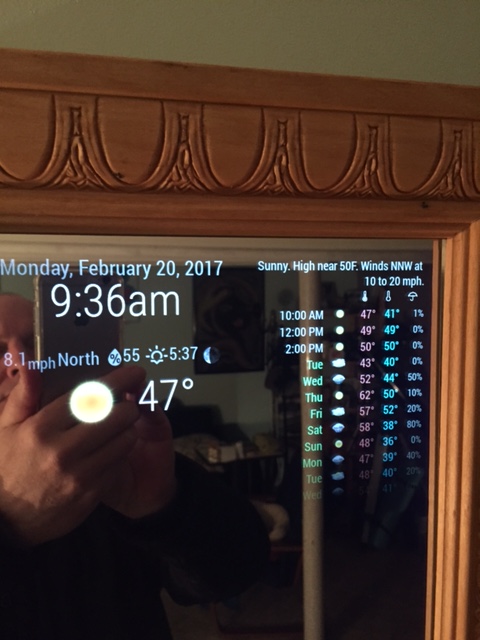
                            0_1487604273042_IMG_1761.JPG

                            Create a working config
                            How to add modules

                            1 Reply Last reply Reply Quote 2
                            • Mykle1M Offline
                              Mykle1 Project Sponsor Module Developer @yawns
                              last edited by

                              @yawns said in 1 old noob + 1 rPi = I can’t believe I did it! (revisited):

                              The pictures are there, the forum is just not showing them currently.
                              I fixed the image links in the opening post manually

                              They seem to be working now. Thanks yawns. :thumbsup:

                              Create a working config
                              How to add modules

                              1 Reply Last reply Reply Quote 0
                              • Mykle1M Offline
                                Mykle1 Project Sponsor Module Developer @Guest
                                last edited by

                                @johnnyboy said in 1 old noob + 1 rPi = I can’t believe I did it! (revisited):

                                so maybe furum still buggy?
                                My Weather icons look nothing like yours… so do I need to update WunderGround?

                                Yes, I think there is an issue with pictures displaying but the moderators/administrators are aware of that and are looking into it. Make sure you have coloricon: true, set in your config.js file in the WunderGround array. If that doesn’t do it then maybe you do need to update WunderGround. In that case, in your terminal

                                ~/MagicMirror/modules/MMM-WunderGround $ git pull

                                That will update your WunderGround, if it needs it

                                Create a working config
                                How to add modules

                                1 Reply Last reply Reply Quote 1
                                • Mykle1M Offline
                                  Mykle1 Project Sponsor Module Developer
                                  last edited by

                                  @johnnyboy said in 1 old noob + 1 rPi = I can’t believe I did it! (revisited):

                                  Also… whats with the time being wrong? Its been stuck on 17.20 ?

                                  That’s your sunset/sunrise time, from the Wunderground module. is your clock module installed.enable?

                                  Create a working config
                                  How to add modules

                                  1 Reply Last reply Reply Quote 1
                                  • Mykle1M Offline
                                    Mykle1 Project Sponsor Module Developer
                                    last edited by

                                    @johnnyboy said in 1 old noob + 1 rPi = I can’t believe I did it! (revisited):

                                    Also… whats with the time being wrong? Its been stuck on 17.20 ?

                                    Is this not in your config.js file?

                                               {
                                    		module: 'clock',
                                    		position: 'top_center'
                                    	},
                                    

                                    Create a working config
                                    How to add modules

                                    1 Reply Last reply Reply Quote 0
                                    • Mykle1M Offline
                                      Mykle1 Project Sponsor Module Developer
                                      last edited by

                                      @johnnyboy said in 1 old noob + 1 rPi = I can’t believe I did it! (revisited):

                                      Your a mind reader from across the pond lol… I was thinking about changing the clock over to centre 5 mins ago…

                                      I wasn’t suggesting that you move the clock. I was only inquiring if you had the clock installed because you thought that the sunset time was the clock, stuck at 17:20

                                      Create a working config
                                      How to add modules

                                      johnnyboyJ 1 Reply Last reply Reply Quote 0
                                      • S Offline
                                        sitobcn82
                                        last edited by

                                        Hi! I’m not able to find inside amazon, this king of acrylic plastic. Can you put the link please ?

                                        Mykle1M 1 Reply Last reply Reply Quote 0
                                        • Mykle1M Offline
                                          Mykle1 Project Sponsor Module Developer @sitobcn82
                                          last edited by

                                          @sitobcn82

                                          https://www.amazon.com/12-Acrylic-See-Through-Mirror-3mm/dp/B01G4MQ5OW/ref=sr_1_4?ie=UTF8&qid=1487615457&sr=8-4&keywords=12"x24"+3mm+acrylic

                                          Create a working config
                                          How to add modules

                                          1 Reply Last reply Reply Quote 0
                                          • johnnyboyJ Offline
                                            johnnyboy @Mykle1
                                            last edited by johnnyboy

                                            This post is deleted!
                                            Mykle1M 1 Reply Last reply Reply Quote 0

                                            Hello! It looks like you're interested in this conversation, but you don't have an account yet.

                                            Getting fed up of having to scroll through the same posts each visit? When you register for an account, you'll always come back to exactly where you were before, and choose to be notified of new replies (either via email, or push notification). You'll also be able to save bookmarks and upvote posts to show your appreciation to other community members.

                                            With your input, this post could be even better 💗

                                            Register Login

                                            • 1
                                            • 2
                                            • 3
                                            • 4
                                            • 5
                                            • 9
                                            • 10
                                            • 2 / 10
                                            • First post
                                              Last post
                                            Enjoying MagicMirror? Please consider a donation!
                                            MagicMirror created by Michael Teeuw.
                                            Forum managed by Sam, technical setup by Karsten.
                                            This forum is using NodeBB as its core | Contributors
                                            Contact | Privacy Policy


