MagicMirror Forum
    • Recent
    • Tags
    • Unsolved
    • Solved
    • MagicMirror² Repository
    • Documentation
    • 3rd-Party-Modules
    • Donate
    • Discord
    • Register
    • Login
    A New Chapter for MagicMirror: The Community Takes the Lead
    Read the statement by Michael Teeuw here.

    Failed Update

    Scheduled Pinned Locked Moved Solved Troubleshooting
    45 Posts 3 Posters 12.9k Views 3 Watching
    Loading More Posts
    • Oldest to Newest
    • Newest to Oldest
    • Most Votes
    Reply
    • Reply as topic
    Log in to reply
    This topic has been deleted. Only users with topic management privileges can see it.
    • D Offline
      DarkV @sdetweil
      last edited by

      @sdetweil Screenshot 2023-10-29 135727.png

      Upgrade started - Sun Oct 2 10:41:43 BST 2022
      system is Linux MAGIC-MIRROR 5.15.61-v7l+ #1579 SMP Fri Aug 26 11:13:03 BST 2022 armv7l GNU/Linux
      the os is Distributor ID: Raspbian Description: Raspbian GNU/Linux 11 (bullseye) Release: 11 Codename: bullseye
      doing test run = true, NO updates will be applied!
      Check current Node installation …
      Node currently installed. Checking version number.
      Minimum Node version: v16.9.1
      Installed Node version: v16.17.1
      No Node.js upgrade necessary.
      Check current NPM installation …
      NPM currently installed. Checking version number.
      Minimum npm version: V7.11.2
      Installed npm version: V8.15.0
      No npm upgrade necessary.

      saving custom.css
      remote name = origin
      upgrading from version 2.20.0 to 2.21.0
      fetching latest revisions
      git fetch rc=0
      current branch = master
      On branch master
      Your branch is behind ‘origin/master’ by 4694 commits, and can be fast-forwarded.
      (use “git pull” to update your local branch)

      Changes not staged for commit:
      (use “git add …” to update what will be committed)
      (use “git restore …” to discard changes in working directory)
      modified: installers/mm.sh
      modified: package-lock.json

      Untracked files:
      (use “git add …” to include in what will be committed)
      0
      core
      css/save_custom.css
      installers/mm_temp.sh
      installers/pm2_MagicMirror.json
      installers/pm2_MagicMirror_new.json
      run-start.sh

      no changes added to commit (use “git add” and/or “git commit -a”)
      there are 2 local files that are different than the master repo

      installers/mm.sh
      package-lock.json

      save/restore files selection = y
      erasing lock files
      Saved working directory and index state WIP on master: 30d5bfe5 Merge pull request #2873 from MichMich/develop
      test merge result rc=‘’ , if empty, no conflicts
      skipping merge, only test run
      Checking for modules with removed libraries
      downloading dumpactivemodules script

      processing dependency changes for active modules with package.json files
      processing for module MMM-Tools please wait

      skipped processing for MMM-Tools, doing test run
      processing complete for module MMM-Tools
      restoring custom.css
      removing git alias
      test run, restoring files stashed
      Removing vendor/package-lock.json
      Removing package-lock.json
      Removing fonts/package-lock.json
      On branch master
      Your branch is behind ‘origin/master’ by 4694 commits, and can be fast-forwarded.
      (use “git pull” to update your local branch)

      Changes not staged for commit:
      (use “git add/rm …” to update what will be committed)
      (use “git restore …” to discard changes in working directory)
      deleted: fonts/package-lock.json
      modified: installers/mm.sh
      deleted: package-lock.json
      deleted: vendor/package-lock.json

      Untracked files:
      (use “git add …” to include in what will be committed)
      0
      core
      installers/mm_temp.sh
      installers/pm2_MagicMirror.json
      installers/pm2_MagicMirror_new.json
      run-start.sh

      no changes added to commit (use “git add” and/or “git commit -a”)
      Dropped refs/stash@{0} (0640a953f8283b8d55b598386c17d310f8a75680)
      Upgrade ended - Sun Oct 2 10:41:58 BST 2022

      Upgrade started - Sun Oct 2 10:42:15 BST 2022
      system is Linux MAGIC-MIRROR 5.15.61-v7l+ #1579 SMP Fri Aug 26 11:13:03 BST 2022 armv7l GNU/Linux
      the os is Distributor ID: Raspbian Description: Raspbian GNU/Linux 11 (bullseye) Release: 11 Codename: bullseye
      user requested to apply changes
      doing test run = false
      Check current Node installation …
      Node currently installed. Checking version number.
      Minimum Node version: v16.9.1
      Installed Node version: v16.17.1
      No Node.js upgrade necessary.
      Check current NPM installation …
      NPM currently installed. Checking version number.
      Minimum npm version: V7.11.2
      Installed npm version: V8.15.0
      No npm upgrade necessary.

      saving custom.css
      remote name = origin
      upgrading from version 2.20.0 to 2.21.0
      fetching latest revisions
      git fetch rc=0
      current branch = master
      On branch master
      Your branch is behind ‘origin/master’ by 4694 commits, and can be fast-forwarded.
      (use “git pull” to update your local branch)

      Changes not staged for commit:
      (use “git add/rm …” to update what will be committed)
      (use “git restore …” to discard changes in working directory)
      deleted: fonts/package-lock.json
      modified: installers/mm.sh
      deleted: package-lock.json
      deleted: vendor/package-lock.json

      Untracked files:
      (use “git add …” to include in what will be committed)
      0
      core
      css/save_custom.css
      installers/mm_temp.sh
      installers/pm2_MagicMirror.json
      installers/pm2_MagicMirror_new.json
      run-start.sh

      no changes added to commit (use “git add” and/or “git commit -a”)
      there are 1 local files that are different than the master repo

      installers/mm.sh

      save/restore files selection = y
      erasing lock files
      Saved working directory and index state WIP on master: 30d5bfe5 Merge pull request #2873 from MichMich/develop
      test merge result rc=‘’ , if empty, no conflicts
      executing merge, apply specified
      merge result rc= 0
      Updating 30d5bfe5…9e029304 Fast-forward .github/ISSUE_TEMPLATE.md
      4 ± .github/workflows/automated-tests.yaml
      4 ± .github/workflows/codecov-test-suites.yaml
      2 ± CHANGELOG.md
      100 ± LICENSE.md
      2 ± css/main.css
      18 ± fonts/package-lock.json
      28 ± fonts/package.json
      4 ± js/node_helper.js
      17 ± modules/default/calendar/README.md
      0 modules/default/calendar/calendar.js
      21 ± modules/default/calendar/calendarutils.js
      37 ± modules/default/calendar/node_helper.js
      8 + modules/default/currentweather/currentweather.js
      33 - modules/default/defaultmodules.js
      2 ± modules/default/newsfeed/newsfeedfetcher.js
      13 + modules/default/weather/README.md
      2 ± modules/default/weather/current.njk
      0 modules/default/weather/providers/README.md
      0 modules/default/weather/providers/darksky.js
      0 …/default/weather/providers/openweathermap.js
      0 modules/default/weather/providers/smhi.js
      61 ± modules/default/weather/providers/ukmetoffice.js
      0 modules/default/weather/providers/weatherbit.js
      26 ± modules/default/weather/providers/weathergov.js
      0 modules/default/weather/weatherobject.js
      0 modules/default/weatherforecast/weatherforecast.js
      33 - package-lock.json
      3885 ++++++++++±-------- package.json
      38 ± tests/configs/data/calendar_test_recurring.ics
      2 ± tests/e2e/env_spec.js
      17 ± tests/e2e/global-setup.js
      57 ± tests/e2e/modules/alert_spec.js
      9 ± tests/e2e/modules/calendar_spec.js
      111 ± tests/e2e/modules/clock_es_spec.js
      47 ± tests/e2e/modules/clock_spec.js
      77 ± tests/e2e/modules/compliments_spec.js
      60 ± tests/e2e/modules/helloworld_spec.js
      18 ± tests/e2e/modules/newsfeed_spec.js
      48 ± tests/e2e/modules/weather_spec.js
      225 ± tests/e2e/modules_display_spec.js
      10 ± tests/e2e/modules_position_spec.js
      9 ± tests/e2e/translations_spec.js
      6 ± tests/e2e/without_modules.js
      12 ± …/snapshots/updatenotification_spec.js.snap
      6 ± translations/en.json
      1 - vendor/package-lock.json
      42 ± vendor/package.json
      6 ± vendor/vendor.js
      0 49 files changed, 2858 insertions(+), 2243 deletions(-)
      mode change 100755 => 100644 modules/default/calendar/README.md
      mode change 100755 => 100644 modules/default/calendar/calendar.js delete mode 100644 modules/default/currentweather/currentweather.js
      mode change 100755 => 100644 modules/default/weather/README.md
      mode change 100755 => 100644 modules/default/weather/current.njk
      mode change 100755 => 100644 modules/default/weather/providers/README.md
      mode change 100755 => 100644 modules/default/weather/providers/darksky.js
      mode change 100755 => 100644 modules/default/weather/providers/openweathermap.js
      mode change 100755 => 100644 modules/default/weather/providers/ukmetoffice.js
      mode change 100755 => 100644 modules/default/weather/providers/weathergov.js
      mode change 100755 => 100644 modules/default/weather/weatherobject.js delete mode 100644 modules/default/weatherforecast/weatherforecast.js
      mode change 100755 => 100644 vendor/package.json
      mode change 100755 => 100644 vendor/vendor.js
      processor architecture is armv7l
      updating MagicMirror runtime, please wait
      npm WARN invalid config omit=“dev --no-audit --no-fund --no-update-notifier” set in command line options
      npm WARN invalid config Must be one or more of: dev, optional, peer

      magicmirror@2.21.0 postinstall
      npm run install-vendor && npm run install-fonts && echo "MagicMirror² installation finished successfully!
      "

      magicmirror@2.21.0 install-vendor
      echo "Installing vendor files …
      " && cd vendor && npm install --loglevel=error --no-audit --no-fund --no-update-notifier

      Installing vendor files …

      changed 3 packages in 9s

      magicmirror@2.21.0 install-fonts
      echo "Installing fonts …
      " && cd fonts && npm install --loglevel=error --no-audit --no-fund --no-update-notifier

      Installing fonts …

      changed 2 packages in 4s
      MagicMirror² installation finished successfully!

      magicmirror@2.21.0 prepare
      [ -f node_modules/.bin/husky ] && husky install || echo no husky installed.

      husky - Git hooks installed

      added 455 packages, removed 3 packages, changed 13 packages, and audited 754 packages in 3m

      91 packages are looking for funding
      run npm fund for details

      3 moderate severity vulnerabilities

      To address all issues (including breaking changes), run:
      npm audit fix --force

      Run npm audit for details.
      npm install completed - Sun Oct 2 10:45:27 BST 2022 on base
      fixing sandbox permissions
      Checking for modules with removed libraries
      downloading dumpactivemodules script

      processing dependency changes for active modules with package.json files
      processing for module MMM-Tools please wait

      npm WARN invalid config omit=“dev --no-audit --no-fund --no-update-notifier” set in command line options
      npm WARN invalid config Must be one or more of: dev, optional, peer

      added 3 packages, and audited 4 packages in 3s

      1 package is looking for funding
      run npm fund for details

      found 0 vulnerabilities
      processing complete for module MMM-Tools
      restoring custom.css
      removing git alias
      we stashed a set of files that appear changed from the latest repo versions. you should review them
      Upgrade ended - Sun Oct 2 10:45:33 BST 2022

      Upgrade started - Tue Oct 17 12:57:21 BST 2023
      system is Linux MAGIC-MIRROR 6.1.21-v8+ #1642 SMP PREEMPT Mon Apr 3 17:24:16 BST 2023 aarch64 GNU/Linux
      the os is Distributor ID: Raspbian Description: Raspbian GNU/Linux 11 (bullseye) Release: 11 Codename: bullseye
      doing test run = true, NO updates will be applied!
      Check current Node installation …
      Node currently installed. Checking version number.
      Minimum Node version: v20.8.0
      Installed Node version: v16.20.2
      Node should be upgraded.
      A Node process is currently running. Can’t upgrade.
      Please quit all Node processes and restart the update.
      junior 18317 18316 0 Oct07 0 00:00:00 node ./node_modules/.bin/electron js/electron.js

      Upgrade started - Tue Oct 17 12:58:30 BST 2023
      system is Linux MAGIC-MIRROR 6.1.21-v8+ #1642 SMP PREEMPT Mon Apr 3 17:24:16 BST 2023 aarch64 GNU/Linux
      the os is Distributor ID: Raspbian Description: Raspbian GNU/Linux 11 (bullseye) Release: 11 Codename: bullseye
      doing test run = true, NO updates will be applied!
      Check current Node installation …
      Node currently installed. Checking version number.
      Minimum Node version: v20.8.0
      Installed Node version: v16.20.2
      Node should be upgraded.
      A Node process is currently running. Can’t upgrade.
      Please quit all Node processes and restart the update.
      junior 8378 8377 5 12:58 0 00:00:00 node ./node_modules/.bin/electron js/electron.js

      Upgrade started - Tue Oct 17 13:04:45 BST 2023
      system is Linux MAGIC-MIRROR 6.1.21-v8+ #1642 SMP PREEMPT Mon Apr 3 17:24:16 BST 2023 aarch64 GNU/Linux
      the os is Distributor ID: Raspbian Description: Raspbian GNU/Linux 11 (bullseye) Release: 11 Codename: bullseye
      doing test run = true, NO updates will be applied!
      Check current Node installation …
      Node currently installed. Checking version number.
      Minimum Node version: v20.8.0
      Installed Node version: v16.20.2
      Node should be upgraded.
      A Node process is currently running. Can’t upgrade.
      Please quit all Node processes and restart the update.
      junior 8378 8377 0 12:58 ? 00:00:00 node ./node_modules/.bin/electron js/electron.js

      Upgrade started - Sun Oct 22 09:24:16 BST 2023
      system is Linux MAGIC-MIRROR 6.1.21-v8+ #1642 SMP PREEMPT Mon Apr 3 17:24:16 BST 2023 aarch64 GNU/Linux
      the os is Distributor ID: Raspbian Description: Raspbian GNU/Linux 11 (bullseye) Release: 11 Codename: bullseye
      doing test run = true, NO updates will be applied!
      Check current Node installation …
      Node currently installed. Checking version number.
      Minimum Node version: v20.8.0
      Installed Node version: v16.20.2
      Node should be upgraded.
      A Node process is currently running. Can’t upgrade.
      Please quit all Node processes and restart the update.
      junior 3451 3450 0 Oct17 ? 00:00:00 node ./node_modules/.bin/electron js/electron.js

      Upgrade started - Tue Oct 24 11:04:00 BST 2023
      system is Linux MAGIC-MIRROR 6.1.21-v8+ #1642 SMP PREEMPT Mon Apr 3 17:24:16 BST 2023 aarch64 GNU/Linux
      the os is Distributor ID: Raspbian Description: Raspbian GNU/Linux 11 (bullseye) Release: 11 Codename: bullseye
      n (node version manager tool) not installed, doing test run, install skipped
      doing test run = true, NO updates will be applied!
      Check current Node installation …
      Node currently installed. Checking version number.
      Minimum Node version: v20.8.0
      Installed Node version: v16.20.2
      Node should be upgraded.
      A Node process is currently running. Can’t upgrade.
      Please quit all Node processes and restart the update.
      junior 3451 3450 0 Oct17 ? 00:00:00 node ./node_modules/.bin/electron js/electron.js

      Upgrade started - Tue Oct 24 11:04:44 BST 2023
      system is Linux MAGIC-MIRROR 6.1.21-v8+ #1642 SMP PREEMPT Mon Apr 3 17:24:16 BST 2023 aarch64 GNU/Linux
      user requested to apply changes
      the os is Distributor ID: Raspbian Description: Raspbian GNU/Linux 11 (bullseye) Release: 11 Codename: bullseye

      added 1 package, and audited 2 packages in 2s

      found 0 vulnerabilities
      npm notice
      npm notice New major version of npm available! 8.19.4 -> 10.2.1
      npm notice Changelog: https://github.com/npm/cli/releases/tag/v10.2.1
      npm notice Run npm install -g npm@10.2.1 to update!
      npm notice
      installing : node-v20.8.0
      mkdir : /usr/local/n/versions/node/20.8.0
      fetch : https://nodejs.org/dist/v20.8.0/node-v20.8.0-linux-arm64.tar.xz
      copying : node/20.8.0
      installed : (with npm 10.1.0)

      Note: the node command changed location and the old location may be remembered in your current shell.
      old : /usr/bin/node
      new : /usr/local/bin/node
      If “node --version” shows the old version then start a new shell, or reset the location hash with:
      hash -r (for bash, zsh, ash, dash, and ksh)
      rehash (for csh and tcsh)
      doing test run = false
      Check current Node installation …
      Node currently installed. Checking version number.
      forcing low Node version
      Minimum Node version: v20.8.0
      Installed Node version: V1.0.0
      Node should be upgraded.
      A Node process is currently running. Can’t upgrade.
      Please quit all Node processes and restart the update.
      junior 3451 3450 0 Oct17 ? 00:00:00 node ./node_modules/.bin/electron js/electron.js

      Upgrade started - Tue Oct 24 13:23:22 BST 2023
      system is Linux MAGIC-MIRROR 6.1.21-v8+ #1642 SMP PREEMPT Mon Apr 3 17:24:16 BST 2023 aarch64 GNU/Linux
      user requested to apply changes
      the os is Distributor ID: Raspbian Description: Raspbian GNU/Linux 11 (bullseye) Release: 11 Codename: bullseye
      node not installed, trying via apt-get
      Reading package lists… Building dependency tree… Reading state information… nodejs is already the newest version (16.20.2-deb-1nodesource1). The following packages were automatically installed and are no longer required: libfuse2 raspinfo Use ‘sudo apt autoremove’ to remove them. 0 upgraded, 0 newly installed, 0 to remove and 0 not upgraded.
      npm not installed, trying via apt-get
      doing test run = false
      Check current Node installation …
      Node currently installed. Checking version number.
      forcing low Node version
      Minimum Node version: v20.8.0
      Installed Node version: V1.0.0
      Node should be upgraded.
      Installing Node.js …
      Hit:1 http://raspbian.raspberrypi.org/raspbian bullseye InRelease
      Hit:2 http://archive.raspberrypi.org/debian bullseye InRelease
      Hit:3 https://deb.nodesource.com/node_10.x bullseye InRelease
      Reading package lists…
      Node release info = ================================================================================ ▓▓▓▓▓▓▓▓▓▓▓▓▓▓▓▓▓▓▓▓▓▓▓▓▓▓▓▓▓▓▓▓▓▓▓▓▓▓▓▓▓▓▓▓▓▓▓▓▓▓▓▓▓▓▓▓▓▓▓▓▓▓▓▓▓▓▓▓▓▓▓▓▓▓▓▓▓▓▓▓ ================================================================================ SCRIPT DEPRECATION WARNING This script, located at https://deb.nodesource.com/setup_X, used to install Node.js is deprecated now and will eventually be made inactive. Please visit the NodeSource distributions Github and follow the instructions to migrate your repo. https://github.com/nodesource/distributions The NodeSource Node.js Linux distributions GitHub repository contains information about which versions of Node.js and which Linux distributions are supported and how to install it. https://github.com/nodesource/distributions SCRIPT DEPRECATION WARNING ================================================================================ ▓▓▓▓▓▓▓▓▓▓▓▓▓▓▓▓▓▓▓▓▓▓▓▓▓▓▓▓▓▓▓▓▓▓▓▓▓▓▓▓▓▓▓▓▓▓▓▓▓▓▓▓▓▓▓▓▓▓▓▓▓▓▓▓▓▓▓▓▓▓▓▓▓▓▓▓▓▓▓▓ ================================================================================ TO AVOID THIS WAIT MIGRATE THE SCRIPT Continuing in 60 seconds (press Ctrl-C to abort) … ## Installing the NodeSource Node.js 20.x repo… ## Populating apt-get cache… + apt-get update Hit:1 http://raspbian.raspberrypi.org/raspbian bullseye InRelease Hit:2 http://archive.raspberrypi.org/debian bullseye InRelease Hit:3 https://deb.nodesource.com/node_10.x bullseye InRelease Reading package lists… ## Confirming “bullseye” is supported… + curl -sLf -o /dev/null ‘https://deb.nodesource.com/node_20.x/dists/bullseye/Release’ ## Adding the NodeSource signing key to your keyring… + curl -s https://deb.nodesource.com/gpgkey/nodesource.gpg.key | gpg --dearmor | tee /usr/share/keyrings/nodesource.gpg >/dev/null ## Creating apt sources list file for the NodeSource Node.js 20.x repo… + echo ‘deb [signed-by=/usr/share/keyrings/nodesource.gpg] https://deb.nodesource.com/node_20.x bullseye main’ > /etc/apt/sources.list.d/nodesource.list + echo ‘deb-src [signed-by=/usr/share/keyrings/nodesource.gpg] https://deb.nodesource.com/node_20.x bullseye main’ >> /etc/apt/sources.list.d/nodesource.list ## Running apt-get update for you… + apt-get update Hit:1 http://raspbian.raspberrypi.org/raspbian bullseye InRelease Hit:2 http://archive.raspberrypi.org/debian bullseye InRelease Get:3 https://deb.nodesource.com/node_20.x bullseye InRelease [4,586 B] Get:4 https://deb.nodesource.com/node_20.x bullseye/main armhf Packages [783 B] Fetched 5,369 B in 1s (4,513 B/s) Reading package lists… ## Run sudo apt-get install -y nodejs to install Node.js 20.x and npm ## You may also need development tools to build native addons: sudo apt-get install gcc g++ make ## To install the Yarn package manager, run: curl -sL https://dl.yarnpkg.com/debian/pubkey.gpg | gpg --dearmor | sudo tee /usr/share/keyrings/yarnkey.gpg >/dev/null echo “deb [signed-by=/usr/share/keyrings/yarnkey.gpg] https://dl.yarnpkg.com/debian stable main” | sudo tee /etc/apt/sources.list.d/yarn.list sudo apt-get update && sudo apt-get install yarn
      Node.js installation Done! version=
      pm2 installed, checking version 5.2.0 vs 5.3.0
      pm2 same major version, so updating

      added 4 packages, removed 30 packages, and changed 153 packages in 18s

      13 packages are looking for funding
      run npm fund for details
      Be sure to have the latest version by doing npm install pm2@latest -g before doing this procedure.

      In-memory PM2 is out-of-date, do:
      $ pm2 update
      In memory PM2 version: 5.2.0
      Local PM2 version: 5.3.0

                    -------------
      

      ██████╗ ███╗ ███╗██████╗ ██╗ ██╗ ██████╗
      ██╔══██╗████╗ ████║╚════██╗ ██║ ██╔╝██╔═══██╗
      ██████╔╝██╔████╔██║ █████╔╝ ██║ ██╔╝ ██║ ██║
      ██╔═══╝ ██║╚██╔╝██║██╔═══╝ ██║ ██╔╝ ██║ ██║
      ██║ ██║ ╚═╝ ██║███████╗ ██║██╔╝ ╚██████╔╝
      ╚═╝ ╚═╝ ╚═╝╚══════╝ ╚═╝╚═╝ ╚═════╝

                    https://pm2.io/
      
       Harden your Node.js Production Environment
      
        - Real-time Monitoring Web Interface
        - Pro Active Alerting System
        - Production Profiling for Memory and CPU
        - PM2 Runtime High Availability Fallback
      
      
               Start using it by typing:
      
                      $ pm2 plus
      
                    -------------
      

      [PM2] Applying action deleteProcessId on app [all](ids: [ 0 ])
      [PM2] MagicMirror ✓
      [PM2] [v] All Applications Stopped
      [PM2] [v] PM2 Daemon Stopped
      [PM2] Spawning PM2 daemon with pm2_home=/home/junior/.pm2
      [PM2] Restoring processes located in /home/junior/.pm2/dump.pm2
      [PM2] Process /home/junior/MagicMirror/installers/mm.sh restored

      PM2 updated

      Upgrade started - Tue Oct 24 13:56:39 BST 2023
      system is Linux MAGIC-MIRROR 6.1.21-v8+ #1642 SMP PREEMPT Mon Apr 3 17:24:16 BST 2023 aarch64 GNU/Linux
      the os is Distributor ID: Raspbian Description: Raspbian GNU/Linux 11 (bullseye) Release: 11 Codename: bullseye
      node not installed, trying via apt-get
      node not installed, doing test run, install skipped
      n (node version manager tool) not installed, doing test run, install skipped
      doing test run = true, NO updates will be applied!
      Check current Node installation …
      Node currently installed. Checking version number.
      forcing low Node version
      Minimum Node version: v20.8.0
      Installed Node version: V1.0.0
      Node should be upgraded.
      A Node process is currently running. Can’t upgrade.
      Please quit all Node processes and restart the update.
      junior 1519 1518 0 13:37 ? 00:00:00 node ./node_modules/.bin/electron js/electron.js

      Upgrade started - Tue Oct 24 13:57:20 BST 2023
      system is Linux MAGIC-MIRROR 6.1.21-v8+ #1642 SMP PREEMPT Mon Apr 3 17:24:16 BST 2023 aarch64 GNU/Linux
      the os is Distributor ID: Raspbian Description: Raspbian GNU/Linux 11 (bullseye) Release: 11 Codename: bullseye
      node not installed, trying via apt-get
      node not installed, doing test run, install skipped
      n (node version manager tool) not installed, doing test run, install skipped
      doing test run = true, NO updates will be applied!
      Check current Node installation …
      Node currently installed. Checking version number.
      forcing low Node version
      Minimum Node version: v20.8.0
      Installed Node version: V1.0.0
      Node should be upgraded.
      Node.js upgrade defered, doing test run
      Check current NPM installation …
      NPM currently installed. Checking version number.
      Minimum npm version: V10.1.0
      Installed npm version: V10.1.0
      No npm upgrade necessary.

      saving custom.css
      remote name = origin
      upgrading from version 2.22.0 to 2.25.0
      fetching latest revisions
      git fetch rc=0
      current branch = master
      On branch master
      Your branch is behind ‘origin/master’ by 3 commits, and can be fast-forwarded.
      (use “git pull” to update your local branch)

      Changes not staged for commit:
      (use “git add …” to update what will be committed)
      (use “git restore …” to discard changes in working directory)
      modified: installers/mm.sh

      Untracked files:
      (use “git add …” to include in what will be committed)
      0
      core
      css/save_custom.css
      installers/mm_temp.sh
      installers/pm2_MagicMirror.json
      installers/pm2_MagicMirror_new.json
      installers/stashed_files
      run-start.sh

      no changes added to commit (use “git add” and/or “git commit -a”)
      there are 1 local files that are different than the master repo

      installers/mm.sh

      save/restore files selection = y
      erasing lock files
      Saved working directory and index state WIP on master: f14e9561 Create Thai Language file (#3028)
      test merge result rc=‘’ , if empty, no conflicts
      skipping merge, only test run
      Checking for modules with removed libraries
      downloading dumpactivemodules script
      no modules found needing npm refresh
      restoring custom.css
      removing git alias
      test run, restoring files stashed
      Removing vendor/package-lock.json
      Removing package-lock.json
      Removing fonts/package-lock.json
      On branch master
      Your branch is behind ‘origin/master’ by 3 commits, and can be fast-forwarded.
      (use “git pull” to update your local branch)

      Changes not staged for commit:
      (use “git add/rm …” to update what will be committed)
      (use “git restore …” to discard changes in working directory)
      deleted: fonts/package-lock.json
      modified: installers/mm.sh
      deleted: package-lock.json
      deleted: vendor/package-lock.json

      Untracked files:
      (use “git add …” to include in what will be committed)
      0
      core
      installers/mm_temp.sh
      installers/pm2_MagicMirror.json
      installers/pm2_MagicMirror_new.json
      installers/stashed_files
      run-start.sh

      no changes added to commit (use “git add” and/or “git commit -a”)
      Dropped refs/stash@{0} (c813d55595387ff98151af075aa3d1f202d8f8c3)
      Upgrade ended - Tue Oct 24 13:57:34 BST 2023

      Upgrade started - Tue Oct 24 13:57:52 BST 2023
      system is Linux MAGIC-MIRROR 6.1.21-v8+ #1642 SMP PREEMPT Mon Apr 3 17:24:16 BST 2023 aarch64 GNU/Linux
      user requested to apply changes
      the os is Distributor ID: Raspbian Description: Raspbian GNU/Linux 11 (bullseye) Release: 11 Codename: bullseye
      node not installed, trying via apt-get
      Reading package lists… Building dependency tree… Reading state information… nodejs is already the newest version (20.5.1-deb-1nodesource1). The following packages were automatically installed and are no longer required: libfuse2 raspinfo Use ‘sudo apt autoremove’ to remove them. 0 upgraded, 0 newly installed, 0 to remove and 0 not upgraded.
      npm not installed, trying via apt-get
      doing test run = false
      Check current Node installation …
      Node currently installed. Checking version number.
      forcing low Node version
      Minimum Node version: v20.8.0
      Installed Node version: V1.0.0
      Node should be upgraded.
      Installing Node.js …
      Hit:1 http://raspbian.raspberrypi.org/raspbian bullseye InRelease
      Hit:2 http://archive.raspberrypi.org/debian bullseye InRelease
      Hit:3 https://deb.nodesource.com/node_20.x bullseye InRelease
      Reading package lists…
      Node release info = ================================================================================ ▓▓▓▓▓▓▓▓▓▓▓▓▓▓▓▓▓▓▓▓▓▓▓▓▓▓▓▓▓▓▓▓▓▓▓▓▓▓▓▓▓▓▓▓▓▓▓▓▓▓▓▓▓▓▓▓▓▓▓▓▓▓▓▓▓▓▓▓▓▓▓▓▓▓▓▓▓▓▓▓ ================================================================================ SCRIPT DEPRECATION WARNING This script, located at https://deb.nodesource.com/setup_X, used to install Node.js is deprecated now and will eventually be made inactive. Please visit the NodeSource distributions Github and follow the instructions to migrate your repo. https://github.com/nodesource/distributions The NodeSource Node.js Linux distributions GitHub repository contains information about which versions of Node.js and which Linux distributions are supported and how to install it. https://github.com/nodesource/distributions SCRIPT DEPRECATION WARNING ================================================================================ ▓▓▓▓▓▓▓▓▓▓▓▓▓▓▓▓▓▓▓▓▓▓▓▓▓▓▓▓▓▓▓▓▓▓▓▓▓▓▓▓▓▓▓▓▓▓▓▓▓▓▓▓▓▓▓▓▓▓▓▓▓▓▓▓▓▓▓▓▓▓▓▓▓▓▓▓▓▓▓▓ ================================================================================ TO AVOID THIS WAIT MIGRATE THE SCRIPT Continuing in 60 seconds (press Ctrl-C to abort) … ## Installing the NodeSource Node.js 20.x repo… ## Populating apt-get cache… + apt-get update Hit:1 http://raspbian.raspberrypi.org/raspbian bullseye InRelease Hit:2 http://archive.raspberrypi.org/debian bullseye InRelease Hit:3 https://deb.nodesource.com/node_20.x bullseye InRelease Reading package lists… ## Confirming “bullseye” is supported… + curl -sLf -o /dev/null ‘https://deb.nodesource.com/node_20.x/dists/bullseye/Release’ ## Adding the NodeSource signing key to your keyring… + curl -s https://deb.nodesource.com/gpgkey/nodesource.gpg.key | gpg --dearmor | tee /usr/share/keyrings/nodesource.gpg >/dev/null ## Creating apt sources list file for the NodeSource Node.js 20.x repo… + echo ‘deb [signed-by=/usr/share/keyrings/nodesource.gpg] https://deb.nodesource.com/node_20.x bullseye main’ > /etc/apt/sources.list.d/nodesource.list + echo ‘deb-src [signed-by=/usr/share/keyrings/nodesource.gpg] https://deb.nodesource.com/node_20.x bullseye main’ >> /etc/apt/sources.list.d/nodesource.list ## Running apt-get update for you… + apt-get update Hit:1 http://archive.raspberrypi.org/debian bullseye InRelease Hit:2 http://raspbian.raspberrypi.org/raspbian bullseye InRelease Hit:3 https://deb.nodesource.com/node_20.x bullseye InRelease Reading package lists… ## Run sudo apt-get install -y nodejs to install Node.js 20.x and npm ## You may also need development tools to build native addons: sudo apt-get install gcc g++ make ## To install the Yarn package manager, run: curl -sL https://dl.yarnpkg.com/debian/pubkey.gpg | gpg --dearmor | sudo tee /usr/share/keyrings/yarnkey.gpg >/dev/null echo “deb [signed-by=/usr/share/keyrings/yarnkey.gpg] https://dl.yarnpkg.com/debian stable main” | sudo tee /etc/apt/sources.list.d/yarn.list sudo apt-get update && sudo apt-get install yarn
      Node.js installation Done! version=
      pm2 installed, checking version 5.3.0 vs 5.3.0
      pm2 same major version, so updating

      changed 157 packages in 15s

      13 packages are looking for funding
      run npm fund for details
      Be sure to have the latest version by doing npm install pm2@latest -g before doing this procedure.
      [PM2] Applying action deleteProcessId on app [all](ids: [ 0 ])
      [PM2] MagicMirror ✓
      [PM2] [v] All Applications Stopped
      [PM2] [v] PM2 Daemon Stopped
      [PM2] Spawning PM2 daemon with pm2_home=/home/junior/.pm2
      [PM2] Restoring processes located in /home/junior/.pm2/dump.pm2
      [PM2] Process /home/junior/MagicMirror/installers/mm.sh restored

      PM2 updated

      S 2 Replies Last reply Reply Quote 0
      • S Offline
        sdetweil @DarkV
        last edited by

        @DarkV said in Failed Update:

        /gpgkey/nodesource.gpg.key | gpg --dearmor

        that is not in my repo currently

        did you git clone the MagicMirror_scripts repo and are executing from the clone??

        don’t do that… execute by copy/paste the lines on the github page

        Sam

        How to add modules

        learning how to use browser developers window for css changes

        1 Reply Last reply Reply Quote 0
        • S Offline
          sdetweil @DarkV
          last edited by

          @DarkV has node 20.5.1

          that is the bad version

          sudo apt-get remove nodejs npm -y
          

          rename the log file out of the way. we don’t need info from Oct 2 now

          new log will be created

          Sam

          How to add modules

          learning how to use browser developers window for css changes

          D 1 Reply Last reply Reply Quote 0
          • D Offline
            DarkV @sdetweil
            last edited by

            @sdetweil Processing triggers for man-db (2.9.4-2) …
            junior@MAGIC-MIRROR:~ $ bash -c “$(curl -sL https://raw.githubusercontent.com/sdetweil/MagicMirror_scripts/master/upgrade-script.sh)”

            doing test run = true, NO updates will be applied!

            update log will be in /home/junior/MagicMirror/installers/upgrade.log
            Check current Node installation …
            Node currently installed. Checking version number.
            bash: line 209: /usr/local/bin/node: No such file or directory
            Minimum Node version: v20.8.0
            Installed Node version: V1.0.0
            Node should be upgraded.
            /usr/bin/env: ‘node’: No such file or directory
            junior@MAGIC-MIRROR:~ $ bash -c “$(curl -sL https://raw.githubusercontent.com/sdetweil/MagicMirror_scripts/master/upgrade-script.sh)” apply

            apply: line 176: /usr/local/bin/node: No such file or directory
            doing test run = false
            update log will be in /home/junior/MagicMirror/installers/upgrade.log
            Check current Node installation …
            Node currently installed. Checking version number.
            apply: line 209: /usr/local/bin/node: No such file or directory
            Minimum Node version: v20.8.0
            Installed Node version: V1.0.0
            Node should be upgraded.
            MagicMirror running under control of PM2, stopping
            junior@MAGIC-MIRROR:~ $
            junior@MAGIC-MIRROR:~ $

            S 1 Reply Last reply Reply Quote 0
            • S Offline
              sdetweil @DarkV
              last edited by

              @DarkV show me the ~/MagicMirror/installers/upgrade.log

              looks like this is a hybrid os… 64 bit kernel and 32 bit runtime… and the wrong architecture node was installed

              so, again do this,

              hash -r 
              sudo apt-get remove nodejs npm -y
              hash -r
              node -v
              

              should get not found
              then do

              which node
              

              show the results, nothing means not found
              if there is a result do
              node -v

              Sam

              How to add modules

              learning how to use browser developers window for css changes

              D 1 Reply Last reply Reply Quote 0
              • D Offline
                DarkV @sdetweil
                last edited by

                @sdetweil Reading package lists… Done
                Building dependency tree… Done
                Reading state information… Done
                Package ‘npm’ is not installed, so not removed
                The following packages were automatically installed and are no longer required:
                libfuse2 raspinfo
                Use ‘sudo apt autoremove’ to remove them.
                The following packages will be REMOVED:
                nodejs
                0 upgraded, 0 newly installed, 1 to remove and 0 not upgraded.
                After this operation, 183 MB disk space will be freed.
                (Reading database … 108415 files and directories currently installed.)
                Removing nodejs (20.5.1-deb-1nodesource1) …
                dpkg: warning: while removing nodejs, directory ‘/usr/lib/node_modules’ not empty so not removed
                Processing triggers for man-db (2.9.4-2) …
                junior@MAGIC-MIRROR:~ $ hash -r
                junior@MAGIC-MIRROR:~ $ node -v
                -bash: /usr/local/bin/node: No such file or directory
                junior@MAGIC-MIRROR:~ $ which node
                /usr/local/bin/node
                junior@MAGIC-MIRROR:~ $ node -v
                -bash: /usr/local/bin/node: No such file or directory
                junior@MAGIC-MIRROR:~ $

                S 1 Reply Last reply Reply Quote 0
                • S Offline
                  sdetweil @DarkV
                  last edited by

                  @DarkV oh such joy

                  sudo n ls
                  sudo n prune
                  sudo n uninstall
                  hash -r
                  which node
                  ``

                  Sam

                  How to add modules

                  learning how to use browser developers window for css changes

                  D 1 Reply Last reply Reply Quote 0
                  • D Offline
                    DarkV @sdetweil
                    last edited by

                    @sdetweil I am glad you know what all this means as I have no clue, many thanks for taking the time to help me, the wifey will kill me if this f***s up:beaming_face_with_smiling_eyes: .

                    login as: junior
                    junior@192.168.2.52’s password:
                    Linux MAGIC-MIRROR 6.1.21-v8+ #1642 SMP PREEMPT Mon Apr 3 17:24:16 BST 2023 aarch64

                    The programs included with the Debian GNU/Linux system are free software;
                    the exact distribution terms for each program are described in the
                    individual files in /usr/share/doc/*/copyright.

                    Debian GNU/Linux comes with ABSOLUTELY NO WARRANTY, to the extent
                    permitted by applicable law.
                    Last login: Tue Oct 31 12:51:37 2023
                    junior@MAGIC-MIRROR:~ $ hash -r
                    junior@MAGIC-MIRROR:~ $ sudo apt-get remove nodejs npm -y
                    Reading package lists… Done
                    Building dependency tree… Done
                    Reading state information… Done
                    Package ‘npm’ is not installed, so not removed
                    The following packages were automatically installed and are no longer required:
                    libfuse2 raspinfo
                    Use ‘sudo apt autoremove’ to remove them.
                    The following packages will be REMOVED:
                    nodejs
                    0 upgraded, 0 newly installed, 1 to remove and 0 not upgraded.
                    After this operation, 183 MB disk space will be freed.
                    (Reading database … 108415 files and directories currently installed.)
                    Removing nodejs (20.5.1-deb-1nodesource1) …
                    dpkg: warning: while removing nodejs, directory ‘/usr/lib/node_modules’ not empty so not removed
                    Processing triggers for man-db (2.9.4-2) …
                    junior@MAGIC-MIRROR:~ $ hash -r
                    junior@MAGIC-MIRROR:~ $ node -v
                    -bash: /usr/local/bin/node: No such file or directory
                    junior@MAGIC-MIRROR:~ $ which node
                    /usr/local/bin/node
                    junior@MAGIC-MIRROR:~ $ node -v
                    -bash: /usr/local/bin/node: No such file or directory
                    junior@MAGIC-MIRROR:~ $ ^C
                    junior@MAGIC-MIRROR:~ $ sudo n ls
                    node/20.8.0
                    junior@MAGIC-MIRROR:~ $ sudo n prune
                    /usr/bin/n: line 474: /usr/local/bin/node: No such file or directory
                    node/20.8.0
                    junior@MAGIC-MIRROR:~ $ sudo n uninstall
                    Do you wish to delete node and npm from /usr/local? y

                    Uninstalling node and npm
                    /usr/local/bin/node
                    /usr/local/bin/npm
                    /usr/local/bin/npx
                    /usr/local/bin/corepack
                    /usr/local/include/node
                    /usr/local/lib/node_modules/npm
                    /usr/local/lib/node_modules/corepack
                    /usr/local/share/doc/node
                    /usr/local/share/man/man1/node.1
                    junior@MAGIC-MIRROR:~ $ hash -r
                    junior@MAGIC-MIRROR:~ $
                    which node
                    junior@MAGIC-MIRROR:~ $ which node
                    ``
                    junior@MAGIC-MIRROR:~ $

                    S 1 Reply Last reply Reply Quote 1
                    • S Offline
                      sdetweil @DarkV
                      last edited by

                      @DarkV ok,

                      two more commands for info before running

                      lsb_release -a
                      file /bin/bash
                      

                      NOW try to run my upgrade script… note that it will NOT install node in test mode…

                      so you have to use the second link that adds the apply parm

                      Sam

                      How to add modules

                      learning how to use browser developers window for css changes

                      D 1 Reply Last reply Reply Quote 0
                      • D Offline
                        DarkV @sdetweil
                        last edited by

                        @sdetweil said in Failed Update:

                        file /bin/bash

                        unior@MAGIC-MIRROR:~ $ bash -c “$(curl -sL https://raw.githubusercontent.com/sdetweil/MagicMirror_scripts/master/upgrade-script.sh)” apply
                        curl: (18) transfer closed with 23780100 bytes remaining to read
                        xz: (stdin): Unexpected end of input
                        tar: Unexpected EOF in archive
                        tar: Unexpected EOF in archive
                        tar: Error is not recoverable: exiting now

                        Error: failed to download archive for 20.8.0

                        doing test run = false
                        update log will be in /home/junior/MagicMirror/installers/upgrade.log
                        Check current Node installation …
                        Node currently installed. Checking version number.
                        Minimum Node version: v20.8.0
                        Installed Node version: v20.5.1
                        Node should be upgraded.
                        Installing Node.js …
                        Reading package lists… Done
                        Building dependency tree… Done
                        Reading state information… Done
                        nodejs is already the newest version (20.5.1-deb-1nodesource1).
                        The following packages were automatically installed and are no longer required:
                        libfuse2 raspinfo
                        Use ‘sudo apt autoremove’ to remove them.
                        0 upgraded, 0 newly installed, 0 to remove and 0 not upgraded.
                        node version is
                        Node.js installation Done! version=v20.5.1
                        npm WARN deprecated uuid@3.4.0: Please upgrade to version 7 or higher. Older versions may use Math.random() in certain circumstances, which is known to be problematic. See https://v8.dev/blog/math-random for details.

                        S 1 Reply Last reply Reply Quote 1
                        • S Offline
                          sdetweil @DarkV
                          last edited by

                          @DarkV man this is a pain

                          one more try

                          sudo apt-get remove nodejs npm -y
                          hash -r
                          which node
                          which n
                          

                          if which n response with empty then do

                          sudo apt-get install n 
                          

                          once n responds then

                          sudo n 20.8.0	--arch armv7l
                          hash -r 
                          node -v 
                          

                          should say V20.8.0

                          i notice that I didn’t copy this little part from the install script…

                          please let me know

                          Sam

                          How to add modules

                          learning how to use browser developers window for css changes

                          S D 2 Replies Last reply Reply Quote 0
                          • S Offline
                            sdetweil @sdetweil
                            last edited by

                            @DarkV never mind that won’t work… need node and npm to install n… grr…

                            ok, only way out is to redo the sd card
                            backup your MM
                            see https://github.com/sdetweil/MagicMirror-backup-restore

                            copy the backup folder MM_backup off the sd card (it can save to github too)

                            reflash the sd card with latest os
                            boot, no updates,
                            run install script to install MM
                            verify it runs
                            restore your config using my restore script (can restore directly from github too)

                            test

                            sorry, the nodejs guys made a mess of this as they changed the node install process too… and it doesn’t work.

                            Sam

                            How to add modules

                            learning how to use browser developers window for css changes

                            S 1 Reply Last reply Reply Quote 0
                            • D Offline
                              DarkV @sdetweil
                              last edited by

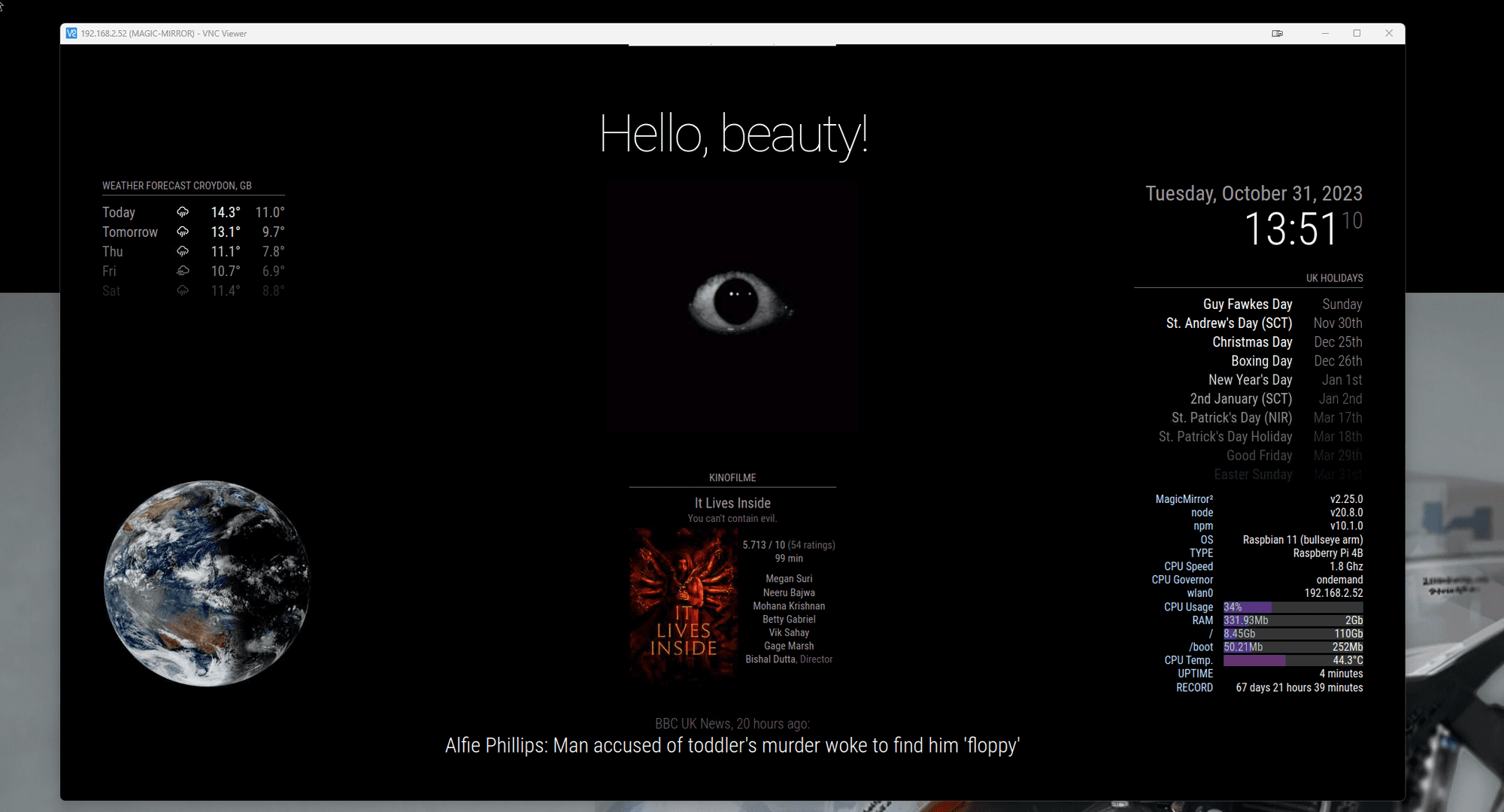
                              @sdetweil All is OK. I am so grateful for all of your assistance. In my opinion, what you performed was alchemy or witchcraft. I’ve been attempting to identify the problem and have made multiple unsuccessful attempts. An old picture I had from a few months ago was my saviour. My wife was becoming tired of my futile attempts at updating.
                              You have brought me happiness and protected me from madness. That’s a significant victory.Screenshot 2023-10-31 135119.png
                              1 Reply Last reply Reply Quote 0
                              • S Offline
                                sdetweil @sdetweil
                                last edited by

                                @DarkV before you jump off the bridge! try this

                                sudo apt-get remove nodejs npm -y
                                hash -r
                                

                                make sure gone
                                which node

                                then 
                                

                                sudo apt-get install nodejs:armv7l
                                node -v

                                Sam

                                How to add modules

                                learning how to use browser developers window for css changes

                                D 1 Reply Last reply Reply Quote 0
                                • D Offline
                                  DarkV @sdetweil
                                  last edited by

                                  @sdetweil I don’t know what happened, but the reply is above. Many thanks

                                  S 1 Reply Last reply Reply Quote 0
                                  • S Offline
                                    sdetweil @DarkV
                                    last edited by

                                    @DarkV cool… i didn’t expect that it, i’m glad!!

                                    Sam

                                    How to add modules

                                    learning how to use browser developers window for css changes

                                    D 1 Reply Last reply Reply Quote 0
                                    • D Offline
                                      DarkV @sdetweil
                                      last edited by

                                      @sdetweil I did this
                                      sudo apt-get remove nodejs npm -y
                                      hash -r
                                      which node
                                      which n

                                      if which n response with empty then do

                                      sudo apt-get install n

                                      once n responds then

                                      sudo n 20.8.0 --arch armv7l
                                      hash -r
                                      node -v

                                      Then both scripts and it went through!

                                      S 1 Reply Last reply Reply Quote 0
                                      • S Offline
                                        sdetweil @DarkV
                                        last edited by

                                        @DarkV said in Failed Update:

                                        –arch armv7l

                                        awesome… it was that sneaky little --arch parm…

                                        fixing upgrade script now . sorry for your troubles

                                        Sam

                                        How to add modules

                                        learning how to use browser developers window for css changes

                                        D 1 Reply Last reply Reply Quote 0
                                        • D Offline
                                          DarkV @sdetweil
                                          last edited by

                                          @sdetweil No worries, thanks you for your time

                                          S 1 Reply Last reply Reply Quote 0
                                          • S Offline
                                            sdetweil @DarkV
                                            last edited by sdetweil

                                            @DarkV any chance you still have the os image file you are running

                                            the info says (from the upgrade.log)

                                            6.1.21-v8+ #1642 SMP PREEMPT Mon Apr 3 17:24:16 BST 2023 aarch64 GNU/Linux
                                            the os is Distributor ID: Raspbian Description: Raspbian GNU/Linux 11 (bullseye) Release: 11 Codename: bullseye
                                            

                                            only one I can find online says
                                            6.1.21-v7+

                                            trying to test fix for the problem you encountered.

                                            if you still have the image file can you give me its name…

                                            also, what pi is this, 3 or 4?
                                            thanks

                                            | edit: was able to make one
                                            | install bullseye armhf
                                            | edit /boot/config.txt
                                            add
                                            arm_64bit=1

                                            then u will boot 64bit kernel, (seen with uname -a, aarch64)

                                            Linux raspberrypi4 6.1.21-v8+ #1642 SMP PREEMPT Mon Apr  3 17:24:16 BST 2023 aarch64 GNU/Linux
                                            

                                            and have 32 bit runtime (seen with file /bin/bash

                                            /bin/bash: ELF 32-bit LSB executable
                                            

                                            Sam

                                            How to add modules

                                            learning how to use browser developers window for css changes

                                            lavolp3L D 2 Replies Last reply Reply Quote 0

                                            Hello! It looks like you're interested in this conversation, but you don't have an account yet.

                                            Getting fed up of having to scroll through the same posts each visit? When you register for an account, you'll always come back to exactly where you were before, and choose to be notified of new replies (either via email, or push notification). You'll also be able to save bookmarks and upvote posts to show your appreciation to other community members.

                                            With your input, this post could be even better 💗

                                            Register Login

                                            • 1
                                            • 2
                                            • 3
                                            • 2 / 3
                                            • First post
                                              Last post
                                            Enjoying MagicMirror? Please consider a donation!
                                            MagicMirror created by Michael Teeuw.
                                            Forum managed by Sam, technical setup by Karsten.
                                            This forum is using NodeBB as its core | Contributors
                                            Contact | Privacy Policy
